
Hands-on: Using Google API to make searches on your applications

Standard

Welcome, dear reader, to another post of my blog. On this post, we will learn to use Google’s custom search API. With this API, you can make searches using Google’s infrastructure, enriching searching business features, like a web crawler, for example.

Pre-steps

Before we start coding, we need to create the keys to make our authentication with the API. One key is the API key itself and the other one is the search engine key. A search engine key is a key to a search engine you create to pre-filter the types of domains you want to make for your searches, so you dont end up searching sites in chinese, for example, if your application only want sites from England.

To start, access the site https://console.developers.google.com. After inputting our credentials, we get to the main site, where we can create a project, activate/deactivate APIs and generate a API key for the project. This tutorial from Google explain how to create API keys.

After that, we need to create the search engine key, on the site https://www.google.com/cse/all. We can follow this tutorial from Google to create the key.

Hands-on

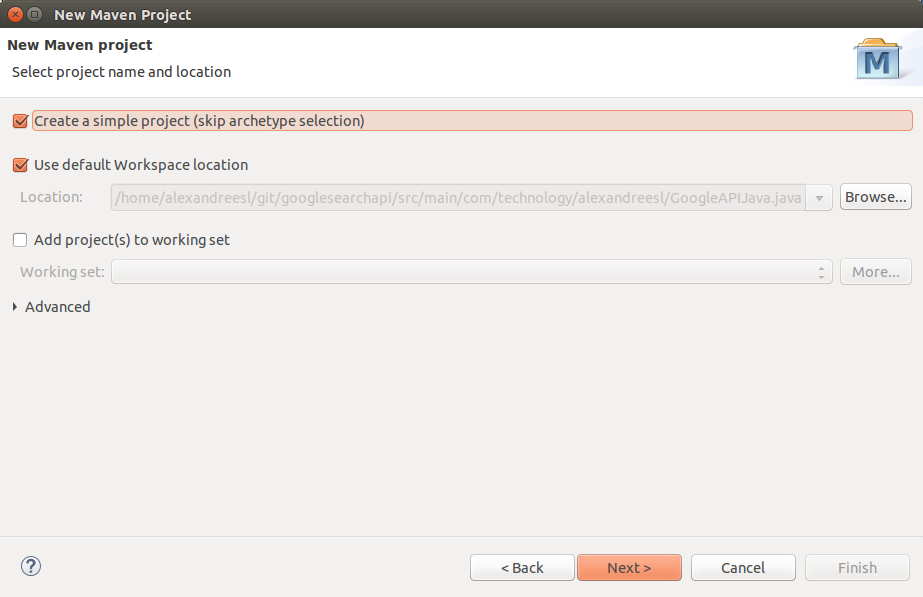
On this hands-on, we will use Eclipse Luna and Maven 3.2.1. First, create a Maven project, without a archetype:
After creating our project, we add the dependencies. Instead of offering a Java library for the consumption, Google’s API consists of a URL, which is called by a simple GET execution, and returns a JSON structure. For the return, we will use a JSON API we used on our previous post. First, we add the following dependencies in our pom.xml:

<dependencies>
<dependency>
<groupId>javax.json</groupId>
<artifactId>javax.json-api</artifactId>
<version>1.0</version>
</dependency>
<dependency>
<groupId>org.glassfish</groupId>
<artifactId>javax.json</artifactId>
<version>1.0.4</version>
</dependency>
<dependency>
<groupId>org.jsoup</groupId>
<artifactId>jsoup</artifactId>
<version>1.7.2</version>
</dependency>
</dependencies>

Finally, with the dependencies included, we write our code. In this example, we will make a call to the API for a search with the string “java+android”. The API has a limit usage of 100 results per search – in the free mode -, and uses a pagination format of 10 results per page, so we will make 10 calls to the API. The following code make our example:

package com.technology.alexandreesl;

import java.io.BufferedReader;
import java.io.InputStreamReader;
import java.io.StringReader;
import java.net.HttpURLConnection;
import java.net.URL;

import javax.json.Json;
import javax.json.stream.JsonParser;
import javax.json.stream.JsonParser.Event;

public class GoogleAPIJava {

final static String apiKey = “<insert your API Key here>”;
final static String customSearchEngineKey = “<insert your search engine key here>”;

// base url for the search query
final static String searchURL = “https://www.googleapis.com/customsearch/v1?&#8221;;

public static void main(String[] args) {

int inicio = 1;

int contador = 0;

while (contador < 10) {

System.out
.println(“***************** SEARCH **************************”);
System.out.println(“”);

String result = “”;

result = read(“java+android”, inicio, 10);

JsonParser parser = Json.createParser(new StringReader(result));

while (parser.hasNext()) {
Event event = parser.next();

if (event == Event.KEY_NAME) {

if (parser.getString().equals(“htmlTitle”)) {
Event value = parser.next();

if (value == Event.VALUE_STRING)
System.out.println(“Title (HTML): ”
+ parser.getString());
}

if (parser.getString().equals(“link”)) {

Event value = parser.next();

if (value == Event.VALUE_STRING)
System.out.println(“Link: ” + parser.getString());
}

}

}

inicio = inicio + 10;

contador++;

System.out
.println(“**************************************************”);

}

}

private static String read(String qSearch, int start, int numOfResults) {
try {

String toSearch = searchURL + “key=” + apiKey + “&cx=”
+ customSearchEngineKey + “&q=”;

toSearch += qSearch;

toSearch += “&alt=json”;

toSearch += “&start=” + start;

toSearch += “&num=” + numOfResults;

URL url = new URL(toSearch);
HttpURLConnection connection = (HttpURLConnection) url
.openConnection();
BufferedReader br = new BufferedReader(new InputStreamReader(
connection.getInputStream()));
String line;
StringBuffer buffer = new StringBuffer();
while ((line = br.readLine()) != null) {
buffer.append(line);
}
return buffer.toString();
} catch (Exception e) {
e.printStackTrace();
}
return null;
}

}

As we can see above, we make use of the java.net standard classes to make the calls. Using counters to control the calls for the API. The result when we run the program is a list of sites for the search string printed on the console:

***************** SEARCH **************************

Title (HTML): Java Manager; Emulate <b>Java</b> – <b>Android</b> Apps on Google Play
Link: https://play.google.com/store/apps/details?id=com.java.manager
Title (HTML): How do I get <b>Java</b> for Mobile device?
Link: https://www.java.com/en/download/faq/java_mobile.xml
Title (HTML): AIDE – <b>Android</b> IDE – <b>Java</b>, C++ – <b>Android</b> Apps on Google Play
Link: https://play.google.com/store/apps/details?id=com.aide.ui
Title (HTML): Como obtenho o <b>Java</b> para Dispositivos Móveis?
Link: https://www.java.com/pt_BR/download/faq/java_mobile.xml
Title (HTML): Download <b>java</b> for <b>android</b> tablet – <b>Android</b> – <b>Android</b> Smartphones
Link: http://www.tomsguide.com/forum/id-1608121/download-java-android-tablet.html
Title (HTML): <b>java</b>.lang | <b>Android</b> Developers
Link: http://developer.android.com/reference/java/lang/package-summary.html
Title (HTML): Comparison of <b>Java</b> and <b>Android</b> API – Wikipedia, the free <b>…</b>
Link: http://en.wikipedia.org/wiki/Comparison_of_Java_and_Android_API
Title (HTML): Learn <b>Java</b> for <b>Android</b> Development: Introduction to <b>Java</b> – Tuts+ <b>…</b>
Link: http://code.tutsplus.com/tutorials/learn-java-for-android-development-introduction-to-java–mobile-2604
Title (HTML): <b>java</b>.text | <b>Android</b> Developers
Link: http://developer.android.com/reference/java/text/package-summary.html
Title (HTML): Apostila <b>Java</b> – Desenvolvimento Mobile com <b>Android</b> | K19
Link: http://www.k19.com.br/downloads/apostilas/java/k19-k41-desenvolvimento-mobile-com-android
**************************************************
***************** SEARCH **************************

Title (HTML): How can I access a <b>Java</b>-based website on an <b>Android</b> phone?
Link: http://www.makeuseof.com/answers/access-javabased-website-android-phone/
Title (HTML): Introduction to <b>Java</b> Variables | Build a Simple <b>Android</b> App (retired <b>…</b>
Link: http://teamtreehouse.com/library/build-a-simple-android-app/getting-started-with-android/introduction-to-java-variables-2
Title (HTML): <b>Java</b> Basics for <b>Android</b> Development – Part 1 – Treehouse Blog
Link: http://blog.teamtreehouse.com/java-basics-for-android-development-part-1
Title (HTML): GC: <b>android</b> – GrepCode <b>Java</b> Project Source
Link: http://grepcode.com/project/repository.grepcode.com/java/ext/com.google.android/android
Title (HTML): <b>Java</b> Essentials for <b>Android</b>
Link: https://www.udemy.com/java-essentials-for-android/
Title (HTML): How to Get <b>Java</b> on <b>Android</b>: 10 Steps (with Pictures) – wikiHow
Link: http://www.wikihow.com/Get-Java-on-Android
Title (HTML): Learn <b>Android</b> 4.0 Programming in <b>Java</b>
Link: https://www.udemy.com/android-tutorial/
Title (HTML): Trending <b>Java</b> repositories on GitHub today · GitHub
Link: https://github.com/trending?l=java
Title (HTML): Developing for <b>Android</b> in Eclipse: R.<b>java</b> not generating – Stack <b>…</b>
Link: http://stackoverflow.com/questions/2757107/developing-for-android-in-eclipse-r-java-not-generating
Title (HTML): Cling – <b>Java</b>/<b>Android</b> UPnP library and tools
Link: http://4thline.org/projects/cling/
**************************************************
***************** SEARCH **************************

Title (HTML): Getting Started | <b>Android</b> Developers
Link: https://developer.android.com/training/
Title (HTML): <b>Java</b> API – <b>Android</b> | Vuforia Developer Portal
Link: https://developer.vuforia.com/resources/api/main
Title (HTML): <b>Java</b> Programming for <b>Android</b> Developers For Dummies: Burd <b>…</b>
Link: http://www.amazon.com/Java-Programming-Android-Developers-Dummies/dp/1118504380
Title (HTML): <b>Android</b> Quickstart – Firebase
Link: https://www.firebase.com/docs/android/quickstart.html
Title (HTML): Learn <b>Java</b> for <b>Android</b> Development: Jeff Friesen: 9781430264545 <b>…</b>
Link: http://www.amazon.com/Learn-Java-Android-Development-Friesen/dp/1430264543
Title (HTML): Unity – Manual: Building Plugins for <b>Android</b>
Link: http://docs.unity3d.com/Manual/PluginsForAndroid.html
Title (HTML): Eclipse, <b>Android</b> and <b>Java</b> training and support
Link: http://www.vogella.com/
Title (HTML): AIDE – <b>Android Java</b> IDE download – Baixaki
Link: http://www.baixaki.com.br/android/download/aide-android-java-ide.htm
Title (HTML): <b>Java</b> Multi-Platform and <b>Android</b> SDK | Philips Hue API
Link: http://www.developers.meethue.com/documentation/java-multi-platform-and-android-sdk
Title (HTML): <b>Android</b> Client Tutorial – <b>Java</b> — Google Cloud Platform
Link: https://cloud.google.com/appengine/docs/java/endpoints/getstarted/clients/android/
**************************************************
***************** SEARCH **************************

Title (HTML): Gradle Plugin User Guide – <b>Android</b> Tools Project Site
Link: http://tools.android.com/tech-docs/new-build-system/user-guide
Title (HTML): Where is a download for <b>java</b> for <b>android</b> tablet? – Download <b>…</b>
Link: http://www.tomshardware.com/forum/52818-34-where-download-java-android-tablet
Title (HTML): Download <b>android java</b>
Link: http://www.softonic.com.br/s/android-java
Title (HTML): Binding a <b>Java</b> Library | Xamarin
Link: http://developer.xamarin.com/guides/android/advanced_topics/java_integration_overview/binding_a_java_library_(.jar)/
Title (HTML): <b>java</b>-ide-droid – JavaIDEdroid allows you to create native <b>Android</b> <b>…</b>
Link: http://code.google.com/p/java-ide-droid/
Title (HTML): Code Style Guidelines for Contributors | <b>Android</b> Developers
Link: https://source.android.com/source/code-style.html
Title (HTML): Eclipse Downloads
Link: https://eclipse.org/downloads/
Title (HTML): Open source <b>Java</b> for <b>Android</b>? Don’t bet on it | InfoWorld
Link: http://www.infoworld.com/article/2615512/java/open-source-java-for-android–don-t-bet-on-it.html
Title (HTML): Make your First <b>Android</b> App! – YouTube
Link: http://www.youtube.com/watch?v=A_qaarY4_lY
Title (HTML): Runtime for <b>Android</b> apps – BlackBerry Developer
Link: http://developer.blackberry.com/android/
**************************************************
***************** SEARCH **************************

Title (HTML): <b>Java</b> Mobile <b>Android</b> Basic Course Online
Link: http://www.vtc.com/products/javamobileandroidbasic.htm
Title (HTML): <b>Android</b> Game Development Tutorial – Kilobolt
Link: http://www.kilobolt.com/game-development-tutorial.html
Title (HTML): Learn <b>Java</b> for <b>Android</b> Development, 3rd Edition – Free Download <b>…</b>
Link: http://feedproxy.google.com/~r/IT-eBooks/~3/oITagjK1kYU/
Title (HTML): Cursos de <b>Android</b> e iOS | Caelum
Link: http://www.caelum.com.br/cursos-mobile/
Title (HTML): Autobahn|<b>Android</b> Documentation — AutobahnAndroid 0.5.2 <b>…</b>
Link: http://ottogrib.appspot.com/autobahn.ws/android
Title (HTML): Dagger ‡ A fast dependency injector for <b>Android</b> and <b>Java</b>.
Link: http://google.github.com/dagger/
Title (HTML): Dagger
Link: http://square.github.com/dagger/
Title (HTML): Setup – google-api-<b>java</b>-client – Download and Setup Instructions <b>…</b>
Link: https://code.google.com/p/google-api-java-client/wiki/Setup
Title (HTML): How to Write a ‘Hello World!’ app for <b>Android</b>
Link: http://www.instructables.com/id/How-to-Write-a-Hello-World-app-for-Android/
Title (HTML): The real history of <b>Java</b> and <b>Android</b>, as told by Google | ZDNet
Link: http://www.zdnet.com/article/the-real-history-of-java-and-android-as-told-by-google/
**************************************************
***************** SEARCH **************************

Title (HTML): Microsoft Releases SignalR SDK for <b>Android</b>, <b>Java</b> — Visual Studio <b>…</b>
Link: http://visualstudiomagazine.com/articles/2014/03/07/signalr-sdk-for-android-and-java.aspx
Title (HTML): <b>Android</b> Game Tutorials | <b>Java</b> Code Geeks
Link: http://www.javacodegeeks.com/tutorials/android-tutorials/android-game-tutorials/
Title (HTML): libgdx
Link: http://libgdx.badlogicgames.com/
Title (HTML): Buck: An <b>Android</b> (and <b>Java</b>!) build tool
Link: https://www.diigo.com/04w2jy
Title (HTML): Google copied <b>Java</b> in <b>Android</b>, expert says | Computerworld
Link: http://www.computerworld.com/article/2512514/government-it/google-copied-java-in-android–expert-says.html
Title (HTML): Reinventing Mobile Development (mobile app development mobile <b>…</b>
Link: http://www.codenameone.com/
Title (HTML): Understanding R.<b>java</b>
Link: http://knowledgefolders.com/akc/display?url=DisplayNoteIMPURL&reportId=2883&ownerUserId=satya
Title (HTML): Download <b>Java</b> Programming for <b>Android</b> Developers For Dummies <b>…</b>
Link: http://kickasstorrentsproxy.com/java-programming-for-android-developers-for-dummies-epub-pdf-t8208814.html
Title (HTML): Court sides with Oracle over <b>Android</b> in <b>Java</b> patent appeal – CNET
Link: http://www.cnet.com/news/court-sides-with-oracle-over-android-in-java-patent-appeal/
Title (HTML): Google Play <b>Android</b> Developer API Client Library for <b>Java</b> – Google <b>…</b>
Link: https://developers.google.com/api-client-library/java/apis/androidpublisher/v1
**************************************************
***************** SEARCH **************************

Title (HTML): Tape – A collection of queue-related classes for <b>Android</b> and <b>Java</b> by <b>…</b>
Link: http://shahmehulv.appspot.com/square.github.io/tape/
Title (HTML): <b>Android</b> Platform Guide
Link: http://cordova.apache.org/docs/en/4.0.0/guide_platforms_android_index.md.html
Title (HTML): OrmLite – Lightweight Object Relational Mapping (ORM) <b>Java</b> Package
Link: http://ormlite.com/
Title (HTML): <b>Android</b> Ported to C# | Xamarin Blog
Link: http://blog.xamarin.com/android-in-c-sharp/
Title (HTML): Tutorials | AIDE – <b>Android</b> IDE
Link: https://www.android-ide.com/tutorials.html
Title (HTML): All Tutorials on Mkyong.com
Link: http://www.mkyong.com/all-tutorials-on-mkyong-com/
Title (HTML): Top 10 <b>Android</b> Apps and IDE for <b>Java</b> Coders and Programmers
Link: https://blog.idrsolutions.com/2014/12/android-apps-ide-for-java-coder-programmers/
Title (HTML): <b>Java Android</b> developer information, news, and how-to advice <b>…</b>
Link: http://www.javaworld.com/category/java-android-developer
Title (HTML): Google <b>Android</b> e <b>Java</b> Micro Edition (ME)
Link: http://www.guj.com.br/forums/show/14.java
Title (HTML): <b>Java</b> &amp; <b>Android</b> Obfuscator | DashO
Link: http://www.preemptive.com/products/dasho/overview
**************************************************
***************** SEARCH **************************

Title (HTML): Using a Custom Set of <b>Java</b> Libraries In Your RAD Studio <b>Android</b> <b>…</b>
Link: http://docwiki.embarcadero.com/RADStudio/XE7/en/Using_a_Custom_Set_of_Java_Libraries_In_Your_RAD_Studio_Android_Apps
Title (HTML): 50. <b>Android</b> (DRD) – <b>java</b> – CERT Secure Coding Standards
Link: https://www.securecoding.cert.org/confluence/pages/viewpage.action?pageId=111509535
Title (HTML): Gameloft: Top Mobile Games for iOS, <b>Android</b>, <b>Java</b> &amp; more
Link: http://www.gameloft.com/
Title (HTML): <b>Android</b> and <b>Java</b> Developers: We Have a SignalR SDK for You!
Link: http://msopentech.com/blog/2014/03/06/android-java-developers-signalr-sdk/
Title (HTML): <b>Java</b> Swing UI on iPad, iPhone and <b>Android</b>
Link: http://www.creamtec.com/products/ajaxswing/solutions/java_swing_ui_on_ipad.html
Title (HTML): TeenCoder <b>Java</b> Series: Computer Programming Courses for Teens!
Link: http://www.homeschoolprogramming.com/teencoder/teencoder_jv_series.php
Title (HTML): Mixpanel <b>Java</b> API Overview – Mixpanel | Mobile Analytics
Link: https://mixpanel.com/help/reference/java
Title (HTML): AN 233 <b>Java</b> D2xx for <b>Android</b> API User Manual – FTDI
Link: http://www.ftdichip.com/Documents/AppNotes/AN_233_Java_D2XX_for_Android_API_User_Manual.pdf
Title (HTML): Xtend – Modernized <b>Java</b>
Link: http://eclipse.org/xtend/
Title (HTML): ProGuard
Link: http://freecode.com/urls/9ab4c148025d25c6eccd84906efb2c05
**************************************************
***************** SEARCH **************************

Title (HTML): FOSS Patents: Oracle wins <b>Android</b>-<b>Java</b> copyright appeal: API code <b>…</b>
Link: http://www.fosspatents.com/2014/05/oracle-wins-android-java-copyright.html
Title (HTML): <b>java android</b> 4.1.1 free download
Link: http://en.softonic.com/s/java-android-4.1.1
Title (HTML): Four reasons to stick with <b>Java</b>, and four reasons to dump it <b>…</b>
Link: http://www.javaworld.com/article/2689406/java-platform/four-reasons-to-stick-with-java-and-four-reasons-to-dump-it.html
Title (HTML): <b>Java</b> Programming for <b>Android</b> Developers For Dummies Cheat Sheet
Link: http://www.dummies.com/how-to/content/java-programming-for-android-developers-for-dummie.html
Title (HTML): Twitter4J – A <b>Java</b> library for the Twitter API
Link: http://twitter4j.org/
Title (HTML): Ignite Realtime: Smack API
Link: http://www.igniterealtime.org/projects/smack/
Title (HTML): <b>Java</b> Programming for <b>Android</b> Developers For Dummies
Link: http://allmycode.com/Java4Android
Title (HTML): Oracle ADF Mobile
Link: http://www.oracle.com/technetwork/developer-tools/adf-mobile/overview/adfmobile-1917693.html
Title (HTML): Introduction of How <b>Android</b> Works for <b>Java</b> Programmers
Link: http://javarevisited.blogspot.com/2013/06/introduction-of-how-android-works-Java-programmers.html
Title (HTML): Download <b>java</b> emulator for <b>Android</b> | JavaEmulator.com
Link: http://www.javaemulator.com/android-java-emulator.html
**************************************************
***************** SEARCH **************************

Title (HTML): Google hauls <b>Java</b>-on-<b>Android</b> spat into US Supreme Court • The <b>…</b>
Link: http://go.theregister.com/feed/www.theregister.co.uk/2014/10/09/google_takes_javaonandroid_case_to_supreme_court/
Title (HTML): <b>Android</b> SDK for Realtime Apps
Link: http://www.pubnub.com/docs/java/android/android-sdk.html
Title (HTML): Como Obter o <b>Java</b> no <b>Android</b>: 4 Passos (com Imagens)
Link: http://pt.wikihow.com/Obter-o-Java-no-Android
Title (HTML): If <b>Android</b> is so hot, why has <b>Java</b> ME overtaken it?
Link: http://fortune.com/2012/01/01/if-android-is-so-hot-why-has-java-me-overtaken-it/
Title (HTML): <b>Android</b> tutorial
Link: http://www.tutorialspoint.com/android/
Title (HTML): What’s New in IntelliJ IDEA 14
Link: https://www.jetbrains.com/idea/whatsnew/
Title (HTML): <b>Android</b> OnClickListener Example | Examples <b>Java</b> Code Geeks
Link: http://examples.javacodegeeks.com/android/core/view/onclicklistener/android-onclicklistener-example/
Title (HTML): JTwitter – the <b>Java</b> library for the Twitter API : Winterwell Associates <b>…</b>
Link: http://www.winterwell.com/software/jtwitter.php
Title (HTML): RL SYSTEM – Cursos Online de <b>Android</b>, .NET, <b>Java</b>, PHP, ASP <b>…</b>
Link: http://www.rlsystem.com.br/
Title (HTML): samples/ApiDemos/src/com/example/<b>android</b>/apis/app <b>…</b>
Link: https://android.googlesource.com/platform/development/+/master/samples/ApiDemos/src/com/example/android/apis/app/FragmentRetainInstance.java
**************************************************

Conclusion

And so we concluded our hands-on. With a simple usage, Google’s custom search API offers a simple but powerful tool in the belt of every developer who need to use a search engine of the internet in his solutions. Thank you for reading, until next time.

Source-code (Github)

Hands-on: Implementing MicroServices with Spring Boot

Standard

Welcome, dear reader, to another post from my technology blog. In this post, we will talk about an interesting architectural model, the microservices architecture, in addition to studying one of the new features of Spring 4.0, Spring Boot. But after all, what are microservices?

Microservices

In the development of large systems, it is common to develop various components and libraries that implement various functions, ranging from implementing business requirements to technical tasks, such as an XML parser, for example. In these scenarios, several components are reused by different interfaces and / or systems. Imagine, for example, a component that implements a register of customers and we package this component in a java project, which generates a deliverable jar file.

In this scenario, we have several interfaces to use this component, such as web applications, mobile, EJBs, etc. In the traditional form of Java implementation, we would package this jar deploy in several other packages, such as EAR files, WAR files, etc. Imagine now that a problem in the customer code is found. In this scenario, we have a considerable operational maintenance work, since as well as the correction on the component, we would have to make the redeploy of all consumer applications due to the component to be packaged inside the other deployment packages.

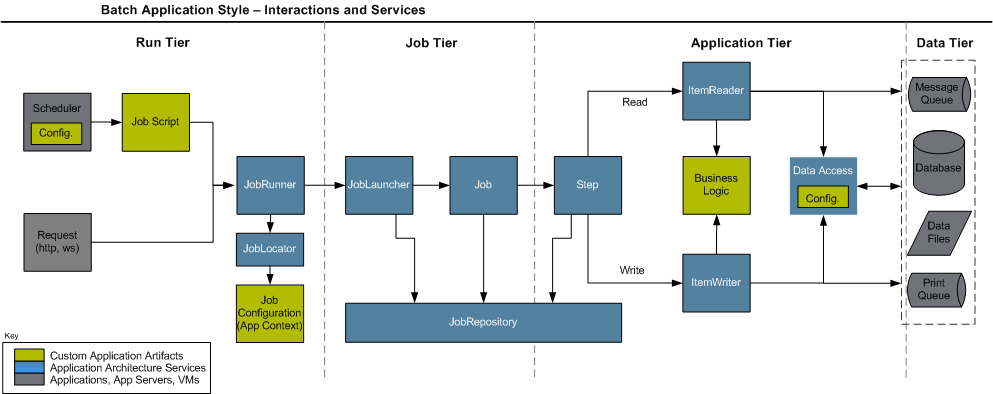
In order to propose a solution to this issue, was born the microservices architecture model. In this architectural model, rather than packaging the components as  jar files to be packaged into consumer systems, the components are independently exposed in the form of remote accessibility APIs, consumed using protocols such as HTTP, for example. The figure below illustrates this architecture:


An important point to note in the above explanations, is that although we are exemplifying the model using the Java world, the same principles can be applied to other technologies such as C #, etc.

Spring Boot

Among the new features in version 4.0 of the Spring Framework, a new project that has arisen is the Spring Boot.The goal of Spring Boot is to provide a way to provide Java applications quickly and simply, through an embedded server – by default it used an embedded version of Tomcat – thus eliminating the need of Java EE containers. With Spring Boot, we can expose components such as REST services independently, exactly as proposed in the microservices architecture, so that in any maintenance of the components, we no longer make the redeploy of all its consumers.

So without further delay, let’s begin our hands-on. For this lab, we will use the Eclipse Luna and Maven 3 .

To illustrate the concept of microservices, we will create 3 Maven projects in this hands-on: each of them will symbolize back-end functionality, ie reusable APIs, and one of them held a composition, that is, will be a consumer of the other 2. All the code that will be presented is available in the links section at the end of this post.

To begin, let’s create 3 simple Maven projects without defined archetype, and let’s call them Product-backend, Customer-backend and Order-backend. In the poms of the 3 projects, we will add the dependencies for the creation of our REST services and the startup of Spring Boot, as we can see below:

.

.

.

<parent>
<groupId>org.springframework.boot</groupId>
<artifactId>spring-boot-starter-parent</artifactId>
<version>1.2.0.RELEASE</version>
</parent>

<dependencies>
<dependency>
<groupId>org.springframework.boot</groupId>
<artifactId>spring-boot-starter-web</artifactId>
</dependency>

<dependency>
<groupId>org.springframework.boot</groupId>
<artifactId>spring-boot-starter-jersey</artifactId>
</dependency>
</dependencies>

.

.

.

With the dependencies established, we start the coding. The first class that we create, that we call Application, will be identical in all three projects, because it only works as an initiator to Spring Boot – as defined by the  @SpringBootApplication annotation – starting a Spring context and the embedded server:

package br.com.alexandreesl.handson;

import org.springframework.boot.SpringApplication;
import org.springframework.boot.autoconfigure.SpringBootApplication;

@SpringBootApplication
public class Application {
public static void main(String[] args) {
SpringApplication.run(Aplication.class, args);
}
}

The next class we will see is the ApplicationConfig. In this class, which uses the @Configuration Spring annotation to indicate to the framework that it is a resource configuration class, we set the Jersey, which is our ResourceManager responsible for exposing REST services for application consumers.

In a real application, this class would be also creating datasources for access to databases and other resources, but in order to keep a hands-on simple  enough to be able to focus on the Spring Boot, we will use mocks to represent the data access.

package br.com.alexandreesl.handson;

import javax.inject.Named;

import org.glassfish.jersey.server.ResourceConfig;
import org.springframework.context.annotation.Configuration;

@Configuration
public class ApplicationConfig {

@Named
static class JerseyConfig extends ResourceConfig {
public JerseyConfig() {
this.packages(“br.com.alexandreesl.handson.rest”);
}
}

}

The above class will be used identically in the projects relating to customers and products. For orders, however, since it will be a consumer of the other services, we will use this class with a slight difference, as we will also instantiate a RestTemplate. This class, one of the novelties in the Spring Framework, is a standardized and very simple interface that facilitates the consumption of REST services. The class to use in the Order-backend project can be seen below:

package br.com.alexandreesl.handson;

import javax.inject.Named;

import org.glassfish.jersey.server.ResourceConfig;
import org.springframework.context.annotation.Bean;
import org.springframework.context.annotation.Configuration;
import org.springframework.web.client.RestTemplate;

@Configuration
public class ApplicationConfig {

@Named
static class JerseyConfig extends ResourceConfig {
public JerseyConfig() {
this.packages(“br.com.alexandreesl.handson.rest”);
}
}

@Bean
public RestTemplate restTemplate() {
RestTemplate restTemplate = new RestTemplate();

return restTemplate;
}

}

Finally, we will start the implementation of the REST services themselves. In the project Customer-backend, we create a class of DTO and a REST service. The class, which is a customer, is a simple POJO, as seen below:

package br.com.alexandreesl.handson.rest;

public class Customer {

private long id;

private String name;

private String email;

public long getId() {
return id;
}

public void setId(long id) {
this.id = id;
}

public String getName() {
return name;
}

public void setName(String name) {
this.name = name;
}

public String getEmail() {
return email;
}

public void setEmail(String email) {
this.email = email;
}

}

The REST service, in turn, has only 2 capabilities, a search of all customers and other search that query a customer from your id:

package br.com.alexandreesl.handson.rest;

import java.util.ArrayList;
import java.util.List;

import javax.inject.Named;
import javax.ws.rs.GET;
import javax.ws.rs.Path;
import javax.ws.rs.Produces;
import javax.ws.rs.QueryParam;
import javax.ws.rs.core.MediaType;

@Named
@Path(“/”)
public class CustomerRest {

private static List<Customer> clients = new ArrayList<Customer>();

static {

Customer customer1 = new Customer();
customer1.setId(1);
customer1.setName(“Cliente 1”);
customer1.setEmail(“customer1@gmail.com”);

Customer customer2 = new Customer();
customer2.setId(2);
customer2.setName(“Cliente 2”);
customer2.setEmail(“customer2@gmail.com”);

Customer customer3 = new Customer();
customer3.setId(3);
customer3.setName(“Cliente 3”);
customer3.setEmail(“customer3@gmail.com”);

Customer customer4 = new Customer();
customer4.setId(4);
customer4.setName(“Cliente 4”);
customer4.setEmail(“customer4@gmail.com”);

Customer customer5 = new Customer();
customer5.setId(5);
customer5.setName(“Cliente 5”);
customer5.setEmail(“customer5@gmail.com”);

clients.add(customer1);
clients.add(customer2);
clients.add(customer3);
clients.add(customer4);
clients.add(customer5);

}

@GET
@Produces(MediaType.APPLICATION_JSON)
public List<Customer> getClientes() {
return clients;
}

@GET
@Path(“customer”)
@Produces(MediaType.APPLICATION_JSON)
public Customer getCliente(@QueryParam(“id”) long id) {

Customer cli = null;

for (Customer c : clients) {

if (c.getId() == id)
cli = c;

}

return cli;
}

}

And that concludes our REST service for searching the customers. For the products, analogous to the customers, we have to search all products or one product through one of his ids and finally we have the order service, which through a “submitOrder” method gets the data of a product and a customer – whose keys are passed as parameters to the method – and return a order header. The classes that make up our product service within its Product-backend project are the following:

package br.com.alexandreesl.handson.rest;

public class Product {

private long id;

private String sku;

private String description;

public long getId() {
return id;
}

public void setId(long id) {
this.id = id;
}

public String getSku() {
return sku;
}

public void setSku(String sku) {
this.sku = sku;
}

public String getDescription() {
return description;
}

public void setDescription(String description) {
this.description = description;
}

}


package br.com.alexandreesl.handson.rest;

import java.util.ArrayList;
import java.util.List;

import javax.inject.Named;
import javax.ws.rs.GET;
import javax.ws.rs.Path;
import javax.ws.rs.Produces;
import javax.ws.rs.QueryParam;
import javax.ws.rs.core.MediaType;

@Named
@Path(“/”)
public class ProductRest {

private static List<Product> products = new ArrayList<Product>();

static {

Product product1 = new Product();
product1.setId(1);
product1.setSku(“abcd1”);
product1.setDescription(“Produto1”);

Product product2 = new Product();
product2.setId(2);
product2.setSku(“abcd2”);
product2.setDescription(“Produto2”);

Product product3 = new Product();
product3.setId(3);
product3.setSku(“abcd3”);
product3.setDescription(“Produto3”);

Product product4 = new Product();
product4.setId(4);
product4.setSku(“abcd4”);
product4.setDescription(“Produto4”);

products.add(product1);
products.add(product2);
products.add(product3);
products.add(product4);

}

@GET
@Produces(MediaType.APPLICATION_JSON)
public List<Product> getProdutos() {
return products;
}

@GET
@Path(“product”)
@Produces(MediaType.APPLICATION_JSON)
public Product getProduto(@QueryParam(“id”) long id) {

Product prod = null;

for (Product p : products) {

if (p.getId() == id)
prod = p;

}

return prod;
}

}

Finally, the classes that make up our aforementioned order service in the Order-backend project are:

package br.com.alexandreesl.handson.rest;

import java.util.Date;

public class Order {

private long id;

private long amount;

private Date orderDate;

private Customer customer;

private Product product;

public long getId() {
return id;
}

public void setId(long id) {
this.id = id;
}

public long getAmount() {
return amount;
}

public void setAmount(long amount) {
this.amount = amount;
}

public Date getOrderDate() {
return orderDate;
}

public void setOrderDate(Date orderDate) {
this.orderDate = orderDate;
}

public Customer getCustomer() {
return customer;
}

public void setCustomer(Customer customer) {
this.customer = customer;
}

public Product getProduct() {
return product;
}

public void setProduct(Product product) {
this.product = product;
}

}


package br.com.alexandreesl.handson.rest;

import java.util.Date;

import javax.inject.Inject;
import javax.inject.Named;
import javax.ws.rs.GET;
import javax.ws.rs.Path;
import javax.ws.rs.Produces;
import javax.ws.rs.QueryParam;
import javax.ws.rs.core.MediaType;

import org.springframework.web.client.RestTemplate;

@Named
@Path(“/”)
public class OrderRest {

private static long id = 1;

@Inject
private RestTemplate restTemplate;

@GET
@Path(“order”)
@Produces(MediaType.APPLICATION_JSON)
public Order submitOrder(@QueryParam(“idCustomer”) long idCustomer,
@QueryParam(“idProduct”) long idProduct,
@QueryParam(“amount”) long amount) {

Order order = new Order();

Customer customer = restTemplate.getForObject(
http://localhost:8081/customer?id={id}”, Customer.class,
idCustomer);

Product product = restTemplate.getForObject(
http://localhost:8082/product?id={id}”, Product.class,
idProduct);

order.setCustomer(customer);
order.setProduct(product);
order.setId(id);
order.setAmount(amount);
order.setOrderDate(new Date());

id++;

return order;
}
}

The reader should note the use of the product and customer classes in our order service. Such classes, however, are not direct references of the classes implemented in the other projects, but classes “cloned” from the original, within the order project. This apparent duplication of code in the DTO classes, sure to be a negative aspect of the solution, which can be seen as similar as stub classes we see in JAX-WS clients, must be measured carefully as it can be considered a small price to pay, considering the problems we see if we make the coupling of the projects.

A half solution that can minimize this problem, is to create a aditional project for the domain classes, which would be imported by all other projects, as the domain classes must undergo much lower maintenance than functionality itself. I leave it to the readers to assess the best option, according to the characteristics of their projects.

Good, but after all this coding, lets get down to, which is to test our services!

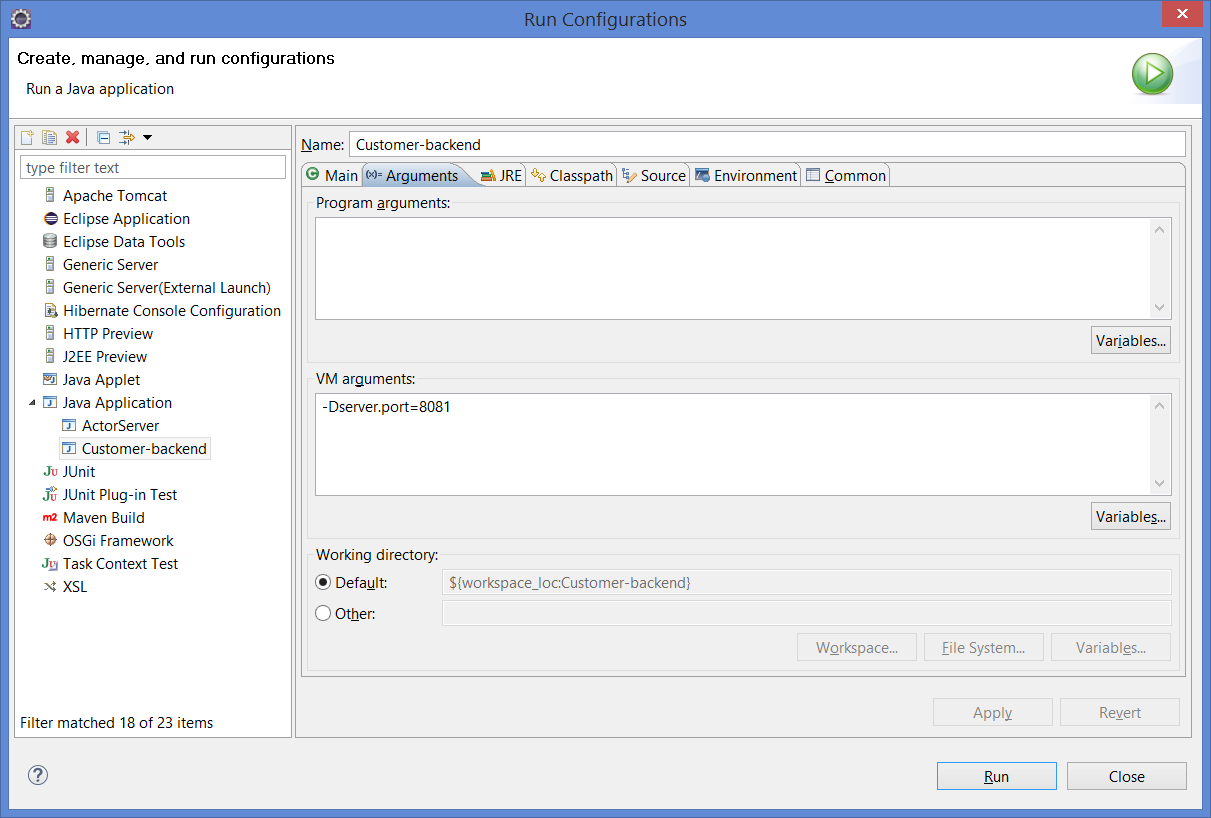
To begin, let’s start our REST services. For this, we create run configurations in Eclipse – like the image below – where we will add a system property, which specify the port where the spring boot will start the process. In my environment, I started the customer service on port 8081, the products in 8082 and the orders on port 8083, but the reader is free to use the most appropriate ports for his environment. The property to be used to configure the port is:

-Dserver.port=8081

PS: If the reader change the ports, you must correct the ports of the calls in the order service code.

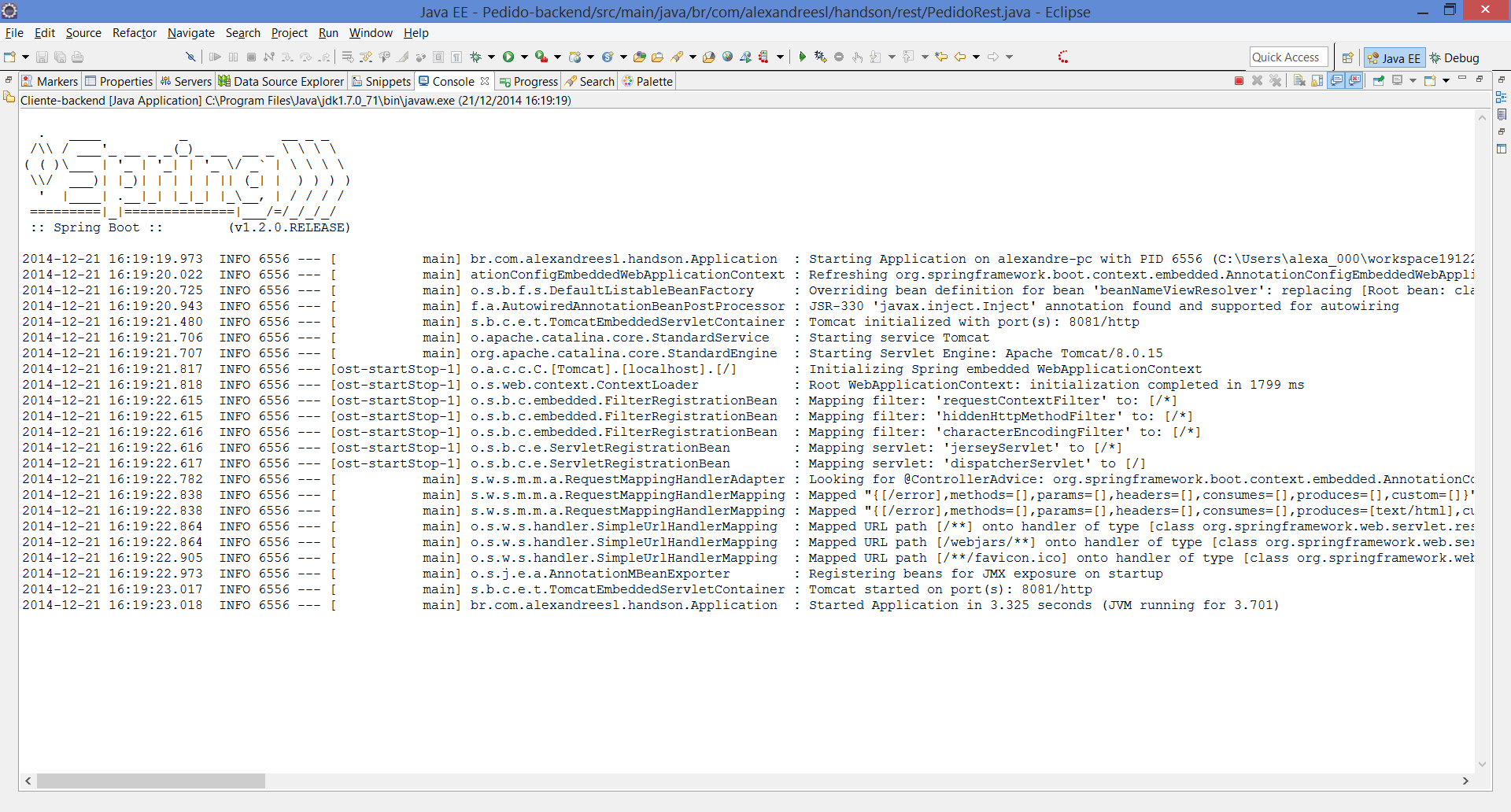
With properly configured run configurations, we will start processing and test some calls to our REST. Simply click on each run configuration created, one at a time, which will generate 3 different console windows running in the Eclipse console window. As we see below, when we started the projects, Spring Boot generates a boot log, where you can see the embedded tomcat and its associated resources, such as Jersey, being initialized:

After booting the services, we can run them through the browser in order to test our implementation. For example, to test the query of all customers, if we type in the browser the following URL:

http://localhost:8081/

Obteremos como retorno a seguinte estrutura JSON:

[{"id":1,"nome":"Cliente 1","email":"cliente1@gmail.com"},{"id":2,"nome":"Cliente 2","email":"cliente2@gmail.com"},{"id":3,"nome":"Cliente 3","email":"cliente3@gmail.com"},{"id":4,"nome":"Cliente 4","email":"cliente4@gmail.com"},{"id":5,"nome":"Cliente 5","email":"cliente5@gmail.com"}]

Consisting of all registered customers in our mocks structure, showing that our service is working properly. To test the method that returns one particular customer from a id, we can enter a URL like the one below:

http://localhost:8081/customer?id=3

That returns a JSON with the customer data:

{"id":3,"nome":"Cliente 3","email":"cliente3@gmail.com"}

Similarly, to test if the product service is functioning properly, please call the URL:

http://localhost:8082/

Which produces the following result in JSON:

[{"id":1,"sku":"abcd1","descricao":"Produto1"},{"id":2,"sku":"abcd2","descricao":"Produto2"},{"id":3,"sku":"abcd3","descricao":"Produto3"},{"id":4,"sku":"abcd4","descricao":"Produto4"}]

Finally, to test the functionality of the order service we make a call, which through, for example, we simulate a order in which a customer of ID 2 wants the product of ID 3, and the amount of 4:

http://localhost:8083/order?idCustomer=2&idProduct=3&amount=4

We produce the following JSON, representing the header of a order effected:

{"id":1,"amount":4,"orderDate":1419530726399,"customer":{"id":2,"name":"Cliente 2","email":"customer2@gmail.com"},"product":{"id":3,"sku":"abcd3","description":"Produto3"}}

At this point, the reader may notice a bug in our order service: subsequent calls will generate the same orders with the same IDs! This is due to our mock variable that generates the ids be declared as a global variable that is recreated every new instance of the class. As REST services have request scope, every request generates a new instance, which means that the variable is never incremented through the calls. One of the simplest ways of fixing this bug is declaring the variable as static, but before we do that, let’s take a moment to think like the fact that we have implemented our services as microservices – yes, they are microservices! – Can help us in our maintenance:

– If we were in a traditional implementation, each of these components would be a jar file encapsulated within a client application such as a web application (WAR);

– Thus, for fixing this bug, and correcting the order code, we would also redeploy the product code, the customer code and the web application itself! The advantages become even more apparent if we consider that the application would have many more features in addition to the problematic one,  which would make the redeploy of all the others, causing a complete unavailability of our system during reimplantation;

So, having realized the advantages of our construction format, we will initiate the maintenance. During the procedure, we will make the stop and restart of our order service in order to demonstrate how microservices do not affect each other’s availability.

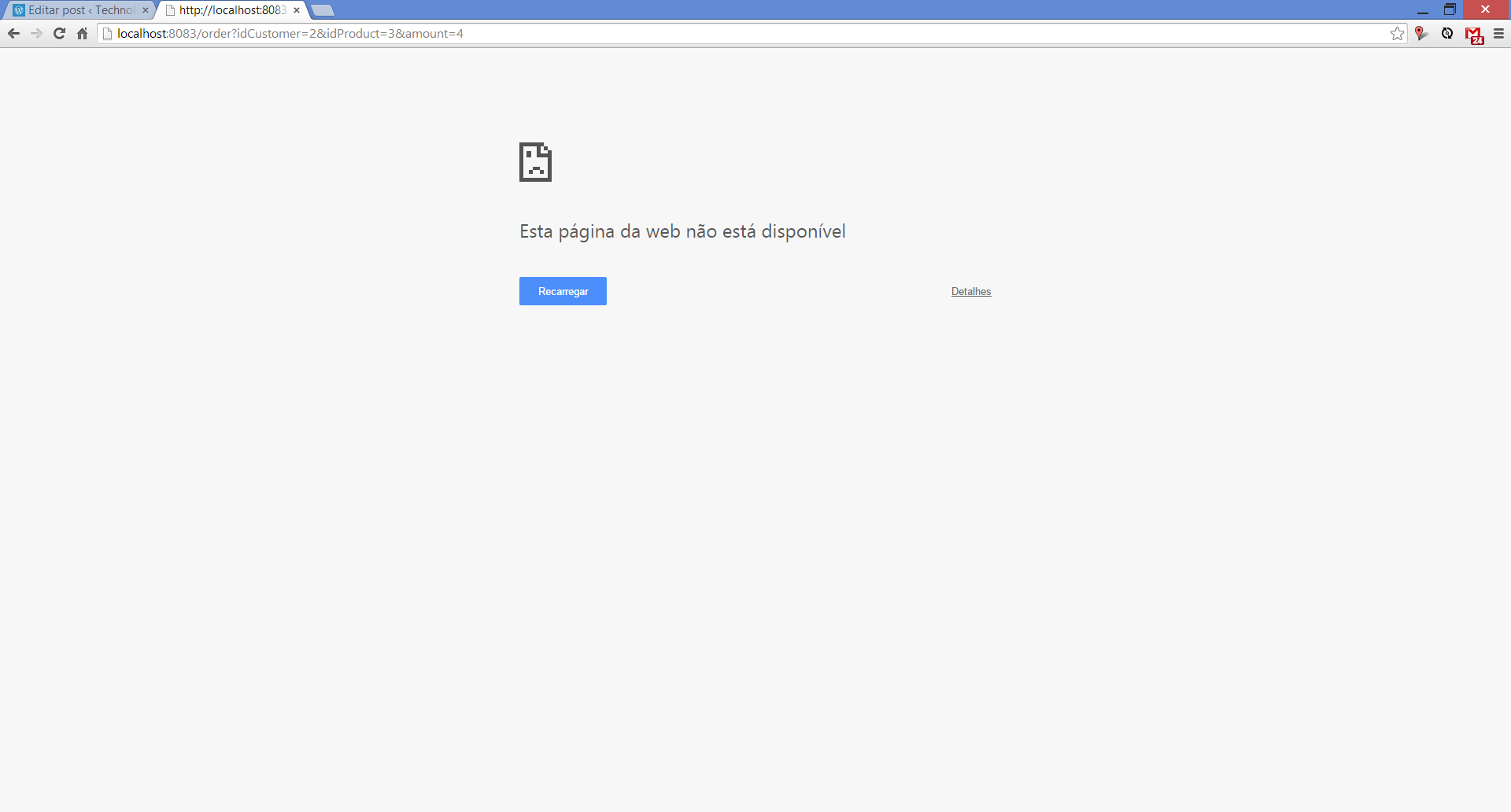
To begin our maintenance, we will terminate the Spring Boot process of our order service. To do this, we simply select the corresponding console window and terminate it. If we call the URL of the order service, we have the following error message, indicating the unavailability:

However, if we try to call the product and customer services, we see that both are operational, proving the independence thereof.

Then we make the maintenance, changing the variable to the static type:

.

.

.

private static long id = 1;

.

.

.

Finally, we make a restart of the order service, with the implemented correction. If we run several calls to the URL of the service, we see that the service is generating orders with different IDs, proving that the fix was a success:

{"id":9,"amount":4,"orderDate":1419531614702,"customer":{"id":2,"name":"Cliente 2","email":"customer2@gmail.com"},"product":{"id":3,"sku":"abcd3","description":"Produto3"}}

We realize, with this simple example, that the microservices architecture brought us a powerful solution: you can stop, correct / evolve and start new versions of the components, without thereby requiring the redeployment of the whole system and its totally unavailable. Not to mention, that since we are using standard protocols such as HTTP to communicate, we could even use other technologies, like C# for example, to make a web front-end to our system.

Going beyond

Recently, I published a new post about microservices, where I demonstrate a evolution of this example, using a service registry to implement service discovery. Please, check it out the post here, I hope the reader will found very interesting!

Conclusion

And so we conclude our hands-on. With a simple but powerful implementation, Spring Boot is a good option to implement a microservices architecture that must be evaluated throughout every Java architect or developer who wants to promote this model in his projects. Thanks to everyone who supported me in this hands-on, until next time.

Continue reading

Hands-on Akka: exploring a new model of parallelism in applications

Standard

Welcome, dear reader, to another post from my blog on technology. In this post we will discuss a framework, originally made for the Scala language, but also with a version for Java, which offers a new way of developing parallel applications: Akka.

Traditional model of parallelism: Threads

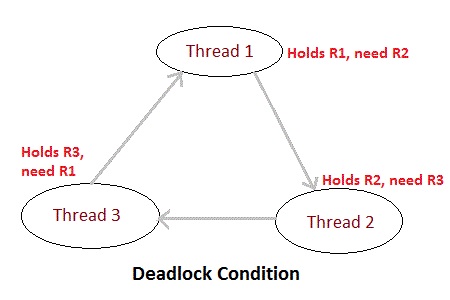
Traditionally, when we work with parallelism, we use threads, which sometimes need to share resources with each other. In order to ensure the isolation of executions, we begin to enter execution blocks with the synchronized policy. As the system grows, more and more blocks of this nature are being added, occasionally taking us to the condition of deadlocks, where processes are in a state of permanent lock, as a process attempts to access a resource that is already locked by a predecessor process of its execution flow. We can see an example of this situation in the figure below, where three threads “compete” for the use of resources and enter in a deadlock state:

Thinking about this, was developed in 1973 by Carl Hewitt, Peter Bishop and Richard Steiger, one paper called “The Universal Modular Actor Formalism for Artificial Intelligence.” This paper introduced the concept of actors, which we will speak next.

Parallelism model by actors

In the model of parallelism by actors, we have a new concept of development. In this model, all processing must be broken into logical units, called actors, each with its due role and its proper order within a flow. A simple way to understand this model is to imagine a process of real life, where the “actors” are people. Imagine a stream where a person A receives a message to be sent by letter to a person B, in this scenario, we would have the following flow of actions, in simplified form:

  • The person A receives the letter;
  • The person A deliver the letter to the receptionist of the post office;
  • The receptionist organizes the letters and deliver to the postman;
  • The postman is headed for the residence of the person B and give the letter;
  • Person B reads the letter;In this simple example, we see each person being an actor within the stream. An important point to notice in this example, is that all actions are asynchronous among actors: as person A hands the letter to the receptionist, it does not need to wait for the delivery of the letter to terminate his participation in the stream.It is precisely from these concepts that Akka builds its processing: with actors running independent of the flow steps with their interactions with each other occurring asynchronously.

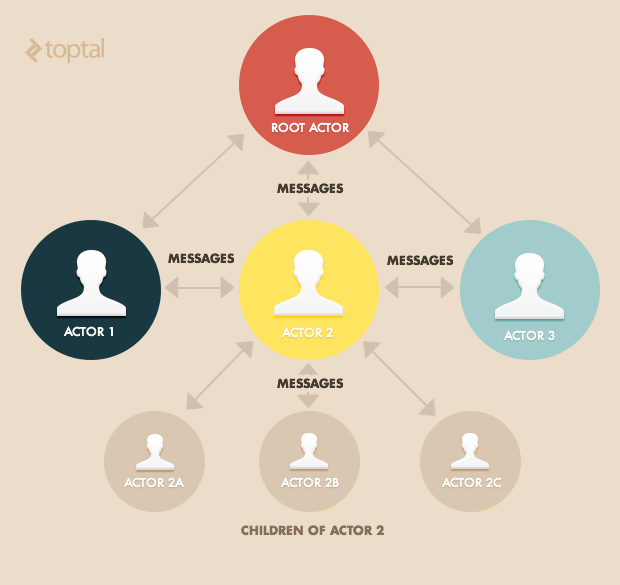
    The diagram below illustrates this model:

PS:In the model above, we can see that the actors are in a kind of hierarchy, where from a root actor, other actors are invoked. This hierarchy is the “location” of the creation of the actors within a flow, where the root actor is created within the main system thread. During the hands-on, we can see more clearly how this hierarchy works.

Hands-on

For this hands-on, we will use Eclipse Luna and Maven 3.0. First, create a simple Maven project – without defined archetype – and put our dependencies in the pom.xml file:

<project xmlns=”http://maven.apache.org/POM/4.0.0&#8243; xmlns:xsi=”http://www.w3.org/2001/XMLSchema-instance&#8221; xsi:schemaLocation=”http://maven.apache.org/POM/4.0.0 http://maven.apache.org/xsd/maven-4.0.0.xsd”&gt;
<modelVersion>4.0.0</modelVersion>
<groupId>br.com.alexandreesl.handson</groupId>
<artifactId>HandsOnAkka</artifactId>
<version>0.0.1-SNAPSHOT</version>

<dependencies>
<dependency>
<groupId>com.typesafe.akka</groupId>
<artifactId>akka-actor_2.10</artifactId>
<version>2.2.3</version>
</dependency>
</dependencies>

</project>

As we can see above, simply include dependence “akka-actor_2.10” to the project. In Akka, we have the concept of actors servers where we run our processes in Akka model. You can instantiate these servers and invokes them remotely, but in this example, we will start one in a standalone way, in order to maintain simplicity in learning.

To begin, let’s create the main class of the project, where we will start the actors server. The code below accomplishes this task:

package br.com.alexandreesl.handson;

import akka.actor.ActorSystem;

public class ActorServer {

public static void main(String[] args) {

ActorSystem server = ActorSystem.create(“ActorServer”);

}

}

As we can see, it is quite simple to create a actors server, with only one line. An important point in the server creation is that it creates a new thread that keeps the program running indefinitly.

In this example, we will simulate the sending of a letter from a person A to person B, as we talked throughout the post. For this, we will make the call to the first actor of the flow, ie, the person who will receive the letter and take it to the post office to send:

package br.com.alexandreesl.handson;

import akka.actor.ActorRef;
import akka.actor.ActorSystem;
import akka.actor.Props;

public class ActorServer {

public static void main(String[] args) {

ActorSystem server = ActorSystem.create(“ActorServer”);

ActorRef personA = server.actorOf(Props.create(PersonA.class),
“PersonA”);

personA.tell(“Message to be delivered “, ActorRef.noSender());

}

}

In the above code, we create a reference (ActorRef) for the actor personA and pass on the letter to the same. To create an actor, just create a class that extends the UntypedActor class, as we see below.

package br.com.alexandreesl.handson;

import akka.actor.ActorRef;
import akka.actor.Props;
import akka.actor.UntypedActor;
import akka.event.Logging;
import akka.event.LoggingAdapter;

public class PersonA extends UntypedActor {

private ActorRef postRecepcionist;

private LoggingAdapter log = Logging.getLogger(getContext().system(), this);

@Override
public void preStart() throws Exception {
super.preStart();

postRecepcionist = getContext().actorOf(
Props.create(PostReceptionist.class), “PostRecepcionist”);

}

@Override
public void onReceive(Object message) throws Exception {

log.info(“Receiving the letter”);

log.info(“Going to the post office”);

log.info(“Delivering the letter to the post recepcionist”);

postRecepcionist.tell(message, getSelf());

}

}

In the above code, we create the reference to the receptionist of the post office in the preStart event and implement the message passing to the receptionist in the actor´s main method, “OnReceive”. Within the life cycle of the actors in Akka, there are 4 events in which we can insert additional code: preStart, preRestart, postRestart and postStop. Basically, the actors have several “incarnations” (instances) that occur each time the actor ´s main method, “OnReceive” throws an exception, where according to a supervisor policy set, the actor can either be reincarnated (restart ) and finished (stop). Later on we will talk in more detail about the policies, but for now, we can see in the diagram below the life cycle of the actors:

One last point to talk about the code above is the use of Akka´s logging API where we can log some messages representing the processing to be performed by the actor. When we use the Akka API, beyond traditional information log that can be found in Java, is also recorded the actor’s hierarchy within the flow, facilitating further analysis. The remaining codes of the example are analogous to the Actor PersonA and represent only the passage of the message flow hierarchy, so below we list the rest of this first code example:

package br.com.alexandreesl.handson;

import akka.actor.ActorRef;
import akka.actor.Props;
import akka.actor.UntypedActor;
import akka.event.Logging;
import akka.event.LoggingAdapter;

public class PostReceptionist extends UntypedActor {

private ActorRef postMan;

private LoggingAdapter log = Logging.getLogger(getContext().system(), this);

@Override
public void preStart() throws Exception {
super.preStart();

postMan = getContext().actorOf(Props.create(PostMan.class), “PostMan”);

}

@Override
public void onReceive(Object message) throws Exception {

log.info(“Organizing the letters”);

log.info(“Delivering the letters to the Postman”);

postMan.tell(message, getSelf());

}

}


package br.com.alexandreesl.handson;

import akka.actor.ActorRef;
import akka.actor.Props;
import akka.actor.UntypedActor;
import akka.event.Logging;
import akka.event.LoggingAdapter;

public class PostMan extends UntypedActor {

private ActorRef personB;

private LoggingAdapter log = Logging.getLogger(getContext().system(), this);

@Override
public void preStart() throws Exception {
super.preStart();

personB = getContext().actorOf(Props.create(PersonB.class), “PersonB”);

}

@Override
public void onReceive(Object message) throws Exception {

log.info(“Go to the address with the letter”);

log.info(“Deliver the letter to personB”);

personB.tell(message, getSelf());

}

}


package br.com.alexandreesl.handson;

import akka.actor.UntypedActor;
import akka.event.Logging;
import akka.event.LoggingAdapter;

public class PersonB extends UntypedActor {

private LoggingAdapter log = Logging.getLogger(getContext().system(), this);

@Override
public void onReceive(Object message) throws Exception {

log.info(“Reads the letter”);

}

}

Finally, to run the example, we just select the ActorServer class and run the same as a Java program (run as> Java Application). The log shows the program execution:

[INFO] [12/25/2014 14:12:48.439] [ActorServer-akka.actor.default-dispatcher-3] [akka://ActorServer/user/PersonA] Receiving the letter
[INFO] [12/25/2014 14:12:48.439] [ActorServer-akka.actor.default-dispatcher-3] [akka://ActorServer/user/PersonA] Going to the post office
[INFO] [12/25/2014 14:12:48.439] [ActorServer-akka.actor.default-dispatcher-3] [akka://ActorServer/user/PersonA] Delivering the letter to the post recepcionist
[INFO] [12/25/2014 14:12:48.439] [ActorServer-akka.actor.default-dispatcher-2] [akka://ActorServer/user/PersonA/PostRecepcionist] Organizing the letters
[INFO] [12/25/2014 14:12:48.439] [ActorServer-akka.actor.default-dispatcher-2] [akka://ActorServer/user/PersonA/PostRecepcionist] Delivering the letters to the Postman
[INFO] [12/25/2014 14:12:48.442] [ActorServer-akka.actor.default-dispatcher-3] [akka://ActorServer/user/PersonA/PostRecepcionist/PostMan] Go to the address with the letter
[INFO] [12/25/2014 14:12:48.442] [ActorServer-akka.actor.default-dispatcher-3] [akka://ActorServer/user/PersonA/PostRecepcionist/PostMan] Deliver the letter to personB
[INFO] [12/25/2014 14:12:48.442] [ActorServer-akka.actor.default-dispatcher-2] [akka://ActorServer/user/PersonA/PostRecepcionist/PostMan/PersonB] Reads the letter

As we can see above, all messages were processed in the order of the implemented flow. An important point to note is that the processing of messages by the actors is asynchronous, that is, if we put more messages, the actors will not wait for the end of the processing to process the next message. To illustrate, let’s modify the main class and include a message loop:

.

.

.

for (int i = 0; i < 10; i++)
personA.tell(“Message to be delivered ” + i, ActorRef.noSender());

With the above modification, if we execute the program again, we will have the following log:

[INFO] [12/25/2014 14:16:33.584] [ActorServer-akka.actor.default-dispatcher-2] [akka://ActorServer/user/PersonA] Receiving the letter
[INFO] [12/25/2014 14:16:33.584] [ActorServer-akka.actor.default-dispatcher-2] [akka://ActorServer/user/PersonA] Going to the post office
[INFO] [12/25/2014 14:16:33.584] [ActorServer-akka.actor.default-dispatcher-2] [akka://ActorServer/user/PersonA] Delivering the letter to the post recepcionist
[INFO] [12/25/2014 14:16:33.584] [ActorServer-akka.actor.default-dispatcher-2] [akka://ActorServer/user/PersonA] Receiving the letter
[INFO] [12/25/2014 14:16:33.584] [ActorServer-akka.actor.default-dispatcher-2] [akka://ActorServer/user/PersonA] Going to the post office
[INFO] [12/25/2014 14:16:33.584] [ActorServer-akka.actor.default-dispatcher-2] [akka://ActorServer/user/PersonA] Delivering the letter to the post recepcionist
[INFO] [12/25/2014 14:16:33.584] [ActorServer-akka.actor.default-dispatcher-2] [akka://ActorServer/user/PersonA] Receiving the letter
[INFO] [12/25/2014 14:16:33.584] [ActorServer-akka.actor.default-dispatcher-2] [akka://ActorServer/user/PersonA] Going to the post office
[INFO] [12/25/2014 14:16:33.584] [ActorServer-akka.actor.default-dispatcher-2] [akka://ActorServer/user/PersonA] Delivering the letter to the post recepcionist
[INFO] [12/25/2014 14:16:33.584] [ActorServer-akka.actor.default-dispatcher-2] [akka://ActorServer/user/PersonA] Receiving the letter
[INFO] [12/25/2014 14:16:33.584] [ActorServer-akka.actor.default-dispatcher-2] [akka://ActorServer/user/PersonA] Going to the post office
[INFO] [12/25/2014 14:16:33.584] [ActorServer-akka.actor.default-dispatcher-2] [akka://ActorServer/user/PersonA] Delivering the letter to the post recepcionist
[INFO] [12/25/2014 14:16:33.584] [ActorServer-akka.actor.default-dispatcher-2] [akka://ActorServer/user/PersonA] Receiving the letter
[INFO] [12/25/2014 14:16:33.584] [ActorServer-akka.actor.default-dispatcher-2] [akka://ActorServer/user/PersonA] Going to the post office
[INFO] [12/25/2014 14:16:33.584] [ActorServer-akka.actor.default-dispatcher-2] [akka://ActorServer/user/PersonA] Delivering the letter to the post recepcionist
[INFO] [12/25/2014 14:16:33.584] [ActorServer-akka.actor.default-dispatcher-2] [akka://ActorServer/user/PersonA] Receiving the letter
[INFO] [12/25/2014 14:16:33.584] [ActorServer-akka.actor.default-dispatcher-2] [akka://ActorServer/user/PersonA] Going to the post office
[INFO] [12/25/2014 14:16:33.584] [ActorServer-akka.actor.default-dispatcher-2] [akka://ActorServer/user/PersonA] Delivering the letter to the post recepcionist
[INFO] [12/25/2014 14:16:33.584] [ActorServer-akka.actor.default-dispatcher-2] [akka://ActorServer/user/PersonA] Receiving the letter
[INFO] [12/25/2014 14:16:33.584] [ActorServer-akka.actor.default-dispatcher-2] [akka://ActorServer/user/PersonA] Going to the post office
[INFO] [12/25/2014 14:16:33.584] [ActorServer-akka.actor.default-dispatcher-2] [akka://ActorServer/user/PersonA] Delivering the letter to the post recepcionist
[INFO] [12/25/2014 14:16:33.584] [ActorServer-akka.actor.default-dispatcher-2] [akka://ActorServer/user/PersonA] Receiving the letter
[INFO] [12/25/2014 14:16:33.584] [ActorServer-akka.actor.default-dispatcher-2] [akka://ActorServer/user/PersonA] Going to the post office
[INFO] [12/25/2014 14:16:33.584] [ActorServer-akka.actor.default-dispatcher-2] [akka://ActorServer/user/PersonA] Delivering the letter to the post recepcionist
[INFO] [12/25/2014 14:16:33.584] [ActorServer-akka.actor.default-dispatcher-2] [akka://ActorServer/user/PersonA] Receiving the letter
[INFO] [12/25/2014 14:16:33.584] [ActorServer-akka.actor.default-dispatcher-2] [akka://ActorServer/user/PersonA] Going to the post office
[INFO] [12/25/2014 14:16:33.584] [ActorServer-akka.actor.default-dispatcher-2] [akka://ActorServer/user/PersonA] Delivering the letter to the post recepcionist
[INFO] [12/25/2014 14:16:33.584] [ActorServer-akka.actor.default-dispatcher-2] [akka://ActorServer/user/PersonA] Receiving the letter
[INFO] [12/25/2014 14:16:33.584] [ActorServer-akka.actor.default-dispatcher-2] [akka://ActorServer/user/PersonA] Going to the post office
[INFO] [12/25/2014 14:16:33.584] [ActorServer-akka.actor.default-dispatcher-3] [akka://ActorServer/user/PersonA/PostRecepcionist] Organizing the letters
[INFO] [12/25/2014 14:16:33.584] [ActorServer-akka.actor.default-dispatcher-2] [akka://ActorServer/user/PersonA] Delivering the letter to the post recepcionist
[INFO] [12/25/2014 14:16:33.584] [ActorServer-akka.actor.default-dispatcher-3] [akka://ActorServer/user/PersonA/PostRecepcionist] Delivering the letters to the Postman
[INFO] [12/25/2014 14:16:33.584] [ActorServer-akka.actor.default-dispatcher-3] [akka://ActorServer/user/PersonA/PostRecepcionist] Organizing the letters
[INFO] [12/25/2014 14:16:33.584] [ActorServer-akka.actor.default-dispatcher-3] [akka://ActorServer/user/PersonA/PostRecepcionist] Delivering the letters to the Postman
[INFO] [12/25/2014 14:16:33.585] [ActorServer-akka.actor.default-dispatcher-3] [akka://ActorServer/user/PersonA/PostRecepcionist] Organizing the letters
[INFO] [12/25/2014 14:16:33.585] [ActorServer-akka.actor.default-dispatcher-3] [akka://ActorServer/user/PersonA/PostRecepcionist] Delivering the letters to the Postman
[INFO] [12/25/2014 14:16:33.585] [ActorServer-akka.actor.default-dispatcher-3] [akka://ActorServer/user/PersonA/PostRecepcionist] Organizing the letters
[INFO] [12/25/2014 14:16:33.585] [ActorServer-akka.actor.default-dispatcher-3] [akka://ActorServer/user/PersonA/PostRecepcionist] Delivering the letters to the Postman
[INFO] [12/25/2014 14:16:33.585] [ActorServer-akka.actor.default-dispatcher-3] [akka://ActorServer/user/PersonA/PostRecepcionist] Organizing the letters
[INFO] [12/25/2014 14:16:33.585] [ActorServer-akka.actor.default-dispatcher-3] [akka://ActorServer/user/PersonA/PostRecepcionist] Delivering the letters to the Postman
[INFO] [12/25/2014 14:16:33.585] [ActorServer-akka.actor.default-dispatcher-3] [akka://ActorServer/user/PersonA/PostRecepcionist] Organizing the letters
[INFO] [12/25/2014 14:16:33.585] [ActorServer-akka.actor.default-dispatcher-3] [akka://ActorServer/user/PersonA/PostRecepcionist] Delivering the letters to the Postman
[INFO] [12/25/2014 14:16:33.585] [ActorServer-akka.actor.default-dispatcher-3] [akka://ActorServer/user/PersonA/PostRecepcionist] Organizing the letters
[INFO] [12/25/2014 14:16:33.585] [ActorServer-akka.actor.default-dispatcher-3] [akka://ActorServer/user/PersonA/PostRecepcionist] Delivering the letters to the Postman
[INFO] [12/25/2014 14:16:33.585] [ActorServer-akka.actor.default-dispatcher-3] [akka://ActorServer/user/PersonA/PostRecepcionist] Organizing the letters
[INFO] [12/25/2014 14:16:33.585] [ActorServer-akka.actor.default-dispatcher-3] [akka://ActorServer/user/PersonA/PostRecepcionist] Delivering the letters to the Postman
[INFO] [12/25/2014 14:16:33.585] [ActorServer-akka.actor.default-dispatcher-3] [akka://ActorServer/user/PersonA/PostRecepcionist] Organizing the letters
[INFO] [12/25/2014 14:16:33.585] [ActorServer-akka.actor.default-dispatcher-3] [akka://ActorServer/user/PersonA/PostRecepcionist] Delivering the letters to the Postman
[INFO] [12/25/2014 14:16:33.585] [ActorServer-akka.actor.default-dispatcher-3] [akka://ActorServer/user/PersonA/PostRecepcionist] Organizing the letters
[INFO] [12/25/2014 14:16:33.585] [ActorServer-akka.actor.default-dispatcher-3] [akka://ActorServer/user/PersonA/PostRecepcionist] Delivering the letters to the Postman
[INFO] [12/25/2014 14:16:33.587] [ActorServer-akka.actor.default-dispatcher-4] [akka://ActorServer/user/PersonA/PostRecepcionist/PostMan] Go to the address with the letter
[INFO] [12/25/2014 14:16:33.587] [ActorServer-akka.actor.default-dispatcher-4] [akka://ActorServer/user/PersonA/PostRecepcionist/PostMan] Deliver the letter to personB
[INFO] [12/25/2014 14:16:33.587] [ActorServer-akka.actor.default-dispatcher-3] [akka://ActorServer/user/PersonA/PostRecepcionist/PostMan/PersonB] Reads the letter
[INFO] [12/25/2014 14:16:33.587] [ActorServer-akka.actor.default-dispatcher-4] [akka://ActorServer/user/PersonA/PostRecepcionist/PostMan] Go to the address with the letter
[INFO] [12/25/2014 14:16:33.588] [ActorServer-akka.actor.default-dispatcher-4] [akka://ActorServer/user/PersonA/PostRecepcionist/PostMan] Deliver the letter to personB
[INFO] [12/25/2014 14:16:33.588] [ActorServer-akka.actor.default-dispatcher-4] [akka://ActorServer/user/PersonA/PostRecepcionist/PostMan] Go to the address with the letter
[INFO] [12/25/2014 14:16:33.588] [ActorServer-akka.actor.default-dispatcher-4] [akka://ActorServer/user/PersonA/PostRecepcionist/PostMan] Deliver the letter to personB
[INFO] [12/25/2014 14:16:33.588] [ActorServer-akka.actor.default-dispatcher-3] [akka://ActorServer/user/PersonA/PostRecepcionist/PostMan/PersonB] Reads the letter
[INFO] [12/25/2014 14:16:33.588] [ActorServer-akka.actor.default-dispatcher-4] [akka://ActorServer/user/PersonA/PostRecepcionist/PostMan] Go to the address with the letter
[INFO] [12/25/2014 14:16:33.588] [ActorServer-akka.actor.default-dispatcher-4] [akka://ActorServer/user/PersonA/PostRecepcionist/PostMan] Deliver the letter to personB
[INFO] [12/25/2014 14:16:33.588] [ActorServer-akka.actor.default-dispatcher-3] [akka://ActorServer/user/PersonA/PostRecepcionist/PostMan/PersonB] Reads the letter
[INFO] [12/25/2014 14:16:33.588] [ActorServer-akka.actor.default-dispatcher-4] [akka://ActorServer/user/PersonA/PostRecepcionist/PostMan] Go to the address with the letter
[INFO] [12/25/2014 14:16:33.588] [ActorServer-akka.actor.default-dispatcher-3] [akka://ActorServer/user/PersonA/PostRecepcionist/PostMan/PersonB] Reads the letter
[INFO] [12/25/2014 14:16:33.588] [ActorServer-akka.actor.default-dispatcher-4] [akka://ActorServer/user/PersonA/PostRecepcionist/PostMan] Deliver the letter to personB
[INFO] [12/25/2014 14:16:33.588] [ActorServer-akka.actor.default-dispatcher-3] [akka://ActorServer/user/PersonA/PostRecepcionist/PostMan/PersonB] Reads the letter
[INFO] [12/25/2014 14:16:33.588] [ActorServer-akka.actor.default-dispatcher-4] [akka://ActorServer/user/PersonA/PostRecepcionist/PostMan] Go to the address with the letter
[INFO] [12/25/2014 14:16:33.588] [ActorServer-akka.actor.default-dispatcher-4] [akka://ActorServer/user/PersonA/PostRecepcionist/PostMan] Deliver the letter to personB
[INFO] [12/25/2014 14:16:33.588] [ActorServer-akka.actor.default-dispatcher-4] [akka://ActorServer/user/PersonA/PostRecepcionist/PostMan] Go to the address with the letter
[INFO] [12/25/2014 14:16:33.588] [ActorServer-akka.actor.default-dispatcher-4] [akka://ActorServer/user/PersonA/PostRecepcionist/PostMan] Deliver the letter to personB
[INFO] [12/25/2014 14:16:33.588] [ActorServer-akka.actor.default-dispatcher-4] [akka://ActorServer/user/PersonA/PostRecepcionist/PostMan] Go to the address with the letter
[INFO] [12/25/2014 14:16:33.588] [ActorServer-akka.actor.default-dispatcher-3] [akka://ActorServer/user/PersonA/PostRecepcionist/PostMan/PersonB] Reads the letter
[INFO] [12/25/2014 14:16:33.588] [ActorServer-akka.actor.default-dispatcher-4] [akka://ActorServer/user/PersonA/PostRecepcionist/PostMan] Deliver the letter to personB
[INFO] [12/25/2014 14:16:33.588] [ActorServer-akka.actor.default-dispatcher-3] [akka://ActorServer/user/PersonA/PostRecepcionist/PostMan/PersonB] Reads the letter
[INFO] [12/25/2014 14:16:33.588] [ActorServer-akka.actor.default-dispatcher-4] [akka://ActorServer/user/PersonA/PostRecepcionist/PostMan] Go to the address with the letter
[INFO] [12/25/2014 14:16:33.588] [ActorServer-akka.actor.default-dispatcher-3] [akka://ActorServer/user/PersonA/PostRecepcionist/PostMan/PersonB] Reads the letter
[INFO] [12/25/2014 14:16:33.588] [ActorServer-akka.actor.default-dispatcher-4] [akka://ActorServer/user/PersonA/PostRecepcionist/PostMan] Deliver the letter to personB
[INFO] [12/25/2014 14:16:33.588] [ActorServer-akka.actor.default-dispatcher-3] [akka://ActorServer/user/PersonA/PostRecepcionist/PostMan/PersonB] Reads the letter
[INFO] [12/25/2014 14:16:33.588] [ActorServer-akka.actor.default-dispatcher-4] [akka://ActorServer/user/PersonA/PostRecepcionist/PostMan] Go to the address with the letter
[INFO] [12/25/2014 14:16:33.588] [ActorServer-akka.actor.default-dispatcher-4] [akka://ActorServer/user/PersonA/PostRecepcionist/PostMan] Deliver the letter to personB
[INFO] [12/25/2014 14:16:33.588] [ActorServer-akka.actor.default-dispatcher-4] [akka://ActorServer/user/PersonA/PostRecepcionist/PostMan/PersonB] Reads the letter

As seen above, executions of the actors interspersed with each other, demonstrating the asynchrony of executions.

Transactions & fault tolerance

The reader may be wondering how the Akka address issues such as transactional code and fault tolerance in cases of executions in which exceptions occur during execution.

For transactional, Akka provides another component called “akka-Transactor”, which uses classes like the Coordinator, where we create code defined as “atomic”, ie, that must be performed in its entirety, or have your changes aborted in failure cases.

To the question of fault tolerance, the Akka provides the concept of supervisors, where an actor can also be a supervisor. When an actor is also a supervisor, it implements a policy that will affect all actors under the supervisor. In our example of hands-on, if we put for example the receptionist as a supervisor, the policy will be applied to both the postman and the personB, which are the next actors in the running. We have in the framework various supervisory models, where actors can either be “reincarnated” or finalized. In addition, you can also define whether the policy will be performed (restart / stop) for all supervised actors, or just for the actor that failed.

To illustrate the use, let’s add the following code snippet in the receptionist actor:

.

.

.

@Override
public SupervisorStrategy supervisorStrategy() {
return new OneForOneStrategy(-1, Duration.Inf(),
new Function<Throwable, Directive>() {
public Directive apply(Throwable t) throws Exception {
return OneForOneStrategy.restart();
}
});
}

In the passage above, we define a policy for all actors below the receptionist, where in case of failure, the actor that failed will be restart.

To simulate a fault, modify the code in personB actor:

package br.com.alexandreesl.handson;

import scala.Option;
import akka.actor.UntypedActor;
import akka.event.Logging;
import akka.event.LoggingAdapter;

public class PersonB extends UntypedActor {

int counter = 0;

private LoggingAdapter log = Logging.getLogger(getContext().system(), this);

@Override
public void preRestart(Throwable reason, Option<Object> message)
throws Exception {

log.info(“THE PERSONB IS BOOTING!”);

super.preRestart(reason, message);
}

@Override
public void onReceive(Object message) throws Exception {

log.info(“Reads the letter”);

if (counter % 2 != 0)
throw new RuntimeException(“ERROR!”);

counter++;

}

}

When we run the example again, we have the following execution log, showing the implementation of the policy:

[INFO] [12/25/2014 14:23:54.807] [ActorServer-akka.actor.default-dispatcher-2] [akka://ActorServer/user/PersonA] Receiving the letter
[INFO] [12/25/2014 14:23:54.807] [ActorServer-akka.actor.default-dispatcher-2] [akka://ActorServer/user/PersonA] Going to the post office
[INFO] [12/25/2014 14:23:54.807] [ActorServer-akka.actor.default-dispatcher-2] [akka://ActorServer/user/PersonA] Delivering the letter to the post recepcionist
[INFO] [12/25/2014 14:23:54.807] [ActorServer-akka.actor.default-dispatcher-2] [akka://ActorServer/user/PersonA] Receiving the letter
[INFO] [12/25/2014 14:23:54.807] [ActorServer-akka.actor.default-dispatcher-2] [akka://ActorServer/user/PersonA] Going to the post office
[INFO] [12/25/2014 14:23:54.807] [ActorServer-akka.actor.default-dispatcher-2] [akka://ActorServer/user/PersonA] Delivering the letter to the post recepcionist
[INFO] [12/25/2014 14:23:54.807] [ActorServer-akka.actor.default-dispatcher-2] [akka://ActorServer/user/PersonA] Receiving the letter
[INFO] [12/25/2014 14:23:54.807] [ActorServer-akka.actor.default-dispatcher-2] [akka://ActorServer/user/PersonA] Going to the post office
[INFO] [12/25/2014 14:23:54.807] [ActorServer-akka.actor.default-dispatcher-2] [akka://ActorServer/user/PersonA] Delivering the letter to the post recepcionist
[INFO] [12/25/2014 14:23:54.807] [ActorServer-akka.actor.default-dispatcher-2] [akka://ActorServer/user/PersonA] Receiving the letter
[INFO] [12/25/2014 14:23:54.807] [ActorServer-akka.actor.default-dispatcher-2] [akka://ActorServer/user/PersonA] Going to the post office
[INFO] [12/25/2014 14:23:54.807] [ActorServer-akka.actor.default-dispatcher-2] [akka://ActorServer/user/PersonA] Delivering the letter to the post recepcionist
[INFO] [12/25/2014 14:23:54.807] [ActorServer-akka.actor.default-dispatcher-2] [akka://ActorServer/user/PersonA] Receiving the letter
[INFO] [12/25/2014 14:23:54.807] [ActorServer-akka.actor.default-dispatcher-2] [akka://ActorServer/user/PersonA] Going to the post office
[INFO] [12/25/2014 14:23:54.807] [ActorServer-akka.actor.default-dispatcher-2] [akka://ActorServer/user/PersonA] Delivering the letter to the post recepcionist
[INFO] [12/25/2014 14:23:54.807] [ActorServer-akka.actor.default-dispatcher-2] [akka://ActorServer/user/PersonA] Receiving the letter
[INFO] [12/25/2014 14:23:54.807] [ActorServer-akka.actor.default-dispatcher-2] [akka://ActorServer/user/PersonA] Going to the post office
[INFO] [12/25/2014 14:23:54.807] [ActorServer-akka.actor.default-dispatcher-2] [akka://ActorServer/user/PersonA] Delivering the letter to the post recepcionist
[INFO] [12/25/2014 14:23:54.807] [ActorServer-akka.actor.default-dispatcher-2] [akka://ActorServer/user/PersonA] Receiving the letter
[INFO] [12/25/2014 14:23:54.807] [ActorServer-akka.actor.default-dispatcher-2] [akka://ActorServer/user/PersonA] Going to the post office
[INFO] [12/25/2014 14:23:54.807] [ActorServer-akka.actor.default-dispatcher-2] [akka://ActorServer/user/PersonA] Delivering the letter to the post recepcionist
[INFO] [12/25/2014 14:23:54.807] [ActorServer-akka.actor.default-dispatcher-3] [akka://ActorServer/user/PersonA/PostRecepcionist] Organizing the letters
[INFO] [12/25/2014 14:23:54.807] [ActorServer-akka.actor.default-dispatcher-2] [akka://ActorServer/user/PersonA] Receiving the letter
[INFO] [12/25/2014 14:23:54.807] [ActorServer-akka.actor.default-dispatcher-3] [akka://ActorServer/user/PersonA/PostRecepcionist] Delivering the letters to the Postman
[INFO] [12/25/2014 14:23:54.807] [ActorServer-akka.actor.default-dispatcher-2] [akka://ActorServer/user/PersonA] Going to the post office
[INFO] [12/25/2014 14:23:54.807] [ActorServer-akka.actor.default-dispatcher-3] [akka://ActorServer/user/PersonA/PostRecepcionist] Organizing the letters
[INFO] [12/25/2014 14:23:54.807] [ActorServer-akka.actor.default-dispatcher-2] [akka://ActorServer/user/PersonA] Delivering the letter to the post recepcionist
[INFO] [12/25/2014 14:23:54.807] [ActorServer-akka.actor.default-dispatcher-3] [akka://ActorServer/user/PersonA/PostRecepcionist] Delivering the letters to the Postman
[INFO] [12/25/2014 14:23:54.807] [ActorServer-akka.actor.default-dispatcher-3] [akka://ActorServer/user/PersonA/PostRecepcionist] Organizing the letters
[INFO] [12/25/2014 14:23:54.807] [ActorServer-akka.actor.default-dispatcher-3] [akka://ActorServer/user/PersonA/PostRecepcionist] Delivering the letters to the Postman
[INFO] [12/25/2014 14:23:54.807] [ActorServer-akka.actor.default-dispatcher-2] [akka://ActorServer/user/PersonA] Receiving the letter
[INFO] [12/25/2014 14:23:54.807] [ActorServer-akka.actor.default-dispatcher-2] [akka://ActorServer/user/PersonA] Going to the post office
[INFO] [12/25/2014 14:23:54.807] [ActorServer-akka.actor.default-dispatcher-2] [akka://ActorServer/user/PersonA] Delivering the letter to the post recepcionist
[INFO] [12/25/2014 14:23:54.807] [ActorServer-akka.actor.default-dispatcher-3] [akka://ActorServer/user/PersonA/PostRecepcionist] Organizing the letters
[INFO] [12/25/2014 14:23:54.807] [ActorServer-akka.actor.default-dispatcher-3] [akka://ActorServer/user/PersonA/PostRecepcionist] Delivering the letters to the Postman
[INFO] [12/25/2014 14:23:54.807] [ActorServer-akka.actor.default-dispatcher-2] [akka://ActorServer/user/PersonA] Receiving the letter
[INFO] [12/25/2014 14:23:54.807] [ActorServer-akka.actor.default-dispatcher-3] [akka://ActorServer/user/PersonA/PostRecepcionist] Organizing the letters
[INFO] [12/25/2014 14:23:54.807] [ActorServer-akka.actor.default-dispatcher-2] [akka://ActorServer/user/PersonA] Going to the post office
[INFO] [12/25/2014 14:23:54.807] [ActorServer-akka.actor.default-dispatcher-3] [akka://ActorServer/user/PersonA/PostRecepcionist] Delivering the letters to the Postman
[INFO] [12/25/2014 14:23:54.807] [ActorServer-akka.actor.default-dispatcher-2] [akka://ActorServer/user/PersonA] Delivering the letter to the post recepcionist
[INFO] [12/25/2014 14:23:54.807] [ActorServer-akka.actor.default-dispatcher-2] [akka://ActorServer/user/PersonA/PostRecepcionist] Organizing the letters
[INFO] [12/25/2014 14:23:54.808] [ActorServer-akka.actor.default-dispatcher-2] [akka://ActorServer/user/PersonA/PostRecepcionist] Delivering the letters to the Postman
[INFO] [12/25/2014 14:23:54.808] [ActorServer-akka.actor.default-dispatcher-2] [akka://ActorServer/user/PersonA/PostRecepcionist] Organizing the letters
[INFO] [12/25/2014 14:23:54.808] [ActorServer-akka.actor.default-dispatcher-2] [akka://ActorServer/user/PersonA/PostRecepcionist] Delivering the letters to the Postman
[INFO] [12/25/2014 14:23:54.808] [ActorServer-akka.actor.default-dispatcher-2] [akka://ActorServer/user/PersonA/PostRecepcionist] Organizing the letters
[INFO] [12/25/2014 14:23:54.816] [ActorServer-akka.actor.default-dispatcher-2] [akka://ActorServer/user/PersonA/PostRecepcionist] Delivering the letters to the Postman
[INFO] [12/25/2014 14:23:54.816] [ActorServer-akka.actor.default-dispatcher-2] [akka://ActorServer/user/PersonA/PostRecepcionist] Organizing the letters
[INFO] [12/25/2014 14:23:54.816] [ActorServer-akka.actor.default-dispatcher-2] [akka://ActorServer/user/PersonA/PostRecepcionist] Delivering the letters to the Postman
[INFO] [12/25/2014 14:23:54.816] [ActorServer-akka.actor.default-dispatcher-2] [akka://ActorServer/user/PersonA/PostRecepcionist] Organizing the letters
[INFO] [12/25/2014 14:23:54.816] [ActorServer-akka.actor.default-dispatcher-2] [akka://ActorServer/user/PersonA/PostRecepcionist] Delivering the letters to the Postman
[INFO] [12/25/2014 14:23:54.817] [ActorServer-akka.actor.default-dispatcher-5] [akka://ActorServer/user/PersonA/PostRecepcionist/PostMan] Go to the address with the letter
[INFO] [12/25/2014 14:23:54.817] [ActorServer-akka.actor.default-dispatcher-5] [akka://ActorServer/user/PersonA/PostRecepcionist/PostMan] Deliver the letter to personB
[INFO] [12/25/2014 14:23:54.817] [ActorServer-akka.actor.default-dispatcher-5] [akka://ActorServer/user/PersonA/PostRecepcionist/PostMan] Go to the address with the letter
[INFO] [12/25/2014 14:23:54.817] [ActorServer-akka.actor.default-dispatcher-5] [akka://ActorServer/user/PersonA/PostRecepcionist/PostMan] Deliver the letter to personB
[INFO] [12/25/2014 14:23:54.817] [ActorServer-akka.actor.default-dispatcher-2] [akka://ActorServer/user/PersonA/PostRecepcionist/PostMan/PersonB] Reads the letter
[INFO] [12/25/2014 14:23:54.817] [ActorServer-akka.actor.default-dispatcher-2] [akka://ActorServer/user/PersonA/PostRecepcionist/PostMan/PersonB] Reads the letter
[INFO] [12/25/2014 14:23:54.817] [ActorServer-akka.actor.default-dispatcher-5] [akka://ActorServer/user/PersonA/PostRecepcionist/PostMan] Go to the address with the letter
[INFO] [12/25/2014 14:23:54.817] [ActorServer-akka.actor.default-dispatcher-5] [akka://ActorServer/user/PersonA/PostRecepcionist/PostMan] Deliver the letter to personB
[INFO] [12/25/2014 14:23:54.817] [ActorServer-akka.actor.default-dispatcher-5] [akka://ActorServer/user/PersonA/PostRecepcionist/PostMan] Go to the address with the letter
[INFO] [12/25/2014 14:23:54.817] [ActorServer-akka.actor.default-dispatcher-5] [akka://ActorServer/user/PersonA/PostRecepcionist/PostMan] Deliver the letter to personB
[INFO] [12/25/2014 14:23:54.817] [ActorServer-akka.actor.default-dispatcher-5] [akka://ActorServer/user/PersonA/PostRecepcionist/PostMan] Go to the address with the letter
[INFO] [12/25/2014 14:23:54.817] [ActorServer-akka.actor.default-dispatcher-5] [akka://ActorServer/user/PersonA/PostRecepcionist/PostMan] Deliver the letter to personB
[INFO] [12/25/2014 14:23:54.817] [ActorServer-akka.actor.default-dispatcher-5] [akka://ActorServer/user/PersonA/PostRecepcionist/PostMan] Go to the address with the letter
[INFO] [12/25/2014 14:23:54.817] [ActorServer-akka.actor.default-dispatcher-5] [akka://ActorServer/user/PersonA/PostRecepcionist/PostMan] Deliver the letter to personB
[INFO] [12/25/2014 14:23:54.817] [ActorServer-akka.actor.default-dispatcher-5] [akka://ActorServer/user/PersonA/PostRecepcionist/PostMan] Go to the address with the letter
[INFO] [12/25/2014 14:23:54.817] [ActorServer-akka.actor.default-dispatcher-5] [akka://ActorServer/user/PersonA/PostRecepcionist/PostMan] Deliver the letter to personB
[INFO] [12/25/2014 14:23:54.817] [ActorServer-akka.actor.default-dispatcher-5] [akka://ActorServer/user/PersonA/PostRecepcionist/PostMan] Go to the address with the letter
[INFO] [12/25/2014 14:23:54.817] [ActorServer-akka.actor.default-dispatcher-5] [akka://ActorServer/user/PersonA/PostRecepcionist/PostMan] Deliver the letter to personB
[INFO] [12/25/2014 14:23:54.818] [ActorServer-akka.actor.default-dispatcher-5] [akka://ActorServer/user/PersonA/PostRecepcionist/PostMan] Go to the address with the letter
[INFO] [12/25/2014 14:23:54.818] [ActorServer-akka.actor.default-dispatcher-5] [akka://ActorServer/user/PersonA/PostRecepcionist/PostMan] Deliver the letter to personB
[INFO] [12/25/2014 14:23:54.818] [ActorServer-akka.actor.default-dispatcher-5] [akka://ActorServer/user/PersonA/PostRecepcionist/PostMan] Go to the address with the letter
[INFO] [12/25/2014 14:23:54.818] [ActorServer-akka.actor.default-dispatcher-5] [akka://ActorServer/user/PersonA/PostRecepcionist/PostMan] Deliver the letter to personB
[ERROR] [12/25/2014 14:23:54.823] [ActorServer-akka.actor.default-dispatcher-2] [akka://ActorServer/user/PersonA/PostRecepcionist/PostMan/PersonB] ERROR!
java.lang.RuntimeException: ERROR!
at br.com.alexandreesl.handson.PersonB.onReceive(PersonB.java:29)
at akka.actor.UntypedActor$$anonfun$receive$1.applyOrElse(UntypedActor.scala:167)
at akka.actor.ActorCell.receiveMessage(ActorCell.scala:498)
at akka.actor.ActorCell.invoke(ActorCell.scala:456)
at akka.dispatch.Mailbox.processMailbox(Mailbox.scala:237)
at akka.dispatch.Mailbox.run(Mailbox.scala:219)
at akka.dispatch.ForkJoinExecutorConfigurator$AkkaForkJoinTask.exec(AbstractDispatcher.scala:386)
at scala.concurrent.forkjoin.ForkJoinTask.doExec(ForkJoinTask.java:260)
at scala.concurrent.forkjoin.ForkJoinPool$WorkQueue.runTask(ForkJoinPool.java:1339)
at scala.concurrent.forkjoin.ForkJoinPool.runWorker(ForkJoinPool.java:1979)
at scala.concurrent.forkjoin.ForkJoinWorkerThread.run(ForkJoinWorkerThread.java:107)

[INFO] [12/25/2014 14:23:54.823] [ActorServer-akka.actor.default-dispatcher-2] [akka://ActorServer/user/PersonA/PostRecepcionist/PostMan/PersonB] THE PERSONB IS BOOTING!
[INFO] [12/25/2014 14:23:54.868] [ActorServer-akka.actor.default-dispatcher-2] [akka://ActorServer/user/PersonA/PostRecepcionist/PostMan/PersonB] Reads the letter
[INFO] [12/25/2014 14:23:54.868] [ActorServer-akka.actor.default-dispatcher-2] [akka://ActorServer/user/PersonA/PostRecepcionist/PostMan/PersonB] Reads the letter
[ERROR] [12/25/2014 14:23:54.868] [ActorServer-akka.actor.default-dispatcher-2] [akka://ActorServer/user/PersonA/PostRecepcionist/PostMan/PersonB] ERROR!
java.lang.RuntimeException: ERROR!
at br.com.alexandreesl.handson.PersonB.onReceive(PersonB.java:29)
at akka.actor.UntypedActor$$anonfun$receive$1.applyOrElse(UntypedActor.scala:167)
at akka.actor.ActorCell.receiveMessage(ActorCell.scala:498)
at akka.actor.ActorCell.invoke(ActorCell.scala:456)
at akka.dispatch.Mailbox.processMailbox(Mailbox.scala:237)
at akka.dispatch.Mailbox.run(Mailbox.scala:219)
at akka.dispatch.ForkJoinExecutorConfigurator$AkkaForkJoinTask.exec(AbstractDispatcher.scala:386)
at scala.concurrent.forkjoin.ForkJoinTask.doExec(ForkJoinTask.java:260)
at scala.concurrent.forkjoin.ForkJoinPool$WorkQueue.runTask(ForkJoinPool.java:1339)
at scala.concurrent.forkjoin.ForkJoinPool.runWorker(ForkJoinPool.java:1979)
at scala.concurrent.forkjoin.ForkJoinWorkerThread.run(ForkJoinWorkerThread.java:107)

[INFO] [12/25/2014 14:23:54.868] [ActorServer-akka.actor.default-dispatcher-2] [akka://ActorServer/user/PersonA/PostRecepcionist/PostMan/PersonB] THE PERSONB IS BOOTING!
[INFO] [12/25/2014 14:23:54.868] [ActorServer-akka.actor.default-dispatcher-2] [akka://ActorServer/user/PersonA/PostRecepcionist/PostMan/PersonB] Reads the letter
[INFO] [12/25/2014 14:23:54.868] [ActorServer-akka.actor.default-dispatcher-2] [akka://ActorServer/user/PersonA/PostRecepcionist/PostMan/PersonB] Reads the letter
[ERROR] [12/25/2014 14:23:54.869] [ActorServer-akka.actor.default-dispatcher-5] [akka://ActorServer/user/PersonA/PostRecepcionist/PostMan/PersonB] ERROR!
java.lang.RuntimeException: ERROR!
at br.com.alexandreesl.handson.PersonB.onReceive(PersonB.java:29)
at akka.actor.UntypedActor$$anonfun$receive$1.applyOrElse(UntypedActor.scala:167)
at akka.actor.ActorCell.receiveMessage(ActorCell.scala:498)
at akka.actor.ActorCell.invoke(ActorCell.scala:456)
at akka.dispatch.Mailbox.processMailbox(Mailbox.scala:237)
at akka.dispatch.Mailbox.run(Mailbox.scala:219)
at akka.dispatch.ForkJoinExecutorConfigurator$AkkaForkJoinTask.exec(AbstractDispatcher.scala:386)
at scala.concurrent.forkjoin.ForkJoinTask.doExec(ForkJoinTask.java:260)
at scala.concurrent.forkjoin.ForkJoinPool$WorkQueue.runTask(ForkJoinPool.java:1339)
at scala.concurrent.forkjoin.ForkJoinPool.runWorker(ForkJoinPool.java:1979)
at scala.concurrent.forkjoin.ForkJoinWorkerThread.run(ForkJoinWorkerThread.java:107)

[INFO] [12/25/2014 14:23:54.869] [ActorServer-akka.actor.default-dispatcher-5] [akka://ActorServer/user/PersonA/PostRecepcionist/PostMan/PersonB] THE PERSONB IS BOOTING!
[INFO] [12/25/2014 14:23:54.869] [ActorServer-akka.actor.default-dispatcher-5] [akka://ActorServer/user/PersonA/PostRecepcionist/PostMan/PersonB] Reads the letter
[INFO] [12/25/2014 14:23:54.869] [ActorServer-akka.actor.default-dispatcher-5] [akka://ActorServer/user/PersonA/PostRecepcionist/PostMan/PersonB] Reads the letter
[ERROR] [12/25/2014 14:23:54.869] [ActorServer-akka.actor.default-dispatcher-5] [akka://ActorServer/user/PersonA/PostRecepcionist/PostMan/PersonB] ERROR!
java.lang.RuntimeException: ERROR!
at br.com.alexandreesl.handson.PersonB.onReceive(PersonB.java:29)
at akka.actor.UntypedActor$$anonfun$receive$1.applyOrElse(UntypedActor.scala:167)
at akka.actor.ActorCell.receiveMessage(ActorCell.scala:498)
at akka.actor.ActorCell.invoke(ActorCell.scala:456)
at akka.dispatch.Mailbox.processMailbox(Mailbox.scala:237)
at akka.dispatch.Mailbox.run(Mailbox.scala:219)
at akka.dispatch.ForkJoinExecutorConfigurator$AkkaForkJoinTask.exec(AbstractDispatcher.scala:386)
at scala.concurrent.forkjoin.ForkJoinTask.doExec(ForkJoinTask.java:260)
at scala.concurrent.forkjoin.ForkJoinPool$WorkQueue.runTask(ForkJoinPool.java:1339)
at scala.concurrent.forkjoin.ForkJoinPool.runWorker(ForkJoinPool.java:1979)
at scala.concurrent.forkjoin.ForkJoinWorkerThread.run(ForkJoinWorkerThread.java:107)

[INFO] [12/25/2014 14:23:54.869] [ActorServer-akka.actor.default-dispatcher-5] [akka://ActorServer/user/PersonA/PostRecepcionist/PostMan/PersonB] THE PERSONB IS BOOTING!
[INFO] [12/25/2014 14:23:54.869] [ActorServer-akka.actor.default-dispatcher-5] [akka://ActorServer/user/PersonA/PostRecepcionist/PostMan/PersonB] Reads the letter
[INFO] [12/25/2014 14:23:54.869] [ActorServer-akka.actor.default-dispatcher-5] [akka://ActorServer/user/PersonA/PostRecepcionist/PostMan/PersonB] Reads the letter
[ERROR] [12/25/2014 14:23:54.869] [ActorServer-akka.actor.default-dispatcher-5] [akka://ActorServer/user/PersonA/PostRecepcionist/PostMan/PersonB] ERROR!
java.lang.RuntimeException: ERROR!
at br.com.alexandreesl.handson.PersonB.onReceive(PersonB.java:29)
at akka.actor.UntypedActor$$anonfun$receive$1.applyOrElse(UntypedActor.scala:167)
at akka.actor.ActorCell.receiveMessage(ActorCell.scala:498)
at akka.actor.ActorCell.invoke(ActorCell.scala:456)
at akka.dispatch.Mailbox.processMailbox(Mailbox.scala:237)
at akka.dispatch.Mailbox.run(Mailbox.scala:219)
at akka.dispatch.ForkJoinExecutorConfigurator$AkkaForkJoinTask.exec(AbstractDispatcher.scala:386)
at scala.concurrent.forkjoin.ForkJoinTask.doExec(ForkJoinTask.java:260)
at scala.concurrent.forkjoin.ForkJoinPool$WorkQueue.runTask(ForkJoinPool.java:1339)
at scala.concurrent.forkjoin.ForkJoinPool.runWorker(ForkJoinPool.java:1979)
at scala.concurrent.forkjoin.ForkJoinWorkerThread.run(ForkJoinWorkerThread.java:107)

[INFO] [12/25/2014 14:23:54.869] [ActorServer-akka.actor.default-dispatcher-5] [akka://ActorServer/user/PersonA/PostRecepcionist/PostMan/PersonB] THE PERSONB IS BOOTING!

I encourage the reader to go deeper in these and other subjects of the framework

Conclusion

And so we conclude our post on the Akka framework. With a very interesting concept and a extensible parallel processing model, the framework is a good option that should be evaluated by all developers and architects who want to explore other ways beyond the traditional thread pool. Many thanks to all who have accompanied me in this post, until next time.

Continue reading

Spring Batch: making massive batch processing on Java

Standard

Welcome, dear reader, to another post from my technology blog. In this post, we discuss a framework that may not be very familiar to everyone, but it is a very powerful feature in the construction of batch applications made in Java: The Spring Batch.

Batch Application: what it is

A batch application, in general, is nothing more than a program whose goal is to make the processing of large amounts of data, on a scheduled basis, usually through programmed trigger mechanisms (scheduling).

Typically, on companies, we see many such programs been built directly into the database layer, using languages such as PL \ SQL, for example. This method has its advantages, but there are several advantages that can draw to build a batch program in a technology like Java. One advantage we get is the ease of application scalation, as a batch built in this language will typically run as a standalone program or within an application server, so you can have your memory, CPU, etc more easily scaled than the alternative of a batch in PL \ SQL. Moreover, the alternative of making a batch on Java offers more opportunities of reuse, as the same logic can be applied to  batch, web, REST, etc.

So, having made our introduction to the subject, let’s proceed and start talking about the framework.

Framework architecture

In the figure below, taken from the framework documentation, can we see the main components that make up the architecture of a Spring Batch job. Let’s see in better detail.


As we can see above, when we build a job – a term commonly used to describe a batch program, we will use from now – in the framework, you must implement three types of artifacts: a job script, which consists of an implementation plan with steps, which makes up the job execution, connection settings for the data sources that the job will process such as databases, JMS queues, etc. and of course, classes that implement the processing logic.

When we use the framework for the first time, a step of the setup is to create a set of database tables, whose function is to provide the basis for a repository of jobs. The framework focuses on the concept where you can, through these tables, control the status of different jobs, through the different executions, allowing a restartability mechanism, that is, it allows a job to be restarted from the point at which it stopped in the last run, in case of failure. To achieve this control, the Spring Batch provides the following control structure represented by a set of classes:

JobRunner: Class responsible to make the execution of a job by external request. Has several implementations to provide method invocation call for different modes such as a shell script, for example. Performs the instantiation of a JobLauncher;

JobLocator: Class responsible for getting the configuration information, such as the implementation plan (job script), for a given job passed by parameter. Works in conjunction with the JobRunner;

JobLauncher: Class responsible for managing the start and manage the actual execution of the job, is instantiated by JobRunner;

JobRepository: Facade class that interface the access of the framework classes to the tables of the repository, it is through this class that jobs communicate the progress of its executions, thus ensuring that it could make his restart;

Thanks to this mechanism of control, Spring provides a web application, developed in Java, which allows actions like view execution logs of batches and start / stop / restart jobs through the interface, called Spring Batch Admin. More information about the application can be found at the end of the post.

Now that we have clarified the framework architecture, let’s talk about the main components (classes / interfaces that the developer must implement) that the developer has at his disposal for the construction of the processing logic itself.

Components

Tasklet: Basic unit of a step, can be created for the development of specific actions of the batch, like calling a webservice which data is to be used for all steps of the implementation, for example.

ItemReader: Component used in a structure known as chunk, where we have a data source that is read, processed and written in an iterative fashion, into blocks – chunks – until all the data has been processed. This component is the logic of reading, that read sources such as databases. The framework comes with a set of pre-build readers, but the developer can also develop your own if necessary.

ItemProcessor: Component used in a structure known as chunk, where we have a data source that is read, processed and written in an iterative fashion, into blocks – chunks – until all the data has been processed. This component is the processing logic, which typically consists of the execution of business rules, calls to external resources for enrichment of data, such as web services, among others.

ItemWriter: Component used in a structure known as chunk, where we have a data source that is read, processed and written in an iterative fashion, into blocks – chunks – until all the data has been processed. This component is for the writte logic of the processed data, like with the ItemReaders, the framework also comes with a set of pre-build ItemWriters to write on sources such as databases, but the developer can also develop your own writer, if necessary.

Decider: Component responsible for making use of logic to perform tasks like “go to the step 1 if a value equal to X, if equal to Y go to the step 2, and ends the execution if the value is equal to Z “.

Classifier: Component that can be used in conjunction with other components, such as a ItemWriter and perform classification logic, such as “run ItemWriterA for the item if it has the property X = true, otherwise, execute the ItemWriterB “. IMPORTANT: IN THIS SCENARIO, THE ORDER OF EXECUTION OF THE ITEMS WITHIN THE CHUNK IS MODIFIED, BECAUSE THE FRAMEWORK  MAKES ALL THE CLASSIFICATION OF THE ITEMS FIRST, AND THEN EXECUTE 1 ITEMWRITER AT A TIME!

Split: Component used when you want, at a certain point of execution, a set of steps to run in parallel through multithreading.

About the Java EE 7 Batch specification

Some readers may be familiar with the new API called “Batch”, the JSR-352, which introduces a new batch processing API in Java EE 7 platform, having very similar concepts to Spring Batch, it fills an important gap in the implementation of reference of the Java technology. More than a philosophical question, some attention points should be considered before you choose to use one or the other framework, such as the requirement of a Java EE container (server) for its implementation, the lack of support for the use via jdbc in access to the databases, and the absence of support for reading outsourced properties in files, which the Spring Batch can use through components called PropertyPlaceHolders. In the links at the end of the post, you can read an article detailing the differences of the two in more depth.

Conclusion

Unfortunately, you can not detail, in a single post, all the power of the framework. Several things were left out, such as support for event listeners in the execution of jobs, error treatments allowing certain exceptions have retries policies or being “ignored” (retry, skip), among other features. I hope, however, be transmitted to the reader a good initial view of the framework, sharpening his curiosity. Massive data processing has always been, and always will be a major challenge for companies, and our mission, as IT professionals, is the constant learning of the best resources we have available. Thank you for your attention, and until next time.

Continue reading

Hands-on: JSON Java API

Standard

JSON (JavaScript Object Notation) is a notation for data communication, as well as XML, for example. Its popularity has grown with the growth of the REST Web Services, and today has long been used in the development of APIs.

In this hands-on, we will learn how to use a JSON Java API, present in Java EE 7. With it, you can parse JSON structures for reading the data, and generate their own structures.

Creating the project

In this hands-on we will use Eclipse. Create a Maven project in New> Other> Maven Project. If you do not have this option, open the Eclipse Marketplace on the IDE itself (Help menu), and look for the plugin “Maven Integration for Eclipse” on your version. At the end of this post, you can find a link to the source code of hands-on.

With the project done, we will add in the pom the following dependencies:

<dependencies>
<dependency>
<groupId>javax.json</groupId>
<artifactId>javax.json-api</artifactId>
<version>1.0</version>
</dependency>
<dependency>
<groupId>org.glassfish</groupId>
<artifactId>javax.json</artifactId>
<version>1.0.4</version>
</dependency>
</dependencies>

With the dependencies created, we will begin to explore the API.

JsonParser

The first class we will talk about is the JsonParser. With this class, we can, from a JSON input, perform a parse of the structure. The code below demonstrates the use of the class:

.....
FileInputStream file = new FileInputStream("dados.json");
JsonParser parser = Json.createParser(file);
while (parser.hasNext()) {
Event evento = parser.next();
switch (evento) {
case KEY_NAME: {
System.out.print(parser.getString() + "=");
break;
}
case VALUE_STRING: {
System.out.println(parser.getString());
break;
}
case VALUE_NUMBER: {
System.out.println(parser.getString());
break;
}
case VALUE_NULL: {
System.out.println("null");
break;
}
case START_ARRAY: {
System.out.println("Inicio do Array de Telefone");
break;
}
case END_ARRAY: {
System.out.println("Final do Array de Telefone");
break;
}
case END_OBJECT: {
System.out.println("Final do Objeto Json");
break;
}
}
}
.....

As we can see in the code above, through the class we followed the whole json structure contained within the file “dados.json”. For example, with a file which has the following structure:

{
“id”:123,
“descricao”:”Produto 1″,
“Classificacao”:{
“nivel”:1,
“subnivel”:2,
“secao”:”eletrodomesticos”
},
“fornecedores”:[
{
“id”:1,
“descricao”:”brastemp”
},
{
“id”:2,
“descricao”:”consul”
},
{
“id”:3,
“descricao”:”eletrolux”
}
]
}

We have the following print on the console:

id:
123
descricao:
Produto 1
Classificacao:
nivel:
1
subnivel:
2
secao:
eletrodomesticos
Final do Objeto Json
fornecedores:
começo de um array
id:
1
descricao:
brastemp
Final do Objeto Json
id:
2
descricao:
consul
Final do Objeto Json
id:
3
descricao:
eletrolux
Final do Objeto Json
final de um array
Final do Objeto Json

JsonGenerator

With the JsonGenerator class, you can generate JSON structures.The usage is made by putting the openings and closings of the tags in a manual way,  through the API methods, generating the structure in a  sequentially way:

.....
JsonGeneratorFactory factory = Json.createGeneratorFactory(properties);
JsonGenerator jsonGen = factory.createGenerator(System.out);
jsonGen.writeStartObject().write("id", 123).write("descricao", "Produto 1").writeStartObject("Classificacao").write("nivel", 1).write("subnivel", 2).write("secao", "eletrodomesticos").writeEnd().writeStartArray("fornecedores").writeStartObject().write("id", 1).write("descricao", "brastemp").writeEnd().writeStartObject().write("id", 2).write("descricao", "consul").writeEnd().writeStartObject().write("id", 3).write("descricao", "eletrolux").writeEnd().writeEnd().writeEnd().close();
.....

The above code will generate an identical Json than shown above.

JsonObjectBuilder

In the example above, although the API facilitates the creation of the JSON, we have some problems. As we have to manually put the openings and closings of the tags, the result is a somewhat laborious code, which requires the developer to careful not generate invalid results. A better alternative is to generate Jsons with the JsonObjectBuilder class, which use a nearest OO API format, and therefore easier to program in the language:

.....
JsonBuilderFactory jBuilderFactory = Json.createBuilderFactory(null);
JsonObjectBuilder jObjectBuilder = jBuilderFactory
.createObjectBuilder();
jObjectBuilder
.add("id", 123)
.add("descricao", "Produto 1")
.add("Classificacao",
jBuilderFactory.createObjectBuilder().add("nivel", 1)
.add("subnivel", 2)
.add("secao", "eletrodomesticos"))
.add("fornecedores",
jBuilderFactory
.createArrayBuilder()
.add(jBuilderFactory.createObjectBuilder()
.add("id", 1)
.add("descricao", "brastemp"))
.add(jBuilderFactory.createObjectBuilder()
.add("id", 2)
.add("descricao", "consul"))
.add(jBuilderFactory.createObjectBuilder()
.add("id", 3)
.add("descricao", "eletrolux")));
JsonObject jObject = jObjectBuilder.build();
JsonWriter jWriterOut = Json.createWriter(System.out);
jWriterOut.writeObject(jObject);
jWriterOut.close();
.....

As in the other example, this code will generate the same JSON shown at the beginning of the post.

Conclusion

In this hands-on, we saw a sample of a JSON manipulation API of the Java language. With it, we can create Jsons more simply, beyond reading them. The reader may be wondering “but it is not easier to use the JAX-RS 2.0 to produce / consume Jsons”? It is true that the JAX-RS 2.0 has brought a simpler interface than the one presented here, where, basically, simply create a POJO to have a ready Json structure. The reader should remember, however, that the JSON is not a unique structure for use with REST services, and therefore, for scenarios where the use of the RS 2.0 is not appropriate, this API can become a good option. Out of curiosity, the JAX-RS 2.0 uses this API “under the hood”.

And so we ended our hands-on. Thanks to all who attended this post, until next time

Continue reading