

ELK: using a centralized logging architecture – part 1

Standard

Welcome, dear reader, to another post from my blog. On this new series, we will talk about a architecture specially designed to process data from log files coming from applications, with the junction of 3 tools, Logstash, ElasticSearch and Kibana. But after all, do we really need such a structure to process log files?

Stacks of log

On a company ecosystem, there is lots of systems, like the CRM, ERP, etc. On such environments, it is common for the systems to produce tons of logs, which provide not only a real-time analysis of the technical status of the software, but could also provide some business information too, like a log of a customer’s behavior  on a  shopping cart, for example. To dive into this useful source of information, enters the ELK architecture, which name came from the initials of the software involved: ElasticSearch, LogStash and Kibana. The picture below shows in a macro vision the flow between the tools:
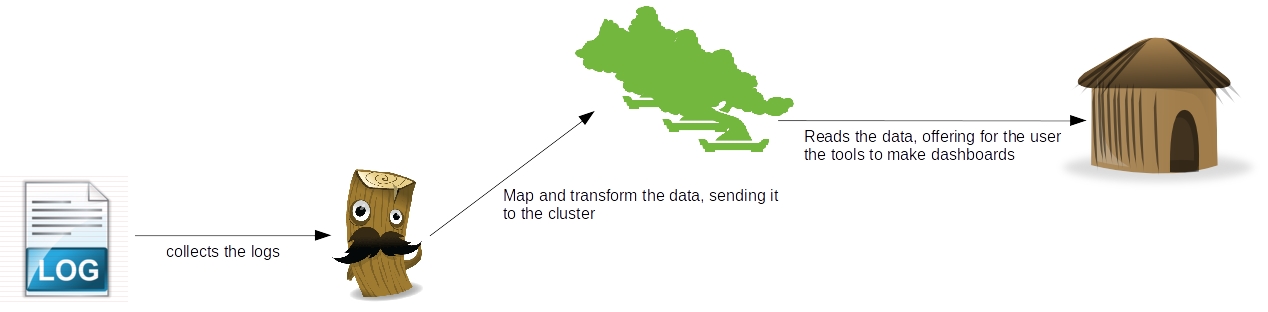
As we can see, there’s a clear separation of concerns between the tools, where which one has his own individual part on the processing of the log data:

  • Logstash: Responsible for collect the data, make transformations like parsing – using regular expressions – adding fields, formatting as structures like JSON, etc and finally sending the data to various destinations, like a ElasticSearch cluster. Later on this post we will see more detail about this useful tool;
  •  ElasticSearch: RESTful data indexer, ElasticSearch provides a clustered solution to make searches and analysis on a set of data. On the second part of our series, we will see more about this tool;
  • Kibana: Web-based application, responsible for providing a light and easy-to-use dashboard tool. On the third and last part of our series, we will see more of this tool;

So, to begin our road in the ELK stack, let’s begin by talking about the tool responsible for integrating our data: LogStash.

LogStash installation

To install, all we need to do is unzip the file we get from LogStash’s site and run the binaries on the bin folder. The only pre-requisite for the tool is to have Java installed and configured in the environment. If the reader wants to follow my instructions with the same system then me, I am using Ubuntu 14.10 with Java 8, which can be downloaded from Oracle’s site here.

With Java installed and configured, we begin by downloading and unziping the file. To do this, we open a terminal and input:

curl https://download.elasticsearch.org/logstash/logstash/logstash-1.4.2.tar.gz | tar xz

After the download, we will have LogStash on a folder on the same place we run our ‘curl’ command. On the LogStash terminology, we have 4 types of configurations we can make for a stream, named:

  • input: On this configuration, we put the sources of our streams, that can range from polling files of a file system to more complex inputs such as a Amazon SQS queue and even Twitter;
  • codec: On this configuration we make transformations on the data, like turning into a JSON structure, or grouping together lines that are semantically related, like for example, a Java’s stack trace;
  • filter: On this configuration we make operations such as parsing data from/to different formats, removal of special characters and checksums for deduplication;
  • output: On this configuration we define the destinations for the processed data, such as a ElasticSearch cluster, AWS SQS, Nagios etc;

Now that we have established LogStash’s configuration structure, let’s begin with our first execution. In LogStash we have two ways to configure our execution, one way by providing the settings on the start command itself and the other one is by providing a configuration file for the command. The simplest way to boot a LogStash’s stream is by setting the input and output as the console itself, to make this execution, we open a terminal, navigate to the bin folder of our LogStash’s installation and execute the following command:

./logstash -e ‘input { stdin { } } output { stdout {} }’

As we can see after we run the command, we booted LogStash, setting the console as the input and the output, without any transformation or filtering. To test, we simply input anything on the console, seeing that our message is displayed back by the tool:

Now that we get the installation out of the way, let’s begin with the actual lab. Unfortunately -or not, depending on the point of view -, it would take us a lot of time to show all the features of what we can do with the tool, so to make a short but illustrative example, we will start 2 logstash streams, to do the following:

1st stream:

  • The input will be made by a java program, which will produce a log file with log4j, representing technical information;
  • For now, we will just print logstash’s events on the console, using the rubydebug codec. On our next part on the series, we will return to this configuration and change the output to send the events to elasticsearch;

2nd stream:

  • The input will be made by the same java program, which will produce a positional file, representing business information of costumers and orders;
  • We will then use the grok filter to parse the data of the positional file into separated fields, producing the data for the output step;
  • Finally, we use the mongodb output, to save our data – filtering to only persist the orders – on a  Mongodb collection;

With the streams defined, we can begin our coding. First, let’s create the java program which will generate the inputs for the streams. The code for the program can be seen bellow:

package com.technology.alexandreesl;

import java.io.FileWriter;
import java.io.IOException;
import java.io.PrintWriter;
import java.util.ArrayList;
import java.util.Date;
import java.util.List;

import org.apache.log4j.Logger;

public class LogStashProvider {

private static Logger logger = Logger.getLogger(LogStashProvider.class);

public static void main(String[] args) throws IOException {

try {

logger.info(“STARTING DATA COLLECTION”);

List<String> data = new ArrayList<String>();

Customer customer = new Customer();
customer.setName(“Alexandre”);
customer.setAge(32);
customer.setSex(‘M’);
customer.setIdentification(“4434554567”);

List<Order> orders = new ArrayList<Order>();

for (int counter = 1; counter < 10; counter++) {

Order order = new Order();

order.setOrderId(counter);
order.setProductId(counter);
order.setCustomerId(customer.getIdentification());
order.setQuantity(counter);

orders.add(order);

}

logger.info(“FETCHING RESULTS INTO DESTINATION”);

PrintWriter file = new PrintWriter(new FileWriter(
“/home/alexandreesl/logstashdataexample/data”
+ new Date().getTime() + “.txt”));

file.println(“1” + customer.getName() + customer.getSex()
+ customer.getAge() + customer.getIdentification());

for (Order order : orders) {
file.println(“2” + order.getOrderId() + order.getCustomerId()
+ order.getProductId() + order.getQuantity());
}

logger.info(“CLEANING UP!”);

file.flush();
file.close();

// forcing a error to simulate stack traces
PrintWriter fileError = new PrintWriter(new FileWriter(
“/etc/nopermission.txt”));

} catch (Exception e) {

logger.error(“ERROR!”, e);
}

}

}

As we can see, it is a very simple class, that uses log4j to generate some log and output a positional file representing data from customers and orders and at the end, try to create a file on a folder we don’t have permission to write by default, “forcing” a error to produce a stack trace. The complete code for the program can be found here. Now that we have made our data generator, let’s begin the configuration for logstash. The configuration for our first example is the following:

input {
log4j {
port => 1500
type => “log4j”
tags => [ “technical”, “log”]
}
}

output {
stdout { codec => rubydebug }
}

To run the script, let’s create a file called “config1.conf” and save the file with the script on the “bin” folder of logstash’s installation folder. Finally, we run the script with the following command:

 ./logstash -f config1.conf

This will start logstash process with the configurations we provided. To test, simply run the java program we coded earlier and we will see a sequence of message events in logstash’s console window, generated by the rubydebug codec, like the one bellow, for example:

{
“message” => “ERROR!”,
“@version” => “1”,
“@timestamp” => “2015-01-24T19:08:10.872Z”,
“type” => “log4j”,
“tags” => [
[0] “technical”,
[1] “log”
],
“host” => “127.0.0.1:34412”,
“path” => “com.technology.alexandreesl.LogStashProvider”,
“priority” => “ERROR”,
“logger_name” => “com.technology.alexandreesl.LogStashProvider”,
“thread” => “main”,
“class” => “com.technology.alexandreesl.LogStashProvider”,
“file” => “LogStashProvider.java:70”,
“method” => “main”,
“stack_trace” => “java.io.FileNotFoundException: /etc/nopermission.txt (Permission denied)\n\tat java.io.FileOutputStream.open(Native Method)\n\tat java.io.FileOutputStream.<init>(FileOutputStream.java:213)\n\tat java.io.FileOutputStream.<init>(FileOutputStream.java:101)\n\tat java.io.FileWriter.<init>(FileWriter.java:63)\n\tat com.technology.alexandreesl.LogStashProvider.main(LogStashProvider.java:66)”
}

Now, let’s move on to the next stream. First, we create another file, called “config2.conf”, on the same folder we created the first one. On this new file, we create the following configuration:

input {
file {
path => “/home/alexandreesl/logstashdataexample/data*.txt”
start_position => “beginning”
}
}

filter {
grok {
match => [ “message” , “(?<file_type>.{1})(?<name>.{9})(?<sex>.{1})(?<age>.{2})(?<identification>.{10})” , “message” , “(?<file_type>.{1})(?<order_id>.{1})(?<costumer_id>.{10})(?<product_id>.{1})(?<quantity>.{1})” ]
}
}

output {
stdout { codec => rubydebug }
if [file_type] == “2” {
mongodb {
collection => “testData”
database => “mydb”
uri => “mongodb://localhost”
}
}
}

With the configuration created, we can run our second example. Before we do that, however, let’s dive a little on the configuration we just made. First, we used the file input, which will make logstash keep monitoring the files on the folder and processing them as they appear on the input folder.

Next, we create a filter with the grok plugin. This filter uses combinations of regular expressions, that parses the data from the input. The plugin comes with more then 100 patterns pre-made that helps the development. Another useful tool in the use of grok is a site where we could test our expressions before use. Both links are available on the links section at the end of this post.

Finally, we use the mongodb plugin, where we reference our logstash for a database and collection of a mongodb instance, where we will insert the data from the file into mongodb’s documents. We also used again the rubydebug codec, so we can also see the processing of the files on the console. The reader will note that we used a “if” statement before the configuration of the mongodb output. After we parse the data with grok, we can use the newly created fields to do some logic on our stream. In this case, we filter to only process data with the type “2”, so only the order’s data goes to the collection on mongodb, instead of all the data. We could have expanded more on this example, like saving the data into two different collections, but for the idea of passing a general view of the structure of logstash for the reader, the present logic will suffice.

PS: This example assumes the reader has mongodb installed and running on the default port of his environment, with a db “mydb” and a collection “testData” created. If the reader doesn’t have mongodb, the instructions can be found on the official documentation.

Finally, with everything installed and configured, we run the script, with the following command:

./logstash -f config2.conf

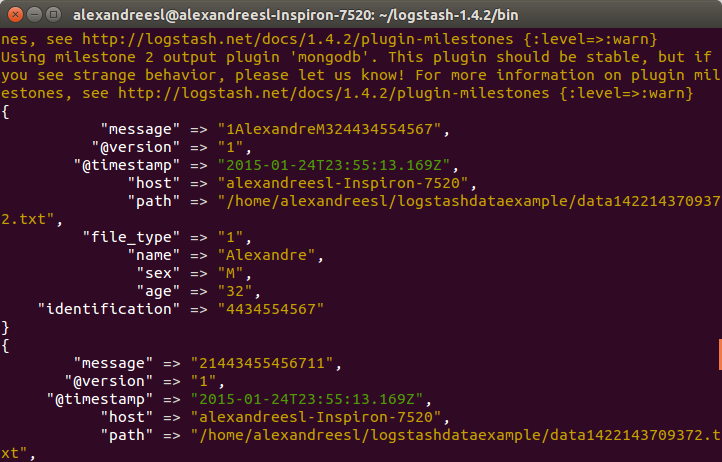
After logstash’s start, if we run our program to generate a file, we will see logstash working the data, like the screen bellow:
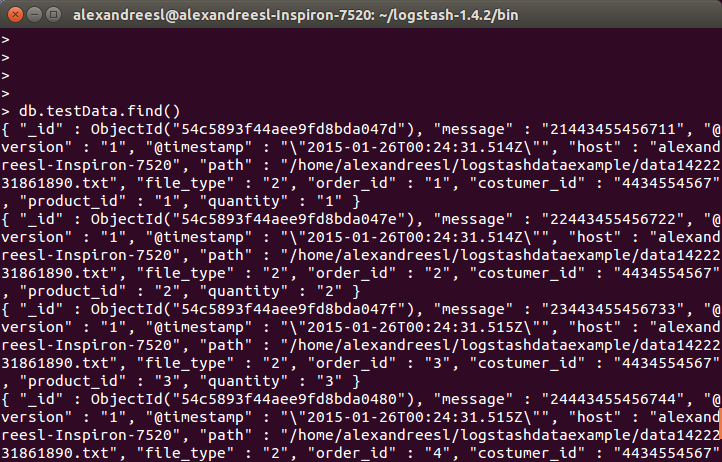
And finally, if we query the collection on mongodb, we see the data is persisted:
Conclusion

And so we conclude the first part of our series. With a simple usage, logstash prove to be a useful tool in the integration of information from different formats and sources, specially log-related. In the next part of our series, we will dive in the next tool of our stack: ElasticSearch. Until next time

Continue reading

Hands-on: Using Google API to make searches on your applications

Standard

Welcome, dear reader, to another post of my blog. On this post, we will learn to use Google’s custom search API. With this API, you can make searches using Google’s infrastructure, enriching searching business features, like a web crawler, for example.

Pre-steps

Before we start coding, we need to create the keys to make our authentication with the API. One key is the API key itself and the other one is the search engine key. A search engine key is a key to a search engine you create to pre-filter the types of domains you want to make for your searches, so you dont end up searching sites in chinese, for example, if your application only want sites from England.

To start, access the site https://console.developers.google.com. After inputting our credentials, we get to the main site, where we can create a project, activate/deactivate APIs and generate a API key for the project. This tutorial from Google explain how to create API keys.

After that, we need to create the search engine key, on the site https://www.google.com/cse/all. We can follow this tutorial from Google to create the key.

Hands-on

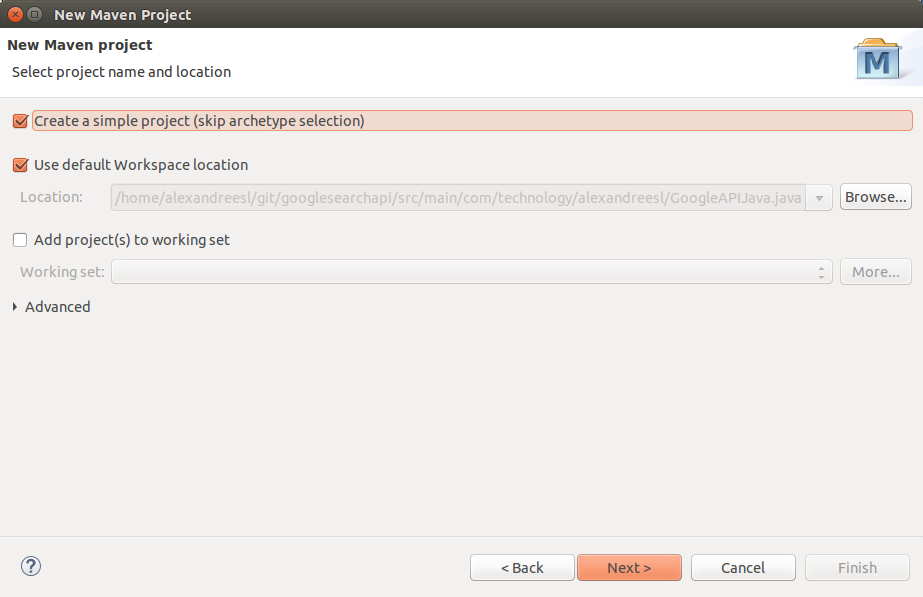
On this hands-on, we will use Eclipse Luna and Maven 3.2.1. First, create a Maven project, without a archetype:

After creating our project, we add the dependencies. Instead of offering a Java library for the consumption, Google’s API consists of a URL, which is called by a simple GET execution, and returns a JSON structure. For the return, we will use a JSON API we used on our previous post. First, we add the following dependencies in our pom.xml:

<dependencies>
<dependency>
<groupId>javax.json</groupId>
<artifactId>javax.json-api</artifactId>
<version>1.0</version>
</dependency>
<dependency>
<groupId>org.glassfish</groupId>
<artifactId>javax.json</artifactId>
<version>1.0.4</version>
</dependency>
<dependency>
<groupId>org.jsoup</groupId>
<artifactId>jsoup</artifactId>
<version>1.7.2</version>
</dependency>
</dependencies>

Finally, with the dependencies included, we write our code. In this example, we will make a call to the API for a search with the string “java+android”. The API has a limit usage of 100 results per search – in the free mode -, and uses a pagination format of 10 results per page, so we will make 10 calls to the API. The following code make our example:

package com.technology.alexandreesl;

import java.io.BufferedReader;
import java.io.InputStreamReader;
import java.io.StringReader;
import java.net.HttpURLConnection;
import java.net.URL;

import javax.json.Json;
import javax.json.stream.JsonParser;
import javax.json.stream.JsonParser.Event;

public class GoogleAPIJava {

final static String apiKey = “<insert your API Key here>”;
final static String customSearchEngineKey = “<insert your search engine key here>”;

// base url for the search query
final static String searchURL = “https://www.googleapis.com/customsearch/v1?&#8221;;

public static void main(String[] args) {

int inicio = 1;

int contador = 0;

while (contador < 10) {

System.out
.println(“***************** SEARCH **************************”);
System.out.println(“”);

String result = “”;

result = read(“java+android”, inicio, 10);

JsonParser parser = Json.createParser(new StringReader(result));

while (parser.hasNext()) {
Event event = parser.next();

if (event == Event.KEY_NAME) {

if (parser.getString().equals(“htmlTitle”)) {
Event value = parser.next();

if (value == Event.VALUE_STRING)
System.out.println(“Title (HTML): ”
+ parser.getString());
}

if (parser.getString().equals(“link”)) {

Event value = parser.next();

if (value == Event.VALUE_STRING)
System.out.println(“Link: ” + parser.getString());
}

}

}

inicio = inicio + 10;

contador++;

System.out
.println(“**************************************************”);

}

}

private static String read(String qSearch, int start, int numOfResults) {
try {

String toSearch = searchURL + “key=” + apiKey + “&cx=”
+ customSearchEngineKey + “&q=”;

toSearch += qSearch;

toSearch += “&alt=json”;

toSearch += “&start=” + start;

toSearch += “&num=” + numOfResults;

URL url = new URL(toSearch);
HttpURLConnection connection = (HttpURLConnection) url
.openConnection();
BufferedReader br = new BufferedReader(new InputStreamReader(
connection.getInputStream()));
String line;
StringBuffer buffer = new StringBuffer();
while ((line = br.readLine()) != null) {
buffer.append(line);
}
return buffer.toString();
} catch (Exception e) {
e.printStackTrace();
}
return null;
}

}

As we can see above, we make use of the java.net standard classes to make the calls. Using counters to control the calls for the API. The result when we run the program is a list of sites for the search string printed on the console:

***************** SEARCH **************************

Title (HTML): Java Manager; Emulate <b>Java</b> – <b>Android</b> Apps on Google Play
Link: https://play.google.com/store/apps/details?id=com.java.manager
Title (HTML): How do I get <b>Java</b> for Mobile device?
Link: https://www.java.com/en/download/faq/java_mobile.xml
Title (HTML): AIDE – <b>Android</b> IDE – <b>Java</b>, C++ – <b>Android</b> Apps on Google Play
Link: https://play.google.com/store/apps/details?id=com.aide.ui
Title (HTML): Como obtenho o <b>Java</b> para Dispositivos Móveis?
Link: https://www.java.com/pt_BR/download/faq/java_mobile.xml
Title (HTML): Download <b>java</b> for <b>android</b> tablet – <b>Android</b> – <b>Android</b> Smartphones
Link: http://www.tomsguide.com/forum/id-1608121/download-java-android-tablet.html
Title (HTML): <b>java</b>.lang | <b>Android</b> Developers
Link: http://developer.android.com/reference/java/lang/package-summary.html
Title (HTML): Comparison of <b>Java</b> and <b>Android</b> API – Wikipedia, the free <b>…</b>
Link: http://en.wikipedia.org/wiki/Comparison_of_Java_and_Android_API
Title (HTML): Learn <b>Java</b> for <b>Android</b> Development: Introduction to <b>Java</b> – Tuts+ <b>…</b>
Link: http://code.tutsplus.com/tutorials/learn-java-for-android-development-introduction-to-java–mobile-2604
Title (HTML): <b>java</b>.text | <b>Android</b> Developers
Link: http://developer.android.com/reference/java/text/package-summary.html
Title (HTML): Apostila <b>Java</b> – Desenvolvimento Mobile com <b>Android</b> | K19
Link: http://www.k19.com.br/downloads/apostilas/java/k19-k41-desenvolvimento-mobile-com-android
**************************************************
***************** SEARCH **************************

Title (HTML): How can I access a <b>Java</b>-based website on an <b>Android</b> phone?
Link: http://www.makeuseof.com/answers/access-javabased-website-android-phone/
Title (HTML): Introduction to <b>Java</b> Variables | Build a Simple <b>Android</b> App (retired <b>…</b>
Link: http://teamtreehouse.com/library/build-a-simple-android-app/getting-started-with-android/introduction-to-java-variables-2
Title (HTML): <b>Java</b> Basics for <b>Android</b> Development – Part 1 – Treehouse Blog
Link: http://blog.teamtreehouse.com/java-basics-for-android-development-part-1
Title (HTML): GC: <b>android</b> – GrepCode <b>Java</b> Project Source
Link: http://grepcode.com/project/repository.grepcode.com/java/ext/com.google.android/android
Title (HTML): <b>Java</b> Essentials for <b>Android</b>
Link: https://www.udemy.com/java-essentials-for-android/
Title (HTML): How to Get <b>Java</b> on <b>Android</b>: 10 Steps (with Pictures) – wikiHow
Link: http://www.wikihow.com/Get-Java-on-Android
Title (HTML): Learn <b>Android</b> 4.0 Programming in <b>Java</b>
Link: https://www.udemy.com/android-tutorial/
Title (HTML): Trending <b>Java</b> repositories on GitHub today · GitHub
Link: https://github.com/trending?l=java
Title (HTML): Developing for <b>Android</b> in Eclipse: R.<b>java</b> not generating – Stack <b>…</b>
Link: http://stackoverflow.com/questions/2757107/developing-for-android-in-eclipse-r-java-not-generating
Title (HTML): Cling – <b>Java</b>/<b>Android</b> UPnP library and tools
Link: http://4thline.org/projects/cling/
**************************************************
***************** SEARCH **************************

Title (HTML): Getting Started | <b>Android</b> Developers
Link: https://developer.android.com/training/
Title (HTML): <b>Java</b> API – <b>Android</b> | Vuforia Developer Portal
Link: https://developer.vuforia.com/resources/api/main
Title (HTML): <b>Java</b> Programming for <b>Android</b> Developers For Dummies: Burd <b>…</b>
Link: http://www.amazon.com/Java-Programming-Android-Developers-Dummies/dp/1118504380
Title (HTML): <b>Android</b> Quickstart – Firebase
Link: https://www.firebase.com/docs/android/quickstart.html
Title (HTML): Learn <b>Java</b> for <b>Android</b> Development: Jeff Friesen: 9781430264545 <b>…</b>
Link: http://www.amazon.com/Learn-Java-Android-Development-Friesen/dp/1430264543
Title (HTML): Unity – Manual: Building Plugins for <b>Android</b>
Link: http://docs.unity3d.com/Manual/PluginsForAndroid.html
Title (HTML): Eclipse, <b>Android</b> and <b>Java</b> training and support
Link: http://www.vogella.com/
Title (HTML): AIDE – <b>Android Java</b> IDE download – Baixaki
Link: http://www.baixaki.com.br/android/download/aide-android-java-ide.htm
Title (HTML): <b>Java</b> Multi-Platform and <b>Android</b> SDK | Philips Hue API
Link: http://www.developers.meethue.com/documentation/java-multi-platform-and-android-sdk
Title (HTML): <b>Android</b> Client Tutorial – <b>Java</b> — Google Cloud Platform
Link: https://cloud.google.com/appengine/docs/java/endpoints/getstarted/clients/android/
**************************************************
***************** SEARCH **************************

Title (HTML): Gradle Plugin User Guide – <b>Android</b> Tools Project Site
Link: http://tools.android.com/tech-docs/new-build-system/user-guide
Title (HTML): Where is a download for <b>java</b> for <b>android</b> tablet? – Download <b>…</b>
Link: http://www.tomshardware.com/forum/52818-34-where-download-java-android-tablet
Title (HTML): Download <b>android java</b>
Link: http://www.softonic.com.br/s/android-java
Title (HTML): Binding a <b>Java</b> Library | Xamarin
Link: http://developer.xamarin.com/guides/android/advanced_topics/java_integration_overview/binding_a_java_library_(.jar)/
Title (HTML): <b>java</b>-ide-droid – JavaIDEdroid allows you to create native <b>Android</b> <b>…</b>
Link: http://code.google.com/p/java-ide-droid/
Title (HTML): Code Style Guidelines for Contributors | <b>Android</b> Developers
Link: https://source.android.com/source/code-style.html
Title (HTML): Eclipse Downloads
Link: https://eclipse.org/downloads/
Title (HTML): Open source <b>Java</b> for <b>Android</b>? Don’t bet on it | InfoWorld
Link: http://www.infoworld.com/article/2615512/java/open-source-java-for-android–don-t-bet-on-it.html
Title (HTML): Make your First <b>Android</b> App! – YouTube
Link: http://www.youtube.com/watch?v=A_qaarY4_lY
Title (HTML): Runtime for <b>Android</b> apps – BlackBerry Developer
Link: http://developer.blackberry.com/android/
**************************************************
***************** SEARCH **************************

Title (HTML): <b>Java</b> Mobile <b>Android</b> Basic Course Online
Link: http://www.vtc.com/products/javamobileandroidbasic.htm
Title (HTML): <b>Android</b> Game Development Tutorial – Kilobolt
Link: http://www.kilobolt.com/game-development-tutorial.html
Title (HTML): Learn <b>Java</b> for <b>Android</b> Development, 3rd Edition – Free Download <b>…</b>
Link: http://feedproxy.google.com/~r/IT-eBooks/~3/oITagjK1kYU/
Title (HTML): Cursos de <b>Android</b> e iOS | Caelum
Link: http://www.caelum.com.br/cursos-mobile/
Title (HTML): Autobahn|<b>Android</b> Documentation — AutobahnAndroid 0.5.2 <b>…</b>
Link: http://ottogrib.appspot.com/autobahn.ws/android
Title (HTML): Dagger ‡ A fast dependency injector for <b>Android</b> and <b>Java</b>.
Link: http://google.github.com/dagger/
Title (HTML): Dagger
Link: http://square.github.com/dagger/
Title (HTML): Setup – google-api-<b>java</b>-client – Download and Setup Instructions <b>…</b>
Link: https://code.google.com/p/google-api-java-client/wiki/Setup
Title (HTML): How to Write a ‘Hello World!’ app for <b>Android</b>
Link: http://www.instructables.com/id/How-to-Write-a-Hello-World-app-for-Android/
Title (HTML): The real history of <b>Java</b> and <b>Android</b>, as told by Google | ZDNet
Link: http://www.zdnet.com/article/the-real-history-of-java-and-android-as-told-by-google/
**************************************************
***************** SEARCH **************************

Title (HTML): Microsoft Releases SignalR SDK for <b>Android</b>, <b>Java</b> — Visual Studio <b>…</b>
Link: http://visualstudiomagazine.com/articles/2014/03/07/signalr-sdk-for-android-and-java.aspx
Title (HTML): <b>Android</b> Game Tutorials | <b>Java</b> Code Geeks
Link: http://www.javacodegeeks.com/tutorials/android-tutorials/android-game-tutorials/
Title (HTML): libgdx
Link: http://libgdx.badlogicgames.com/
Title (HTML): Buck: An <b>Android</b> (and <b>Java</b>!) build tool
Link: https://www.diigo.com/04w2jy
Title (HTML): Google copied <b>Java</b> in <b>Android</b>, expert says | Computerworld
Link: http://www.computerworld.com/article/2512514/government-it/google-copied-java-in-android–expert-says.html
Title (HTML): Reinventing Mobile Development (mobile app development mobile <b>…</b>
Link: http://www.codenameone.com/
Title (HTML): Understanding R.<b>java</b>
Link: http://knowledgefolders.com/akc/display?url=DisplayNoteIMPURL&reportId=2883&ownerUserId=satya
Title (HTML): Download <b>Java</b> Programming for <b>Android</b> Developers For Dummies <b>…</b>
Link: http://kickasstorrentsproxy.com/java-programming-for-android-developers-for-dummies-epub-pdf-t8208814.html
Title (HTML): Court sides with Oracle over <b>Android</b> in <b>Java</b> patent appeal – CNET
Link: http://www.cnet.com/news/court-sides-with-oracle-over-android-in-java-patent-appeal/
Title (HTML): Google Play <b>Android</b> Developer API Client Library for <b>Java</b> – Google <b>…</b>
Link: https://developers.google.com/api-client-library/java/apis/androidpublisher/v1
**************************************************
***************** SEARCH **************************

Title (HTML): Tape – A collection of queue-related classes for <b>Android</b> and <b>Java</b> by <b>…</b>
Link: http://shahmehulv.appspot.com/square.github.io/tape/
Title (HTML): <b>Android</b> Platform Guide
Link: http://cordova.apache.org/docs/en/4.0.0/guide_platforms_android_index.md.html
Title (HTML): OrmLite – Lightweight Object Relational Mapping (ORM) <b>Java</b> Package
Link: http://ormlite.com/
Title (HTML): <b>Android</b> Ported to C# | Xamarin Blog
Link: http://blog.xamarin.com/android-in-c-sharp/
Title (HTML): Tutorials | AIDE – <b>Android</b> IDE
Link: https://www.android-ide.com/tutorials.html
Title (HTML): All Tutorials on Mkyong.com
Link: http://www.mkyong.com/all-tutorials-on-mkyong-com/
Title (HTML): Top 10 <b>Android</b> Apps and IDE for <b>Java</b> Coders and Programmers
Link: https://blog.idrsolutions.com/2014/12/android-apps-ide-for-java-coder-programmers/
Title (HTML): <b>Java Android</b> developer information, news, and how-to advice <b>…</b>
Link: http://www.javaworld.com/category/java-android-developer
Title (HTML): Google <b>Android</b> e <b>Java</b> Micro Edition (ME)
Link: http://www.guj.com.br/forums/show/14.java
Title (HTML): <b>Java</b> &amp; <b>Android</b> Obfuscator | DashO
Link: http://www.preemptive.com/products/dasho/overview
**************************************************
***************** SEARCH **************************

Title (HTML): Using a Custom Set of <b>Java</b> Libraries In Your RAD Studio <b>Android</b> <b>…</b>
Link: http://docwiki.embarcadero.com/RADStudio/XE7/en/Using_a_Custom_Set_of_Java_Libraries_In_Your_RAD_Studio_Android_Apps
Title (HTML): 50. <b>Android</b> (DRD) – <b>java</b> – CERT Secure Coding Standards
Link: https://www.securecoding.cert.org/confluence/pages/viewpage.action?pageId=111509535
Title (HTML): Gameloft: Top Mobile Games for iOS, <b>Android</b>, <b>Java</b> &amp; more
Link: http://www.gameloft.com/
Title (HTML): <b>Android</b> and <b>Java</b> Developers: We Have a SignalR SDK for You!
Link: http://msopentech.com/blog/2014/03/06/android-java-developers-signalr-sdk/
Title (HTML): <b>Java</b> Swing UI on iPad, iPhone and <b>Android</b>
Link: http://www.creamtec.com/products/ajaxswing/solutions/java_swing_ui_on_ipad.html
Title (HTML): TeenCoder <b>Java</b> Series: Computer Programming Courses for Teens!
Link: http://www.homeschoolprogramming.com/teencoder/teencoder_jv_series.php
Title (HTML): Mixpanel <b>Java</b> API Overview – Mixpanel | Mobile Analytics
Link: https://mixpanel.com/help/reference/java
Title (HTML): AN 233 <b>Java</b> D2xx for <b>Android</b> API User Manual – FTDI
Link: http://www.ftdichip.com/Documents/AppNotes/AN_233_Java_D2XX_for_Android_API_User_Manual.pdf
Title (HTML): Xtend – Modernized <b>Java</b>
Link: http://eclipse.org/xtend/
Title (HTML): ProGuard
Link: http://freecode.com/urls/9ab4c148025d25c6eccd84906efb2c05
**************************************************
***************** SEARCH **************************

Title (HTML): FOSS Patents: Oracle wins <b>Android</b>-<b>Java</b> copyright appeal: API code <b>…</b>
Link: http://www.fosspatents.com/2014/05/oracle-wins-android-java-copyright.html
Title (HTML): <b>java android</b> 4.1.1 free download
Link: http://en.softonic.com/s/java-android-4.1.1
Title (HTML): Four reasons to stick with <b>Java</b>, and four reasons to dump it <b>…</b>
Link: http://www.javaworld.com/article/2689406/java-platform/four-reasons-to-stick-with-java-and-four-reasons-to-dump-it.html
Title (HTML): <b>Java</b> Programming for <b>Android</b> Developers For Dummies Cheat Sheet
Link: http://www.dummies.com/how-to/content/java-programming-for-android-developers-for-dummie.html
Title (HTML): Twitter4J – A <b>Java</b> library for the Twitter API
Link: http://twitter4j.org/
Title (HTML): Ignite Realtime: Smack API
Link: http://www.igniterealtime.org/projects/smack/
Title (HTML): <b>Java</b> Programming for <b>Android</b> Developers For Dummies
Link: http://allmycode.com/Java4Android
Title (HTML): Oracle ADF Mobile
Link: http://www.oracle.com/technetwork/developer-tools/adf-mobile/overview/adfmobile-1917693.html
Title (HTML): Introduction of How <b>Android</b> Works for <b>Java</b> Programmers
Link: http://javarevisited.blogspot.com/2013/06/introduction-of-how-android-works-Java-programmers.html
Title (HTML): Download <b>java</b> emulator for <b>Android</b> | JavaEmulator.com
Link: http://www.javaemulator.com/android-java-emulator.html
**************************************************
***************** SEARCH **************************

Title (HTML): Google hauls <b>Java</b>-on-<b>Android</b> spat into US Supreme Court • The <b>…</b>
Link: http://go.theregister.com/feed/www.theregister.co.uk/2014/10/09/google_takes_javaonandroid_case_to_supreme_court/
Title (HTML): <b>Android</b> SDK for Realtime Apps
Link: http://www.pubnub.com/docs/java/android/android-sdk.html
Title (HTML): Como Obter o <b>Java</b> no <b>Android</b>: 4 Passos (com Imagens)
Link: http://pt.wikihow.com/Obter-o-Java-no-Android
Title (HTML): If <b>Android</b> is so hot, why has <b>Java</b> ME overtaken it?
Link: http://fortune.com/2012/01/01/if-android-is-so-hot-why-has-java-me-overtaken-it/
Title (HTML): <b>Android</b> tutorial
Link: http://www.tutorialspoint.com/android/
Title (HTML): What’s New in IntelliJ IDEA 14
Link: https://www.jetbrains.com/idea/whatsnew/
Title (HTML): <b>Android</b> OnClickListener Example | Examples <b>Java</b> Code Geeks
Link: http://examples.javacodegeeks.com/android/core/view/onclicklistener/android-onclicklistener-example/
Title (HTML): JTwitter – the <b>Java</b> library for the Twitter API : Winterwell Associates <b>…</b>
Link: http://www.winterwell.com/software/jtwitter.php
Title (HTML): RL SYSTEM – Cursos Online de <b>Android</b>, .NET, <b>Java</b>, PHP, ASP <b>…</b>
Link: http://www.rlsystem.com.br/
Title (HTML): samples/ApiDemos/src/com/example/<b>android</b>/apis/app <b>…</b>
Link: https://android.googlesource.com/platform/development/+/master/samples/ApiDemos/src/com/example/android/apis/app/FragmentRetainInstance.java
**************************************************

Conclusion

And so we concluded our hands-on. With a simple usage, Google’s custom search API offers a simple but powerful tool in the belt of every developer who need to use a search engine of the internet in his solutions. Thank you for reading, until next time.

Source-code (Github)