
Welcome, dear reader, to another post from my technology blog. In this post, we discuss a framework that may not be very familiar to everyone, but it is a very powerful feature in the construction of batch applications made in Java: The Spring Batch.
Batch Application: what it is
A batch application, in general, is nothing more than a program whose goal is to make the processing of large amounts of data, on a scheduled basis, usually through programmed trigger mechanisms (scheduling).
Typically, on companies, we see many such programs been built directly into the database layer, using languages such as PL \ SQL, for example. This method has its advantages, but there are several advantages that can draw to build a batch program in a technology like Java. One advantage we get is the ease of application scalation, as a batch built in this language will typically run as a standalone program or within an application server, so you can have your memory, CPU, etc more easily scaled than the alternative of a batch in PL \ SQL. Moreover, the alternative of making a batch on Java offers more opportunities of reuse, as the same logic can be applied to batch, web, REST, etc.
So, having made our introduction to the subject, let’s proceed and start talking about the framework.
Framework architecture
In the figure below, taken from the framework documentation, can we see the main components that make up the architecture of a Spring Batch job. Let’s see in better detail.
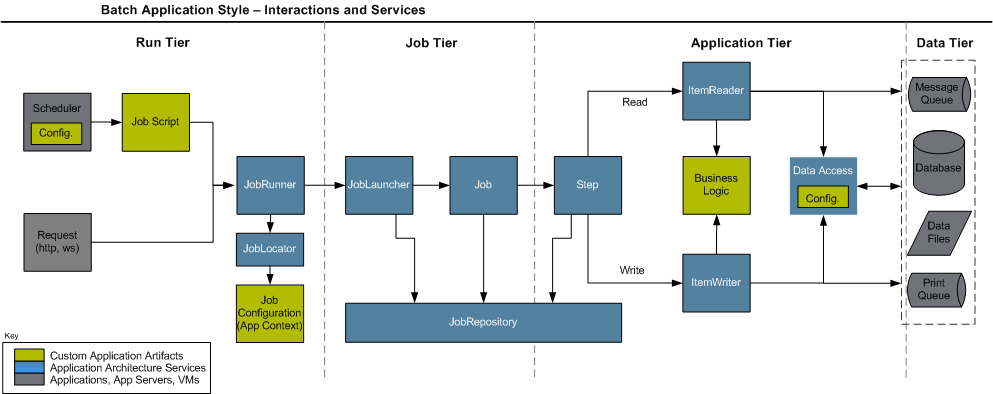
As we can see above, when we build a job – a term commonly used to describe a batch program, we will use from now – in the framework, you must implement three types of artifacts: a job script, which consists of an implementation plan with steps, which makes up the job execution, connection settings for the data sources that the job will process such as databases, JMS queues, etc. and of course, classes that implement the processing logic.
When we use the framework for the first time, a step of the setup is to create a set of database tables, whose function is to provide the basis for a repository of jobs. The framework focuses on the concept where you can, through these tables, control the status of different jobs, through the different executions, allowing a restartability mechanism, that is, it allows a job to be restarted from the point at which it stopped in the last run, in case of failure. To achieve this control, the Spring Batch provides the following control structure represented by a set of classes:
JobRunner: Class responsible to make the execution of a job by external request. Has several implementations to provide method invocation call for different modes such as a shell script, for example. Performs the instantiation of a JobLauncher;
JobLocator: Class responsible for getting the configuration information, such as the implementation plan (job script), for a given job passed by parameter. Works in conjunction with the JobRunner;
JobLauncher: Class responsible for managing the start and manage the actual execution of the job, is instantiated by JobRunner;
JobRepository: Facade class that interface the access of the framework classes to the tables of the repository, it is through this class that jobs communicate the progress of its executions, thus ensuring that it could make his restart;
Thanks to this mechanism of control, Spring provides a web application, developed in Java, which allows actions like view execution logs of batches and start / stop / restart jobs through the interface, called Spring Batch Admin. More information about the application can be found at the end of the post.
Now that we have clarified the framework architecture, let’s talk about the main components (classes / interfaces that the developer must implement) that the developer has at his disposal for the construction of the processing logic itself.
Components
Tasklet: Basic unit of a step, can be created for the development of specific actions of the batch, like calling a webservice which data is to be used for all steps of the implementation, for example.
ItemReader: Component used in a structure known as chunk, where we have a data source that is read, processed and written in an iterative fashion, into blocks – chunks – until all the data has been processed. This component is the logic of reading, that read sources such as databases. The framework comes with a set of pre-build readers, but the developer can also develop your own if necessary.
ItemProcessor: Component used in a structure known as chunk, where we have a data source that is read, processed and written in an iterative fashion, into blocks – chunks – until all the data has been processed. This component is the processing logic, which typically consists of the execution of business rules, calls to external resources for enrichment of data, such as web services, among others.
ItemWriter: Component used in a structure known as chunk, where we have a data source that is read, processed and written in an iterative fashion, into blocks – chunks – until all the data has been processed. This component is for the writte logic of the processed data, like with the ItemReaders, the framework also comes with a set of pre-build ItemWriters to write on sources such as databases, but the developer can also develop your own writer, if necessary.
Decider: Component responsible for making use of logic to perform tasks like “go to the step 1 if a value equal to X, if equal to Y go to the step 2, and ends the execution if the value is equal to Z “.
Classifier: Component that can be used in conjunction with other components, such as a ItemWriter and perform classification logic, such as “run ItemWriterA for the item if it has the property X = true, otherwise, execute the ItemWriterB “. IMPORTANT: IN THIS SCENARIO, THE ORDER OF EXECUTION OF THE ITEMS WITHIN THE CHUNK IS MODIFIED, BECAUSE THE FRAMEWORK MAKES ALL THE CLASSIFICATION OF THE ITEMS FIRST, AND THEN EXECUTE 1 ITEMWRITER AT A TIME!
Split: Component used when you want, at a certain point of execution, a set of steps to run in parallel through multithreading.
About the Java EE 7 Batch specification
Some readers may be familiar with the new API called “Batch”, the JSR-352, which introduces a new batch processing API in Java EE 7 platform, having very similar concepts to Spring Batch, it fills an important gap in the implementation of reference of the Java technology. More than a philosophical question, some attention points should be considered before you choose to use one or the other framework, such as the requirement of a Java EE container (server) for its implementation, the lack of support for the use via jdbc in access to the databases, and the absence of support for reading outsourced properties in files, which the Spring Batch can use through components called PropertyPlaceHolders. In the links at the end of the post, you can read an article detailing the differences of the two in more depth.
Conclusion
Unfortunately, you can not detail, in a single post, all the power of the framework. Several things were left out, such as support for event listeners in the execution of jobs, error treatments allowing certain exceptions have retries policies or being “ignored” (retry, skip), among other features. I hope, however, be transmitted to the reader a good initial view of the framework, sharpening his curiosity. Massive data processing has always been, and always will be a major challenge for companies, and our mission, as IT professionals, is the constant learning of the best resources we have available. Thank you for your attention, and until next time.

 Technology explained