TDD: Designing our code, test-first

Standard

Hi, dear readers! Welcome to my blog. On this post, we will talk about TDD, a methodology that preaches about focusing first on tests, instead of our production code. I have already talked about test technologies on my post about mockito, so in this post we will focus more on the theoretical aspects of this subject. So, without further delay, let’s begin talking about TDD!

Test-driven development

TDD, also known as Test-driven development, is a development technique created by Kent Beck, which also created JUnit, a highly known Java test library.

TDD, as the name implies, dictates that the development must be guided by tests, that must be written before even the “real” code that implements the requirements is written! Let’s see in more detail how the steps of TDD work on the next section.

TDD steps

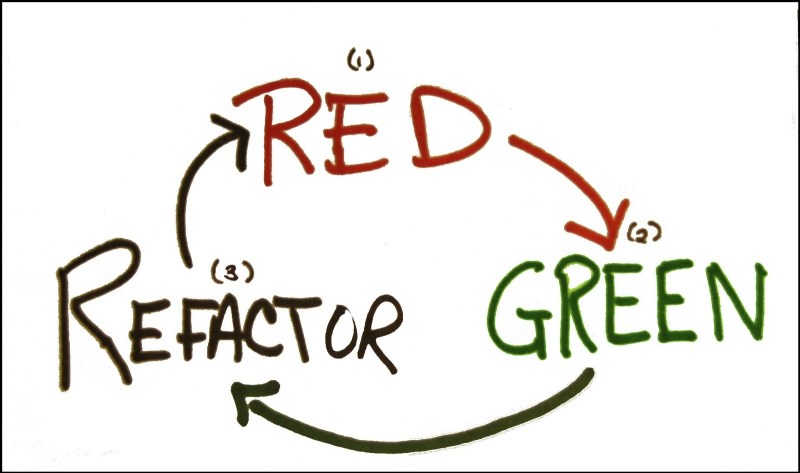
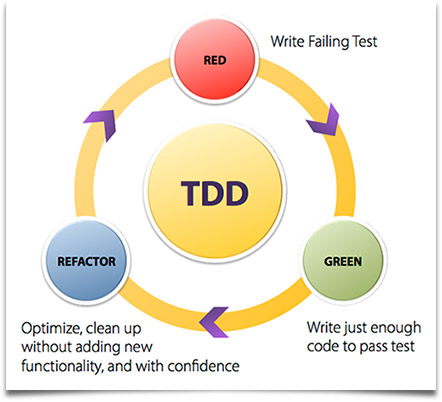
As we can see on the picture above, the following steps must be met to proceed in using the TDD paradigm:

  1. Write a test (that fails): Represented by the red circle, it means that before we implement the code – a method on a class, for example – we implement a test case, like a JUnit method for instance, and invoke our code, in this case a simple empty method. Of course, on this scenario the test will fail, since there is no implementation, which leads to our next step;
  2. Write code just enough to pass: Represented by the green circle, it means that we write code on our method just enough to make our test case pass with success. The principle behind this step is that we write code with simplicity in mind, in other words, keeping it simple, like the famous kiss principle;
  3. Refactor the code, improving his quality: Represented by the blue circle, it means that, after we make our code to pass the test, we analyse our code, looking for chances to improve his quality. Is there duplicate code? Remove the duplications! Is there hard coded constants? Consider changing to a enum or a properties table, for instance.

A important thing to notice is that the focus of the third step and the previous one is to not implement more functionality then the test code is testing. The reason for this is pretty obvious: since our focus is to implement the tests for our scenarios first, any functionality that we implement without the test reflecting the scenario is automatically a code without test coverage;

After we conclude the third step, the construction returns to the first step, reinitiating the cycle. On the next iteration, we implement another test case for our method, representing another scenario. We then code the minimum code to implement the new scenario and conclude the process by refactoring the code. This keeps going until all the scenarios are met, leaving at the end not only our final code, but all the test cases necessary to effective test our method, with all the functionalities he is intended to implement.

The reader may be asking: “but couldn’t we get the same by coding the tests after we write our production code?”. The answer is yes, we could get the same results by adding our tests at the end of the process, but then we wouldn’t have something called feedback from our code.

Feedback

When we talk about feedback, we mean the perception we have about how our code will perform. If we think about, the test code is the first client of our code: he will prepare the data necessary for the invocation, invoke our code and then collect the results. By implementing the tests first, we receive more rapidly this feedbacks from our implementation, not only on the sphere of correctness, but also on design levels.

For instance, imagine that we are building a test case and realize that the test is getting difficult to implement because of the complex class structure we have to populate just to make the invocation of our test’s target. This could mean that our class model is too complex and a refactoring is necessary.

By getting this feedback when we are just beginning the development – remember that we always code just enough to the test to pass! – it makes a lot more cheap and less complex to refactor the model then if we receive this feedback just at the end of the construction, when a lot of time and effort was already made! By this point of view, we can easily see the benefits of the TDD approach.

Types of tests

When we talked about tests on the previous sections, we talked about a type of test called unit test. Unit tests are tests focused on testing a single program unit, like a class, not focusing on testing the access to external resources, for example. Of course, there are other types of tests we can implement, as follows:

Unit tests: Unit tests have their focus to test individually each program unit that composes the system, without external interferences.

Integration tests: Integration tests also have the focus to test program units, but in this case to test the integration of the system with external resources, like a database, for example. A good example of a integration test is test cases for a DAO class, testing the code that implement insertions, updates, etc.

System tests: System tests, as the name implies, are tests that focus on testing the whole system, across all his layers. In a web application, for example, that means a automated test that turns on a server, execute some HTTP requests to the web application and analyse the responses. A good example of technology that could be used to test the web tier is a tool called Selenium.

Acceptance tests: Acceptance tests, commonly, are tests made by the end user of the system. The focus of this kind of test is to measure the quality of the implementation of requirements specified by the user. Other requirements such as usability are also evaluated by this kind of test.

A important thing to notice is that this kind of test is also referred as a automated system test, with the objective of testing the requirement as it is, for example:

  • Requirement: the invoice must be inserted on the system by the web interface;
  • Test: create a system test that executes the insertion by the web interface and verifies if the data is correctly inserted;

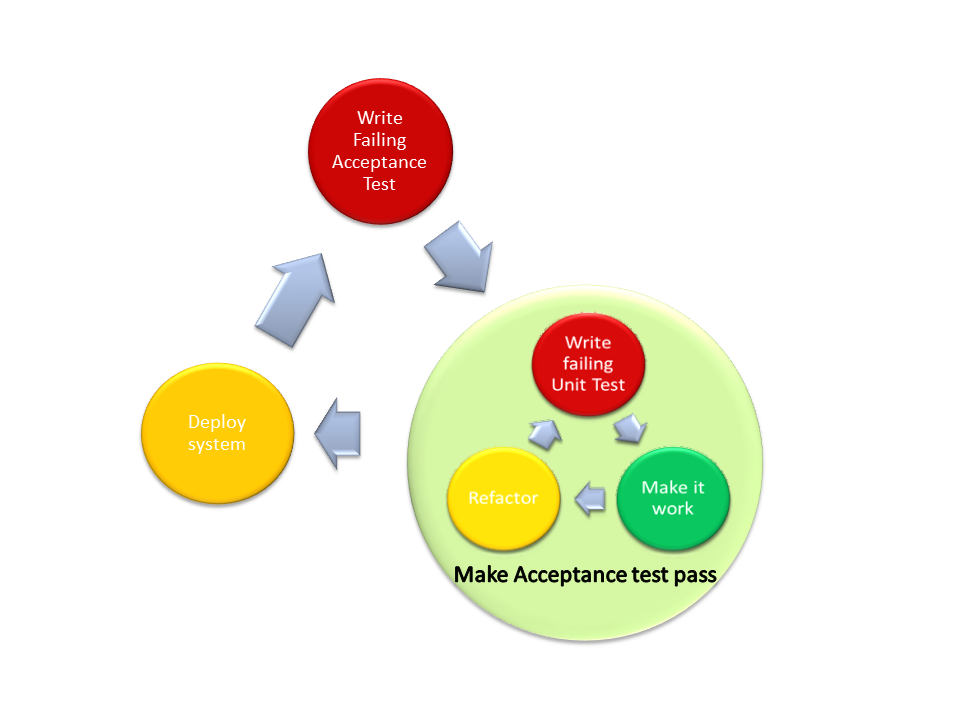
This technique, called ATDD (Acceptance Test-Driven Development) preaches that first a acceptance test must be created, and then the TDD technique is applied, until the acceptance test is satisfied. The diagram bellow shows this technique in practice:

Mock objects and unit tests

When we talk about unit tests, as said before, it is important to isolate the program unit we are testing, avoiding the interference from other tiers and dependencies that the program unit uses. On the Java world, a good framework we can use to create mocks is Mockito, which we talked about on my previous post.

With mocks, following the principles of TDD, we can, for example, create just the interfaces our code depends on and mock that interfaces, this way already establishing the communication channel that will be created, without leaving our focus from the program unit we are creating.

Another benefit of this approach is on the creation of the interfaces themselves, since our focus is always to implement the minimum necessary for the tests to pass, the resulting interfaces will be simple and concise, improving their quality.

Considerations

When do I use mocks?

A important note about mocks is that not always is good to use them. Taking for example a DAO class, that essentially is just a class that implement code necessary to interact with a database, for instance, the use of mocks won’t bring any value, since the code of the class itself is too simple to benefit from a unit test. On this cases, typically just a integration test is enough, using for example in-memory databases such as HSQLDB to act as the database.

Should I code more then one test case at a time?

In general, is considered a bad practice to write more then one test case at once before running and getting the fail results. The reason for this is that the point of the technique is to test one functionality at a time, which of course is “ruined” by the practice of coding more then one test at once.

How much of a functionality do I code on the test?

On the TDD terminology, we can also call the “amounts” of functionality we code at each iteration as baby steps. There is no universal convention of how much must be implement in each of this baby steps, but it is a good advice to follow common sense. If the developer is experienced and the functionality is simple, it could be even possible to implement almost the whole code on just one iteration.

If the developer is less experienced and/or the functionality is more complex, it makes more sense to spend more time with more baby steps, since it will create more feedbacks for the developer, making it easier to implement the complex requirements.

Should I test private code?

Private code, as the name implies, are code – like a method, for instance – that are accessible only inside the same program unit, like a class, for example. Since the test cases are normally implemented on another program unit (class), the test code can’t access this code, which in turn begs the question: should I make any code to test that private code?

Generally speaking, a common consensus is that private code is intended to implement little things, like a portion of code that is duplicated across multiple methods, for example. In that scenario, if you have for instance a private method on a Java class that it is enormous with lots of functionality, then maybe it means that this method should be made public, maybe even moved to a different class, like a utility class.

If that is not the case, then it is really necessary to design test cases to efficiently test the method, by invoking him indirectly by his public consumer. Talking specifically on the Java World, one way to test the code without the “barrier” of the public consumer is by using reflection.

My target code has too much test cases, is this normal?

When implementing the test cases for a target production code – a method, for example – the developer could end up on a scenario that lots of test cases are created just to test the whole functionality that single code composes. When this kind of situation happens, it is a good practice that the developer analyse if the code doesn’t have too much functionality implemented on itself, which leads to what in OO we call as low cohesion.

To avoid this situation, a refactoring from the code is needed, maybe splitting the code on more methods, or even classes on Java’s case.

Conclusion

And this concludes our post about TDD. By shifting the focus from implementing the code first to implementing the tests first, we can easily make our code more robust, simple and testable.

In a time that software is more important then ever – been on places like airplanes, cars and even inside human beans -, testing efficiently the code is really important, since the consequences of a bad code are getting more and more devastating. Thank you for following me on another post, until next time.

Java 8: Knowing the new features – the new Date API

Standard

Hi, dear readers! Welcome to my blog. On this post, the last on the series, we talk about the new library for Date & Time manipulation, which was inspired by the Joda Time library.

So, without further delay, let’s begin our journey through this feature!

Manipulating Dates & Time on Java

It is a old complain on the Java community how the Java APIs for manipulating Dates has his issues, like limitations, difficult  to work with, etc. Thinking on this, the Java 8 comes with a new API that brings simplicity and strength to the way we work with datetimes on Java. Let’s start by learning how to create instances of the new classes.

To create a new Date instance (without time), representing the current date, all we have to do is:

LocalDate date = LocalDate.now();

To create a new Time instance, based at the time the instance was created, we do this:

LocalTime time = LocalTime.now();

And finally, to create a datetime, in other words, a date and time representation, we use this:

LocalDateTime dateTime = LocalDateTime.now();

The instance above have not timezone information, using only the local timezone. If it is needed to use a specific timezone, we created a class called ZonedDateTime. For example, if we wanted to create a instance from our timezone and them change to Sidney’s timezone, we could do like this:

ZonedDateTime zonedDateTime = ZonedDateTime.now();

System.out.println("Time at my timezone: " + zonedDateTime);

zonedDateTime = zonedDateTime.withZoneSameInstant(ZoneId
.of("Australia/Sydney"));

System.out.println("Time at Sidney: " + zonedDateTime);

The code above print the following at my location:

Time at my timezone: 2015-06-04T14:42:30.850-03:00[America/Sao_Paulo]
Time at Sidney: 2015-06-05T03:42:30.850+10:00[Australia/Sydney]

Another way of instantiating this classes is for a predefined date and/or time. We can do this like the following:

 date = LocalDate.of(2015, Month.DECEMBER, 25);

 dateTime = LocalDateTime.of(2015, Month.DECEMBER, 25, 10, 30);

With all those classes is really simple to add and/or remove days, months or years to a date, or the same to a time object. the code bellow illustrate this simplicity:

System.out.println("Date before adding days: " + date);

date = date.plusDays(10);

System.out.println("Date after adding days: " + date);

date = date.plusMonths(6);

System.out.println("Date after adding months: " + date);

date = date.plusYears(5);

System.out.println("Date after adding years: " + date);

date = date.minusDays(7);

System.out.println("Date after subtracting days: " + date);

date = date.minusMonths(6);

System.out.println("Date after subtracting months: " + date);

date = date.minusYears(10);

System.out.println("Date after subtracting years: " + date);

time = time.plusHours(12);

System.out.println("Time after adding hours: " + time);

time = time.plusMinutes(30);

System.out.println("Time after adding minutes: " + time);

time = time.plusSeconds(120);

System.out.println("Time after adding seconds: " + time);

time = time.minusHours(12);

System.out.println("Time after subtracting hours: " + time);

time = time.minusMinutes(30);

System.out.println("Time after subtracting minutes: " + time);

time = time.minusSeconds(120);

System.out.println("Time after subtracting seconds: " + time);

Running the above code, it prints:

Date before adding days: 2015-12-25
Date after adding days: 2016-01-04
Date after adding months: 2016-07-04
Date after adding years: 2021-07-04
Date after subtracting days: 2021-06-27
Date after subtracting months: 2020-12-27
Date after subtracting years: 2010-12-27
Time after adding hours: 09:28:24.380
Time after adding minutes: 09:58:24.380
Time after adding seconds: 10:00:24.380
Time after subtracting hours: 22:00:24.380
Time after subtracting minutes: 21:30:24.380
Time after subtracting seconds: 21:28:24.380

One important thing to notice is that in all methods we had to “catch” the return of the operations. The reason for this is that, opposite to the old classes we used like the Calendar one, the instances on the new date API are immutable, so they always return a new value. This is useful for scenarios with concurrent access for example, since the instances wont carry states.

Another simplicity is on the way we get the values from a date or time. On the old days, when we wanted to get a year or month from a Calendar, for example, we would need to use the generic get method, with a indication of the field we would want, like Calendar.YEAR. With the new API, we could use specific methods with ease, like the following:

System.out.println("For the date: " + date);

System.out.println("The year from the date is: " + date.getYear());

System.out.println("The month from the date is: " + date.getMonth());

System.out.println("The day from the date is: " + date.getDayOfMonth());

System.out.println("The era from the date is: " + date.getEra());

System.out.println("The day of the week is: " + date.getDayOfWeek());

System.out.println("The day of the year is: " + date.getDayOfYear());

After we run the code above, the following result will be produced:

For the date: 2010-12-27
The year from the date is: 2010
The month from the date is: DECEMBER
The day from the date is: 27
The era from the date is: CE
The day of the week is: MONDAY
The day of the year is: 361

Another simple thing to do is comparing dates with the API. If we code the following:

  // comparing dates
  LocalDate today = LocalDate.now();
  LocalDate tomorrow = today.plusDays(1);

   System.out.println("Is today before tomorrow? "
			+ today.isBefore(tomorrow));

   System.out.println("Is today after tomorrow? "
			+ today.isAfter(tomorrow));

   System.out.println("Is today equal tomorrow? "
			+ today.isEqual(tomorrow));

On the code above, as expected, only  the first print will print true.

One interesting feature of the new API is the locale support. On the code bellow, for example, we print the month of a date in different languages:

System.out.println("English: "+today.getMonth().getDisplayName(TextStyle.FULL, Locale.ENGLISH));
		
System.out.println("Portuguese: "+today.getMonth().getDisplayName(TextStyle.FULL, Locale.forLanguageTag("pt")));
		
System.out.println("German: "+today.getMonth().getDisplayName(TextStyle.FULL, Locale.GERMAN));
		
System.out.println("Italian: "+today.getMonth().getDisplayName(TextStyle.FULL, Locale.ITALIAN));
		
System.out.println("Japanese: "+today.getMonth().getDisplayName(TextStyle.FULL, Locale.JAPANESE));
		
System.out.println("Chinese: "+today.getMonth().getDisplayName(TextStyle.FULL, Locale.CHINESE));

Running the above code, on my current date, we will get the following result:

English: June
Portuguese: Junho
German: Juni
Italian: giugno
Japanese: 6月
Chinese: 六月

Formatting dates is also a easy task with the new API. If we wanted to format a date to a “dd/MM/yyyy” format, all we have to do is pass a DateTimeFormatter with the desired format:

System.out.println(today.format(DateTimeFormatter
			.ofPattern("dd/MM/yyyy")));

One very common requirement we encounter from time to time is the need to calculate the time between two dates. With the new API, we can calculate this very easily, with the ChronoUnit class:

 LocalDateTime oneDate = LocalDateTime.now();
 LocalDateTime anotherDate = LocalDateTime.of(1982, Month.JUNE, 21, 20,
 00);

 System.out.println("Days between the dates: "
 + ChronoUnit.DAYS.between(anotherDate, oneDate));

 System.out.println("Months between the dates: "
 + ChronoUnit.MONTHS.between(anotherDate, oneDate));

 System.out.println("Years between the dates: "
 + ChronoUnit.YEARS.between(anotherDate, oneDate));

System.out.println("Hours between the dates: "
 + ChronoUnit.HOURS.between(anotherDate, oneDate));

 System.out.println("Minutes between the dates: "
 + ChronoUnit.MINUTES.between(anotherDate, oneDate));

 System.out.println("Seconds between the dates: "
 + ChronoUnit.SECONDS.between(anotherDate, oneDate));

On my current day (08/06/2015), the above code produced:

Days between the dates: 12040
Months between the dates: 395
Years between the dates: 32
Hours between the dates: 288962
Minutes between the dates: 17337771
Seconds between the dates: 1040266275

One thing to note is that, if we use the same methods with the objects exchanged, we will receive negative numbers. If our logic needs the calculations to be always positive, we could use the classes Period and Duration to calculate the time between the dates, which have the methods isNegative() and negated() to produce this desired effect.

One final feature we will visit of the new API is the concept of invalid dates. When we were using a Calendar,  if we tried to input the date of February, 30, on a year the month goes to 28 days, the Calendar will adjust the date to March, 2, in other words, it will go past the date inputted, without throwing any errors. This is not always the desired effect, since sometimes this could lead to unpredictable behaviors. On the new API, if we try for example to do the following:

LocalDate invalidDate = LocalDate.of(2014, Month.FEBRUARY, 30);
		
System.out.println(invalidDate);

We will receive a invalid date exception, ensuring a easier way to treat this kind of bug:

Exception in thread "main" java.time.DateTimeException: Invalid date 'FEBRUARY 30'
	at java.time.LocalDate.create(LocalDate.java:431)
	at java.time.LocalDate.of(LocalDate.java:249)
	at com.alexandreesl.handson.DateAPIShowcase.main(DateAPIShowcase.java:174)

References

This series was inspired by a book from the publisher “Casa do Código”, which was used by me on my studies. Unfortunately the book is on Portuguese, but it is a good source for developers who want to quickly learn about the new features of Java 8:

Java 8 prático

Conclusion

And that concludes our series about the new features  of the Java 8. Of course, there is other subjects we didn’t talked about, like the end of the PermGen, that it was replaced by another memory technique called metaspace. If the reader wants to know more about this, this article is very interesting on the subject. However, with this series, the reader can have a good base to start developing on Java 8.

On a programming language like Java, it is normal to have changes from time to time. For a language with so many years, it is impressive how Java can still evolve, reflecting the new tendencies from the more modern languages. Will it Java continue like this forever? Only time will tell….

Thank you for following me on another post from my blog, until next time.

Continue reading

Java 8: Knowing the new features – Streams

Standard

Hi, dear readers! Welcome to my blog. On this post, the second on the series, we talk about streams, a new way to manipulate collections.

So, without further delay, let’s begin our journey through this feature!

Streams

Streams was introduced on Java 8 as a way to create a new form of manipulating Collections. Normally, when we use a Collection, we prepare a list of items, make several operations by this collection, like filtering, sums, etc and finally we use a final result, which could be evaluated as a single operation. That is exactly the goal of the streams API: allow us to program our Collection’s logic like a single operation, using the functional programming paradigm.

So, let’s get started with the preparations for the examples.

First, we create a Client class, which we will use as the POJO for our examples:

public class Client {

private String name;

private Long phone;

private String sex;

private List<Order> orders;

public List<Order> getOrders() {
return orders;
}

public void setOrders(List<Order> orders) {
this.orders = orders;
}

public String getName() {
return name;
}

public void setName(String name) {
this.name = name;
}

public Long getPhone() {
return phone;
}

public void setPhone(Long phone) {
this.phone = phone;
}

public String getSex() {
return sex;
}

public void setSex(String sex) {
this.sex = sex;
}

public void markClientSpecial() {

System.out.println("The client " + getName() + " is special! ");

}

}

Our Client class this time has a reference to another POJO, the Order class, which we will use to enrich our examples:

public class Order {

private Long id;

private String description;

private Double total;

public Long getId() {
return id;
}

public void setId(Long id) {
this.id = id;
}

public String getDescription() {
return description;
}

public void setDescription(String description) {
this.description = description;
}

public Double getTotal() {
return total;
}

public void setTotal(Double total) {
this.total = total;
}

}

Finally, for all the examples, we will use a single Collection’s data, so we create a Utility class to populate our data:

public class CollectionUtils {

public static List<Client> getData() {

List<Client> list = new ArrayList<>();

List<Order> orders;

Order order;

Client clientData = new Client();

clientData.setName("Alexandre Eleuterio Santos Lourenco");
clientData.setPhone(33455676l);
clientData.setSex("M");

list.add(clientData);

orders = new ArrayList<>();

order = new Order();

order.setDescription("description 1");
order.setId(1l);
order.setTotal(32.33);
orders.add(order);

order = new Order();

order.setDescription("description 2");
order.setId(2l);
order.setTotal(42.33);
orders.add(order);

order = new Order();

order.setDescription("description 3");
order.setId(3l);
order.setTotal(72.54);
orders.add(order);

clientData.setOrders(orders);

clientData = new Client();

clientData.setName("Lucebiane Santos Lourenco");
clientData.setPhone(456782387l);
clientData.setSex("F");

list.add(clientData);

orders = new ArrayList<>();

order = new Order();

order.setDescription("description 4");
order.setId(4l);
order.setTotal(52.33);
orders.add(order);

order = new Order();

order.setDescription("description 2");
order.setId(5l);
order.setTotal(102.33);
orders.add(order);

order = new Order();

order.setDescription("description 5");
order.setId(6l);
order.setTotal(12.54);
orders.add(order);

clientData.setOrders(orders);

clientData = new Client();

clientData.setName("Ana Carolina Fernandes do Sim");
clientData.setPhone(345622189l);
clientData.setSex("F");

list.add(clientData);

orders = new ArrayList<>();

order = new Order();

order.setDescription("description 6");
order.setId(7l);
order.setTotal(12.43);
orders.add(order);

order = new Order();

order.setDescription("description 7");
order.setId(8l);
order.setTotal(98.11);
orders.add(order);

order = new Order();

order.setDescription("description 8");
order.setId(9l);
order.setTotal(130.22);
orders.add(order);

clientData.setOrders(orders);

return list;

}

}

So, let’s begin with the examples!

To use the stream API, all we have to to is use the stream() mehod on the Collection’s APIs to get a stream already prepared for our use. The Stream interface use the default methods feature, so we don’t need to implement the interface methods. Another good point on this approach is that consequently all Collections already has support for the Streams feature, so if the reader has that favorite framework for collections (like the commons one from Apache), all you have to do is upgrading the JVM of your projects and the support is added!

The first thing to notice about streams is that they don’t change the Collection. That means that if we do something like this:

public class StreamsExample {

public static void main(String[] args) {

List<Client> clients = CollectionUtils.getData();

clients.stream().filter(
c -> c.getName().equals("Alexandre Eleuterio Santos Lourenco"));

clients.forEach(c -> System.out.println(c.getName()));

}

}

And run the code, we will see that the Collection will still print the 3 clients from our Collection’s test data, not just the one we filtered on our stream! This is a important concept to keep it in mind, since it means we don’t have to populate multiple collections with different data to execute different logic.

So, how we could print the result of our previous filter? All we have to do is link the methods, like this:

.

.

.

clients.stream()
.filter(c -> c.getName().equals(
"Alexandre Eleuterio Santos Lourenco"))
.forEach(c -> System.out.println(c.getName()));

if we run our code again, we will see that now the code only prints the elements we filtered. On this example, as said before, we didn’t received the list we filtered. If we needed to retrieve the Collection formed by the transformations we made on our Streams, we can use the collect method. This method receives 3 functional interfaces as the parameters, but fortunately Java 8 already comes with another interface, called Collectors, that supply common implementations for the interfaces we need to supply to the collect method. Using this features, we could retrieve the Collection coding like this:

.

.

.

List<Client> filteredList = clients
.stream()
.filter(c -> c.getName().equals(
"Alexandre Eleuterio Santos Lourenco"))
.collect(Collectors.toList());

filteredList.forEach(c -> System.out.println(c.getName()));

On our previous examples, we retrieved the whole Client objects on our filtering. But and if we wanted to retrieve a List with the names of the Clients that has orders with total > 90 and print on the console? We could do this:

.

.

.

System.out.println("USING THE MAP METHOD!");

clients.stream()
.filter(c -> c.getOrders().stream()
.anyMatch(o -> o.getTotal() > 90))
.map(Client::getName)
.forEach(System.out::println);

The code above could seen a little strange at first, but if we imagine the size of the code we would do to make the same with traditional Java code – iterating by multiple Collections, creating another collection with just the names and iterating again for the prints – we can see that the new features really help to make a more simple and cleaner code. We also see the use of the anyMatch method, which receives a predicate as parameter and returns true or false if any of the elements on the stream succeeds on the predicate.

Besides the all-purpose map method, there’s also another implementations specific for integers, longs and doubles. The reason for this is to prevent the called “boxing effect” where the primitive values would be wrapped and unwrapped on the operations, which will cause a performance overhead, and since we already informed the type of value we are working with, this implementations provide some interesting methods that return things like the average or the max value of our mapping. Let’s see a example. Imagine that we want to retrieve the max total from the orders on each client and print the name and the total on the console. We could do like this:

.

.

.
clients.stream().forEach(
c -> System.out.println("Name: "
+ c.getName()
+ " Highest Order Total: "
+ c.getOrders().stream().mapToDouble(Order::getTotal)
.max().getAsDouble()));

The reader may notice that the max method’s return is not the primitive itself, but a Object. This object is a OptionalDouble, that together with other classes like the java.util.Optional, it supplies a implementation that allow us to provide a default behavior for the cases in which the operation been used with the Optional – in our case, the max() method – has some null element among the values. For example, if we want in our previous operation that the max returns 0 in case any of the elements was null, we could modify the code as follows:

.

.

.

clients.stream().forEach(
c -> System.out.println("Name: "
+ c.getName()
+ " Highest Order Total: "
+ c.getOrders().stream().mapToDouble(Order::getTotal)
.max().orElse(0)));

One interesting behavior of the streams is their lazy behavior. That means that when we create a flow – also called a pipe – of streams operations, the operations will always execute only at the time they are really needed to produce the final result. We can see this behavior using one method called peek(). Let’s see a example that clearly shows this behavior:

.

.

.

clients.stream()

.filter(c -> c.getName().equals(
"Alexandre Eleuterio Santos Lourenco"))
.peek(System.out::println);

System.out.println("*********** SECOND PEEK TEST ******************");

clients.stream()
.filter(c -> c.getName().equals(
"Alexandre Eleuterio Santos Lourenco"))
.peek(System.out::println)
.forEach(c -> System.out.println(c.getName()));

If we run the example above, we can see that on the first stream the peek method doesn’t print anything. That’s because the filter operation it was not executed, since we didn’t do anything with the stream after the filtering. On the second stream, we used the foreach operation afterwards, so the peek method will print a toString() of all the objects inside the filtered stream.

On our previous examples, we see the max method, which returns the max value from a stream of numbers. That type of operation, that returns a single result from a stream, is called a reduce operation. We can make our own reduce operations, just providing a initial value and the operation itself, using the reduce method. For example, if we wanted to subtract the values from the stream:

.

.

.

clients.stream().forEach(
c -> System.out.println("Name: "
+ c.getName()
+ " TOTAL SUBTRACTED: "
+ c.getOrders().stream().mapToDouble(Order::getTotal)
.reduce(0, (a, b) -> a - b)));

This is a really useful feature to keep in mind when the default arithmetic operations don’t suffice.

Parallel Streams

At last, let’s talk about the last subject on our streams’s journey: parallel streams. When using parallel streams, we run all the operations we see previously with parallel processing mode, instead of just the main thread as usual. The jdk will choose the number of threads, how to break the segments of processing and how to join the parts to the final result. The reader may be asking “what do I have to pass to help the jdk on this settings?” the answer is: nothing! That’s right, all we have to do to use parallel streams is change the beginning of our commands, like the example bellow:

.

.

.
clients.parallelStream()
.filter(c -> c.getOrders().stream()
.anyMatch(o -> o.getTotal() > 90)).map(Client::getName)
.forEach(System.out::println);

As we can see, all we have to do is change from stream() to parallelStream(). One important thing to keep in mind is when to use parallel streams. Since there is a payload of preparing the thread pool and managing the segmentation and joining of the results, unless we have a really big volume of data to use or a really heavy operation to do with the data, we normally will use single thread streams.

Other features

Of course, there is more features we could talk on this post, like the sort method, that as the name implies, make sorting of the items on our streams. Another really powerful feature is on the Collectors’s methods, which has impressive transformation options such as grouping, partitioning, joining and so on. However, with this post we made a very good start with the usage of the feature, sowing the way for his adoption.

Conclusion 

And so we conclude another part of our series. As we can easily see, streams is a very powerful tool, which can help us a lot on keeping a really short code when processing our collections. That is one of the keys – or maybe the master key – of the Java 8 philosophy. For years, the Java scenario was plagued with “accusations” of not being a simple language, since it is so verbose, specially with the appearance of languages like Python or Ruby, for example. With this new features, maybe the burden of “being complex” for Java will finally begone. I thank the reader for following me on another post and invite you to please return to the last part of our series, when we will talk about the last of our pillars, the new Date API. Until next time.

Continue reading

Java 8: Knowing the new features – Lambdas

Standard

Hi, dear readers! Welcome to my blog. On this post, the first of a 3-part series, we will talk about the new features of Java 8, launched on 2014. The new version comes with several features that change the way we think when we code on Java. The series will be split on 3 pillars, each dedicated to one specific subject, as it follows:

  • Lambdas;
  • Streams;
  • java.time (aka the new Date API);

So, without further delay, let’s begin by talking about what probably is the most famous of the new features: Lambdas!

Lambdas

On a nutshell, a lambda on Java is a way that the Java ecosystem aggregated in order to enable the use of functional programming. The functional programming paradigm is a programming paradigm that advocate the use of functions – or in other words, blocks of code with arguments and/or return values – that work on a sequence of calls, without the implications of maintaining states of variables and such. With lambdas, we can create and store functions on our code, that we can use across our programs. One of the major benefits we can take on this method is the simplification of our code, that become simpler then the usual way.

So, let’s begin with the examples!

Let’s imagine we want to print all the numbers from a for looping, using a new thread to print each number. On a Java code made pre-Java 8, we could do this by coding the following:

.

.

.

for (int i = 1; i <= 10; i++) {

final int number = i;

Thread thread = new Thread(new Runnable() {

@Override
public void run() {

System.out.println(“The number is ” + number);

}

});

thread.start();

}

.

.

.

There’s nothing wrong with the above code, except maybe the verbosity of the code, since we need to declare the interface (runnable) and the method (run()) we want to override, in order to create the inner class we need to create the Thread’s implementation. It would be good if the Java language had any feature that could remove this verbosity out of the way. Now, with Java 8, we have such feature: lambdas!

Let’s revisit the same example, now with a lambda:

.

.

.

for (int i = 1; i <= 10; i++) {

int number = i;

Runnable runnable = () -> System.out
.println(“The number with a lambda is ” + number);

Thread thread = new Thread(runnable);

thread.start();

}

.

.

.

As we can see, the lambda version is much simpler then our previous code, taking the creation of the thread’s implementation to a simple one-line command. One interesting thing to notice is that the “runnable” variable we created on our code is it not a object, but a function. That means that the “translation” of the lambda differs from the interpretation of a inner class. This become apparent when we print the result of the getClass method of our lambda, which will produce a print like the following:

The ‘class’ of our lambda: class com.alexandreesl.handson.LambdaBaseExample$$Lambda$1/424058530

This is interesting, because if we search for the compiled folder of our project, we can see that, depending on the strategy the compiler is using, he didn’t even produce a .class file for the lambda, opposed to a inner class! If the reader want to delve more on the subject of the lambda’s interpretation, this link has more information on this subject.

The reader may also notice that we didn’t need to declare the number variable as final in order to the lambda to read the value. That is because on the lambda’s interpretation, the concept that the variable is implicitly final is enough for the compiler to accept our code. If we try to use the variable on any other place of the code, we would receive a compilation error.

Well, everything is good, but the reader may be questioning: “but how does the compiler now which method I am trying to override from the Runnable interface?”

Is to resolve that question that enters another new concept on Java 8: Functional Interfaces!

A functional interface is a interface that has just one abstract method – by default, all methods are abstract on a interface, with the exception of another novelty we will talk about it in a few moments -, which means that when the compiler checks the interface, he interprets that method as the one to infer the lambda. One key point here is that, in order to promote a interface to be a functional interface, all we have to do is having just one abstract method on it, so all the older Java interfaces that has this condition are already functional interfaces, like the Runnable interface, that we used previously. If we want to ensure that a functional interface won’t be demoted from this condition, there is a new annotation called @FunctionalInterface. Let’s see a example of the use of this annotation.

Let’s create a interface called MyInterface, with the@FunctionalInterface annotation:

package com.alexandreesl.handson;

@FunctionalInterface
public interface MyInterface {

void methodA(String message);

}

Now, let’s create a class and test creating a lambda for our functional interface:

package com.alexandreesl.handson;

public class FunctionalInterfaceExample {

public static void main(String[] args) {

MyInterface myFunctionalInterface = (message) -> System.out
.println(“The message is: ” + message);

myFunctionalInterface.methodA(“SECRET MESSAGE!”);

}

}

If we run the code, we can see that works as intended:

The message is: SECRET MESSAGE!

Now, let’s try adding another method to the interface:

package com.alexandreesl.handson;

@FunctionalInterface
public interface MyInterface {

void methodA(String message);

void methodB();

}

When we add this method and save, Eclipse – in case the reader is using a IDE for the examples – will immediately get a compiler error:

Description Resource Path Location Type
The target type of this expression must be a functional interface FunctionalInterfaceExample.java /Java8Lambdas/src/main/java/com/alexandreesl/handson line 7 Java Problem

If we try to run the class we created previously, we will receive the following error:

Exception in thread “main” java.lang.Error: Unresolved compilation problem:
The target type of this expression must be a functional interface

at com.alexandreesl.handson.FunctionalInterfaceExample.main(FunctionalInterfaceExample.java:7)

The reader remembers, a moment ago, we talked about another novelty on the language when we were talking about interfaces having by default abstract methods. Well, now, we also have the possibility to do the unthinkable: implementations on Interfaces! So it enters the default methods!

Default methods

A default method is a method on a interface that, as the name implies, has a default implementation. Let’s see this on our previous interface. Let’s change MyInterface to the following:

package com.alexandreesl.handson;

@FunctionalInterface
public interface MyInterface {

void methodA(String message);

default String methodB(String message) {
System.out.println(“I received: ” + message);
message += ” ALTERED!”;
return message;
}

}

As we can see, it is simple to create a default method, all we have to do is use the keyword default and provide a implementation. To test our modifications, let’s change our test class to:

package com.alexandreesl.handson;

public class FunctionalInterfaceExample {

public static void main(String[] args) {

MyInterface myFunctionalInterface = (message) -> System.out
.println(“The message is: ” + message);

String secret = “SECRET MESSAGE!”;

myFunctionalInterface.methodA(secret);

System.out.println(myFunctionalInterface.methodB(secret));

}

}

If we run the code:

The message is: SECRET MESSAGE!
I received: SECRET MESSAGE!
SECRET MESSAGE! ALTERED!

We can see that our modifications were successful.

Multiple Inheritance

The reader may be asking: “My God! This is multiple inheritance on Java!”. Indeed, on a first look, that could be seen to be the case, but the goal that the Java developer team behind the Java 8 targeted was actually the maintenance of old Java interfaces. On Java 8, the List interface for example has new methods, like the forEach method, that enables us to iterate through a collection using a lambda. Just imagine the chaos that it would be on the whole Java ecosystem – proprietary and open-source frameworks alike – not to mention our own Java project’s code, if we would need to implement this new method on all the places! In order to prevent this, the default methods were created.

Still, if the reader is not convinced, the leaders of the specification had prepared a page with their arguments on this case, like for example the fact that default methods can’t use state variables, since interfaces didn’t accept variables. the link to the page can be found here.

Method References

Another new feature of Java 8’s plethora is method references. With method references, in the same way we did with lambdas, we can shorten our code when accessing methods, making the code more “functional readable”.  Let’s make a POJO for example:

public class Client {

private String name;

private Long phone;

private String sex;

public String getName() {
return name;
}

public void setName(String name) {
this.name = name;
}

public Long getPhone() {
return phone;
}

public void setPhone(Long phone) {
this.phone = phone;
}

public String getSex() {
return sex;
}

public void setSex(String sex) {
this.sex = sex;
}

public void markClientSpecial() {

System.out.println(“The client ” + getName() + ” is special! “);

}

}

Now, let’s imagine that we want to populate a List of this POJOs, and iterate by them, calling the markClientSpecial method. Before Java 8, we could do this by doing the following:

public class MethodReferencesExample {

public static void main(String[] args) {

List<Client> list = new ArrayList<>();

Client clientData = new Client();

clientData.setName(“Alexandre Eleuterio Santos Lourenco”);
clientData.setPhone(33455676l);
clientData.setSex(“M”);

list.add(clientData);

clientData = new Client();

clientData.setName(“Lucebiane Santos Lourenco”);
clientData.setPhone(456782387l);
clientData.setSex(“F”);

list.add(clientData);

clientData = new Client();

clientData.setName(“Ana Carolina Fernandes do Sim”);
clientData.setPhone(345622189l);
clientData.setSex(“F”);

list.add(clientData);

// pre Java 8

System.out.println(“PRE-JAVA 8!”);

for (Client client : list) {

client.markClientSpecial();

}

}

}

We iterate using a for loop, calling the method explicit. Now on Java 8, with Lambdas, we can do the following:

.

.

.

// Java 8 with lambdas

System.out.println(“JAVA 8 WITH LAMBDAS!”);

list.forEach(client -> client.markClientSpecial());

Using the new forEach method, we iterated by the elements of the list, also calling our desired method. But that is not all! With method references, we could also do the following:

.

.

.

// Java 8 with method references

System.out.println(“JAVA 8 WITH METHOD REFERENCES!”);

list.forEach(Client::markClientSpecial);

With the method reference syntax, we indicate the class which we want to execute a method – in our case, the Client class – and a reference of the method we want  to execute. The forEach method interprets that we want to execute this method for all the elements of the List, as we can see on the results of our execution:

PRE-JAVA 8!
The client Alexandre Eleuterio Santos Lourenco is special!
The client Lucebiane Santos Lourenco is special!
The client Ana Carolina Fernandes do Sim is special!
JAVA 8 WITH LAMBDAS!
The client Alexandre Eleuterio Santos Lourenco is special!
The client Lucebiane Santos Lourenco is special!
The client Ana Carolina Fernandes do Sim is special!
JAVA 8 WITH METHOD REFERENCES!
The client Alexandre Eleuterio Santos Lourenco is special!
The client Lucebiane Santos Lourenco is special!
The client Ana Carolina Fernandes do Sim is special!

The method references could also be pointed for methods referring a specific instance. This is interesting for example if we want to make a Thread that only will execute a method from a Object’s instance in her run method:

.

.

.

// Thread with method reference

Client client = list.get(0);

Thread thread = new Thread(client::markClientSpecial);

System.out.println(“THREAD WITH METHOD REFERENCES!”);

thread.run();

On our examples, we are only using method references without parameters and no return values, but is also possible to use methods with parameters or returns, for example using the Consumer and Supplier interfaces:

.

.

.

// Method references with a parameter and return
System.out.println(“METHOD REFERENCES WITH PARAMETERS!”);

client = list.get(1);

Consumer<String> consumer = client::setName;

consumer.accept(“Altering the name! “);

Supplier<String> supplier = client::getName;

System.out.println(supplier.get());

With method references, we can get, in some cases, a even more simple code than with lambdas!

Typing of a Lambda 

One last subject we will talk about on this first part, is the typing of a lambda. To define the type of a lambda, the compiler infer the typing by using a technique we call context, which means that he uses the context of the method or constructor the lambda is being used to identify the type of the lambda. For example, if we see our first lambda example:

.

.

.

Runnable runnable = () -> System.out
.println(“The number with a lambda is ” + number);

Thread thread = new Thread(runnable);

.

.

.

We can see that we declared the lambda as of type Runnable and passed to a Thread class. However, we could also coded like this:

.

.

.

Thread thread = new Thread(() -> System.out
.println(“The number with a lambda is ” + number));

thread.start();

.

.

.

And the code would also work as well. On this case, the compiler would utilize the type of the parameter of the Thread’s class constructor – a Runnable interface implementation – to infer the type of the Lambda.

Conclusion

And that concludes the first part of our series. Proposing a new way to see how we code, searching for more simplicity and enabling the refactoring of old interfaces, the new features of Java 8 come to stay, changing our way of developing and evolving our Java projects. Thank you for following on this post, until next time.

Continue reading

Social media and sentimental analysis: knowing your clients

Standard

Hi, dear readers! Welcome to another post of my blog. On this post, we will talk about social media and sentimental analysis, seeing how she is revolutionizing the way companies are targeting their clients.

Social media

Undoubtedly, there is no doubt about the importance of social media on the modern life. As a example of the power that social media has today, we can say about the recent protests on Brazil against the president and her government’s corruption, which leaded thousands of people to the streets across the country, all organized by Facebook!

Today, social media has a very strong power of influence in the masses, reflecting the tastes and opinions of thousands of people. All of this gigantic amount of information is a gold mine to the companies, just waiting to be tapped.

Just imagine that you are the director of a area responsible for developing new products for a gaming company. Now, imagine if you could use the social medias to analyse the reactions of the players to the trailers and news your company releases on the internet. That information could be crucial to discover, for example, that your brand new shinning multiplayer mode is angering your audience, because of a new weapon your development team thought it would be awesome, but to the players feel extreme unbalanced.

Now imagine that you are responsible for the public relations of a oil company. Imagine that a ecological NGO start launching a “attack” at your company’s image on the social networks, saying that your refinery’s locations are bad for the ecosystems, despise your company’s efforts on reforestation. Without a proper tool to quickly analyse the data flowing on the social networks, it may be too late to revert the damage on the company’s image, with hundreds of people “flagellating” your company on the Internet. This may not seen important at first, until you realize that some companies you provide your fuel start buying less from you, because they are worried with their own image on the market, by associating themselves with you. More and more, the companies are realizing the importance of how positive is the image of their brands on the eyes of their customers, a term also known as “brand health”.

This “brand’s health” metric is very important on the marketing area, already influencing several companies to enter on the social media monitoring field, providing partial or even complete solutions to a brand’s health monitoring tool, many times on a SAAS model. Examples of companies that provide this kind of service are Datasift, Mention and Gnip.

Sentimental analysis

A very important metric on the brand’s health monitoring is the sentimental analysis. In a simple statement, sentimental analysis is exactly what the name says: is the analysis of the “sentiment” the author of a given text is feeling about the subject of a given text he wrote about, been classified as negative, neutral or positive. Of course, it is very clear how important this metric is for most of the analysis, since is the key to understand the quality of your brand’s image on the perspective of your public.

But how does this work? How is it possible to analyse someone’s sentiments? This is a field still on progress, but there’s already some techniques been applied for this task, such as keywords scoring (presence of words such as curses, for example), polarities scores to balance the percentage a sentence is positive, neutral and negative in order to analyse the overall sentiment of the text and so on. At the end of this post, there is a article from Columbia’s University about sentimental analysis of Twitter posts, that the reader can use as a starting point to deepen on the details of the techniques involved on the subject.

Big Data

As the reader may have already guessed, we are talking about a big volume of data, that grows very fast, is unstructured, has mixed veracity – since we can have both valuable and non-valuable information among our dataset – and has a enormous potential of value for our analysis, since are the opinions and tastes – or the “soul” – of our costumers. As we have see previously on my first post about Big Data, this data qualifies on the famous “Vs” that are always talked about when we heard about Big Data. Indeed, generally speaking, most of the tools used on this kind of solution can be classified as Big Data’s solutions, since they are processing amounts of data with this characteristics, heavily using distributed systems concepts. Just remember: It is not always that because it uses social media, that it is Big Data!

A practical exercise

Now, let’s see a simple practical exercise, just to see a little of the things we talked about working on practice. On this hands-on, we will make a simple Python script. This Python script will connect to Twitter, to the public feed to be more precise, filtering everything with the keyword “coca-cola”. Then, it will make a sentimental analysis on all the tweets provided by the feed, using a library called TextBlob that provides us with Natural Language Processing (NLP) capabilities and finally it will print all the results on the console. So, without further delay, let’s begin!

Installation

On this lab, we will use Python 3. I am using Ubuntu 15.04, so Python is already installed by default. If the reader is using a different OS, you can install Python 3 by following this link.

We will also use virtualenv. Virtualenv is a tool used to create independent Python’s environments on our development machine. This is useful to isolate the dependencies and versions of libraries between Python applications, eliminating the problems of installing the libraries on the global Python’s installation of the OS. To install Virtualenv, please refer to this link.

Set up

To start our set up, first, let’s create a virtual environment. To do this, we open a terminal and type:

virtualenv –python=python3.4 twitterhandson

This will create a folder called twitterhandson, where we can see that a complete Python environment was created, including executables such as pip and python itself. To use Virtualenv, enter the twitterhandson folder and input:

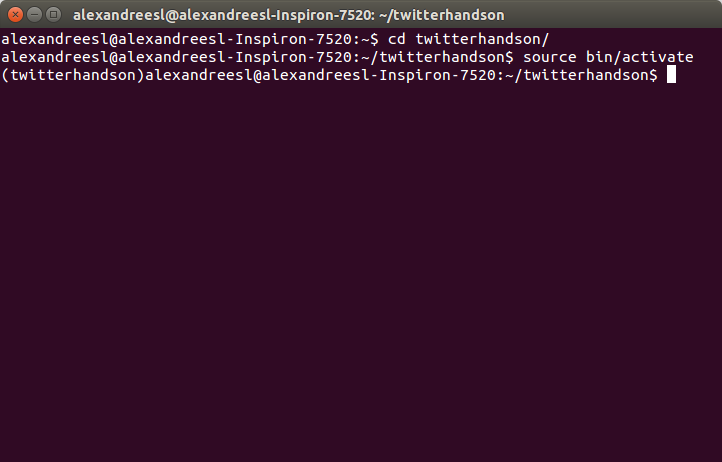
source bin/activate

After entering the command, we can see that our command prompt got a prefix with the name of our environment, as we can see on the screen bellow:

 That’s all we need to do in order to use Virtualenv. If we want to close, just type exit on the console.

Using a IDE

On this lab, I am using Pycharm, a powerfull Python’s IDE developed by Jetbrains. The IDE is not required for our lab, since any text editor will suffice, but I recommend the reader to experiment the IDE, I am sure you will like it!

Downloading module dependencies

On Python, we have modules. A module is a python file where we can have definitions of variables, functions and classes, that we can reuse later on more complex scripts. For our lab, we will use Pip to download the dependencies. Pip is a tool recommended by Python used to manage dependencies, something like what Maven do for us in the Java World. To use it, first, we create on our virtualenv root folder a file called requirements.txt and put the following inside:

httplib2
simplejson
six
tweepy
textblob

The dependencies above are necessary to use the NLP library and use the Twitter API. To make Pip download the dependencies, first we activate the virtual environment we created previously and then, on the same folder of our txt file, we input:

pip3 install -r requirements.txt

After running the command above, the modules should be downloaded and enabled on our virtualenv environment.

Using sentimental analysis on other languages

On this post, we are using TextBlob, which sadly has only english as supported language for sentimental analysis – he can translate the text to other languages using Google translator, but of course is not the same as a analyser specially designed to process the language. If the reader wants a alternative to process sentimental analysis on other languages as well, such as Portuguese for example, is there a REST API from a company called BIText – which provides the sentimental analysis solution for Salesforce’s Marketing products – that I have tested and provides very good results. The following link points for the company’s API page:

BIText

Creating the Access Token

Before we start our code, there is one last thing we need to do: We need to create a access token, in order to authenticate our calls on Twitter to obtain the data from the public feed. In order to do this, first, we need to create a Twitter account, on Twitter.com. With a account created, we create a access token, following this tutorial from Twitter.

Developing the script

Well, now that all the preparations were made, let’s finally code! First, we will create a file called config.py. On that file, we will create all the constants we will use on our script:

accesstoken='<access token>’
accesstokensecret='<access token secret>’
consumerkey='<consumer key>’
consumerkeysecret='<consumer key secret>’

And finally, we will create a file called twitter.py, where we will code our Python script, as the following:

from config import *
from textblob import TextBlob
from nltk import downloader
import tweepy


class MyStreamListener(tweepy.StreamListener):
    def on_status(self, status):
        print('A TWEET!')
        print(status.text)
        print('AND THE SENTIMENT PER SENTENCE IS:')
        blob = TextBlob(status.text)
        for sentence in blob.sentences:
            print(sentence.sentiment.polarity)


auth = tweepy.OAuthHandler(consumerkey, consumerkeysecret)
auth.set_access_token(accesstoken, accesstokensecret)

downloader.download('punkt')

myStreamListener = MyStreamListener()
myStream = tweepy.Stream(auth=auth, listener=myStreamListener)

stream = tweepy.Stream(auth, myStreamListener)
stream.filter(track=['coca cola'], languages=['en'])

On the first time we run the example, the reader may notice that the script will download some files. That is because we have to download the resources for the NLTK library, a dependency from TextBlob, which is the real NLP processor that TextBlob uses under the hood. Beginning our explanation of the script, we can see that we are creating a OAuth handler, which will be responsible for managing our authentication with Twitter. Then, we instantiate a listener, which we defined at the beginning of our script and pass him as one of the args for the creation of our stream and then we start the stream, filtering to return just tweets with the words “coca cola” and on the english language. According to Twitter documentation, it is advised to process the tweets asynchronously, because if we process them synchronous, we can lose a tweet while we are still processing the predecessor. That is why tweepy requires us to implement a listener, so he can collect the tweets for us and order them to be processed on our listener implementation.

On our listener, we simply print the tweet, use the TextBlob library to make the sentimental analysis and finally we print the results, which are calculated sentence by sentence. We can see the results from a run bellow:

A TWEET!
RT @GeorgeLudwigBiz: Coca-Cola sees a new opportunity in bottling billion-dollar #startups http://t.co/nZXpFRwQOe
AND THE SENTIMENT PER SENTENCE IS:
0.13636363636363635
A TWEET!
RT @momosdonuts: I told y’all I change things up often! Delicious, fluffy, powdered and caramel drizzled coca-cola cake. #momosdonuts http:…
AND THE SENTIMENT PER SENTENCE IS:
0.0
0.4
0.0
A TWEET!
vanilla coca-cola master race

tho i have yet to find a place where they sell imports of the british version
AND THE SENTIMENT PER SENTENCE IS:
0.0
A TWEET!
RT @larrywhoran: CLOUDS WAS USED IN THE COCA COLA COMMERCIAL AND NO CONTROL BEING PLAYED IN RADIOS AND THEYRE NOT EVEN SINGLES YAS SLAY
AND THE SENTIMENT PER SENTENCE IS:
0.0
A TWEET!
RT @bromleyfthood: so sei os covers e coca cola dsanvn I vote for @OTYOfficial for the @RedCarpetBiz Rising Star Award 2015 #RCBAwards
AND THE SENTIMENT PER SENTENCE IS:
0.0
A TWEET!
RT @LiPSMACKER_UK: Today, we’re totally craving Coca-Cola! http://t.co/V140SADKok
AND THE SENTIMENT PER SENTENCE IS:
0.0
0.0
A TWEET!
RT @woodstammie8: Early production of Coca Cola contained trace amounts of coca leaves, which, when processed, render cocaine.
AND THE SENTIMENT PER SENTENCE IS:
0.1
A TWEET!
RT @designtaxi: Coca-Cola creates braille cans for the blind http://t.co/cCSvJLv7O0 http://t.co/UA0PGoheO2
AND THE SENTIMENT PER SENTENCE IS:
-0.5
A TWEET!
Instrus, weed, Coca-Cola y snacks.
AND THE SENTIMENT PER SENTENCE IS:
0.0
A TWEET!
RT @larrywhoran: CLOUDS WAS USED IN THE COCA COLA COMMERCIAL AND NO CONTROL BEING PLAYED IN RADIOS AND THEYRE NOT EVEN SINGLES YAS SLAY
AND THE SENTIMENT PER SENTENCE IS:
0.0
A TWEET!
1 Korean Coca-Cola Bottle in GREAT CONDITION Coke Bottle Coke Coca Cola http://t.co/IHhxoJ7aMz
AND THE SENTIMENT PER SENTENCE IS:
0.8
A TWEET!
#Coca-Cola#I#♥#YOU#
Fanny#day#Good… https://t.co/5PU7L4QchC
AND THE SENTIMENT PER SENTENCE IS:
0.0
A TWEET!
Entry List for Coca-Cola 600 #NASCAR Sprint Cup Series race at Charlotte Motor Speedway is posted, 48 drivers entered http://t.co/UYXPdOP9te
AND THE SENTIMENT PER SENTENCE IS:
0.0
A TWEET!
@diannaeanderson + walk, get some Coca-Cola, and spend some time reading. Lord knows I need to de-stress.
AND THE SENTIMENT PER SENTENCE IS:
0.0
0.0
A TWEET!
Apply now to work for Coca-Cola #jobs http://t.co/ReFQUIuNeK http://t.co/KVTvyr1e6T
AND THE SENTIMENT PER SENTENCE IS:
0.0
A TWEET!
RT @jayski: Entry List for Coca-Cola 600 #NASCAR Sprint Cup Series race at Charlotte Motor Speedway is posted, 48 drivers entered http://t.…
AND THE SENTIMENT PER SENTENCE IS:
0.0
A TWEET!
RT @SeyiLawComedy: When you enter a fast food restaurant and see their bottle of Coca-Cola drink (35cl) is N800; You just exit like » http:…
AND THE SENTIMENT PER SENTENCE IS:
0.2
A TWEET!
Entry List for Coca-Cola 600 #NASCAR Sprint Cup Series race at @CLTMotorSpdwy is posted, 48 drivers entered http://t.co/c2wJAUzIeQ
AND THE SENTIMENT PER SENTENCE IS:
0.0

The reader may notice that the sentimental analysis of the tweets could be more or less inaccurate to what the sentiment of the author really was, using our “human analysis”. Indeed, as we have talked before, this field is still improving, so it will take some more time for us to rely 100% on this kind of analysis

Conclusion

As we can see, it was pretty simple to construct a program that connects to Twitter, runs a sentimental analysis and print the results. Despise some current issues with the accuracy of the sentimental analysis, as we talked about previously, this kind of analysis are already a really powerfull tool to explore, that companies can use to improve their perception of how the world around them realize their existences. Thank you for following me on another post, until next time.

Continue reading

Hands-on HazelCast: using a open source in-memory data grid

Standard

Welcome, dear readers! Welcome to another post of my blog. On this post, we will talk about Hazelcast, a open source solution for in-memory data grids, used by companies such as AT&T, HSBC, Cisco and HP. But after all, why do we want to use a in-memory data grid?

In-memory Data Grids

In-memory data grids, also known as IMDGs, are distributed data structures, where the whole data is stored entirely on the RAM (Random Access Memory) across a cluster. This way, we could have both the advantages of using faster resources such as the RAM, opposed to the hard disk – off course, IMDGs such as HazelCast also use the hard disk as a persistent store for fault tolerance, but still, for the applications usage, the major resource is the RAM – and the horizontal scalability of a cluster, opposed to the traditional vertical scalability of a relational database, for example.

Common use case scenarios for IMDGs are as a caching layer for databases, clustering web sessions for web applications and even as NOSQL solutions.

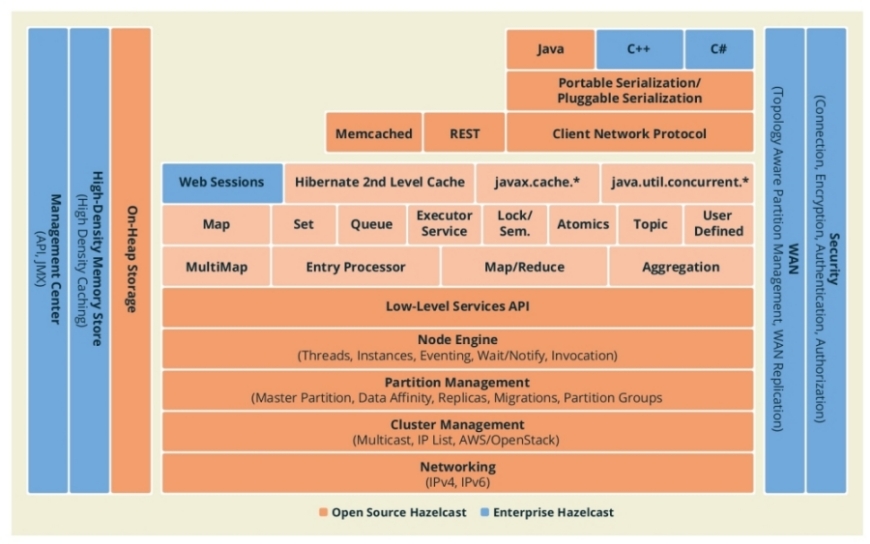
Talking about HazelCast, we have a very robust architecture, which provides features such as encryption, clustering replication and partitioning and more. The following picture, extracted from HazelCast’s documentation, shows the features from the architecture both on free and enterprise editions.

Installation & set up

HazelCast has a very simple installation, that basically consist of downloading a tar.gz and extracting his contents. In order to do this, we visit HazelCast’s download page and click on the tar.gz button – or zip, if the reader is using Windows, I am using Ubuntu 15.04 -, after the download, we extract the tar.gz on the folder of our preference and that’s it, we finished our installation! The only prior requisite is to have Java installed, which the reader can install downloading from here.

To start a HazelCast node, we simply start a shell script provided by the installation. On versions previous to 3.2.6, this script was called run.sh and was inside the bin folder. On newer versions, the script is called server.sh, but it is still inside the bin folder. So to start a node, simply navigate on a terminal to the folder we extracted previously – if the reader is using the same version I am using, it would be called hazelcast-3.4.2 – and type:

cd bin

./server.sh

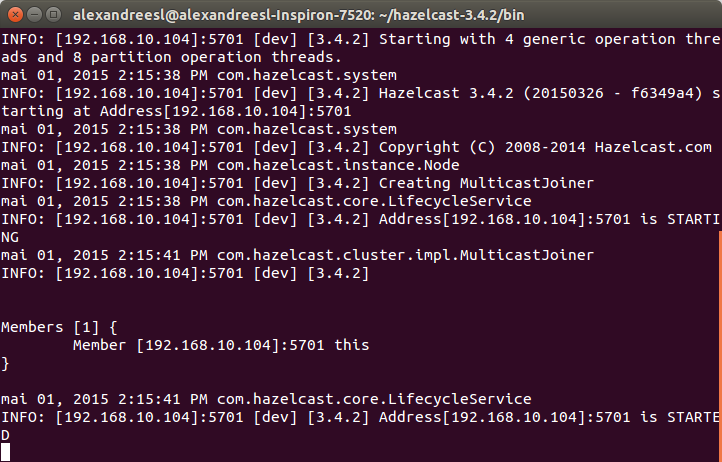
After some seconds, we can see that the node has successfully booted:

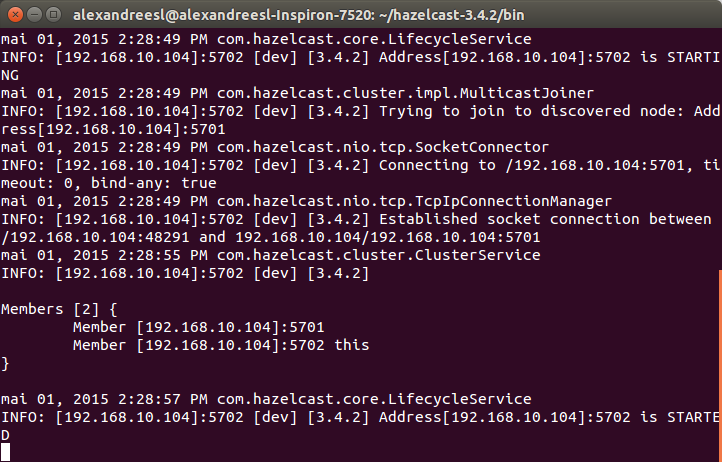
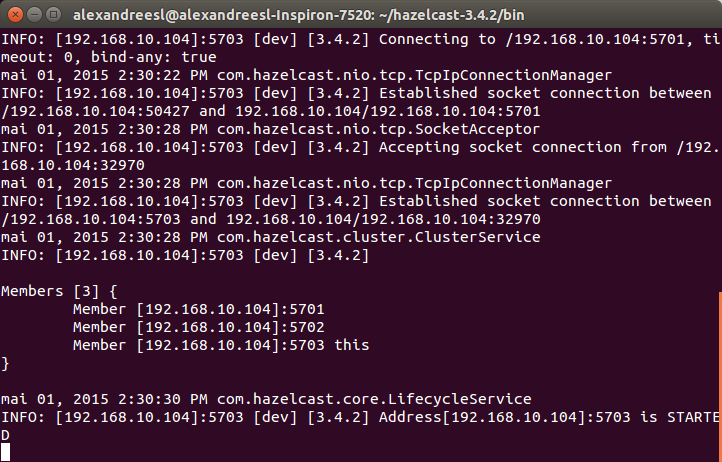
For this lab, we will use a HazelCast cluster composed of 3 nodes, so, we open another 2 terminal windows and repeat the previous procedure to start the first node. HazelCast uses multicast to check and establish the participation of new nodes on the cluster, as we can see on the members list updated by the nodes on their consoles, as we include new nodes:

That’s all we need to do to create the cluster for our lab. Now, let’s start using HazelCast!

Using distributed objects

To connect to our HazelCast cluster,  there’s 3 ways:

  • Programmatic configuration, by using the classes of the Java API;
  • By XML configuration, using a XML called hazelcast.xml that we put on the classpath;
  • By integrating HazelCast with Spring;

On this lab, we will explore the first option, so, starting our lab, let’s create a new Maven project – without adding any archetype – and include the following dependencies on the pom.xml:

.

.

.

<dependencies>

<dependency>
<groupId>com.hazelcast</groupId>
<artifactId>hazelcast</artifactId>
<version>3.4.2</version>
</dependency>

<dependency>
<groupId>com.hazelcast</groupId>
<artifactId>hazelcast-client</artifactId>
<version>3.4.2</version>
</dependency>

</dependencies>

.

.

.

After including the dependencies,  let’s create a class, responsible for creating a single HazelCast’s instance for us, for reuse on the whole application:

public class HazelCastFactory {

private static HazelcastInstance cluster;

private static boolean shutDown = true;

public static HazelcastInstance getInstance() {

if (shutDown) {
ClientConfig clientConfig = new ClientConfig();
ClientNetworkConfig clientNetworkConfig = new ClientNetworkConfig();
clientNetworkConfig.addAddress(“127.0.0.1:5701”);
clientConfig.setNetworkConfig(clientNetworkConfig);
cluster = HazelcastClient.newHazelcastClient(clientConfig);
shutDown = false;

}

return cluster;

}

public static void shutDown() {
cluster.shutdown();
shutDown = true;
}

}

On the code above we created a client to connect to our HazelCast’s cluster, pointing the node on the 5701 port as the entry point of our connection. If we want to add other addresses for cases in which our entry node falls on the connection start, we just add more addresses with the addAddress method. There’s no need to add the whole cluster to use the data grid, however: HazelCast itself is responsible for load balancing the requests across the cluster. We also included a method to shutdown our connection to the data grid, releasing the resources allocated.

NOTE: One interesting thing to note is that, when a client connects to a HazelCast cluster, he actually establish a connection to the cluster, not just the node we informed as the entry point, meaning that, even if the entry node falls after the connection is established, our client will still maintain a connection with the cluster.

Let’s begin by creating a distributed object on the cluster, a map data structure. Distributed objects are objects created and managed by the cluster, with their data distributed and replicated across the cluster.

To create it, all we have to do is call the getMap mehod on the client instance we receive from the factory class, providing a unique name on the cluster to identify the map:

public class HazelCastDistributedMap {

public static void main(String[] args) {

HazelcastInstance client = HazelCastFactory.getInstance();

Map<String, String> map = client.getMap(“mymap”);

HazelCastFactory.shutDown();

}

}

As we can see, is very simple to create a map. To use it, is even more simple: all we have to do is use the methods from the Map interface, just like we do with any basic Map on a common Java program. Behind the scenes, HazelCast is working for us, supplying a IMDG for our data. Let’s demonstrate this by creating a more elaborated example. First, we create a POJO, representing a client (NOTE: in order to be distributed by HazelCast, the objects used must be serializable):

public class Client implements Serializable {

/**
*
*/
private static final long serialVersionUID = -4870061854652654067L;

private String name;

private Long phone;

private String sex;

public String getName() {
return name;
}

public void setName(String name) {
this.name = name;
}

public Long getPhone() {
return phone;
}

public void setPhone(Long phone) {
this.phone = phone;
}

public String getSex() {
return sex;
}

public void setSex(String sex) {
this.sex = sex;
}

}

Then, we change the example to the following:

public class HazelCastDistributedMap {

public static void main(String[] args) {

HazelcastInstance client = HazelCastFactory.getInstance();

IMap<Long, Client> map = client.getMap(“customers”);

Client clientData = new Client();

clientData.setName(“Alexandre Eleuterio Santos Lourenco”);
clientData.setPhone(33455676l);
clientData.setSex(“M”);

map.put(clientData.getPhone(), clientData, 5, TimeUnit.MINUTES);

clientData = new Client();

clientData.setName(“Lucebiane Santos Lourenco”);
clientData.setPhone(456782387l);
clientData.setSex(“F”);

map.put(clientData.getPhone(), clientData, 2, TimeUnit.MINUTES);

clientData = new Client();

clientData.setName(“Ana Carolina Fernandes do Sim”);
clientData.setPhone(345622189l);
clientData.setSex(“F”);

map.put(clientData.getPhone(), clientData, 120, TimeUnit.SECONDS);

HazelCastFactory.shutDown();

client = HazelCastFactory.getInstance();

Map<Long, Client> mapPostShutDown = client.getMap(“customers”);

for (Long phone : mapPostShutDown.keySet()) {
Client cli = mapPostShutDown.get(phone);

System.out.println(cli.getName());

}

System.out.println(mapPostShutDown.size());

HazelCastFactory.shutDown();

}

}

As we can see on the new code, we obtained a distributed map from HazelCast, inserted some clients on it, shutdown the connection, reopened and finally iterated by the map, printing the names of the clients and the size of the map. If we run the code, we will receive, alongside logging information from the HazelCast’s client, the following prints:

Ana Carolina Fernandes do Sim
Alexandre Eleuterio Santos Lourenco
Lucebiane Santos Lourenco
3

If we revisit the code, two things are noticeable: First, we used a put method which received alongside the key and value, another 2 parameters. The two last parameters we used on the put method are the time-to-live (TTL), which can be set individually like we did previously, or in a global fashion, using the Configuration classes we used on our factory class. The other thing we can notice is that we got our map from HazelCast’s client first with the IMap interface from HazelCast and secondly with the plain classic java.util.Map. The IMap interface provide us with other features alongside the traditional ones from a map such as listeners to be executed at every put/get/delete action on the map or even a processor to be executed for a certain key or even all the keys. On the next sections, we will see examples of both of this features. This interface also implements the Map interface, reason why we can also get our map from HazelCast as a java.util.Map.

One thing that it is very important to notice is that, after we retrieve a value from a map already stored on HazelCast, the object is not updated on the cluster. Let’s see a example to understand in better detail the implications of this behavior. Let’s analyse if we change our code to the following:

.

.

.

clientData = new Client();

clientData.setName(“Ana Carolina Fernandes do Sim”);
clientData.setPhone(345622189l);
clientData.setSex(“F”);

map.put(clientData.getPhone(), clientData, 120, TimeUnit.SECONDS);

clientData = (Client) map.get(33455676l);

clientData.setName(“Alexandre Eleuterio Santos Lourenco UPDATED!”);

HazelCastFactory.shutDown();

client = HazelCastFactory.getInstance();

.

.

.

If we run this code, we will see that the client we tried to update before we shutdown our connection for the first time won’t be updated. The reason for this is that objects already stored on HazelCast aren’t re-serialized if we make changes on them, unless we explicit do this, by re-inputing the data on the map. To do this, we change our code for the following:

public class HazelCastDistributedMap {

public static void main(String[] args) {

HazelcastInstance client = HazelCastFactory.getInstance();

IMap<Long, Client> map = client.getMap(“customers”);

Client clientData = new Client();

clientData.setName(“Alexandre Eleuterio Santos Lourenco”);
clientData.setPhone(33455676l);
clientData.setSex(“M”);

map.put(clientData.getPhone(), clientData, 5, TimeUnit.MINUTES);

clientData = new Client();

clientData.setName(“Lucebiane Santos Lourenco”);
clientData.setPhone(456782387l);
clientData.setSex(“F”);

map.put(clientData.getPhone(), clientData, 2, TimeUnit.MINUTES);

clientData = new Client();

clientData.setName(“Ana Carolina Fernandes do Sim”);
clientData.setPhone(345622189l);
clientData.setSex(“F”);

map.put(clientData.getPhone(), clientData, 120, TimeUnit.SECONDS);

clientData = (Client) map.get(33455676l);

clientData.setName(“Alexandre Eleuterio Santos Lourenco UPDATED!”);

map.put(clientData.getPhone(), clientData, 5, TimeUnit.MINUTES);

HazelCastFactory.shutDown();

client = HazelCastFactory.getInstance();

Map<Long, Client> mapPostShutDown = client.getMap(“customers”);

for (Long phone : mapPostShutDown.keySet()) {
Client cli = mapPostShutDown.get(phone);

System.out.println(cli.getName());

}

System.out.println(mapPostShutDown.size());

HazelCastFactory.shutDown();

}

}

If we run again the code and check the prints, we can see that now our client is correctly updated.

Listeners

Like we talked before, the IMap interface – and other interfaces from HazelCast’s API – allow us to use another features besides the traditional operations from a Java Collection, such as listeners. With listeners, we can create additional code to run every time a entry is added/updated/deleted/evicted (entries can be evicted automatically by a policy in order to maintain the cluster’s memory capabilities), or even when the whole map is evicted or cleared. In order to implement a listener to our Map, we use a interface called EntryListener and implement a class like the following:

public class MyMapEntryListener implements EntryListener<Long, Client> {

public void entryAdded(EntryEvent<Long, Client> event) {
System.out.println(“entryAdded:” + event);

}

public void entryRemoved(EntryEvent<Long, Client> event) {
System.out.println(“entryRemoved:” + event);

}

public void entryUpdated(EntryEvent<Long, Client> event) {
System.out.println(“entryUpdated:” + event);

}

public void entryEvicted(EntryEvent<Long, Client> event) {
System.out.println(“entryEvicted:” + event);

}

public void mapEvicted(MapEvent event) {
System.out.println(“mapEvicted:” + event);

}

public void mapCleared(MapEvent event) {
System.out.println(“mapCleared:” + event);

}

}

And finally, we add the listener to our map, like the following snippet:

.

.

.

HazelcastInstance client = HazelCastFactory.getInstance();

IMap<Long, Client> map = client.getMap(“customers”);

map.addEntryListener(new MyMapEntryListener(), true);

.

.

.

On the code above, we added the listener using the addEntryListener method. The second parameter, a boolean, is used to indicate if the event class we receive as parameter for the event’s methods should receive the entry’s value or not. If we run the code, we will see that among the messages on the console, we will receive outputs from our listener, like the following:

entryAdded:EntryEvent{entryEventType=ADDED, member=Member [192.168.10.104]:5702, name=’customers’, key=33455676, oldValue=null, value=com.alexandreesl.handson.model.Client@44daa124}
entryAdded:EntryEvent{entryEventType=ADDED, member=Member [192.168.10.104]:5702, name=’customers’, key=456782387, oldValue=null, value=com.alexandreesl.handson.model.Client@588ec3d1}
entryAdded:EntryEvent{entryEventType=ADDED, member=Member [192.168.10.104]:5702, name=’customers’, key=345622189, oldValue=null, value=com.alexandreesl.handson.model.Client@4476e1bd}
entryUpdated:EntryEvent{entryEventType=UPDATED, member=Member [192.168.10.104]:5702, name=’customers’, key=33455676, oldValue=com.alexandreesl.handson.model.Client@63a68758, value=com.alexandreesl.handson.model.Client@1f5df98a}

One important thing to note about the EntryListener, is HazelCast’s threading system. If we include a sysout to print the current thread on our listener – I included on the add and update entries methods, since are the ones we are using on our examples – we can see that the executions are asynchronous, since HazelCast creates a thread pool to serve the listener calls. The following snippet from the console shows this behavior:

thread:hz.client_0_dev.event-2
thread:hz.client_0_dev.event-1
entryUpdated:EntryEvent{entryEventType=UPDATED, member=Member [192.168.10.104]:5702, name=’customers’, key=33455676, oldValue=com.alexandreesl.handson.model.Client@63a68758, value=com.alexandreesl.handson.model.Client@1f5df98a}
entryUpdated:EntryEvent{entryEventType=UPDATED, member=Member [192.168.10.104]:5702, name=’customers’, key=456782387, oldValue=com.alexandreesl.handson.model.Client@588ec3d1, value=com.alexandreesl.handson.model.Client@564936b0}
thread:hz.client_0_dev.event-3
entryUpdated:EntryEvent{entryEventType=UPDATED, member=Member [192.168.10.104]:5702, name=’customers’, key=345622189, oldValue=com.alexandreesl.handson.model.Client@4ab1169b, value=com.alexandreesl.handson.model.Client@4476e1bd}
thread:hz.client_0_dev.event-2
entryUpdated:EntryEvent{entryEventType=UPDATED, member=Member [192.168.10.104]:5702, name=’customers’, key=33455676, oldValue=com.alexandreesl.handson.model.Client@1f4f3962, value=com.alexandreesl.handson.model.Client@e8d682e}

With that being said, one thing is important to keep a eye out when using this feature: according to HazelCast’s documentation, this thread pool is exclusive for the execution of the events, not been shared with the thread that execute the action itself – meaning that, even if we run our examples creating the node on the main method, running the node embedded on our program, instead of connecting to a remote cluster, still the thread that runs our event won’t be the same that manipulate the data – so if we create too much logic to run with our listener, we can run on a situation that some of the calls to the listener would fail, because there would be no threads available to run the listener.

Processors

Another feature we talked about previously is Processors. With a processor, we can add logic that we want to run to a single key on our map, or even all keys. One very important thing to notice in this feature, opposed to the listener one, is that this feature is scalable, because not only it runs on the server side, but it is also sent to all nodes of the cluster, executing the logic on all entries of the map, if applicable, on parallel.  Let’s get a example where we want to change all the phones of our clients to “888888888”. To do this, we implement the following class to accomplish this task:

public class MyMapProcessor extends AbstractEntryProcessor<String, Client> {

/**
*
*/
private static final long serialVersionUID = 8890058180314253853L;

@Override
public Object process(Entry<String, Client> entry) {

Client client = entry.getValue();

client.setPhone(888888888l);

entry.setValue(client);

System.out.println(“Processing the client: ” + client.getName());

return null;
}

}

And finally, in order to test our processor, we change the code of our main class to the following:

.

.

.

IMap<Long, Client> mapProcessors = client.getMap(“customers”);

mapProcessors.executeOnEntries(new MyMapProcessor());

HazelCastFactory.shutDown();

client = HazelCastFactory.getInstance();

mapProcessors = client.getMap(“customers”);

for (Long phone : mapProcessors.keySet()) {
Client cli = mapProcessors.get(phone);

System.out.println(cli.getName() + ” ” + cli.getPhone());

}

.

.

.

However, if we run our code the way it is, we will be greeted with the following error:

Exception in thread “main” com.hazelcast.nio.serialization.HazelcastSerializationException: java.lang.ClassNotFoundException: com.alexandreesl.handson.examples.MyMapProcessor
at com.hazelcast.nio.serialization.DefaultSerializers$ObjectSerializer.read(DefaultSerializers.java:201)
at com.hazelcast.nio.serialization.StreamSerializerAdapter.read(StreamSerializerAdapter.java:44)
at com.hazelcast.nio.serialization.SerializationServiceImpl.readObject(SerializationServiceImpl.java:309)
at com.hazelcast.nio.serialization.ByteArrayObjectDataInput.readObject(ByteArrayObjectDataInput.java:439)
at com.hazelcast.map.impl.client.MapExecuteOnAllKeysRequest.read(MapExecuteOnAllKeysRequest.java:96)
at com.hazelcast.client.impl.client.ClientRequest.readPortable(ClientRequest.java:116)
at com.hazelcast.nio.serialization.PortableSerializer.read(PortableSerializer.java:88)
at com.hazelcast.nio.serialization.PortableSerializer.read(PortableSerializer.java:30)
at com.hazelcast.nio.serialization.StreamSerializerAdapter.toObject(StreamSerializerAdapter.java:65)
at com.hazelcast.nio.serialization.SerializationServiceImpl.toObject(SerializationServiceImpl.java:260)
at com.hazelcast.client.impl.ClientEngineImpl$ClientPacketProcessor.loadRequest(ClientEngineImpl.java:364)
at com.hazelcast.client.impl.ClientEngineImpl$ClientPacketProcessor.run(ClientEngineImpl.java:340)
at java.util.concurrent.ThreadPoolExecutor.runWorker(ThreadPoolExecutor.java:1142)
at java.util.concurrent.ThreadPoolExecutor$Worker.run(ThreadPoolExecutor.java:617)
at java.lang.Thread.run(Thread.java:745)
at com.hazelcast.util.executor.HazelcastManagedThread.executeRun(HazelcastManagedThread.java:76)
at com.hazelcast.util.executor.HazelcastManagedThread.run(HazelcastManagedThread.java:92)
at —— End remote and begin local stack-trace ——.(Unknown Source)
at com.hazelcast.client.spi.impl.ClientCallFuture.resolveResponse(ClientCallFuture.java:202)
at com.hazelcast.client.spi.impl.ClientCallFuture.get(ClientCallFuture.java:143)
at com.hazelcast.client.spi.impl.ClientCallFuture.get(ClientCallFuture.java:119)
at com.hazelcast.client.spi.ClientProxy.invoke(ClientProxy.java:151)
at com.hazelcast.client.proxy.ClientMapProxy.executeOnEntries(ClientMapProxy.java:890)
at com.alexandreesl.handson.examples.HazelCastDistributedMap.main(HazelCastDistributedMap.java:68)
Caused by: java.lang.ClassNotFoundException: com.alexandreesl.handson.examples.MyMapProcessor
at java.net.URLClassLoader$1.run(URLClassLoader.java:372)
at java.net.URLClassLoader$1.run(URLClassLoader.java:361)

.

.

.

The reason for this is because we don’t have the class on the classpath of our cluster. In order to resolve this, first we will export both the Client and the MyMapProcessor classes on a jar – the reader can obtain a jar already prepared by me on the github repository at the end of this post -, save the jar on the lib folder of HazelCast´s installation folder and edit the classpath on the server.sh script on the bin folder of HazelCast:

.

.

.

export CLASSPATH=$HAZELCAST_HOME/lib/hazelcast-3.4.2.jar:$HAZELCAST_HOME/lib/hazelcastcustomprocessors.jar

.

.

.

After restarting our cluster, we can see on the console that all the clients have the same phone, proving that our processor was successful:

Ana Carolina Fernandes do Sim 888888888
Alexandre Eleuterio Santos Lourenco UPDATED! 888888888
Lucebiane Santos Lourenco 888888888

Out of curiosity, one last thing to notice is that, as we have also coded a sysout on our processor, we can search the console of our nodes and see that our sysouts are printed there, like in the screen bellow:

NOTE: According to HazelCast´s documentation, it is a good practice to isolate all the classes shared across client and server – in our case, our HazelCast´s client and the cluster itself – in a separate project, making the structure less coupled.

MultiMaps

One last feature we are going to visit is the multimaps. Sometimes, we would like to store multiple values for a single key, like storing a list of orders by user id, for example. On a simple solution, we could simply use a common map and pass for the value parameter as a Collection, like a List or a Set. However, when using this approach on a distributed system, this would lead to 2 problems:

  1. Performance: when using a distributed system, the whole value is serialized and deserialized before the operations are made. That means that if we have a list with 50 items on the value, for example, every time we want to include a new value to the list, the whole list will be deserialized, the new value included and the whole list be reserialized again! Of course, this leads to a overhead, which in turn affects the performance of our map;
  2. Thread safety: when using the common implementation of the map collection, there is no concurrency controls implemented on his methods. That means that if we are using a common map with a collection as the value and we have multiple consumers updating the values, we could run with problems of concurrency, such as values not being updated or even removed;

In order to address this problems, HazelCast provides us with a special implementation called Multimap. To illustrate the use of the implementation, let’s create a class called HazelCastDistributedMultiMap and code it like the following:

public class HazelCastDistributedMultiMap {

public static void main(String[] args) {

HazelcastInstance client = HazelCastFactory.getInstance();

MultiMap<String, Client> map = client.getMultiMap(“multicustomers”);

Client clientData = new Client();

clientData.setName(“Alexandre Eleuterio Santos Lourenco”);
clientData.setPhone(33455676l);
clientData.setSex(“M”);

map.put(clientData.getSex(), clientData);

clientData = new Client();

clientData.setName(“Lucebiane Santos Lourenco”);
clientData.setPhone(456782387l);
clientData.setSex(“F”);

map.put(clientData.getSex(), clientData);

clientData = new Client();

clientData.setName(“Ana Carolina Fernandes do Sim”);
clientData.setPhone(345622189l);
clientData.setSex(“F”);

map.put(clientData.getSex(), clientData);

HazelCastFactory.shutDown();

client = HazelCastFactory.getInstance();

map = client.getMultiMap(“multicustomers”);

for (String key : map.keySet()) {

for (Client cli : map.get(key)) {

System.out.println(“The Client: ” + cli.getName()
+ ” for the Key: ” + key);

}

}

HazelCastFactory.shutDown();

}

}

If we run the code, we can see by the sysouts that HazelCast has successfully grouped the clients by the sex, proving that our code was a success:

The Client: Alexandre Eleuterio Santos Lourenco for the Key: M
The Client: Ana Carolina Fernandes do Sim for the Key: F
The Client: Lucebiane Santos Lourenco for the Key: F

Other features

Of course, there is much more HazelCast is capable of alongside what we see on this post, like the ability to work with primitives on the cluster, implement asynchronous solutions with queues and topics and even a criteria API that enable us to search our data on a “JPA-like” fashion. On the links section, there is a link for a PDF called Mastering HazelCast, made by HazelCast themselves, which is free and a very good source of information to get more deep on all the subjects about HazelCast.

Conclusion

And this concludes another post. With the advances of the hardware technologies, it became more and more easy to develop solutions entirely on pure RAM and/or with a very heavy usage of parallelism, such as Big Data´s related technologies. In time, distributed systems will became so common – and in a sense, they already are – that one day we will wonder how we lived before them! Thank you for following me on another post, until next time.

Continue reading

Mockito & DBUnit: Implementing a mocking structure focused and independent to your automated tests on Java

Standard

Hi, my dear readers! Welcome to my blog. On this post, we will make a hands-on about Mockito and DBUnit, two libraries from Java’s open source ecosystem which can help us in improving our JUnit tests on focus and independence. But why mocking is so important on our unit tests?

Focusing the tests

Let’s imagine a Java back-end application with a tier-like architecture. On this application, we  could have 2 tiers:

  • The service tier, which have the business rules and make as a interface for the front-end;
  • The entity tier, which have the logic responsible for making calls to a database, utilizing techonologies like JDBC or JPA;

Of course, on a architecture of this kind, we will have the following dependence of our tiers:

Service >>> Entity

On this kind of architecture, the most common way of building our automated tests is by creating JUnit Test Classes which test each tier independently, thus we can make running tests that reflect  only the correctness of the tier we want to test. However, if we simply create the classes without any mocking, we will got problems like the following:

  • On the JUnit tests of our service tier, for example, if we have a problem on the entity tier, we will have also our tests failed, because the error from the entity tier will reverberate across the tiers;
  • If we have a project where different teams are working on the same system, and one team is responsible for the construction of the service tier, while the other is responsible for the construction of the entity tier, we will have a dependency of one team with the other before the tests could be made;

To resolve such issues, we could mock the entity tier on the service tier’s unit test classes, so we can have independence and focus of our tests on the service tier, which it belongs.

independence

One point that it is specially important when we make our JUnit test classes in the independence department is the entity tier. Since in our example this tier is focused in the connection and running of SQL commands on a database, it makes a break on our independence goal, since we will need a database so we can run our tests. Not only that, if a test breaks any structure that it is  used by the subsequent tests, all of them will also fail. It is on this point that enters our other library, DBUnit.

With DBUnit, we can use embedded databases, such as HSQLDB, to make our database exclusive to the running of our tests.

So, without further delay, let’s begin our hands-on!

Hands-on

For this lab, we will create a basic CRUD for a Client entity. The structure will follow the simple example we talked about previously, with the DAO (entity) and Service tiers. We will use DBUnit and JUnit to test the DAO tier, and Mockito with JUnit to test the Service tier. First, let’s create a Maven project, without any archetype and include the following dependencies on pom.xml:

.

.

.

<dependencies>

<dependency>
<groupId>junit</groupId>
<artifactId>junit</artifactId>
<version>4.12</version>
</dependency>

<dependency>
<groupId>org.dbunit</groupId>
<artifactId>dbunit</artifactId>
<version>2.5.0</version>
</dependency>

<dependency>
<groupId>org.mockito</groupId>
<artifactId>mockito-all</artifactId>
<version>1.10.19</version>
</dependency>

<dependency>
<groupId>org.hibernate</groupId>
<artifactId>hibernate-entitymanager</artifactId>
<version>4.3.8.Final</version>
</dependency>

<dependency>
<groupId>org.hsqldb</groupId>
<artifactId>hsqldb</artifactId>
<version>2.3.2</version>
</dependency>

<dependency>
<groupId>org.springframework</groupId>
<artifactId>spring-core</artifactId>
<version>4.1.4.RELEASE</version>
</dependency>

<dependency>
<groupId>org.springframework</groupId>
<artifactId>spring-context</artifactId>
<version>4.1.5.RELEASE</version>
</dependency>

<dependency>
<groupId>org.springframework</groupId>
<artifactId>spring-test</artifactId>
<version>4.1.5.RELEASE</version>
</dependency>

<dependency>
<groupId>org.springframework</groupId>
<artifactId>spring-tx</artifactId>
<version>4.1.5.RELEASE</version>
</dependency>

<dependency>
<groupId>org.springframework</groupId>
<artifactId>spring-orm</artifactId>
<version>4.1.5.RELEASE</version>
</dependency>

</dependencies>

.

.

.

On the previous snapshot, we included not only the Mockito, DBUnit and JUnit libraries, but we also included Hibernate to implement the persistence layer and Spring 4 to use the IoC container and the transaction management. We also included the Spring Test library, which includes some features that we will use later on this lab. Finally, to simplify the setup and remove the need of installing a database to run the code, we will use HSQLDB as our database.

Our lab will have the following structure:

  • One class will represent the application itself, as a standalone class, where we will consume the tiers, like a real application would do;
  • We will have another 2 classes, each one with JUnit tests, that will test each tier independently;

First, we define a persistence unit, where we define the name of the unit and the properties to make Hibernate create the table for us and populate her with some initial rows. The code of the persistence.xml can be seen bellow:

<?xml version=”1.0″ encoding=”UTF-8″?>
<persistence xmlns=”http://java.sun.com/xml/ns/persistence&#8221;
version=”1.0″>
<persistence-unit name=”persistence” transaction-type=”RESOURCE_LOCAL”>
<class>com.alexandreesl.handson.model.Client</class>

<properties>
<property name=”hibernate.hbm2ddl.auto” value=”create” />
<property name=”hibernate.hbm2ddl.import_files” value=”sql/import.sql” />
</properties>

</persistence-unit>
</persistence>

And the initial data to populate the table can be seen bellow:

insert into Client(id,name,sex, phone) values (1,’Alexandre Eleuterio Santos Lourenco’,’M’,’22323456′);
insert into Client(id,name,sex, phone) values (2,’Lucebiane Santos Lourenco’,’F’,’22323876′);
insert into Client(id,name,sex, phone) values (3,’Maria Odete dos Santos Lourenco’,’F’,’22309456′);
insert into Client(id,name,sex, phone) values (4,’Eleuterio da Silva Lourenco’,’M’,’22323956′);
insert into Client(id,name,sex, phone) values (5,’Ana Carolina Fernandes do Sim’,’F’,’22123456′);

In order to not making the post burdensome, we will not discuss the project structure during the lab, but just show the final structure at the end. The code can be found on a Github repository, at the end of the post.

With the persistence unit defined, we can start coding! First, we create the entity class:

package com.alexandreesl.handson.model;

import javax.persistence.Column;
import javax.persistence.Entity;
import javax.persistence.Id;
import javax.persistence.Table;

@Table(name = “Client”)
@Entity
public class Client {

@Id
private long id;

@Column(name = “name”, nullable = false, length = 50)
private String name;

@Column(name = “sex”, nullable = false)
private String sex;

@Column(name = “phone”, nullable = false)
private long phone;

public long getId() {
return id;
}

public void setId(long id) {
this.id = id;
}

public String getName() {
return name;
}

public void setName(String name) {
this.name = name;
}

public String getSex() {
return sex;
}

public void setSex(String sex) {
this.sex = sex;
}

public long getPhone() {
return phone;
}

public void setPhone(long phone) {
this.phone = phone;
}

}

In order to create the persistence-related beans to enable Hibernate and the transaction manager, alongside all the rest of the beans necessary for the application, we use a Java-based Spring configuration class. The code of the class can be seen bellow:

package com.alexandreesl.handson.core;

import org.springframework.context.annotation.Bean;
import org.springframework.context.annotation.ComponentScan;
import org.springframework.context.annotation.Configuration;
import org.springframework.jdbc.datasource.DriverManagerDataSource;
import org.springframework.orm.jpa.JpaTransactionManager;
import org.springframework.orm.jpa.LocalContainerEntityManagerFactoryBean;
import org.springframework.orm.jpa.vendor.Database;
import org.springframework.orm.jpa.vendor.HibernateJpaDialect;
import org.springframework.orm.jpa.vendor.HibernateJpaVendorAdapter;
import org.springframework.transaction.annotation.EnableTransactionManagement;

@Configuration
@EnableTransactionManagement
@ComponentScan({ “com.alexandreesl.handson.dao”,
“com.alexandreesl.handson.service” })
public class AppConfiguration {

@Bean
public DriverManagerDataSource dataSource() {

DriverManagerDataSource dataSource = new DriverManagerDataSource();

dataSource.setDriverClassName(“org.hsqldb.jdbcDriver”);
dataSource.setUrl(“jdbc:hsqldb:mem://standalone”);
dataSource.setUsername(“sa”);
dataSource.setPassword(“”);

return dataSource;
}

@Bean
public JpaTransactionManager transactionManager() {

JpaTransactionManager transactionManager = new JpaTransactionManager();

transactionManager.setEntityManagerFactory(entityManagerFactory()
.getNativeEntityManagerFactory());
transactionManager.setDataSource(dataSource());
transactionManager.setJpaDialect(jpaDialect());

return transactionManager;
}

@Bean
public HibernateJpaDialect jpaDialect() {
return new HibernateJpaDialect();
}

@Bean
public HibernateJpaVendorAdapter jpaVendorAdapter() {
HibernateJpaVendorAdapter jpaVendor = new HibernateJpaVendorAdapter();

jpaVendor.setDatabase(Database.HSQL);
jpaVendor.setDatabasePlatform(“org.hibernate.dialect.HSQLDialect”);

return jpaVendor;

}

@Bean
public LocalContainerEntityManagerFactoryBean entityManagerFactory() {

LocalContainerEntityManagerFactoryBean entityManagerFactory = new LocalContainerEntityManagerFactoryBean();

entityManagerFactory
.setPersistenceXmlLocation(“classpath:META-INF/persistence.xml”);
entityManagerFactory.setPersistenceUnitName(“persistence”);
entityManagerFactory.setDataSource(dataSource());
entityManagerFactory.setJpaVendorAdapter(jpaVendorAdapter());
entityManagerFactory.setJpaDialect(jpaDialect());

return entityManagerFactory;

}

}

And finally, we create the classes that represent the tiers itself. This is the DAO class:

package com.alexandreesl.handson.dao;

import javax.persistence.EntityManager;
import javax.persistence.PersistenceContext;

import org.springframework.stereotype.Component;
import org.springframework.transaction.annotation.Transactional;

import com.alexandreesl.handson.model.Client;

@Component
public class ClientDAO {

@PersistenceContext
private EntityManager entityManager;

@Transactional(readOnly = true)
public Client find(long id) {

return entityManager.find(Client.class, id);

}

@Transactional
public void create(Client client) {

entityManager.persist(client);

}

@Transactional
public void update(Client client) {

entityManager.merge(client);

}

@Transactional
public void delete(Client client) {

entityManager.remove(client);

}

}

And this is the service class:

 package com.alexandreesl.handson.service;

import org.springframework.beans.factory.annotation.Autowired;
import org.springframework.stereotype.Component;

import com.alexandreesl.handson.dao.ClientDAO;
import com.alexandreesl.handson.model.Client;

@Component
public class ClientService {

@Autowired
private ClientDAO clientDAO;

public ClientDAO getClientDAO() {
return clientDAO;
}

public void setClientDAO(ClientDAO clientDAO) {
this.clientDAO = clientDAO;
}

public Client find(long id) {

return clientDAO.find(id);

}

public void create(Client client) {

clientDAO.create(client);

}

public void update(Client client) {

clientDAO.update(client);

}

public void delete(Client client) {

clientDAO.delete(client);

}

}

The reader may notice that we created a getter/setter to the DAO class on the Service class. This is not necessary for the Spring injection, but we made this way to get easier to change the real DAO by a Mockito’s mock on the tests class. Finally, we code the class we talked about previously, the one that consume the tiers:

package com.alexandreesl.handson.core;

import org.springframework.context.ApplicationContext;
import org.springframework.context.annotation.AnnotationConfigApplicationContext;

import com.alexandreesl.handson.model.Client;
import com.alexandreesl.handson.service.ClientService;

public class App {

public static void main(String[] args) {

ApplicationContext context = new AnnotationConfigApplicationContext(
AppConfiguration.class);

ClientService service = (ClientService) context
.getBean(ClientService.class);

System.out.println(service.find(1).getName());

System.out.println(service.find(3).getName());

System.out.println(service.find(5).getName());

Client client = new Client();

client.setId(6);
client.setName(“Celina do Sim”);
client.setPhone(44657688);
client.setSex(“F”);

service.create(client);

System.out.println(service.find(6).getName());

System.exit(0);

}

}

If we run the class, we can see that the console print all the clients we searched for and that Hibernate is initialized properly, proving our implementation is a success:

Mar 28, 2015 1:09:22 PM org.springframework.context.annotation.AnnotationConfigApplicationContext prepareRefresh
INFO: Refreshing org.springframework.context.annotation.AnnotationConfigApplicationContext@6433a2: startup date [Sat Mar 28 13:09:22 BRT 2015]; root of context hierarchy
Mar 28, 2015 1:09:22 PM org.springframework.jdbc.datasource.DriverManagerDataSource setDriverClassName
INFO: Loaded JDBC driver: org.hsqldb.jdbcDriver
Mar 28, 2015 1:09:22 PM org.springframework.orm.jpa.LocalContainerEntityManagerFactoryBean createNativeEntityManagerFactory
INFO: Building JPA container EntityManagerFactory for persistence unit ‘persistence’
Mar 28, 2015 1:09:22 PM org.hibernate.jpa.internal.util.LogHelper logPersistenceUnitInformation
INFO: HHH000204: Processing PersistenceUnitInfo [
name: persistence
…]
Mar 28, 2015 1:09:22 PM org.hibernate.Version logVersion
INFO: HHH000412: Hibernate Core {4.3.8.Final}
Mar 28, 2015 1:09:22 PM org.hibernate.cfg.Environment <clinit>
INFO: HHH000206: hibernate.properties not found
Mar 28, 2015 1:09:22 PM org.hibernate.cfg.Environment buildBytecodeProvider
INFO: HHH000021: Bytecode provider name : javassist
Mar 28, 2015 1:09:22 PM org.hibernate.annotations.common.reflection.java.JavaReflectionManager <clinit>
INFO: HCANN000001: Hibernate Commons Annotations {4.0.5.Final}
Mar 28, 2015 1:09:23 PM org.hibernate.dialect.Dialect <init>
INFO: HHH000400: Using dialect: org.hibernate.dialect.HSQLDialect
Mar 28, 2015 1:09:23 PM org.hibernate.hql.internal.ast.ASTQueryTranslatorFactory <init>
INFO: HHH000397: Using ASTQueryTranslatorFactory
Mar 28, 2015 1:09:23 PM org.hibernate.tool.hbm2ddl.SchemaExport execute
INFO: HHH000227: Running hbm2ddl schema export
Mar 28, 2015 1:09:23 PM org.hibernate.tool.hbm2ddl.SchemaExport execute
INFO: HHH000230: Schema export complete
Alexandre Eleuterio Santos Lourenco
Maria Odete dos Santos Lourenco
Ana Carolina Fernandes do Sim
Celina do Sim

Now, let’s move on for the tests themselves. For the DBUnit tests, we create a Base class, which will provide the base DB operations which all of our JUnit tests will benefit. On the @PostConstruct method, which is fired after all the injections of the Spring context are made – reason why we couldn’t use the @BeforeClass annotation, because we need Spring to instantiate and inject the EntityManager first – we use DBUnit to make a connection to our database, with the class DatabaseConnection and populate the table using the DataSet class we created, passing a XML structure that represents the data used on the tests.

This operation of populating the table is made by the DatabaseOperation class, which we use with the CLEAN_INSERT operation, that truncate the table first and them insert the data on the dataset. Finally, we use one of JUnit’s event listeners, the @After event, which is called after every test case. On our scenario, we use this event to call the clear() method on the EntityManager, which forces Hibernate to query against the Database for the first time at every test case, thus eliminating possible problems we could have between our test cases because of data that it is different on the second level cache than it is on the DB.

The code for the base class is the following:

package com.alexandreesl.handson.dao.test;

import java.io.InputStream;
import java.sql.SQLException;

import javax.annotation.PostConstruct;
import javax.persistence.EntityManager;
import javax.persistence.EntityManagerFactory;
import javax.persistence.PersistenceUnit;

import org.dbunit.DatabaseUnitException;
import org.dbunit.database.DatabaseConfig;
import org.dbunit.database.DatabaseConnection;
import org.dbunit.database.IDatabaseConnection;
import org.dbunit.dataset.IDataSet;
import org.dbunit.dataset.xml.FlatXmlDataSetBuilder;
import org.dbunit.ext.hsqldb.HsqldbDataTypeFactory;
import org.dbunit.operation.DatabaseOperation;
import org.hibernate.HibernateException;
import org.hibernate.internal.SessionImpl;
import org.junit.After;

public class BaseDBUnitSetup {

private static IDatabaseConnection connection;
private static IDataSet dataset;

@PersistenceUnit
public EntityManagerFactory entityManagerFactory;

private EntityManager entityManager;

@PostConstruct
public void init() throws HibernateException, DatabaseUnitException,
SQLException {

entityManager = entityManagerFactory.createEntityManager();

connection = new DatabaseConnection(
((SessionImpl) (entityManager.getDelegate())).connection());
connection.getConfig().setProperty(
DatabaseConfig.PROPERTY_DATATYPE_FACTORY,
new HsqldbDataTypeFactory());

FlatXmlDataSetBuilder flatXmlDataSetBuilder = new FlatXmlDataSetBuilder();
InputStream dataSet = Thread.currentThread().getContextClassLoader()
.getResourceAsStream(“test-data.xml”);
dataset = flatXmlDataSetBuilder.build(dataSet);

DatabaseOperation.CLEAN_INSERT.execute(connection, dataset);

}

@After
public void afterTests() {
entityManager.clear();
}

}

The xml structure used on the test cases is the following:

<?xml version=”1.0″ encoding=”UTF-8″?>
<dataset>
<Client id=”1″ name=”Alexandre Eleuterio Santos Lourenco” sex=”M” phone=”22323456″ />
<Client id=”2″ name=”Lucebiane Santos Lourenco” sex=”F” phone=”22323876″ />
</dataset>

And the code of our test class of the DAO tier is the following:

package com.alexandreesl.handson.dao.test;

import static org.junit.Assert.assertNotNull;
import static org.junit.Assert.assertNull;

import org.junit.Test;
import org.junit.runner.RunWith;
import org.springframework.beans.factory.annotation.Autowired;
import org.springframework.test.context.ContextConfiguration;
import org.springframework.test.context.junit4.SpringJUnit4ClassRunner;
import org.springframework.test.context.transaction.TransactionConfiguration;
import org.springframework.transaction.annotation.Transactional;

import com.alexandreesl.handson.core.test.AppTestConfiguration;
import com.alexandreesl.handson.dao.ClientDAO;
import com.alexandreesl.handson.model.Client;

@RunWith(SpringJUnit4ClassRunner.class)
@ContextConfiguration(classes = AppTestConfiguration.class)
@TransactionConfiguration(defaultRollback = true)
public class ClientDAOTest extends BaseDBUnitSetup {

@Autowired
private ClientDAO clientDAO;

@Test
public void testFind() {

Client client = clientDAO.find(1);

assertNotNull(client);

client = clientDAO.find(2);

assertNotNull(client);

client = clientDAO.find(3);

assertNull(client);

client = clientDAO.find(4);

assertNull(client);

client = clientDAO.find(5);

assertNull(client);

}

@Test
@Transactional
public void testInsert() {

Client client = new Client();

client.setId(3);
client.setName(“Celina do Sim”);
client.setPhone(44657688);
client.setSex(“F”);

clientDAO.create(client);

}

@Test
@Transactional
public void testUpdate() {

Client client = clientDAO.find(1);

client.setPhone(12345678);

clientDAO.update(client);

}

@Test
@Transactional
public void testRemove() {

Client client = clientDAO.find(1);

clientDAO.delete(client);

}

}

The code is very self explanatory so we will just focus on explaining the annotations at the top-level class. The @RunWith(SpringJUnit4ClassRunner.class) annotation changes the JUnit base class that runs our test cases, using rather one made by Spring that enable support of the IoC container and the Spring’s annotations. The @TransactionConfiguration(defaultRollback = true) annotation is from Spring’s test library and change the behavior of the @Transactional annotation, making the transactions to roll back after execution, instead of a commit. That ensures that our test cases wont change the structure of the DB, so a test case wont break the execution of his followers.

The reader may notice that we changed the configuration class to another one, exclusive for the test cases. It is essentially the same beans we created on the original configuration class, just changing the database bean to point to a different DB then the previously one, showing that we can change the database of our tests without breaking the code. On a real world scenario, the configuration class of the application would be pointing to a relational database like Oracle, DB2, etc and the test cases would use a embedded database such as HSQLDB, which we are using on this case:

package com.alexandreesl.handson.core.test;

import org.springframework.context.annotation.Bean;
import org.springframework.context.annotation.ComponentScan;
import org.springframework.context.annotation.Configuration;
import org.springframework.jdbc.datasource.DriverManagerDataSource;
import org.springframework.orm.jpa.JpaTransactionManager;
import org.springframework.orm.jpa.LocalContainerEntityManagerFactoryBean;
import org.springframework.orm.jpa.vendor.Database;
import org.springframework.orm.jpa.vendor.HibernateJpaDialect;
import org.springframework.orm.jpa.vendor.HibernateJpaVendorAdapter;
import org.springframework.transaction.annotation.EnableTransactionManagement;

@Configuration
@EnableTransactionManagement
@ComponentScan({ “com.alexandreesl.handson.dao”,
“com.alexandreesl.handson.service” })
public class AppTestConfiguration {

@Bean
public DriverManagerDataSource dataSource() {

DriverManagerDataSource dataSource = new DriverManagerDataSource();

dataSource.setDriverClassName(“org.hsqldb.jdbcDriver”);
dataSource.setUrl(“jdbc:hsqldb:mem://standalone-test”);
dataSource.setUsername(“sa”);
dataSource.setPassword(“”);

return dataSource;
}

@Bean
public JpaTransactionManager transactionManager() {

JpaTransactionManager transactionManager = new JpaTransactionManager();

transactionManager.setEntityManagerFactory(entityManagerFactory()
.getNativeEntityManagerFactory());
transactionManager.setDataSource(dataSource());
transactionManager.setJpaDialect(jpaDialect());

return transactionManager;
}

@Bean
public HibernateJpaDialect jpaDialect() {
return new HibernateJpaDialect();
}

@Bean
public HibernateJpaVendorAdapter jpaVendorAdapter() {
HibernateJpaVendorAdapter jpaVendor = new HibernateJpaVendorAdapter();

jpaVendor.setDatabase(Database.HSQL);
jpaVendor.setDatabasePlatform(“org.hibernate.dialect.HSQLDialect”);

return jpaVendor;

}

@Bean
public LocalContainerEntityManagerFactoryBean entityManagerFactory() {

LocalContainerEntityManagerFactoryBean entityManagerFactory = new LocalContainerEntityManagerFactoryBean();

entityManagerFactory
.setPersistenceXmlLocation(“classpath:META-INF/persistence.xml”);
entityManagerFactory.setPersistenceUnitName(“persistence”);
entityManagerFactory.setDataSource(dataSource());
entityManagerFactory.setJpaVendorAdapter(jpaVendorAdapter());
entityManagerFactory.setJpaDialect(jpaDialect());

return entityManagerFactory;

}

}

If we run the test class, we can see that it runs the test cases successfully, showing that our code is a success. If we see the console, we can see that transactions were created and rolled back, respecting our configuration:

.

.

.

ar 28, 2015 2:29:55 PM org.springframework.test.context.transaction.TransactionContext startTransaction
INFO: Began transaction (1) for test context [DefaultTestContext@644abb8f testClass = ClientDAOTest, testInstance = com.alexandreesl.handson.dao.test.ClientDAOTest@1a411233, testMethod = testInsert@ClientDAOTest, testException = [null], mergedContextConfiguration = [MergedContextConfiguration@70325d20 testClass = ClientDAOTest, locations = ‘{}’, classes = ‘{class com.alexandreesl.handson.core.test.AppTestConfiguration}’, contextInitializerClasses = ‘[]’, activeProfiles = ‘{}’, propertySourceLocations = ‘{}’, propertySourceProperties = ‘{}’, contextLoader = ‘org.springframework.test.context.support.DelegatingSmartContextLoader’, parent = [null]]]; transaction manager [org.springframework.orm.jpa.JpaTransactionManager@7c2327fa]; rollback [true]
Mar 28, 2015 2:29:55 PM org.springframework.test.context.transaction.TransactionContext endTransaction
INFO: Rolled back transaction for test context [DefaultTestContext@644abb8f testClass = ClientDAOTest, testInstance = com.alexandreesl.handson.dao.test.ClientDAOTest@1a411233, testMethod = testInsert@ClientDAOTest, testException = [null], mergedContextConfiguration = [MergedContextConfiguration@70325d20 testClass = ClientDAOTest, locations = ‘{}’, classes = ‘{class com.alexandreesl.handson.core.test.AppTestConfiguration}’, contextInitializerClasses = ‘[]’, activeProfiles = ‘{}’, propertySourceLocations = ‘{}’, propertySourceProperties = ‘{}’, contextLoader = ‘org.springframework.test.context.support.DelegatingSmartContextLoader’, parent = [null]]].
Mar 28, 2015 2:29:55 PM org.springframework.test.context.transaction.TransactionContext startTransaction
INFO: Began transaction (1) for test context [DefaultTestContext@644abb8f testClass = ClientDAOTest, testInstance = com.alexandreesl.handson.dao.test.ClientDAOTest@2adddc06, testMethod = testRemove@ClientDAOTest, testException = [null], mergedContextConfiguration = [MergedContextConfiguration@70325d20 testClass = ClientDAOTest, locations = ‘{}’, classes = ‘{class com.alexandreesl.handson.core.test.AppTestConfiguration}’, contextInitializerClasses = ‘[]’, activeProfiles = ‘{}’, propertySourceLocations = ‘{}’, propertySourceProperties = ‘{}’, contextLoader = ‘org.springframework.test.context.support.DelegatingSmartContextLoader’, parent = [null]]]; transaction manager [org.springframework.orm.jpa.JpaTransactionManager@7c2327fa]; rollback [true]
Mar 28, 2015 2:29:55 PM org.springframework.test.context.transaction.TransactionContext endTransaction
INFO: Rolled back transaction for test context [DefaultTestContext@644abb8f testClass = ClientDAOTest, testInstance = com.alexandreesl.handson.dao.test.ClientDAOTest@2adddc06, testMethod = testRemove@ClientDAOTest, testException = [null], mergedContextConfiguration = [MergedContextConfiguration@70325d20 testClass = ClientDAOTest, locations = ‘{}’, classes = ‘{class com.alexandreesl.handson.core.test.AppTestConfiguration}’, contextInitializerClasses = ‘[]’, activeProfiles = ‘{}’, propertySourceLocations = ‘{}’, propertySourceProperties = ‘{}’, contextLoader = ‘org.springframework.test.context.support.DelegatingSmartContextLoader’, parent = [null]]].
Mar 28, 2015 2:29:55 PM org.springframework.test.context.transaction.TransactionContext startTransaction
INFO: Began transaction (1) for test context [DefaultTestContext@644abb8f testClass = ClientDAOTest, testInstance = com.alexandreesl.handson.dao.test.ClientDAOTest@4905c46b, testMethod = testUpdate@ClientDAOTest, testException = [null], mergedContextConfiguration = [MergedContextConfiguration@70325d20 testClass = ClientDAOTest, locations = ‘{}’, classes = ‘{class com.alexandreesl.handson.core.test.AppTestConfiguration}’, contextInitializerClasses = ‘[]’, activeProfiles = ‘{}’, propertySourceLocations = ‘{}’, propertySourceProperties = ‘{}’, contextLoader = ‘org.springframework.test.context.support.DelegatingSmartContextLoader’, parent = [null]]]; transaction manager [org.springframework.orm.jpa.JpaTransactionManager@7c2327fa]; rollback [true]
Mar 28, 2015 2:29:55 PM org.springframework.test.context.transaction.TransactionContext endTransaction
INFO: Rolled back transaction for test context [DefaultTestContext@644abb8f testClass = ClientDAOTest, testInstance = com.alexandreesl.handson.dao.test.ClientDAOTest@4905c46b, testMethod = testUpdate@ClientDAOTest, testException = [null], mergedContextConfiguration = [MergedContextConfiguration@70325d20 testClass = ClientDAOTest, locations = ‘{}’, classes = ‘{class com.alexandreesl.handson.core.test.AppTestConfiguration}’, contextInitializerClasses = ‘[]’, activeProfiles = ‘{}’, propertySourceLocations = ‘{}’, propertySourceProperties = ‘{}’, contextLoader = ‘org.springframework.test.context.support.DelegatingSmartContextLoader’, parent = [null]]].

Now let’s move on to the Service tests, with the help of Mockito.

The class to test the Service tier is very simple, as we can see bellow:

package com.alexandreesl.handson.service.test;

import static org.junit.Assert.assertEquals;

import org.junit.BeforeClass;
import org.junit.Test;
import org.mockito.Mockito;
import org.mockito.invocation.InvocationOnMock;
import org.mockito.stubbing.Answer;

import com.alexandreesl.handson.dao.ClientDAO;
import com.alexandreesl.handson.model.Client;
import com.alexandreesl.handson.service.ClientService;

public class ClientServiceTest {

private static ClientDAO clientDAO;

private static ClientService clientService;

@BeforeClass
public static void beforeClass() {

clientService = new ClientService();

clientDAO = Mockito.mock(ClientDAO.class);

clientService.setClientDAO(clientDAO);

Client client = new Client();
client.setId(0);
client.setName(“Mocked client!”);
client.setPhone(11111111);
client.setSex(“M”);

Mockito.when(clientDAO.find(Mockito.anyLong())).thenReturn(client);

Mockito.doThrow(new RuntimeException(“error on client!”))
.when(clientDAO).delete((Client) Mockito.any());

Mockito.doNothing().when(clientDAO).create((Client) Mockito.any());

Mockito.doAnswer(new Answer<Object>() {
public Object answer(InvocationOnMock invocation) {
Object[] args = invocation.getArguments();

Client client = (Client) args[0];

client.setName(“Mocked client has changed!”);

return client;
}
}).when(clientDAO).update((Client) Mockito.any());

}

@Test
public void testFind() {

Client client = clientService.find(10);

Mockito.verify(clientDAO).find(10);

assertEquals(client.getName(), “Mocked client!”);

}

@Test
public void testInsert() {

Client client = new Client();

client.setId(3);
client.setName(“Celina do Sim”);
client.setPhone(44657688);
client.setSex(“F”);

clientService.create(client);

Mockito.verify(clientDAO).create(client);

}

@Test
public void testUpdate() {

Client client = clientService.find(20);

client.setPhone(12345678);

clientService.update(client);

Mockito.verify(clientDAO).update(client);

assertEquals(client.getName(), “Mocked client has changed!”);

}

@Test(expected = RuntimeException.class)
public void testRemove() {

Client client = clientService.find(2);

clientService.delete(client);

}

}

On this test case, we didn’t need Spring to inject the dependencies, because the only dependency of the Service class is the DAO, which we create as a mock with Mockito on the @BeforeClass event, which executes just once before any test case is executed. On Mockito, we have the concept of Mocks and Spys. With Mocks, we have to define the behavior of the methods that we know our tests will be calling, because the mocks didn’t call the original methods, even if no behavior is declared. If we want to mock just some methods and use the original implementation on the others, we use a Spy instead.

On our tests, we made the following mocks:

  • For the find method, we specify that for any call, it will return a client with the name “Mocked client!”;
  • For the delete method, we throw a RuntimeException, with the message “error on client!”;
  • For the create method, we just receive the argument and do nothing;
  • For the update method, we receive the client passed as argument and change his name for “Mocked client has changed!”;

And that is it. We can also see that our test cases use the verify method from Mockito, that ensures that our mock was called inside the service tier. This check is very useful to ensure for example, that a developer didn’t removed the call of the DAO tier by accident. If we run the JUnit class, we can see that everything runs as a success, proving that our coding was successful.

This is the final structure of the project:
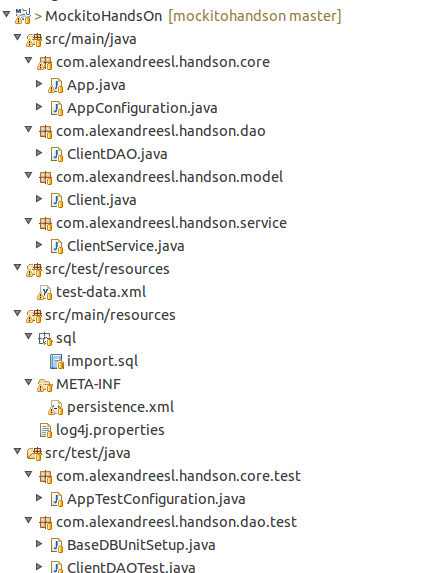
Conclusion

And that concludes our hands-on. With a simple usage, but a powerful usability, test libraries like Mockito and DBUnit are useful tools on the development of a powerful testing tier on our applications, improving and ensuring the quality of our code. Thank you for following me, until next time.

Continue reading

My ELK Series was mentioned on ElasticSearch’s official blog!

Standard

Welcome, my dear readers! It is always nice to see our work been recognized, so I want to post this in thanks from ElasticSearch’s official blog, which I found out that it has praised my series about the ELK stack on his blog. Thank you very much for you guys on elastic.co, you guys rock!

https://www.elastic.co/blog/2015-03-04-this-week-in-elasticsearch

My work of graduation on SOA architecture (In Portuguese)

Standard

Hi, my dear readers, on this post, I thought of doing something a little different: On 2010, I have concluded a graduation study on SOA’s architecture and have made this work about SOA security. So, on my philosophy of sharing the knowledge, here it is my work, please enjoy the reading and if you have any questions, please ask. Oh, and sorry about been in Portuguese, but it is my native language, hehehe

Artigo_TCC_Seguranca_SOA

ELK: using a centralized logging architecture – final part

Standard

Welcome, dear reader! This is the last part of our series about the ELK stack, that provides a centralized architecture for gathering and analyse of application logs. On this last part, we will see how we can construct a rich front-end for our logging solution, using Kibana.

Kibana

Also developed by Elasticsearch, Kibana provides a way to explore the data and/or build rich dashboards of our data on the indexer. With a simple configuration, that consist of pointing Kibana to a ElasticSearch’s index – it also allows to point to multiple indexes at once, using a wildcard configuration -, it allow us to quickly set up a front-end for our stack.

So, without further delay, let’s begin our last step on the setup of our solution.

Hands-on

Installation

Beginning our lab, let’s download Kibana from the site. To do this, let’s open a terminal and type the following command:

curl https://download.elasticsearch.org/kibana/kibana/kibana-4.0.0-linux-x64.tar.gz | tar -zx

PS: this lab assumes the reader is using a linux 64-bit OS (I am using Ubuntu 14.10). If the reader is using another type of OS, the download page for Kibana is the following:

http://www.elasticsearch.org/overview/kibana/installation/

After running the command, we can see a folder called “kibana-4.0.0-linux-x64”. That’s all we need to do to install Kibana on our lab. Before we start running, however, we need to start both Logstash and ElasticSearch, to make our whole stack go live. If the reader didn’t have the stack set up, please refer to part 1 and part 2.

One configuration that the reader may take note is the elasticsearch_url property, inside the “kibana.yml” file, on the config folder. Since we didn’t change the default port from our elasticsearch’s cluster and we are running all the tools on the same machine, there is no need to change anything, but on a real world scenario, you may need to change this property to point to your elasticsearch’s cluster. The reader can made other configurations as well on this file, such as configuring a SSL connection between Kibana and Elasticsearch or configure the name of the index Kibana will use to store his metadata on elasticsearch.

After we start the rest of the stack, it is time to run Kibana.To run it, we navigate to the bin folder of Kibana’s installation folder, and type:

 ./kibana

After some seconds, we can see that Kibana has successfully booted:

Set up

Now, let’s start using Kibana. Let’s open a web browser and enter:

http://localhost:5601/

On our first run, we will be greeted with the following screen:

The reason because we are seeing this screen is because we dont have any index configured. It is on this screen that we can, for example, point to multiple indexes. If we think, for example, about the default naming pattern of logstash’s plugin, we can see that, for each new date we run, logstash will demand the creation of a new index with the pattern “logstash-%{+YYYY.MM.dd}”. So, if we want Kibana to use all the indexes created this way on a single dataset, we simply configure the field with the value “logstash-*”

On our case, we change the default naming of the index, to demonstrate the possible configurations of the tool, so we change the field to “log4jlogs”. One important thing to note on logstash’s plugin documentation, is that the idea behind the index pattern is to make more easy to do operations such as deleting old data, so in a real world scenario, it would be more wise to leave the default pattern enabled.

The other field we need to set is the Time-field name . This field is used by Kibana as a primary filter, allowing him to filter the data from the dashboards and data explorations on a timeline perspective. If we see our document type from the documents storing log information on elasticsearch, we can see it has a field called @timestamp. This field is perfectly fit to our time-field need, so we put “@timestamp” in the field.

After we click on the “create” button, we will be sent to a new page, where we can see all the fields from the index we pointed, proving that our configuration was a success:

Of course, there is other settings as well that we can configure, such as the precision on the numeric fields or the date mask when showing this kind of data on the interface, all available on the “advanced” menu. For our lab needs, however, the default options will suffice, so we leave this page by clicking on the “Discover” menu.

Discovering the data

When we enter the new page, if we didnt send any data to the cluster in the last 15 minutes, we will see a message of no data found (see bellow). The reason for this is because, by default, Kibana limits the results for the last 15 minutes only. To change this, we can either change the time limit by clicking on the value on the upper right corner of the page, or by running again the java program from the previous post, so we have more fresh data.

After we set some data to explore, we can see that the page changes to a data view, where we can dinamically change field filters, by changing the left menu, and drill down the data to the fields level, as we can see bellow. The reader can feel free to explore the page before we move on to our next part.

Dashboards

Now that we have all set, let’s begin by creating a simple dashboard. we will create a pie chart of the messages by the log level, a table view showing the count of messages by class and a line chart of the error messages across the time.

First, let’s begin with the pie chart. We will select, from the menu, “Visualize” , then follow this sequence of options on the next pages:

pie chart >> from a new search

We will enter a page like the one bellow:

In this page, we will make our log level pie chart. To do this, we leave the metrics area unchanged, with the “count” value as slice size. Then, we choose “split slices” on the buckets area and select a “terms” aggregation, by the field “priority”. The screen bellow show our pie chart born!

After we made our chart, before we leave this page, we click on the disk icon on the top menu, input a name for our chart – also called visualization by Kibana’s terminology – and save it, for later use.

Now it is time for our table view. From the same menu we used to save our pie chart, click on the most left icon, called “new visualization”, then select “data table” and “from a new search”. We will see a similar page from the pie chart one, with similar options of aggregations and metrics to configure. With the intent of not bothering the reader with much repetitive instructions, from now on I will keep the explanation the more graphical possible, by the screenshots.

So, our data table view is made by making the configurations we can see on the left menu:

Analogous with what we made on the previous visualization, let’s also save the table view and click on new visualization, selecting line chart this time. The configuration for this chart can be seen bellow:

That concludes our visualizations. Now, let’s conclude our lab by making a dashboard that will show all the visualizations we build on the same page. To do this, first we select the “dashboard” option on the top menu. We will be greeted with the screen bellow:

This is the dashboard page, where we can create, edit and load dashboards. To add visualizations, we simply click on the plus icon on the top right side and select the visualization we want to add, like we can see bellow:

After we add the visualizations, it is pretty simple to arrange them: all we have to do is to drag and drop the visualizations as we like. My final arrangement of the dashboard is bellow, but the reader can arrange the way he finds best:

Finally, to save the dashboard, we simply click on the disk icon and input a name for our dashboard.

Cons

Of course, we cant make a complete overview of a tool, if we dont mention any noticeable con of it. The most visible downside of Kibana, on my opinion, is the lack of a native support to authentication and authorization. The reader may notice, by our tour of the interface, that there is no user or permission CRUDs whatsoever. Indeed, Kibana doesnt come with this feature.

One common workaround for this is to configure basic authentication on the web server Kibana runs with it – if we were using Kibana 3 on our lab, we would have to install manually a web server and deploy Kibana on it. On Kibana 4, we dont have to do this, because Kibana comes with a embedded node.js – , so the authentication is made by URL patterns. This link to the official node.js documentation provides a path to set basic authentication on the embedded server Kibana comes with it. The file that starts the server and need to be edited is on /src/bin/kibana.js.

Very recently, Elasticsearch has released shield, a plugin that implements a versatile security layer on Elasticsearch and subsequently on Kibana. Evidently, is a much more elegant and complete solution then the previous one, but the reader has to keep it in mind that he has to acquire a license to use shield.

Conclusion

And that concludes our tour by the ELK stack. Of course, on a real world scenario, we have some more steps to do, like the aforementioned authentication configuration, the configuration of purge policies and so on.However, we still can see that the core features we need were implemented, with very little effort. Like we talked about on the beginning of our series, logging information is a very rich source of information, that it has to be better explored on the business world. Thanks to everyone that follows my blog, until next time.

Continue reading