
MongoDB aggregations: making powerful data-driven applications on MongoDB

Standard

Hello, dear readers! Welcome to my blog. On this post, we will talk about MongoDB aggregations, and how it could help us on developing powerful applications.

NoSQL

NoSQL (non-SQL) stands for databases that uses mechanisms that differ from traditional relational DBs. NoSQL DBs implement eventual consistency, which means there’s no read-after-write guarantee – but with clustering techniques, it is not typically a big deal – but with good clustering support, allows us to deploy robust databases with horizontal scalability and excellent performance, specially for data retrieval.

MongoDB

MongoDB is one of these databases that are classified as as NoSQL. It is document-based, meaning the data is stored as JSON-like objects (called BSONs, that internally are serialized as bytes to storage compression) in groups called collections, that are kind like tables in a database.

Used on thousands of companies across the globe, is one of the most popular NoSQL solutions around the world. It also provides a PAAS solution, called MongoDB Atlas.

Aggregations

Aggregations allows us to make operations upon data, like filtering, grouping, sums, counting, etc. At the end of the aggregation pipeline, we have our final, transformed, dataset with the results we want.

A good analogy to think about MongoDB aggregations is to imagine a conveyor belt in a factory. In this analogy, data are like parts been constructed in a factory: they got different construction stages, such as soldering, post manufactoring, etc. In the end, we have a finished part, ready to be shipped.

Now that we have the concepts effectively grasped, let’s begin to dive on the code!

Lab Setup

First, we need a dataset to make our aggregations. For this lab, we will use a dataset from fivethirtyeight, a popular site with public datasets for use in machine learning projects.

We will use a dataset containing lists of comic book characters from DC and Marvel up to 2014, compiled with their first appearance month/year and number of appearances since their debuts. The dataset is uploaded at the lab’s Github repository, and also can be found here.

The dataset comes in the format of two csv files. To import to MongoDB, we will use mongoimport. This link from Mongo’s documentation instruct how to install Mongo’s database tools.

We will use Docker to instantiate MongoDB database. In the repository we have a Docker Compose file ready to use to create the DB, by running:

docker-compose up -d

After that, we can connect to Mongo using Mongo Shell, by typing:

mongo

Next, let’s add the csvs to a new database called comic-book by inputing (from the project’s root folder):

mongoimport --db comic-book --collection DC --type csv --headerline --ignoreBlanks --file ./data/dc_wiki.csv
mongoimport --db comic-book --collection Marvel --type csv --headerline --ignoreBlanks --file ./data/marvel_wiki.csv

After running, in the shell, we can check everything was imported by running the following commands:

use comic-book
db.DC.findOne()
db.Marvel.findOne()

This would produce results like the following:
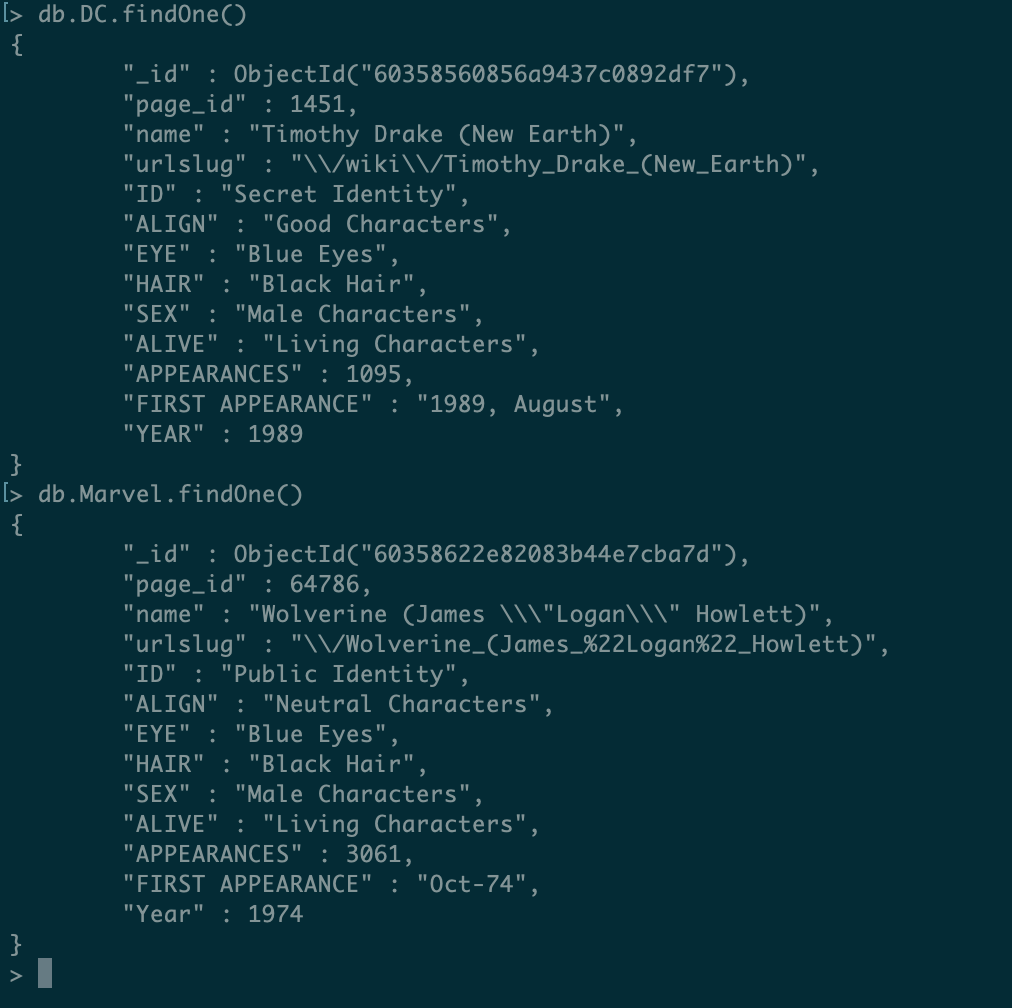
Let’s now understanding the meaning of our dataset’s fields. As stated in the dataset’s repository, the fields are:

VariableDefinition
page_idThe unique identifier for that characters page within the wikia
nameThe name of the character
urlslugThe unique url within the wikia that takes you to the character
IDThe identity status of the character (Secret Identity, Public identity, [on marvel only: No Dual Identity])
ALIGNIf the character is Good, Bad or Neutral
EYEEye color of the character
HAIRHair color of the character
SEXSex of the character (e.g. Male, Female, etc.)
GSMIf the character is a gender or sexual minority (e.g. Homosexual characters, bisexual characters)
ALIVEIf the character is alive or deceased
APPEARANCESThe number of appareances of the character in comic books (as of Sep. 2, 2014. Number will become increasingly out of date as time goes on.)
FIRST APPEARANCEThe month and year of the character’s first appearance in a comic book, if available
YEARThe year of the character’s first appearance in a comic book, if available

Now that we have our data ready, let’s begin aggregating!

Our first aggregations

For this lab, we will use Python 3.6. As a first example, let’s search for all Flashes there is on DC comics. For this, we create a generic runner structure, composed of a main script:

import re

from aggregations.aggregations import run


def main():
    run('DC', [{
        '$match': {
            'name': re.compile(r"Flash")
        }
    }])


if __name__ == "__main__":
    main()

And a generic aggregation runner, where we pass the pipeline to be executed as a parameter:

from pymongo import MongoClient
import pprint

client = MongoClient('mongodb://localhost:27017/?readPreference=primary&appname=MongoDB%20Compass&ssl=false')


def run(collection, pipeline):
    result = client['comic-book'][collection].aggregate(
        pipeline
    )

    pprint.pprint(list(result))

After running it, we will get the following results:

[{'ALIGN': 'Good Characters',
  'ALIVE': 'Living Characters',
  'APPEARANCES': 1028,
  'EYE': 'Blue Eyes',
  'FIRST APPEARANCE': '1956, October',
  'HAIR': 'Blond Hair',
  'ID': 'Secret Identity',
  'SEX': 'Male Characters',
  'YEAR': 1956,
  '_id': ObjectId('60358560856a9437c0892dfa'),
  'name': 'Flash (Barry Allen)',
  'page_id': 1380,
  'urlslug': '\\/wiki\\/Flash_(Barry_Allen)'},
 {'ALIGN': 'Good Characters',
  'ALIVE': 'Living Characters',
  'APPEARANCES': 14,
  'FIRST APPEARANCE': '2008, August',
  'SEX': 'Male Characters',
  'YEAR': 2008,
  '_id': ObjectId('60358560856a9437c08934ac'),
  'name': 'Well-Spoken Sonic Lightning Flash (New Earth)',
  'page_id': 87335,
  'urlslug': '\\/wiki\\/Well-Spoken_Sonic_Lightning_Flash_(New_Earth)'},
 {'ALIGN': 'Neutral Characters',
  'ALIVE': 'Living Characters',
  'APPEARANCES': 12,
  'FIRST APPEARANCE': '1998, June',
  'SEX': 'Male Characters',
  'YEAR': 1998,
  '_id': ObjectId('60358560856a9437c08935ac'),
  'name': 'Black Flash (New Earth)',
  'page_id': 22026,
  'urlslug': '\\/wiki\\/Black_Flash_(New_Earth)'},
 {'ALIGN': 'Bad Characters',
  'ALIVE': 'Living Characters',
  'APPEARANCES': 3,
  'FIRST APPEARANCE': '2007, November',
  'ID': 'Secret Identity',
  'SEX': 'Male Characters',
  'YEAR': 2007,
  '_id': ObjectId('60358560856a9437c0893f36'),
  'name': 'Bizarro Flash (New Earth)',
  'page_id': 32435,
  'urlslug': '\\/wiki\\/Bizarro_Flash_(New_Earth)'},
 {'ALIGN': 'Good Characters',
  'ALIVE': 'Living Characters',
  'EYE': 'Green Eyes',
  'FIRST APPEARANCE': '1960, January',
  'HAIR': 'Red Hair',
  'ID': 'Secret Identity',
  'SEX': 'Male Characters',
  'YEAR': 1960,
  '_id': ObjectId('60358560856a9437c08948d3'),
  'name': 'Flash (Wally West)',
  'page_id': 1383,
  'urlslug': '\\/wiki\\/Flash_(Wally_West)'}]

Lol, that’s a lot of Flashes! However, we also got some villains together, such as the strange Bizarro Flash. let’s improve our pipeline by filtering to only show the good guys:

[{
        '$match': {
            'name': re.compile(r"Flash ", flags=re.IGNORECASE),
            'ALIGN': 'Good Characters'
        }
    }]

If we run again, we can see characters such as Bizarro Flash no longer exist in our results.

We also had our first glance at our first pipeline stage, $match. This stage allows us to filter our results, by using the same kind of filtering expressions we can use in normal searches.

In MongoDB’s aggregations, an aggregation pipeline is composed of stages, which are the items inside an array that will be executed by Mongo. The stages are executed from first to last item in the array, with the output of one stage servings as input for the next.

As an example of how a pipeline can have multiple stages and how each stage handles the data from the previous one, let’s use another stage, $project. Project allows us to create new fields by applying operations to it (more in a minute) and also allow us to control which fields we want on our results. Let’s remove all other fields except for the name and first appearance to see this in practice:

[{
        '$match': {
            'name': re.compile(r"Flash ", flags=re.IGNORECASE),
            'ALIGN': 'Good Characters'
        }
    },
    {
        '$project': {
            'FIRST APPEARANCE': 1, 'name': 1, '_id': 0
        }
    }]

When defining which fields to maintain, we use 1 to define a field to be maintained and 0 to define fields that won’t be maintained (only the defined fields will be maintained, the only field we need to use 0 to define we don’t want is the object’s ID field, so we set 0 only for him).

This produces the following:

[{'FIRST APPEARANCE': '1956, October', 'name': 'Flash (Barry Allen)'},
 {'FIRST APPEARANCE': '2008, August',
  'name': 'Well-Spoken Sonic Lightning Flash (New Earth)'},
 {'FIRST APPEARANCE': '1960, January', 'name': 'Flash (Wally West)'}]

Now, let’s make another aggregation. In our dataset, the first appearance is a string following this pattern:

<year> , <month>

Not only that, we also have some “dirty” data, as there is records without this field, or records with just the year in numerical format. We need to do some cleaning, using just characters we have the information and transform the data to a standard numerical field, in order to make it more useful for our use cases.

Now, let’s say we want to know the names of all characters created in the comics silver age (a time-period that goes from 1956 to 1970). To do this, first we create a field with the first appearance’s year, like we said before, and then use the new field to filter only silver age characters.

We already have a field with the year properly defined on the dataset, but for exercise’s sake, let’s suppose we had only this string-formatted field available, in order to examine more features and simulate real-world scenarios where many times data has formatting and correctness issues.

Let’s begin by creating our new field:

[
        {
        '$match': {
            'FIRST APPEARANCE': {'$exists': True}
        }
        },
        {
            '$project': {
                '_id': 0,
                'name': 1,
                'year': {'$toInt': {'$arrayElemAt': [{'$split': [{'$toString': '$FIRST APPEARANCE'}, ","]}, 0]}}
            }
        }
    ]

Lol, that’s some transforming! We filter the records to just use the ones that have the field, and in project stage we make conversions to allows us to extract the year from the field and convert him to a number. This produces something like this fragment:

 ...
 {'name': 'Tempus (New Earth)', 'year': 1997},
 {'name': 'Valkyra (New Earth)', 'year': 1997},
 {'name': 'Spider (New Earth)', 'year': 1997},
 {'name': 'Vayla (New Earth)', 'year': 1997},
 {'name': 'Widow (New Earth)', 'year': 1997},
 {'name': "William O'Neil (New Earth)", 'year': 1997},
 {'name': 'Arzaz (New Earth)', 'year': 1996},
 {'name': 'Download II (New Earth)', 'year': 1996}
...

With everything transformed, we only need to filter the year to get our silver age characters:

        [{
            '$match': {
                'FIRST APPEARANCE': {'$exists': True}
            }
        },
        {
            '$project': {
                '_id': 0,
                'name': 1,
                'year': {'$toInt': {'$arrayElemAt': [{'$split': [{'$toString': '$FIRST APPEARANCE'}, ","]}, 0]}}
            }
        },
        {
            '$match': {
                'year': {"$gte": 1956, "$lte": 1970}
            }
        }]

This produces the following list (just a fragment, due to size):

[{'name': 'Dinah Laurel Lance (New Earth)', 'year': 1969},
 {'name': 'Flash (Barry Allen)', 'year': 1956},
 {'name': 'GenderTest', 'year': 1956},
 {'name': 'Barbara Gordon (New Earth)', 'year': 1967},
 {'name': 'Green Lantern (Hal Jordan)', 'year': 1959},
 {'name': 'Raymond Palmer (New Earth)', 'year': 1961},
 {'name': 'Guy Gardner (New Earth)', 'year': 1968},
 {'name': 'Garfield Logan (New Earth)', 'year': 1965},
 {'name': 'Ralph Dibny (New Earth)', 'year': 1960},
...

Talking about big lists, one feature that is good to keep in mind when aggregating datasets, is that there is a memory limit imposed by MongoDB for doing in-memory aggregation (the default behavior). To allow MongoDB to use disk swap when aggregating, we add the following option when running the pipeline:

result = client['comic-book'][collection].aggregate(
        pipeline, allowDiskUse=True
    )

By running again, we can see everything is still working as expected.

We also can notice the results are not sorted. To sort by the name, we can add a $sort stage:

        [{
            '$match': {
                'FIRST APPEARANCE': {'$exists': True}
            }
        },
        {
            '$project': {
                '_id': 0,
                'name': 1,
                'year': {'$toInt': {'$arrayElemAt': [{'$split': [{'$toString': '$FIRST APPEARANCE'}, ","]}, 0]}}
            }
        },
        {
            '$match': {
                'year': {"$gte": 1956, "$lte": 1970}
            }
        },
        {
            '$sort': {
                'name': 1
            }
        }]

The $sort stage receives fields definitions, where 1 means ascending order and -1 means descending. After running, we can see the results were sorted:

[{'name': 'Abel (New Earth)', 'year': 1969},
 {'name': 'Abel Tarrant (New Earth)', 'year': 1963},
 {'name': 'Abin Sur (New Earth)', 'year': 1959},
 {'name': 'Abnegazar (New Earth)', 'year': 1962},
 {'name': 'Abner Krill (New Earth)', 'year': 1962},
 {'name': 'Ace Arn (New Earth)', 'year': 1965},
 {'name': 'Ace Chance (New Earth)', 'year': 1966},
 {'name': 'Achilles Milo (New Earth)', 'year': 1957},
 {'name': 'Adam Strange (New Earth)', 'year': 1958},
 {'name': 'Agantha (New Earth)', 'year': 1964},
 {'name': 'Ahk-Ton (New Earth)', 'year': 1965},
 {'name': 'Alanna Strange (New Earth)', 'year': 1958},
 {'name': 'Albert Desmond (New Earth)', 'year': 1958},
 {'name': 'Albrecht Raines (New Earth)', 'year': 1958},
 {'name': 'Alpheus Hyatt (New Earth)', 'year': 1962},
 {'name': 'Aluminum (New Earth)', 'year': 1963},
 {'name': 'Amazo (New Earth)', 'year': 1960},
 {'name': 'Amos Fortune (New Earth)', 'year': 1961},
 {'name': 'Anais Guillot (New Earth)', 'year': 1959},
...

Now, let’s suppose we just wanted to count how many characters from silver age are on DC, not know their names or any other data. We could do this by adding a $count stage:

[{
            '$match': {
                'FIRST APPEARANCE': {'$exists': True}
            }
        },
        {
            '$project': {
                '_id': 0,
                'name': 1,
                'year': {'$toInt': {'$arrayElemAt': [{'$split': [{'$toString': '$FIRST APPEARANCE'}, ","]}, 0]}}
            }
        },
        {
            '$match': {
                'year': {"$gte": 1956, "$lte": 1970}
            }
        },
        {
            '$count': 'total'
        }]

Count only ask us to define a name for the count. This would produce the following:

[{'total': 556}]

Grouping data together

Let’s start using Marvel collection now. To know how many characters there are in Marvel according to their aligns (neutral, good or bad), we use a $group stage to group the data by the align and use a accumulator to count the characters:

[
        {
            '$match': {
                'ALIGN': {'$exists': True}
            }
        },
        {
            '$group': {
                '_id': '$ALIGN',
                'count': {'$sum': 1}
            }
        }
    ]

Yes, is simple as that! This produces the following:

[{'_id': 'Good Characters', 'count': 4636},
 {'_id': 'Bad Characters', 'count': 6720},
 {'_id': 'Neutral Characters', 'count': 2208}]

Now, let’s try a different example. We want to count all characters created by Marvel, breaking down by decade.

To make this grouping, we will use the $bucket stage, as follows:

[{
            '$bucket': {
                'groupBy': "$Year",
                'boundaries': [1930, 1940, 1950, 1960, 1970, 1980, 1990, 2000, 2010, 2020],
                'default': "Unknown",
                'output': {
                    'count': {'$sum': 1}
                }
            }
        }]

Here we have a groupBy field to define which field to use as bucket selector. We define boundaries for the buckets and a default in case a bucket can’t be defined. Finally, we have an output, where we define aggregators to be executed for each bucket.

This produces the following results:

[{'_id': 1930, 'count': 69},
 {'_id': 1940, 'count': 1441},
 {'_id': 1950, 'count': 302},
 {'_id': 1960, 'count': 1306},
 {'_id': 1970, 'count': 2234},
 {'_id': 1980, 'count': 2425},
 {'_id': 1990, 'count': 3657},
 {'_id': 2000, 'count': 3086},
 {'_id': 2010, 'count': 1041},
 {'_id': 'Unknown', 'count': 815}]

Another type of bucketing is by using the $bucketAuto stage. This stage allows us to let MongoDB do the grouping for us, without needing to define the boundaries. Let’s try it out with DC:

[{
            '$bucketAuto': {
                'groupBy': "$YEAR",
                'buckets': 10,
                'output': {
                    'count': {'$sum': 1}
                }
            }
        }]

This produces:

[{'_id': {'max': 1965, 'min': None}, 'count': 702},
 {'_id': {'max': 1981, 'min': 1965}, 'count': 703},
 {'_id': {'max': 1987, 'min': 1981}, 'count': 779},
 {'_id': {'max': 1990, 'min': 1987}, 'count': 806},
 {'_id': {'max': 1994, 'min': 1990}, 'count': 707},
 {'_id': {'max': 1998, 'min': 1994}, 'count': 779},
 {'_id': {'max': 2004, 'min': 1998}, 'count': 791},
 {'_id': {'max': 2008, 'min': 2004}, 'count': 752},
 {'_id': {'max': 2011, 'min': 2008}, 'count': 716},
 {'_id': {'max': 2013, 'min': 2011}, 'count': 161}]

By default, Mongo will try to spread the buckets the more evenly as possible. We can define a field called granularity to better restrict how we want to group:

[{
            '$match': {
                'YEAR': {'$exists': True}
            }
        },
        {
            '$bucketAuto': {
                'groupBy': '$YEAR',
                'buckets': 10,
                'granularity': 'E192',
                'output': {
                    'count': {'$sum': 1}
                }
            }
        }]

This defines a preferred time series to round the buckets and calculate the edges. More info can be found at the documentation. One important thing to note is that granularity must only be used on numeric buckets and must not contain data without the field (that’s why we introduced the filter).

This produces:

[{'_id': {'max': 1980.0, 'min': 1930.0}, 'count': 1300},
 {'_id': {'max': 2000.0, 'min': 1980.0}, 'count': 3429},
 {'_id': {'max': 2030.0, 'min': 2000.0}, 'count': 2098}]

Faceting & persisting the results

Now, let’s make a report where we have some of our previous aggregations grouped in a single result, like a report. We can do this by creating facet stages, which act like independent pipelines that will be grouped as a single result at the end.

This can be achieved by adding the following facets:

[
        {
            '$facet': {
                'Silver age characters': [
                    {
                        '$match': {
                            'FIRST APPEARANCE': {'$exists': True}
                        }
                    },
                    {
                        '$project': {
                            '_id': 0,
                            'name': 1,
                            'year': {
                                '$toInt': {'$arrayElemAt': [{'$split': [{'$toString': '$FIRST APPEARANCE'}, ","]}, 0]}}
                        }
                    },
                    {
                        '$match': {
                            'year': {"$gte": 1956, "$lte": 1970}
                        }
                    },
                    {
                        '$sort': {
                            'name': 1
                        }
                    }
                ],
                'Characters by decade': [
                    {
                        '$bucket': {
                            'groupBy': "$YEAR",
                            'boundaries': [1930, 1940, 1950, 1960, 1970, 1980, 1990, 2000, 2010, 2020],
                            'default': "Unknown",
                            'output': {
                                'count': {'$sum': 1}
                            }
                        }
                    }
                ]
            }
        }
    ]

This produces results like the following, running for DC:

[{'Characters by decade': [{'_id': 1930, 'count': 42},
                           {'_id': 1940, 'count': 268},
                           {'_id': 1950, 'count': 121},
                           {'_id': 1960, 'count': 453},
                           {'_id': 1970, 'count': 416},
                           {'_id': 1980, 'count': 1621},
                           {'_id': 1990, 'count': 1808},
                           {'_id': 2000, 'count': 1658},
                           {'_id': 2010, 'count': 440},
                           {'_id': 'Unknown', 'count': 69}],
  'Silver age characters': [{'name': 'Abel (New Earth)', 'year': 1969},
                            {'name': 'Abel Tarrant (New Earth)', 'year': 1963},
                            {'name': 'Abin Sur (New Earth)', 'year': 1959},
                            {'name': 'Abnegazar (New Earth)', 'year': 1962},
                            {'name': 'Abner Krill (New Earth)', 'year': 1962},
                            {'name': 'Ace Arn (New Earth)', 'year': 1965},
...

Now, what if we wanted to persist this report, without having to resort to -re-run the aggregation? For this, we add a $out stage, which persist the aggregation’s results on a collection. Let’s change our pipeline like this:

[
        {
            '$facet': {
                'Silver age characters': [
                    {
                        '$match': {
                            'FIRST APPEARANCE': {'$exists': True}
                        }
                    },
                    {
                        '$project': {
                            '_id': 0,
                            'name': 1,
                            'year': {
                                '$toInt': {'$arrayElemAt': [{'$split': [{'$toString': '$FIRST APPEARANCE'}, ","]}, 0]}}
                        }
                    },
                    {
                        '$match': {
                            'year': {"$gte": 1956, "$lte": 1970}
                        }
                    },
                    {
                        '$sort': {
                            'name': 1
                        }
                    }
                ],
                'Characters by decade': [
                    {
                        '$bucket': {
                            'groupBy': "$YEAR",
                            'boundaries': [1930, 1940, 1950, 1960, 1970, 1980, 1990, 2000, 2010, 2020],
                            'default': "Unknown",
                            'output': {
                                'count': {'$sum': 1}
                            }
                        }
                    }
                ]
            }
        },
        {'$out': 'DC-reports'}
    ]

After running, we can check the DB for the persisted data:
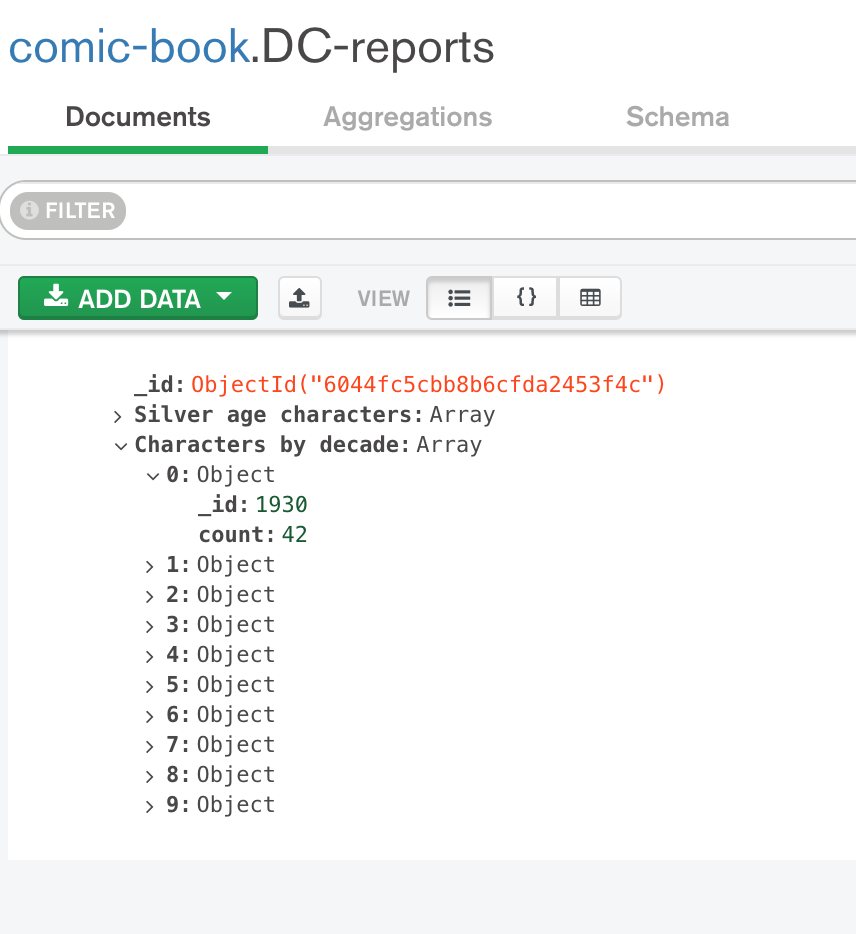
IMPORTANT: All data on the collection will be deleted and replaced by the aggregation’s results upon re-running!

Conclusion

And that concludes our quick tour on MongoDB’s aggregations. Of course, this is just a taste of what we are capable of with the framework. I suggest reading the documentation for learning more features, such as $lookup, that allows us to left-join collections.

With a simple and intuitive interface, is a very robust and powerful solution, that must be explored. Thank you for following me on one more article, until next time.

AWS Lambda: building a serverless back-end on Amazon

Standard

Hello, dear readers! welcome to my blog. On this post, we will learn about AWS Lambda, a serverless architectural solution that enables us to quickly deploy serverless back-end infrastructures. But why using this service, instead of good old EC2s?Let’s find it out!

Motivation behind AWS Lambda

Alongside the benefits of developing a back-end using the serverless paradigm – which can be learned on more detail on this other post of mine – another good point on using AWS is pricing.

When deploying your application with a EC2, be a on-demand, spot or reserved one, we are charged by hour. This is true even if our application is not called at all during that hour, resulting on wasted resources and money.

With AWS lambda, Amazon charge us by processing time, as such, it only charges us the time spent on lambdas execution. This results on a much cleaner architecture, where less resources and money are spent. This post details the case on more detail.

AWS Lambda development is based on functions. When developing a lambda, we develop a function that can run as a REST endpoint – served by Amazon API Gateway – or a event processing function, running on events such as a file been uploaded to a S3 bucket.

Limitations

However, not all is simple on this service. When developing with AWS Lambda, two things must be kept in mind: cold starts and resource restrictions.

Cold starts consist of the first time a lambda is called, or after some time is passed and the server – behind the scenes, obviously there are servers that runs the functions, but this is hidden from the user – used to run the lambda is already down due to inactivity. Amazon has algorithms that make the server be up and serving as long as there is a consistent frequency of client calls, but off course, from time to time, there will be idle times.

When a cold start is made, this causes the requests to have a more slow response, since it will wait for a server to be up and running to run the function. This can be worsen if clients have low timeout configurations, resulting on requests failing. This should be taking on account when developing lambdas that act as APIs.

Another important aspect to take note are resource restrictions. Been designed to be used for small functions (“microservices”), lambdas have several limitations, such as amount of memory, disk and cpu. This limits can be increased, but only by a small amount. This link on AWS docs details more about the limits.

One important limit is the running time of the lambda itself. A AWS Lambda can run at most 5 minutes. This is a important limit to understand the nature of what lambdas must be in nature: simple functions, that must not run by long periods of time.

If any of this limits are reached, the lambda will fail his execution.

Lab

For this lab, we will use a framework called Serverless. Serverless is a framework that automates for us some tasks that are a little boring to do if developing with AWS Lambda by hand, such as creating a zip file with all our sources to be uploaded to S3 and creating/configuring all AWS resources. Serverless uses CloudFormation under the hood, managing resource creation and updates for us. For programming language, we will use Python 3.6.

To install Serverless, please follow this guide.

With Serverless installed, let’s begin our lab! First, let’s create a project, by running:

serverless create --template aws-python3 --path MyAmazingAWSLambdaService 

This command will create a new Serverless project, using a initial template for our first Python lambda. Let’s open the project – I will be using PyCharm, but any IDE or editor of choice will suffice – and see what the framework created for us.

Project structure

Serverless created a simple project structure, consisting of a serverless YAML file and a Python script. It is on the YAML that we declare our functions, the cloud provider, IAM permissions, resources to be created etc.

The file created by the command is as follows:

# Welcome to Serverless!
#
# This file is the main config file for your service.
# It's very minimal at this point and uses default values.
# You can always add more config options for more control.
# We've included some commented out config examples here.
# Just uncomment any of them to get that config option.
#
# For full config options, check the docs:
#    docs.serverless.com
#
# Happy Coding!

service: MyAmazingAWSLambdaService

# You can pin your service to only deploy with a specific Serverless version
# Check out our docs for more details
# frameworkVersion: "=X.X.X"

provider:
  name: aws
  runtime: python3.6

# you can overwrite defaults here
#  stage: dev
#  region: us-east-1

# you can add statements to the Lambda function's IAM Role here
#  iamRoleStatements:
#    - Effect: "Allow"
#      Action:
#        - "s3:ListBucket"
#      Resource: { "Fn::Join" : ["", ["arn:aws:s3:::", { "Ref" : "ServerlessDeploymentBucket" } ] ]  }
#    - Effect: "Allow"
#      Action:
#        - "s3:PutObject"
#      Resource:
#        Fn::Join:
#          - ""
#          - - "arn:aws:s3:::"
#            - "Ref" : "ServerlessDeploymentBucket"
#            - "/*"

# you can define service wide environment variables here
#  environment:
#    variable1: value1

# you can add packaging information here
#package:
#  include:
#    - include-me.py
#    - include-me-dir/**
#  exclude:
#    - exclude-me.py
#    - exclude-me-dir/**

functions:
  hello:
    handler: handler.hello

#    The following are a few example events you can configure
#    NOTE: Please make sure to change your handler code to work with those events
#    Check the event documentation for details
#    events:
#      - http:
#          path: users/create
#          method: get
#      - s3: ${env:BUCKET}
#      - schedule: rate(10 minutes)
#      - sns: greeter-topic
#      - stream: arn:aws:dynamodb:region:XXXXXX:table/foo/stream/1970-01-01T00:00:00.000
#      - alexaSkill
#      - alexaSmartHome: amzn1.ask.skill.xx-xx-xx-xx
#      - iot:
#          sql: "SELECT * FROM 'some_topic'"
#      - cloudwatchEvent:
#          event:
#            source:
#              - "aws.ec2"
#            detail-type:
#              - "EC2 Instance State-change Notification"
#            detail:
#              state:
#                - pending
#      - cloudwatchLog: '/aws/lambda/hello'
#      - cognitoUserPool:
#          pool: MyUserPool
#          trigger: PreSignUp

#    Define function environment variables here
#    environment:
#      variable2: value2

# you can add CloudFormation resource templates here
#resources:
#  Resources:
#    NewResource:
#      Type: AWS::S3::Bucket
#      Properties:
#        BucketName: my-new-bucket
#  Outputs:
#     NewOutput:
#       Description: "Description for the output"
#       Value: "Some output value"

For now, let’s just remove all comments in order to have a cleaner file. The other file is a Python script, which have our first function. Let’s see it:

import json


def hello(event, context):
    body = {
        "message": "Go Serverless v1.0! Your function executed successfully!",
        "input": event
    }

    response = {
        "statusCode": 200,
        "body": json.dumps(body)
    }

    return response

    # Use this code if you don't use the http event with the LAMBDA-PROXY
    # integration
    """
    return {
        "message": "Go Serverless v1.0! Your function executed successfully!",
        "event": event
    }
    """

As we can see, is a pretty simple script. All we have to do is create a function that receives 2 parameters, context and event. Event is used to pass the input data on which the lambda will work. Context is used by AWS to pass information about the environment on which the lambda is running. For example, if we wanted to know how much time is left before our running time limit is reached, we could do the following call:

print("Time remaining (MS):", context.get_remaining_time_in_millis())

The dictionary returned by the function is the standard response for a lambda that acts as a API, proxied by AWS API Gateway.

For now, let’s leave the script as it is, as we will add more functions to the project. Let’s begin by adding the Dynamodb table we will use on our lab, alongside other configurations.

Creating Dynamodb table

In order to create the table, we modify our YAML as follows:

service: MyAmazingAWSLambdaService

provider:
  name: aws
  runtime: python3.6
  stage: ${opt:stage, 'dev'}
  region: ${opt:region, 'us-east-1'}
  profile: personal

functions:
  hello:
    handler: handler.hello

resources:
  Resources:
    product:
      Type: AWS::DynamoDB::Table
      Properties:
        TableName: product
        AttributeDefinitions:
          - AttributeName: id
            AttributeType: S
        KeySchema:
          - AttributeName: id
            KeyType: HASH
        ProvisionedThroughput:
          ReadCapacityUnits: 1
          WriteCapacityUnits: 1

We added a resources section, where we defined a dynamodb table called product and defined a atribute called id to be key in table’s items. We also defined the stage and region to be collected as command-line options – stages are used as application environments, such as QA and Production. Finally, we defined that we want the deploys to use a IAM profile called personal. This is useful when having several accounts on the same machine.

Let’s deploy the stack by entering:

serverless deploy --stage prod

After some time, we will see that our stack was successfully deployed, as we can see on the console:

Serverless: Packaging service...
Serverless: Excluding development dependencies...
Serverless: Creating Stack...
Serverless: Checking Stack create progress...
.....
Serverless: Stack create finished...
Serverless: Uploading CloudFormation file to S3...
Serverless: Uploading artifacts...
Serverless: Uploading service .zip file to S3 (3.38 KB)...
Serverless: Validating template...
Serverless: Updating Stack...
Serverless: Checking Stack update progress...
..................
Serverless: Stack update finished...
Service Information
service: MyAmazingAWSLambdaService
stage: prod
region: us-east-1
stack: MyAmazingAWSLambdaService-prod
api keys:
 None
endpoints:
 None
functions:
 hello: MyAmazingAWSLambdaService-prod-hello

During the deployment, Serverless generated a zip file with all our resources, uploaded to a bucket, created a CloudFormation stack and deployed our lambda with it, alongside the necessary permissions to run. It also created our dynamodb table, as required.

Now that we have our stack and table, let’s begin by creating a group of lambdas to implement CRUD operations on our table.

Creating CRUD lambdas

Now, let’s create our lambdas. First, let’s create a Python class to encapsulate the operations on our dynamodb table:

# -*- coding: UTF-8 -*-

import boto3

dynamodb = boto3.resource('dynamodb')


class DynamoDbHelper:

    def __init__(self, **kwargs):
        self.table = dynamodb.Table(kwargs.get('table', """missing"""))

    def save(self, entity):
        """
           save entity from DYNAMODB_self.table
        """
        saved = self.table.put_item(Item=entity)
        print('Saving result: ({})'.format(saved))

    def get(self, entity_id):
        """
         get entity from DYNAMODB_self.table
      """
        entity = self.table.get_item(Key={'id': entity_id})

        if 'Item' in entity:
            return entity['Item']
        else:
            return None

    def delete(self, entity_id):
        """
           delete entity from DYNAMODB_self.table
        """
        deleted = self.table.delete_item(Key={'id': entity_id})
        print('Deleting result: ({})'.format(deleted))

Then, we create another script to make a converter. This will be used to read the input data from lambda calls to dynamodb’s data:

# -*- coding: UTF-8 -*-
import json


class ProductConverter:

    def convert(self, event):
        """
           convert entity from input to dictionary to be saved on dynamodb
        """
        if isinstance(event['body'], dict):
            data = event['body']
        else:
            data = json.loads(event['body'])
        return {
            'id': data['id'],
            'name': data.get('name', ''),
            'description': data.get('description', ''),
            'price': data.get('price', '')
        }

Next, we change the script created by Serverless, creating the lambda handlers:

# -*- coding: UTF-8 -*-

import json

from helpers.DynamoDbHelper import DynamoDbHelper
from helpers.ProductConverter import ProductConverter


def get_path_parameters(event, name):
    return event['pathParameters'][name]


dynamodb_helper = DynamoDbHelper(table='product')
product_converter = ProductConverter()


def save(event, context):
    product = product_converter.convert(event)

    if 'id' not in event['body']:
        return {
            "statusCode": 422,
            "body": json.dumps({'message': 'Product ID is required!'})
        }

    try:
        dynamodb_helper.save(product)
        response = {
            "statusCode": 200,
            "body": json.dumps({'message': 'saved successfully'})
        }
    except Exception as e:
        return {
            "statusCode": 500,
            "body": json.dumps({'message': str(e)})
        }

    return response


def get(event, context):
    product = dynamodb_helper.get(get_path_parameters(event, 'product_id'))

    if product is not None:
        response = {
            "statusCode": 200,
            "body": json.dumps(product)
        }
    else:
        response = {
            "statusCode": 404,
            "body": json.dumps({'message': 'not found'})
        }
    return response


def delete(event, context):
    try:
        dynamodb_helper.delete(get_path_parameters(event, 'product_id'))
        response = {
            "statusCode": 200,
            "body": json.dumps({'message': 'deleted successfully'})
        }
    except Exception as e:
        return {
            "statusCode": 500,
            "body": json.dumps({'message': str(e)})
        }

    return response

Finally, we change serverless.yml, defining our lambdas to be deployed on AWS:

service: MyAmazingAWSLambdaService

provider:
  name: aws
  runtime: python3.6
  stage: ${opt:stage, 'dev'}
  region: ${opt:region, 'us-east-1'}
  profile: personal

  iamRoleStatements: # permissions for all of your functions can be set here
      - Effect: Allow
        Action:
          - dynamodb:*
        Resource: "arn:aws:dynamodb:us-east-1:<your_account_id>:table/product"

functions:
  save_product:
    handler: handler.save
    events:
      - http:
          path: product/save
          method: post
  update_product:
    handler: handler.save
    events:
      - http:
          path: product/update
          method: patch
  get_product:
    handler: handler.get
    events:
      - http:
          path: product/{product_id}
          method: get
  delete_product:
    handler: handler.delete
    events:
      - http:
          path: product/{product_id}
          method: delete

resources:
  Resources:
    product:
      Type: AWS::DynamoDB::Table
      Properties:
        TableName: product
        AttributeDefinitions:
          - AttributeName: id
            AttributeType: S
        KeySchema:
          - AttributeName: id
            KeyType: HASH
        ProvisionedThroughput:
          ReadCapacityUnits: 1
          WriteCapacityUnits: 1

After running the deployment again, we can see the functions were deployed, as seen on terminal:

Serverless: Packaging service...
Serverless: Excluding development dependencies...
Serverless: Uploading CloudFormation file to S3...
Serverless: Uploading artifacts...
Serverless: Uploading service .zip file to S3 (4.92 KB)...
Serverless: Validating template...
Serverless: Updating Stack...
Serverless: Checking Stack update progress...
........................................................................................
Serverless: Stack update finished...
Service Information
service: MyAmazingAWSLambdaService
stage: prod
region: us-east-1
stack: MyAmazingAWSLambdaService-prod
api keys:
 None
endpoints:
 POST - https://xxxxxxxxxxxx.execute-api.us-east-1.amazonaws.com/prod/product/save
 PATCH - https://xxxxxxxxxxxx.execute-api.us-east-1.amazonaws.com/prod/product/update
 GET - https://xxxxxxxxxxxx.execute-api.us-east-1.amazonaws.com/prod/product/{product_id}
 DELETE - https://xxxxxxxxxxxx.execute-api.us-east-1.amazonaws.com/prod/product/{product_id}
functions:
 save_product: MyAmazingAWSLambdaService-prod-save_product
 update_product: MyAmazingAWSLambdaService-prod-update_product
 get_product: MyAmazingAWSLambdaService-prod-get_product
 delete_product: MyAmazingAWSLambdaService-prod-delete_product

PS: the rest api id was intentionally masked by me for security reasons.

On terminal, we can also see the URLs to call our lambdas. On AWS lambda, the URLs follows this pattern:

https://{restapi_id}.execute-api.{region}.amazonaws.com/{stage_name}/

Later on our lab we will learn how to test our lambdas. For now, let’s learn how to create our last lambda, the one that will read from S3 events.

Creating S3 lambda to bulk create to Dynamodb

Now, let’s implement a lambda that will bulk process product inserts. This lambda will use a csv file as parameter, receiving chunks of data. The lambda will process the data as a stream, using the streaming interface from boto3 behind the hood, saving products as it reads them. To facilitate, we will use Pandas Python library to read the csv . The lambda code is as follows:

# -*- coding: UTF-8 -*-

import boto3
import pandas as pd
import io

from helpers.DynamoDbHelper import DynamoDbHelper

s3 = boto3.client('s3')
dynamodb_helper = DynamoDbHelper(table='product')


def bulk_insert(event, context):
    for record in event['Records']:
        bucket = record['s3']['bucket']['name']
        key = record['s3']['object']['key']
        print('Bucket: ' + bucket)
        print('Key: ' + key)
        obj = s3.get_object(Bucket=bucket, Key=key)
        products = pd.read_csv(io.BytesIO(obj['Body'].read()))
        products_records = products.fillna('').to_dict('records')
        for product in products_records:
            record = {
                'id': str(product['id']),
                'name': product.get('name', ''),
                'description': product.get('description', ''),
                'price': str(product.get('price', '0'))
            }
            dynamodb_helper.save(record)

You may notice that we iterate over a list to read bucket files. That’s because AWS can bulk S3 changes to call our lambda fewer times, so we need to read all references that are sent to us.

Before moving on to serverless.yml changes, we need to install a plugin called serverless-python-requirements. This plugin is responsible for adding our pip requirements to lambda packaging.

First, let’s create a file called package.json, with the following. This file must be created by the npm init command:

{
  "name": "myamazingawslambdaservice",
  "version": "1.0.0",
  "description": "",
  "main": "index.js",
  "author": "",
  "license": "ISC"
}

Next, let’s install the plugin, using npm:

npm install --save serverless-python-requirements

And finally, add the plugin to serverless.yml. Here it is all the changes needed for the new lambda:

service: MyAmazingAWSLambdaService

plugins:
  - serverless-python-requirements

custom:
  pythonRequirements:
    dockerizePip: non-linux

provider:
  name: aws
  runtime: python3.6
  stage: ${opt:stage, 'dev'}
  region: ${opt:region, 'us-east-1'}
  profile: personal

  iamRoleStatements: # permissions for all of your functions can be set here
      - Effect: Allow
        Action:
          - dynamodb:*
        Resource: "arn:aws:dynamodb:us-east-1:<your_account_id>:table/product"
      - Effect: Allow
        Action:
          - s3:GetObject
        Resource: "arn:aws:s3:::myamazingbuckets3/*"

functions:
  bulk_insert:
    handler: bulk_handler.bulk_insert
    events:
      - s3:
          bucket: myamazingbuckets3
          event: s3:ObjectCreated:*
  save_product:
    handler: handler.save
    events:
      - http:
          path: product/save
          method: post
  update_product:
    handler: handler.save
    events:
      - http:
          path: product/update
          method: patch
  get_product:
    handler: handler.get
    events:
      - http:
          path: product/{product_id}
          method: get
  delete_product:
    handler: handler.delete
    events:
      - http:
          path: product/{product_id}
          method: delete

resources:
  Resources:
    product:
      Type: AWS::DynamoDB::Table
      Properties:
        TableName: product
        AttributeDefinitions:
          - AttributeName: id
            AttributeType: S
        KeySchema:
          - AttributeName: id
            KeyType: HASH
        ProvisionedThroughput:
          ReadCapacityUnits: 1
          WriteCapacityUnits: 1

PS: because of the plugin, is now needed to have Docker running on deployment. This is because the plugin uses Docker to compile Python packages that requires OS binaries to be installed. The first time you run it, you may notice the process ‘hangs’ at docker step. This is because is downloading the docker image, which is quite sizeable (about 600Mb). 

All we had to do is add IAM permissions to the bucket and define the lambda, adding a event to fire at object creations on the bucket. It is not needed to add the bucket to the resource creation section, as Serverless will already create the bucket as we defined that will be used by a lambda on the project.

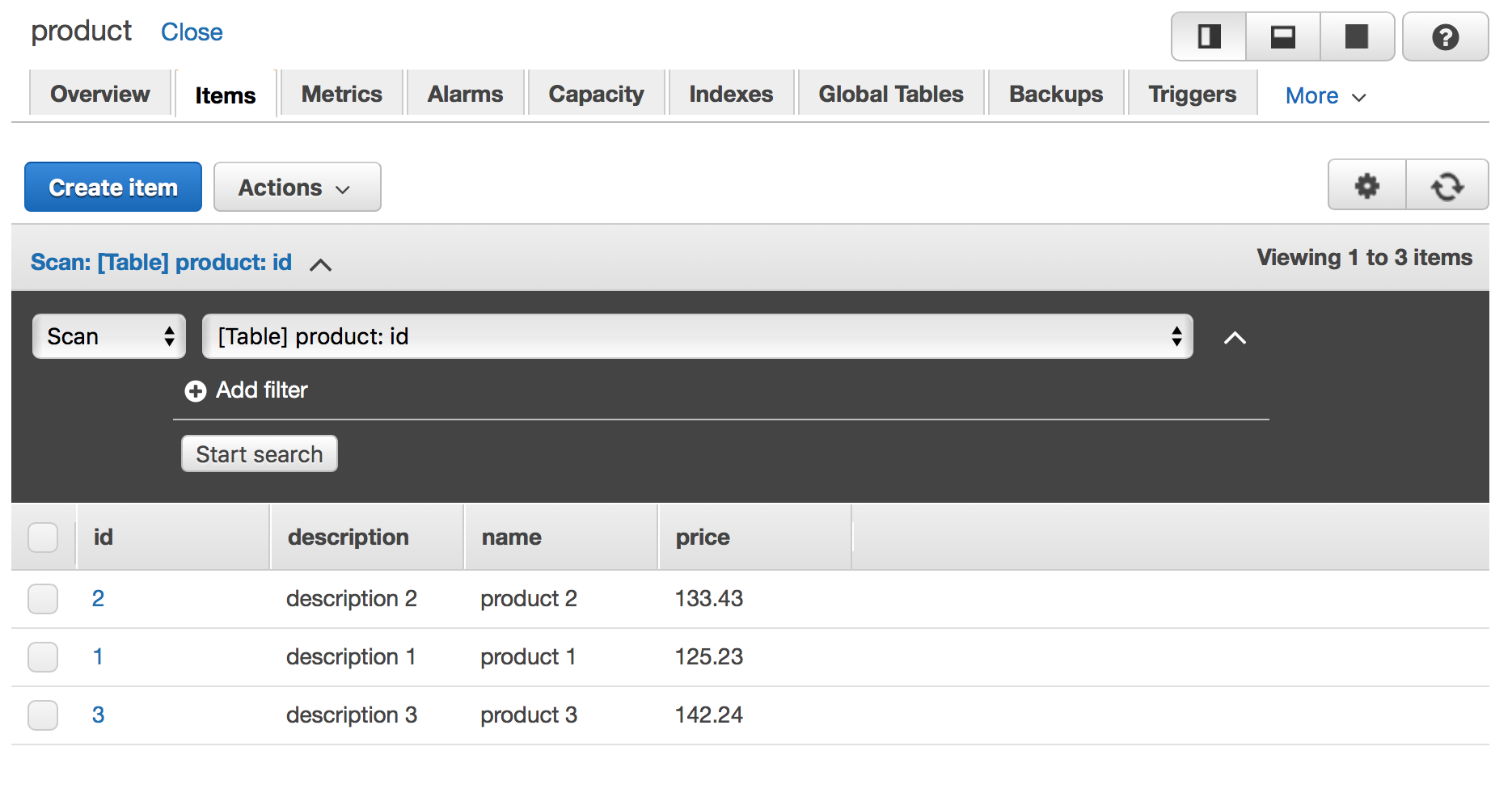
Now, let’s test the bulk insert. After redeploying, let’s create a csv like following:

id,name,description,price
1,product 1,description 1,125.23
2,product 2,description 2,133.43
3,product 3,description 3,142.24

Let’s save the file and upload to our bucket. After some instants, we will see that our DynamoDB table will be populated with the data, as we can see bellow:

Screen Shot 2018-05-07 at 23.45.56

DynamoDB table populated with csv bulk data

Now that we have all our lambdas developed, let’s learn how to test locally and invoke our lambdas from different locations.

Testing local

Let’s test locally our insert product lambda. First, we need to create a json file to hold our test data. Let’s call it example_json.json :

{
  "body": {
    "id": "123",
    "name": "product 1",
    "description": "description 1",
    "price": "123.24"
  }
}

Next, let’s run locally by using Serverless, with the following command:

serverless invoke local --function save_product --path example_json.json

PS: Before running, don’t forget to set the AWS_PROFILE env variable to your profile.

After some instants, we will see the terminal outputting as follows:

Serverless: Invoke invoke:local
Saving result: ({'ResponseMetadata': {'RequestId': '0CDUDLGJEU7UBLLSCQ82SF0B53VV4KQNSO5AEMVJF66Q9ASUAAJG', 'HTTPStatusCode': 200, 'HTTPHeaders': {'server': 'Server', 'date': 'Mon, 14 May 2018 15:13:22 GMT', 'content-type': 'application/x-amz-json-1.0', 'content-length': '2', 'connection': 'keep-alive', 'x-amzn-requestid': '0CDUDLGJEU7UBLLSCQ82SF0B53VV4KQNSO5AEMVJF66Q9ASUAAJG', 'x-amz-crc32': '2745614147'}, 'RetryAttempts': 0}})

{
 "statusCode": 200,
 "body": "{\"message\": \"saved successfully\"}"
}

Behind the hood, Serverless is creating a emulated environment as close as it gets to AWS lambda environment, using the permissions described on the YAML to emulate the permissions set for the function.

It is important to notice that the framework doesn’t guarantee 100% accuracy with a real lambda environment, so more testing in a separate stage – QA, for example – is still necessary before going to production.

Testing on AWS API gateway

To test with AWS API gateway interface, is pretty simple: simply navigate to API Gateway inside Amazon console, then select prod-MyAmazingAWSLambdaService API, navigate to the POST endpoint for example, and select the TEST link.

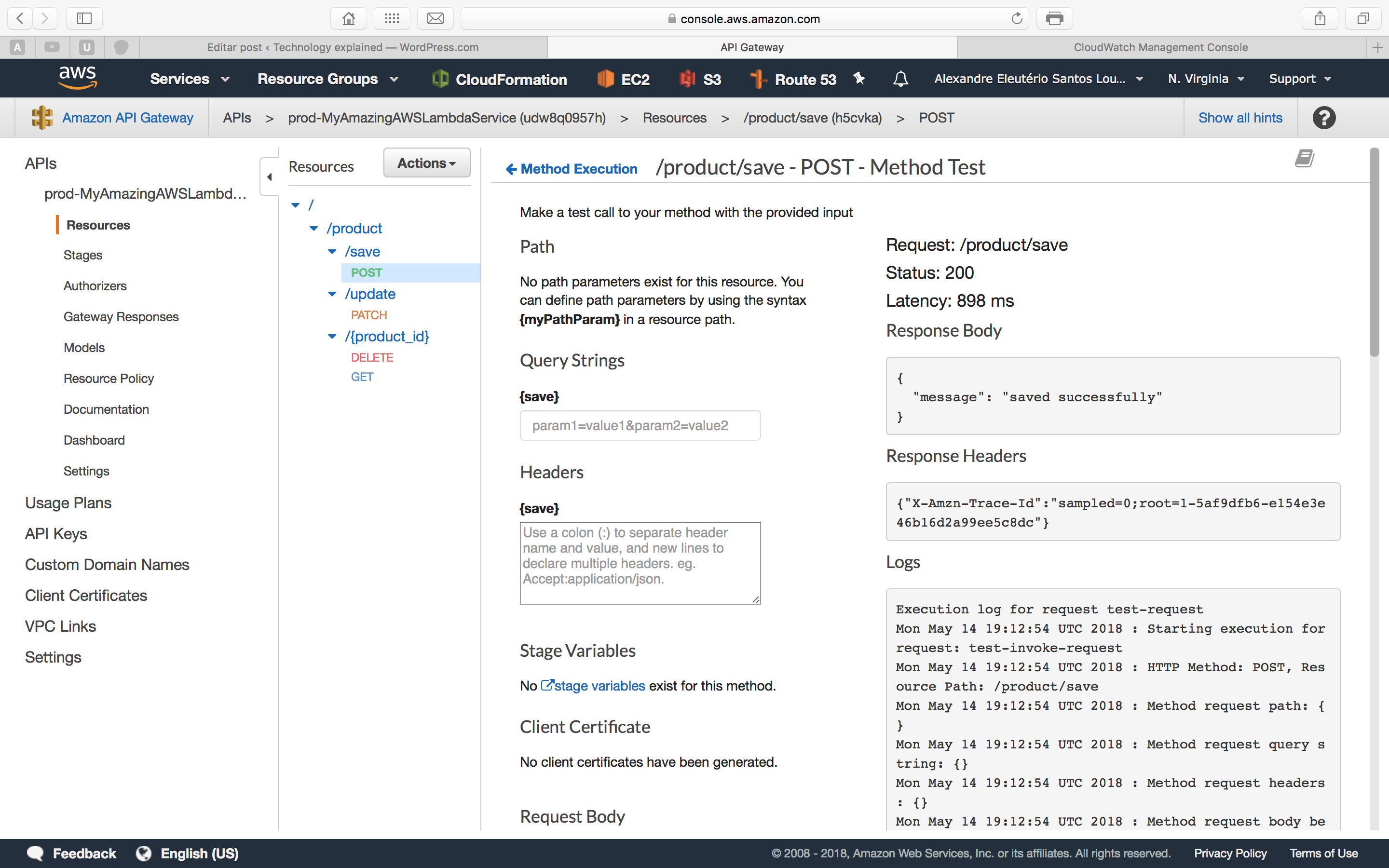
Provide a JSON like the one we used on our local test – but without the body atribute, moving the attributes to the root – and run it. The API will run successfully, as we can see on the picture bellow:

Screen Shot 2018-05-14 at 16.12.59

AWS Lambda running on API Gateway

Testing as a consumer

Finally, let’s test like a consumer would call our API. For that, we will use curl. We open a terminal and run:

curl -d '{ "id": "123", "name": "product 1", "description": "description 1", "price": "123.24" }' -H "Content-Type: application/json" -X POST https://<your_rest_api_id>.execute-api.us-east-1.amazonaws.com/prod/product/save

This will produce the following output:

{"message": "saved successfully"}%  

Proving our API is successfully deployed for consuming!

Adding security (API keys)

In our previous example, our API is exposed without security to the open world. Of course, on a real scenario, this is not good. It is possible to integrate lambda with several security solutions such as AWS Cognito, to improve security. In our lab, we will use basic API token authentication provided by AWS API gateway.

Let’s change our YAML as follows:

...omitted....
functions:
  bulk_insert:
    handler: bulk_handler.bulk_insert
    events:
      - s3:
          bucket: myamazingbuckets3
          event: s3:ObjectCreated:*
  save_product:
    handler: handler.save
    events:
      - http:
          path: product/save
          method: post
          private: true
  update_product:
    handler: handler.save
    events:
      - http:
          path: product/update
          method: patch
          private: true
  get_product:
    handler: handler.get
    events:
      - http:
          path: product/{product_id}
          method: get
          private: true
  delete_product:
    handler: handler.delete
    events:
      - http:
          path: product/{product_id}
          method: delete
          private: true
...omitted....

Now, after redeploying, if we try to make our previous curl, we will receive the following error:

{"message":"Forbidden"}% 

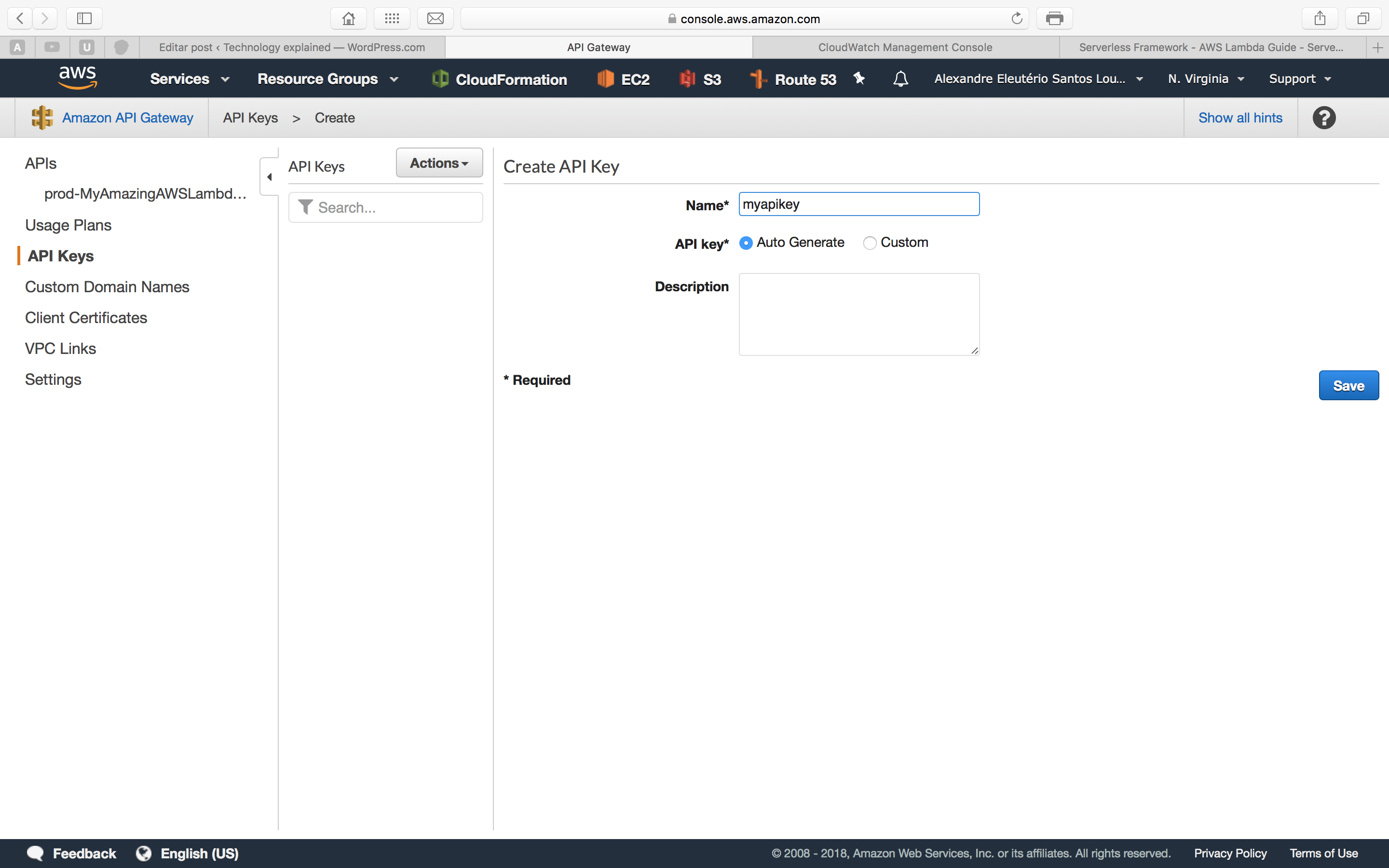
So, how do we call it now? First, we need to enter API Gateway and generate a API key, as bellow:

Screen Shot 2018-05-14 at 16.35.10

API gateway keys

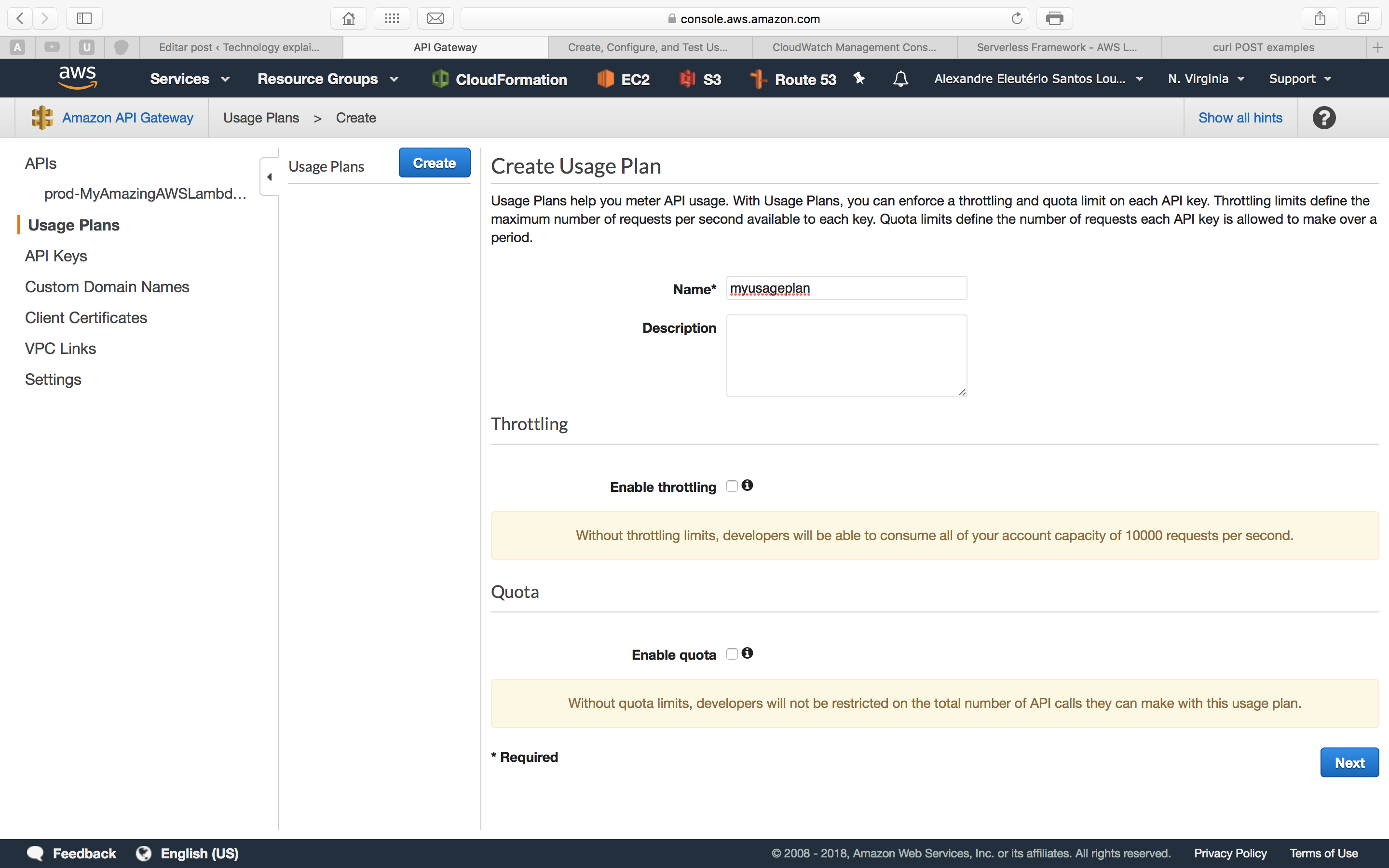
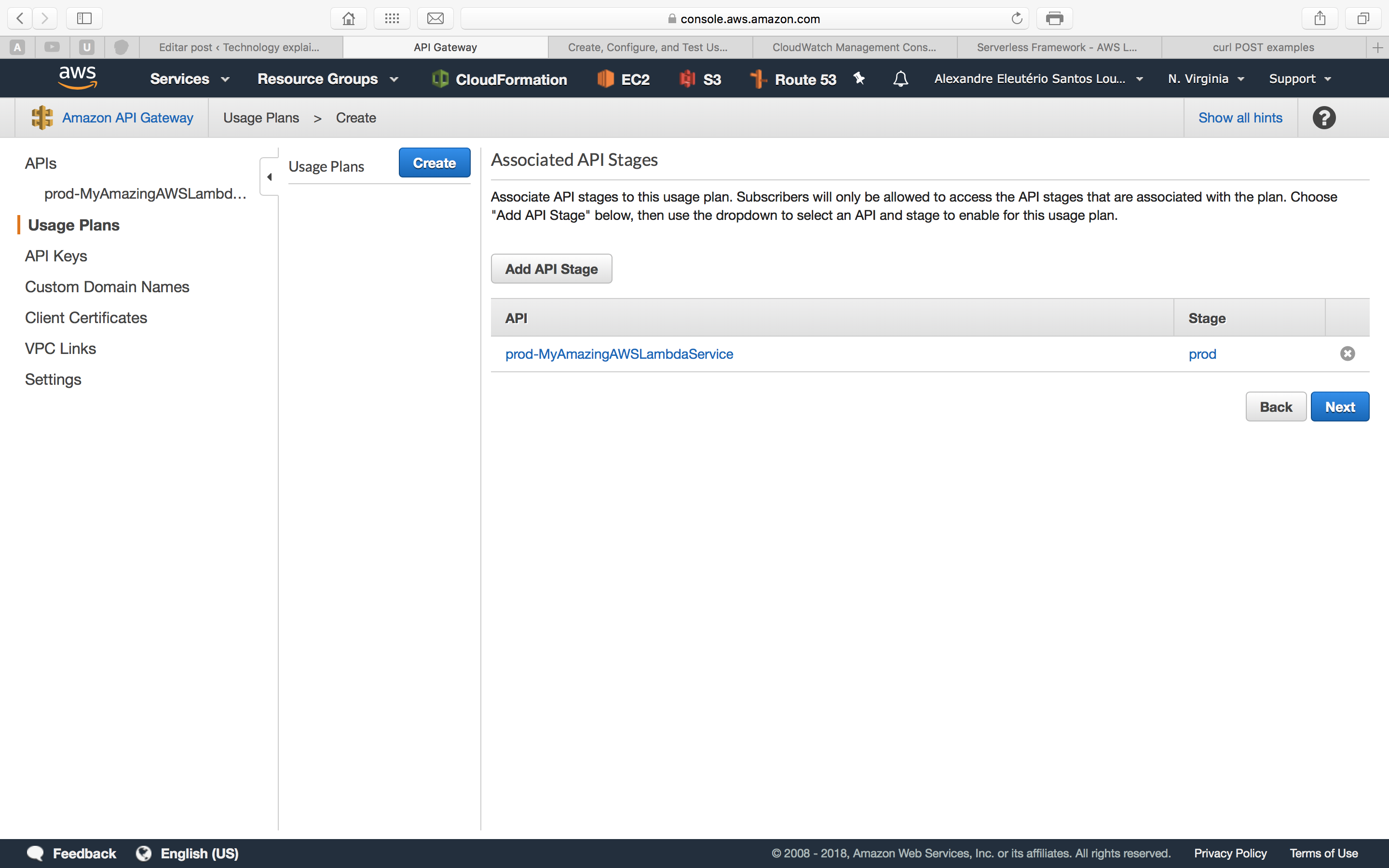
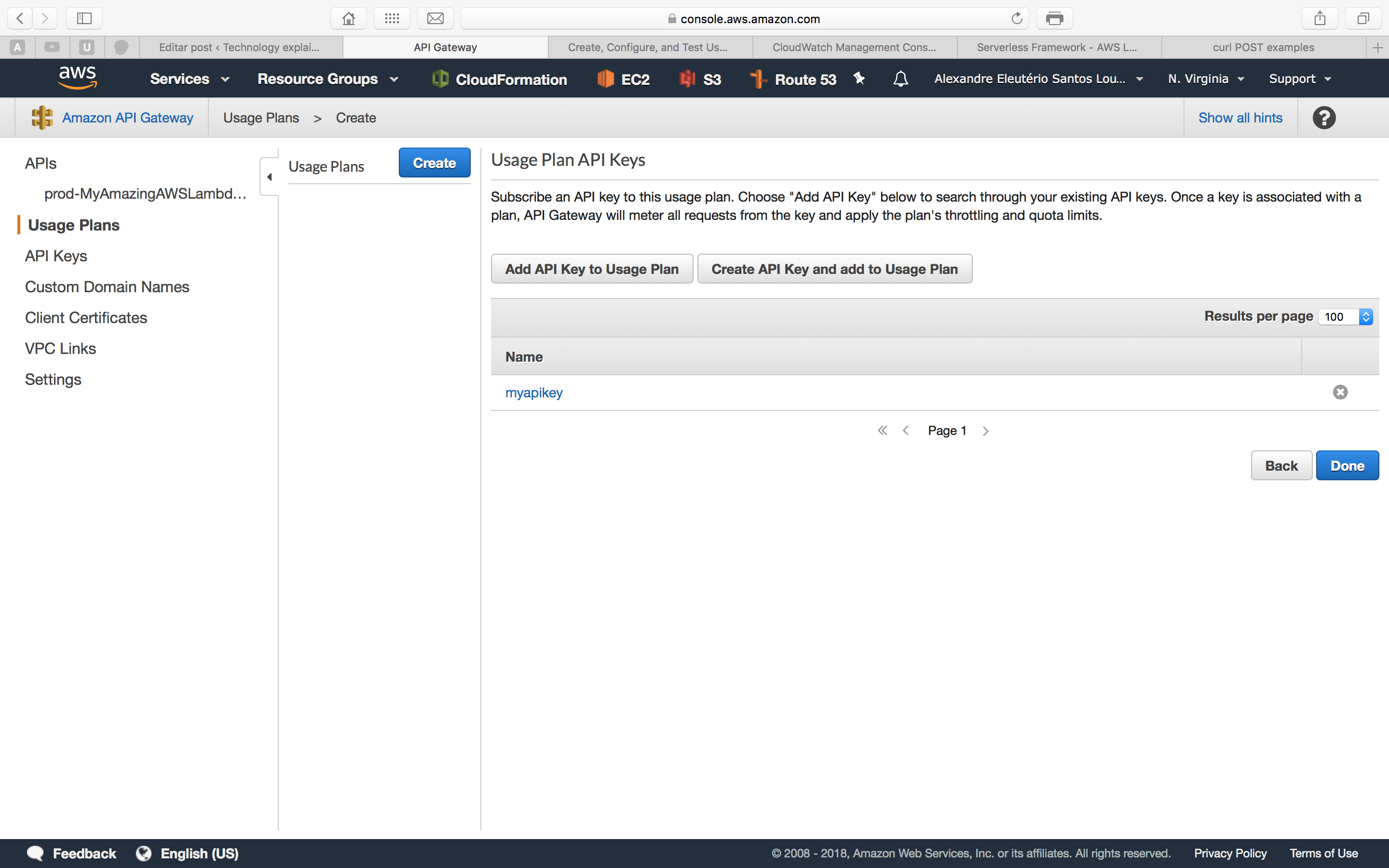
Secondly, we need to create a usage plan, to associate the key with our API. We do this by following the steps bellow inside API gateway interface:

usage1

usage2

usage3

With our key in hand, let’s try again our curl call, adding the header to pass our key:

curl -d '{ "id": "123", "name": "product 1", "description": "description 1", "price": "123.24" }' -H "Content-Type: application/json" -H "x-api-key: <your_API_key>" -X POST https://udw8q0957h.execute-api.us-east-1.amazonaws.com/prod/product/save

After the call, we will receive again the saved successfully response, proving our configuration was successful.

Lambda Logs (CloudWatch)

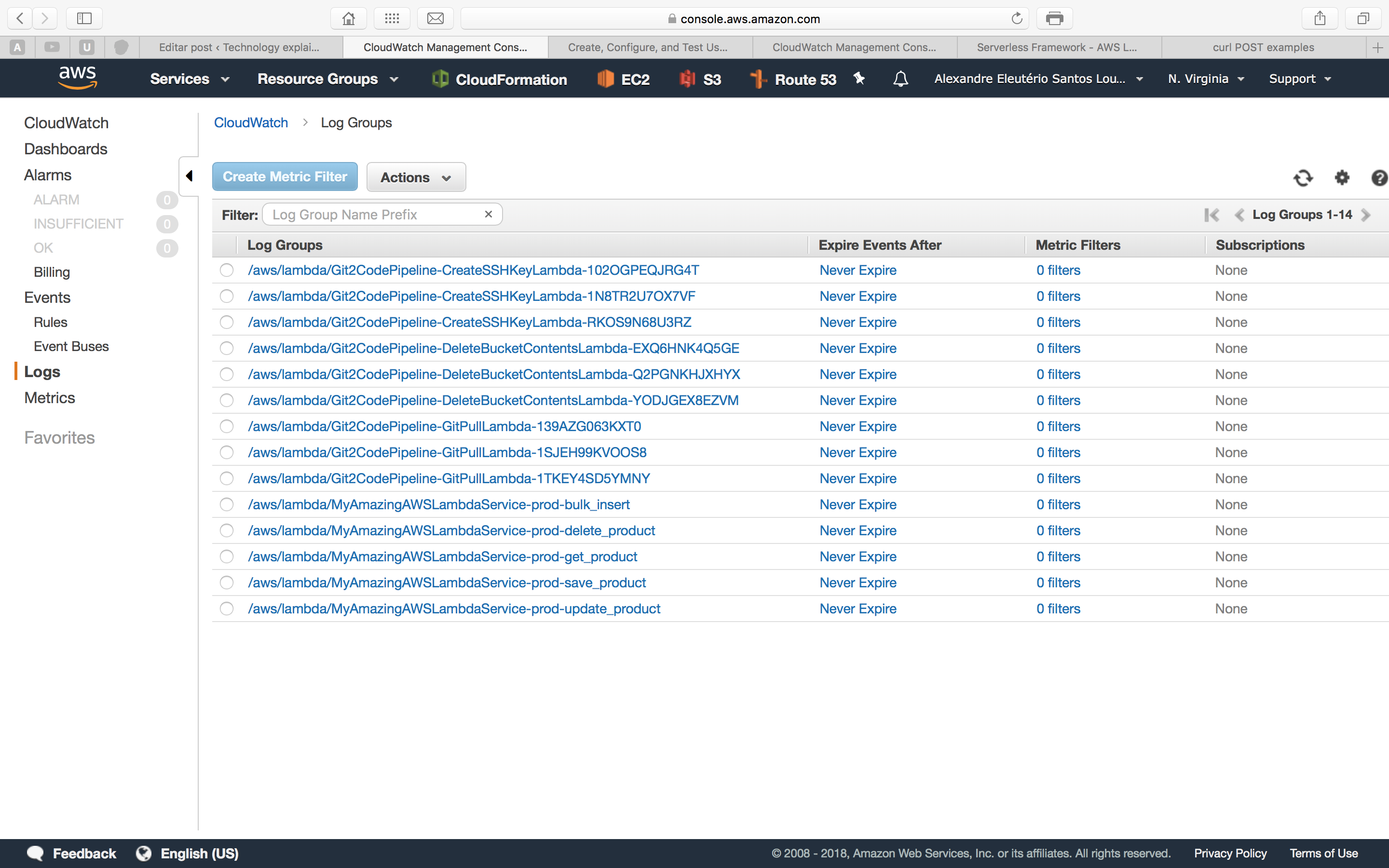
One last thing we will talk about is logging on AWS Lambda. The reader may noticed the use of Python’s print function in our code. On AWS Lambda, the prints done by Python are collected and organised inside another AWS service, called CloudWatch. We can access CloudWatch on the Amazon Console, as follows:

Screen Shot 2018-05-14 at 17.05.56

CloudWatch logs list

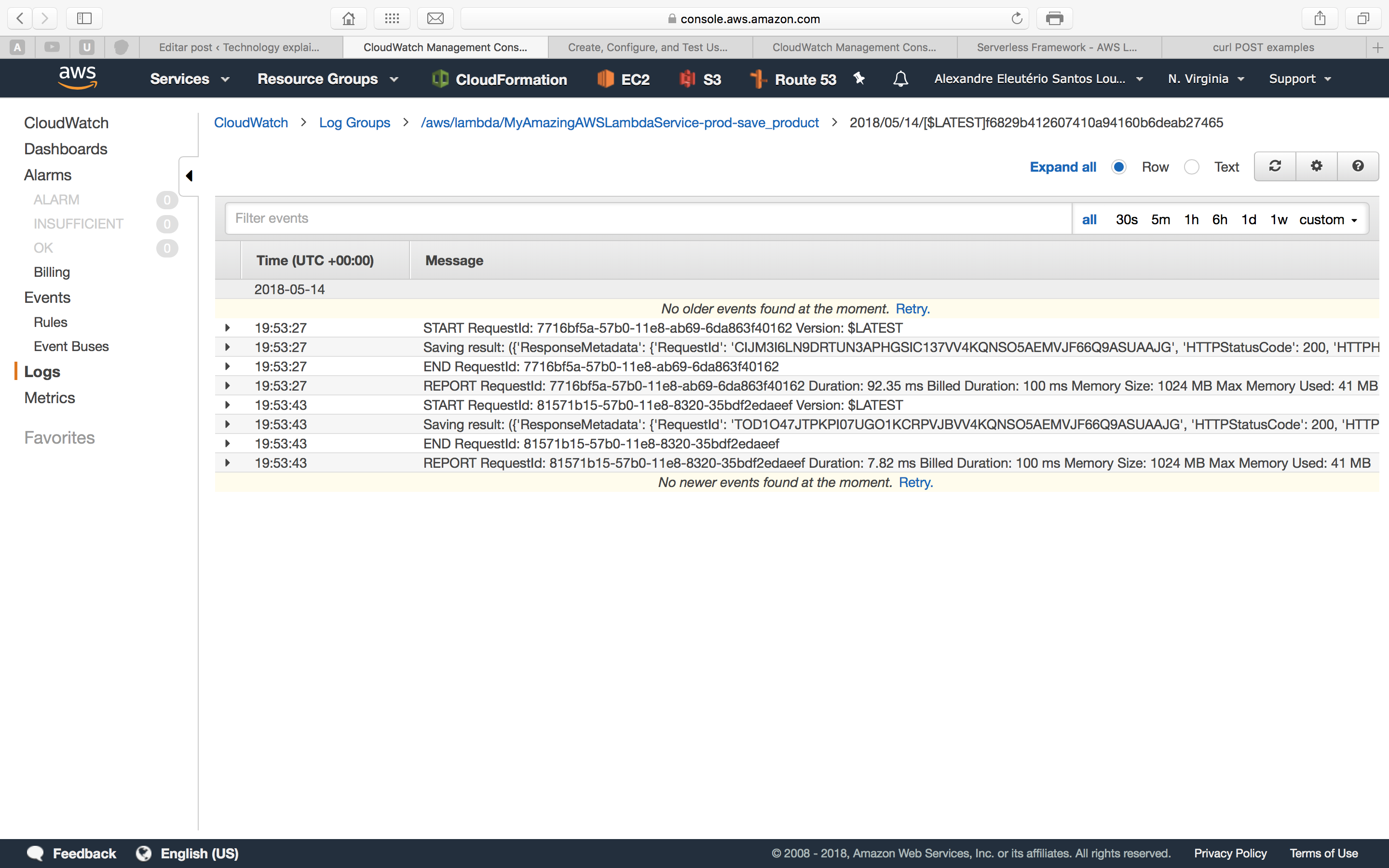
On the list above, we have each function separated as a link. If we drill down inside one of the links, we will see another link list of each execution made by that function. The print bellow is a example of one of our lambda’s executions:

Screen Shot 2018-05-14 at 17.06.11

Lambda execution log

Conclusion

And so we concluded our tour through AWS Lambda. With a simple and intuitive approach, it is a good option to deploy applications back-ends following the microservices paradigm. Thank you for following me on this post, until next time.

sources used on this lab

gRPC: Transporting massive data with Google’s serialization

Standard

Hello, dear readers! Welcome to my blog. On this post, we will delve on Google’s RPC style solution, gRPC and his serialization technique, protocol buffers. But what is gRPC and why it is so useful? Let’s find out!

The escalation of data transfer

When developing APIs, one of the most common ways of implementing the interface is with REST, using HTTP and JSON as transportation protocol and data schema, respectively. At first, there is no problem with this approach, and most of the time we won’t need to change from this kind of stack.

However, the problems begin when we get a API that has a big continuous volume of requests. On a situation like this, the amount of memory used on tasks like data transportation could begin to be a burden on the API, making calls more and more slow.

It is on this scenario that gRPC comes in handy. With a server-client model and a serialization technique from Google’s that allows us to shrink the amount of resources used on remote calls, we can scale more capacity per API instance, making our APIs more powerful.

This comes with a price, however: operations like debugging get more difficult on this scenario, because gRPC encapsulates the transportation logic on Google’s solution that utilizes binary serialization to do the transportation, so it is not as easily debuggable as a common plain REST/JSON application.

RPC

RPC is a acronym for Remote Procedure Call, a old model that was much used on the past. On that model, a client-server solution is developed, where the details of transport are abstracted from the developer, been responsible only for implementing the server and client inner logic. Famous RPC models were CORBA, RMI and DCOM.

Despite the name, gRPC only has the concept of a client-server application in common with the old solutions, that suffered from problems such as incompatible protocols between each other, alongside with not offering more advanced techniques from today, such as streams. Their solutions reminds more of the classical request-response model, from the first days of the web.

gRPC

So what is gRPC? This is Google’s approach to a client-server application that takes principles from the original RPC. However, gRPC allows us to use more sophisticated technologies such as HTTP2 and streams. gRPC is also designed as technology-agnostic, which means that can be used and interacted with server and clients from different programming languages.

With gRPC we develop gRPC services, which are generated based on a proto file we provide. Using the proto file, gRPC generates for us a server and a stub (some languages just call it a client) where we develop our server and client logic. The following diagram, taken from gRPC documentation, represents the client-server schematics:

grpc-1

As we can see on the diagram, gRPC supplies us with different types of languages to choose from to develop /expose our gRPC services. At the time of this post, gRPC supports Java, C++, Python, Objective-C, C#, a lite-runtime (Android Java), Ruby, JavaScript and Go – using the golang/protobuf library.

Protocol Buffers

Protocol buffer is gRPC’s serialization mechanism, which allows us to send compressed messages between our services, allowing us in turn to process more data with less network roundtrips between the parts.

According to Protocol Buffers documentation, Protocol Buffers messages offers the following advantages, if we compare to a traditional data schema such as XML:

  • are simpler
  • are 3 to 10 times smaller
  • are 20 to 100 times faster
  • are less ambiguous
  • generate data access classes that are easier to use programmatically

The Protocol Buffers framework supplies us with several code generators for different programming languages. If we want to develop on Java, for instance, we download Protocol Buffers for Java, then we model a proto file where we design the schema for the messages we will transport and then we generate code using the protoc compiler.

The compiler will generate code for us in order to use for serialize/deserialize data on the format we provided on the proto file.

Types of gRPC applications

gRPC applications can be written using 3 types of processing, as follows:

  • Unary RPCs: The simplest type and more close to classical RPC, consists of a client sending one message to a server, that makes some processing and returns one message as response;
  • Server streams: On this type, the client sends one message for the server, but receives a stream of messages from the server. The client keeps reading the messages from the server until there is no more messages to read;
  • Client streams: This type is the opposite of the server streams one, where on this case is the client who sends a stream of messages to make a request for the server and them waits for the server to produce a single response for the series of request messages provided;
  • Bidirecional stream RPC: This is the more complex but also more dynamic of all the types. On this model, we have both client and server reading and writing on streams, which are stablished between the server and client. This streams are independent from each other, which means that could be possible for a client to send a message to a server by one stream and vice-versa at the same time. This allows us to make multiple processing scenarios, such as clients sending all the messages before the responses, clients and servers “ping-poinging” messages between each other and so on.

Synch vs. Asynch

As the name implies, synchronous processing occurs when we have a communication where the client thread is blocked when a message is sent and is been processed.

Asynchronous processing occurs when we have this communication with the processing been done by other threads, making the whole process been non-blocking.

On gRPC we have both styles of processing supported, so it is up to the developer to use the better approach for his solutions.

Deadlines & timeouts

A deadline stipulates how much time a gRPC client will wait on a RPC call to return before assuming a problem has happened. On the server’s side, the gRPC services can query this time, verifying how much time it has left.

If a response couldn’t be received before the deadline is met, a DEADLINE_EXCEEDED error is thrown and the RPC call is terminated.

RPC termination

On gRPC, both clients and servers decide if a RPC call is finished or not locally and independently. This means that a server can decide to end a call before a client has transmitted all their messages and a client can decide to end a call before a server has transmitted one or all of their responses.

This point is important to remember specially when working with streams, in a sense that logic must pay attention to possible RPC terminations when treating sequences of messages.

Channels

Channels are the way a client stub can connect with gRPC services on a given host and port. Channels can be configured specific by client, such as turning message compression on and off for a specific client.

Tutorial

On this lab we will implement a gRPC service, test by making some calls and experimenting a little with streams. It will get us a feel and a head start on how to develop solutions using gRPC.

Set up

For this lab we will use Python 3.4. For the coding, I like to use Pycharm, is a really good IDE for Python that the reader can find it here.

For containerization I used Docker 17.03.1-ce. I also recommend you create a virtual environment for the lab, using virtualenv.

Let’s create a new virtual environment for our lab. On a terminal, let’s type the following:

virtualenv --python=python3.4 -v grpc-handson

After running the command, we will see that a folder was created. That is our virtual environment.

To install gRPC, first we enable the virtual environment on our terminal session. we do this by typing the following, assuming we are inside the virtual environment’s folder:

source ./bin/activate

This will change our terminal, that will now show a prefix with our env’s name, showing it is enabled.

Now on to the installation. First, let’s install gRPC with pip by typing:

python -m pip install grpcio

We also need to install gRPC tools. This tools are responsible for installing the protoc compiler which we will use later on the lab. We install it by typing:

python -m pip install grpcio-tools

That’s it! Now that we have our environment, let’s start with the development.

Creating the gRPC Service definition

First, we create a gRPC Service definition. We create this by coding a proto file, which will have the following:

syntax = "proto3";

option java_multiple_files = true;
option java_package = "com.alexandreesl.handson";
option java_outer_classname = "MyServiceProto";
option objc_class_prefix = "HLW";

package handson;


service MyService {

    rpc MyMethod1 (MyRequest) returns (MyResponse) {
    }

    rpc MyMethod2 (MyRequest) returns (MyResponse) {
    }

}

message MyRequest {
    string name = 1;
    int32 code = 2;
}

message MyResponse {
    string name = 1;
    string sex = 2;
    int32 code = 3;
}

This file is based on examples from the official gRPC repo – you can find the link at the end of this post. Alongside setting some properties such as the service’s package, we defined a service with 2 methods and 2 schemas for the protocol buffers, used by the methods.

With the proto file created (let’s save it as my_service.proto), it is time for us to use gRPC to create the code.

Generating gRPC code

To generate the code, let’s run the following command, with our virtual environment enabled and on the same folder of the proto file:

 python -m grpc_tools.protoc -I. --python_out=. --grpc_python_out=. my_service.proto

After running the command, we will see 2 files created, as we can see bellow:

grpc-2

PS: The source code for our lab can be found at the end of the post.

Building the server

Now that we have our code generated, let’s begin our work. Let’s begin by creating the server side.

The code from our command is auto-generated, so is not a good practice to code on them. Instead, for the server we will extend the servicer class, so we implement our own gRPC service without editing generated code.

Let’s create a file called gRPC_server.py and add the following code:

import time
from concurrent import futures

import grpc

import my_service_pb2 as my_service_pb2
import my_service_pb2_grpc as my_service_pb2_grpc

_ONE_DAY_IN_SECONDS = 60 * 60 * 24


class gRPCServer(my_service_pb2_grpc.MyServiceServicer):
    def __init__(self):
        print('initialization')

    def MyMethod1(self, request, context):
        print(request.name)
        print(request.code)
        return my_service_pb2.MyResponse(name=request.name, sex='M', code=123)

    def MyMethod2(self, request, context):
        print(request.name)
        print(request.code * 12)
        return my_service_pb2.MyResponse(name=request.name, sex='F', code=1234)


def serve():
    server = grpc.server(futures.ThreadPoolExecutor(max_workers=10))
    my_service_pb2_grpc.add_MyServiceServicer_to_server(
        gRPCServer(), server)
    server.add_insecure_port('[::]:50051')
    server.start()
    try:
        while True:
            time.sleep(_ONE_DAY_IN_SECONDS)
    except KeyboardInterrupt:
        server.stop(0)


if __name__ == '__main__':
    serve()

On the code above we created a class that it is a subclass of the class generated by the protoc compiler. We can see that in order to get the request’s parameters, all we have to do is navigate from the request object. To generate a response, all we have to do is instantiate the appropriate class.

We also coded the serve method, where we created a server with 10 worker threads to serve requests and initialized with the class we created to implement the server-side.

To start the server, all we have to do is run:

python gRPC_server.py

And from now on, unless we kill the process, it will be answering on the 50051 port.

Now that we created the server, let’s begin the work on the client.

Constructing the client

In order to consume the server, we need to create a client for our stub. Let’s do this.

Let’s create a file called gRPC_client.py and code the following:

import grpc

import my_service_pb2 as my_service_pb2
import my_service_pb2_grpc as my_service_pb2_grpc


class gRPCClient():
    def __init__(self):
        channel = grpc.insecure_channel('localhost:50051')
        self.stub = my_service_pb2_grpc.MyServiceStub(channel)

    def method1(self, name, code):
        print('method 1')
        return self.stub.MyMethod1(my_service_pb2.MyRequest(name=name, code=code))

    def method2(self, name, code):
        print('method 2')
        return self.stub.MyMethod2(my_service_pb2.MyRequest(name=name, code=code))


def main():
    print('main')

    client = gRPCClient()

    print(client.method1('Alexandre', 123))
    print(client.method2('Maria', 123))


if __name__ == '__main__':
    main()

As we can see, is really simple to create a client: we just needed to establish a channel and instantiate a stub with it. Once instantiated, we just need to call the methods on the stub as we normally would do with any Pythonic object.

Now that we have the coding done, let’s test some calls!

Making the call

To test a call, let’s first start the server. With a terminal session opened and our virtual environment enabled, let’s start the server, by entering the command we talked about earlier:

python gRPC_server.py

And on another terminal, started like the previous one, we call the client by typing:

python gRPC_client.py

After firing up the client, we will see that the client produced the following output:

main
method 1
name: "Alexandre"
sex: "M"
code: 123

method 2
name: "Maria"
sex: "F"
code: 1234

And on the server terminal, we can see the following output:

initialization
Alexandre
123
Maria
1476

Success! We have implemented our first gRPC service. Now, let’s wrap it up our lab by seeing the last topics: using streams and containerization.

Using streams

To learn about streams, let’s add a new method, that it will be a bidirectional streaming.

First, let’s change the proto file, creating a new method, like the following:

syntax = "proto3";

option java_multiple_files = true;
option java_package = "com.alexandreesl.handson";
option java_outer_classname = "MyServiceProto";
option objc_class_prefix = "HLW";

package handson;


service MyService {

    rpc MyMethod1 (MyRequest) returns (MyResponse) {
    }

    rpc MyMethod2 (MyRequest) returns (MyResponse) {
    }

    rpc MyMethod3 (stream MyRequest) returns (stream MyResponse) {
    }

}

message MyRequest {
    string name = 1;
    int32 code = 2;
}

message MyResponse {
    string name = 1;
    string sex = 2;
    int32 code = 3;
}

That’s right, this is everything we need to do. After generating the files from the proto again, we need to modify our server to reflect the changes. We do this modifying the file as follows:

import time
from concurrent import futures

import grpc

import my_service_pb2 as my_service_pb2
import my_service_pb2_grpc as my_service_pb2_grpc

_ONE_DAY_IN_SECONDS = 60 * 60 * 24


class gRPCServer(my_service_pb2_grpc.MyServiceServicer):
    def __init__(self):
        print('initialization')

    def MyMethod1(self, request, context):
        print(request.name)
        print(request.code)
        return my_service_pb2.MyResponse(name=request.name, sex='M', code=123)

    def MyMethod2(self, request, context):
        print(request.name)
        print(request.code * 12)
        return my_service_pb2.MyResponse(name=request.name, sex='F', code=1234)

    def MyMethod3(self, request_iterator, context):
        for req in request_iterator:
            print(req.name)
            print(req.code)

            yield my_service_pb2.MyResponse(name=req.name, sex='M', code=123)


def serve():
    server = grpc.server(futures.ThreadPoolExecutor(max_workers=10))
    my_service_pb2_grpc.add_MyServiceServicer_to_server(
        gRPCServer(), server)
    server.add_insecure_port('[::]:50051')
    server.start()
    try:
        while True:
            time.sleep(_ONE_DAY_IN_SECONDS)
    except KeyboardInterrupt:
        server.stop(0)


if __name__ == '__main__':
    serve()

As we can see, the new MyMethod3 receives a iterator of request messages and also send a series of responses as well, by using the yield keyword, which teaches Python to create a generator from our function. We can read more about the yield keyword on this link.

Now we modify the client. We also use a generator with the yield keyword, but on this case, we make the generator create each item at random time intervals, to simulate a real life application with data entering at intervals. The response stream is read with a simple for loop, that it will continue to run until there is no data to output:

import random
import time

import grpc

import my_service_pb2 as my_service_pb2
import my_service_pb2_grpc as my_service_pb2_grpc


class gRPCClient():
    def __init__(self):
        channel = grpc.insecure_channel('localhost:50051')
        self.stub = my_service_pb2_grpc.MyServiceStub(channel)

    def method1(self, name, code):
        print('method 1')
        return self.stub.MyMethod1(my_service_pb2.MyRequest(name=name, code=code))

    def method2(self, name, code):
        print('method 2')
        return self.stub.MyMethod2(my_service_pb2.MyRequest(name=name, code=code))

    def method3(self, req):
        print('method 3')
        return self.stub.MyMethod3(req)


def generateRequests():
    reqs = [my_service_pb2.MyRequest(name='Alexandre', code=123), my_service_pb2.MyRequest(name='Maria', code=123),
            my_service_pb2.MyRequest(name='Eleuterio', code=123), my_service_pb2.MyRequest(name='Lucebiane', code=123),
            my_service_pb2.MyRequest(name='Ana Carolina', code=123)]

    for req in reqs:
        yield req
        time.sleep(random.uniform(2, 4))


def main():
    print('main')

    client = gRPCClient()

    print(client.method1('Alexandre', 123))
    print(client.method2('Maria', 123))

    res = client.method3(generateRequests())

    for re in res:
        print(re)


if __name__ == '__main__':
    main()

If we restart the server and run the new client, we will receive the following output:

main
method 1
name: "Alexandre"
sex: "M"
code: 123

method 2
name: "Maria"
sex: "F"
code: 1234

method 3
name: "Alexandre"
sex: "M"
code: 123

name: "Maria"
sex: "M"
code: 123

name: "Eleuterio"
sex: "M"
code: 123

name: "Lucebiane"
sex: "M"
code: 123

name: "Ana Carolina"
sex: "M"
code: 123


Process finished with exit code 0

Please note that all this calls were made using the synchronous approach, so the client thread is locked each time a call is made. If we wanted to call the server asynchronously, we would use Python’s futures to do so. I suggest the reader to explore this option as a post-lab exercise.

Running gRPC on Docker

Finally, we would want to run our gRPC server on a Docker container. That is a very simple task to do.

First, let’s create a Dockerfile like the following:

FROM grpc/python:1.0-onbuild
CMD [ "python", "./gRPC_server.py" ]

Yup, that’s all! This is a official image from gRPC which makes a pip install on a requirements file and adds the current directory on the container, so we don’t need to add the files ourselves. Let’s build the container:

docker build -t alexandreesl/grpc-lab .

And finally, launch it with our image:

docker run --rm -p 50051:50051 alexandreesl/grpc-lab

If we run again the client, we will see that the server was successfully started. If the reader want, you can also start the container directly by a image I created on Docker Hub for this lab, already built with the source code from our lab. To pull the image, just type the following:

docker pull alexandreesl/grpc-lab

Conclusion

And so we concludes another journey on our great world of technology. I hope I could help the reader to understand what is gRPC and how it can be used to improve our capacity on high demanding API scenarios. Thank you for following me on this post, see you next time.

Continue reading

Social media and sentimental analysis: knowing your clients

Standard

Hi, dear readers! Welcome to another post of my blog. On this post, we will talk about social media and sentimental analysis, seeing how she is revolutionizing the way companies are targeting their clients.

Social media

Undoubtedly, there is no doubt about the importance of social media on the modern life. As a example of the power that social media has today, we can say about the recent protests on Brazil against the president and her government’s corruption, which leaded thousands of people to the streets across the country, all organized by Facebook!

Today, social media has a very strong power of influence in the masses, reflecting the tastes and opinions of thousands of people. All of this gigantic amount of information is a gold mine to the companies, just waiting to be tapped.

Just imagine that you are the director of a area responsible for developing new products for a gaming company. Now, imagine if you could use the social medias to analyse the reactions of the players to the trailers and news your company releases on the internet. That information could be crucial to discover, for example, that your brand new shinning multiplayer mode is angering your audience, because of a new weapon your development team thought it would be awesome, but to the players feel extreme unbalanced.

Now imagine that you are responsible for the public relations of a oil company. Imagine that a ecological NGO start launching a “attack” at your company’s image on the social networks, saying that your refinery’s locations are bad for the ecosystems, despise your company’s efforts on reforestation. Without a proper tool to quickly analyse the data flowing on the social networks, it may be too late to revert the damage on the company’s image, with hundreds of people “flagellating” your company on the Internet. This may not seen important at first, until you realize that some companies you provide your fuel start buying less from you, because they are worried with their own image on the market, by associating themselves with you. More and more, the companies are realizing the importance of how positive is the image of their brands on the eyes of their customers, a term also known as “brand health”.

This “brand’s health” metric is very important on the marketing area, already influencing several companies to enter on the social media monitoring field, providing partial or even complete solutions to a brand’s health monitoring tool, many times on a SAAS model. Examples of companies that provide this kind of service are Datasift, Mention and Gnip.

Sentimental analysis

A very important metric on the brand’s health monitoring is the sentimental analysis. In a simple statement, sentimental analysis is exactly what the name says: is the analysis of the “sentiment” the author of a given text is feeling about the subject of a given text he wrote about, been classified as negative, neutral or positive. Of course, it is very clear how important this metric is for most of the analysis, since is the key to understand the quality of your brand’s image on the perspective of your public.

But how does this work? How is it possible to analyse someone’s sentiments? This is a field still on progress, but there’s already some techniques been applied for this task, such as keywords scoring (presence of words such as curses, for example), polarities scores to balance the percentage a sentence is positive, neutral and negative in order to analyse the overall sentiment of the text and so on. At the end of this post, there is a article from Columbia’s University about sentimental analysis of Twitter posts, that the reader can use as a starting point to deepen on the details of the techniques involved on the subject.

Big Data

As the reader may have already guessed, we are talking about a big volume of data, that grows very fast, is unstructured, has mixed veracity – since we can have both valuable and non-valuable information among our dataset – and has a enormous potential of value for our analysis, since are the opinions and tastes – or the “soul” – of our costumers. As we have see previously on my first post about Big Data, this data qualifies on the famous “Vs” that are always talked about when we heard about Big Data. Indeed, generally speaking, most of the tools used on this kind of solution can be classified as Big Data’s solutions, since they are processing amounts of data with this characteristics, heavily using distributed systems concepts. Just remember: It is not always that because it uses social media, that it is Big Data!

A practical exercise

Now, let’s see a simple practical exercise, just to see a little of the things we talked about working on practice. On this hands-on, we will make a simple Python script. This Python script will connect to Twitter, to the public feed to be more precise, filtering everything with the keyword “coca-cola”. Then, it will make a sentimental analysis on all the tweets provided by the feed, using a library called TextBlob that provides us with Natural Language Processing (NLP) capabilities and finally it will print all the results on the console. So, without further delay, let’s begin!

Installation

On this lab, we will use Python 3. I am using Ubuntu 15.04, so Python is already installed by default. If the reader is using a different OS, you can install Python 3 by following this link.

We will also use virtualenv. Virtualenv is a tool used to create independent Python’s environments on our development machine. This is useful to isolate the dependencies and versions of libraries between Python applications, eliminating the problems of installing the libraries on the global Python’s installation of the OS. To install Virtualenv, please refer to this link.

Set up

To start our set up, first, let’s create a virtual environment. To do this, we open a terminal and type:

virtualenv –python=python3.4 twitterhandson

This will create a folder called twitterhandson, where we can see that a complete Python environment was created, including executables such as pip and python itself. To use Virtualenv, enter the twitterhandson folder and input:

source bin/activate

After entering the command, we can see that our command prompt got a prefix with the name of our environment, as we can see on the screen bellow:

 That’s all we need to do in order to use Virtualenv. If we want to close, just type exit on the console.

Using a IDE

On this lab, I am using Pycharm, a powerfull Python’s IDE developed by Jetbrains. The IDE is not required for our lab, since any text editor will suffice, but I recommend the reader to experiment the IDE, I am sure you will like it!

Downloading module dependencies

On Python, we have modules. A module is a python file where we can have definitions of variables, functions and classes, that we can reuse later on more complex scripts. For our lab, we will use Pip to download the dependencies. Pip is a tool recommended by Python used to manage dependencies, something like what Maven do for us in the Java World. To use it, first, we create on our virtualenv root folder a file called requirements.txt and put the following inside:

httplib2
simplejson
six
tweepy
textblob

The dependencies above are necessary to use the NLP library and use the Twitter API. To make Pip download the dependencies, first we activate the virtual environment we created previously and then, on the same folder of our txt file, we input:

pip3 install -r requirements.txt

After running the command above, the modules should be downloaded and enabled on our virtualenv environment.

Using sentimental analysis on other languages

On this post, we are using TextBlob, which sadly has only english as supported language for sentimental analysis – he can translate the text to other languages using Google translator, but of course is not the same as a analyser specially designed to process the language. If the reader wants a alternative to process sentimental analysis on other languages as well, such as Portuguese for example, is there a REST API from a company called BIText – which provides the sentimental analysis solution for Salesforce’s Marketing products – that I have tested and provides very good results. The following link points for the company’s API page:

BIText

Creating the Access Token

Before we start our code, there is one last thing we need to do: We need to create a access token, in order to authenticate our calls on Twitter to obtain the data from the public feed. In order to do this, first, we need to create a Twitter account, on Twitter.com. With a account created, we create a access token, following this tutorial from Twitter.

Developing the script

Well, now that all the preparations were made, let’s finally code! First, we will create a file called config.py. On that file, we will create all the constants we will use on our script:

accesstoken='<access token>’
accesstokensecret='<access token secret>’
consumerkey='<consumer key>’
consumerkeysecret='<consumer key secret>’

And finally, we will create a file called twitter.py, where we will code our Python script, as the following:

from config import *
from textblob import TextBlob
from nltk import downloader
import tweepy


class MyStreamListener(tweepy.StreamListener):
    def on_status(self, status):
        print('A TWEET!')
        print(status.text)
        print('AND THE SENTIMENT PER SENTENCE IS:')
        blob = TextBlob(status.text)
        for sentence in blob.sentences:
            print(sentence.sentiment.polarity)


auth = tweepy.OAuthHandler(consumerkey, consumerkeysecret)
auth.set_access_token(accesstoken, accesstokensecret)

downloader.download('punkt')

myStreamListener = MyStreamListener()
myStream = tweepy.Stream(auth=auth, listener=myStreamListener)

stream = tweepy.Stream(auth, myStreamListener)
stream.filter(track=['coca cola'], languages=['en'])

On the first time we run the example, the reader may notice that the script will download some files. That is because we have to download the resources for the NLTK library, a dependency from TextBlob, which is the real NLP processor that TextBlob uses under the hood. Beginning our explanation of the script, we can see that we are creating a OAuth handler, which will be responsible for managing our authentication with Twitter. Then, we instantiate a listener, which we defined at the beginning of our script and pass him as one of the args for the creation of our stream and then we start the stream, filtering to return just tweets with the words “coca cola” and on the english language. According to Twitter documentation, it is advised to process the tweets asynchronously, because if we process them synchronous, we can lose a tweet while we are still processing the predecessor. That is why tweepy requires us to implement a listener, so he can collect the tweets for us and order them to be processed on our listener implementation.

On our listener, we simply print the tweet, use the TextBlob library to make the sentimental analysis and finally we print the results, which are calculated sentence by sentence. We can see the results from a run bellow:

A TWEET!
RT @GeorgeLudwigBiz: Coca-Cola sees a new opportunity in bottling billion-dollar #startups http://t.co/nZXpFRwQOe
AND THE SENTIMENT PER SENTENCE IS:
0.13636363636363635
A TWEET!
RT @momosdonuts: I told y’all I change things up often! Delicious, fluffy, powdered and caramel drizzled coca-cola cake. #momosdonuts http:…
AND THE SENTIMENT PER SENTENCE IS:
0.0
0.4
0.0
A TWEET!
vanilla coca-cola master race

tho i have yet to find a place where they sell imports of the british version
AND THE SENTIMENT PER SENTENCE IS:
0.0
A TWEET!
RT @larrywhoran: CLOUDS WAS USED IN THE COCA COLA COMMERCIAL AND NO CONTROL BEING PLAYED IN RADIOS AND THEYRE NOT EVEN SINGLES YAS SLAY
AND THE SENTIMENT PER SENTENCE IS:
0.0
A TWEET!
RT @bromleyfthood: so sei os covers e coca cola dsanvn I vote for @OTYOfficial for the @RedCarpetBiz Rising Star Award 2015 #RCBAwards
AND THE SENTIMENT PER SENTENCE IS:
0.0
A TWEET!
RT @LiPSMACKER_UK: Today, we’re totally craving Coca-Cola! http://t.co/V140SADKok
AND THE SENTIMENT PER SENTENCE IS:
0.0
0.0
A TWEET!
RT @woodstammie8: Early production of Coca Cola contained trace amounts of coca leaves, which, when processed, render cocaine.
AND THE SENTIMENT PER SENTENCE IS:
0.1
A TWEET!
RT @designtaxi: Coca-Cola creates braille cans for the blind http://t.co/cCSvJLv7O0 http://t.co/UA0PGoheO2
AND THE SENTIMENT PER SENTENCE IS:
-0.5
A TWEET!
Instrus, weed, Coca-Cola y snacks.
AND THE SENTIMENT PER SENTENCE IS:
0.0
A TWEET!
RT @larrywhoran: CLOUDS WAS USED IN THE COCA COLA COMMERCIAL AND NO CONTROL BEING PLAYED IN RADIOS AND THEYRE NOT EVEN SINGLES YAS SLAY
AND THE SENTIMENT PER SENTENCE IS:
0.0
A TWEET!
1 Korean Coca-Cola Bottle in GREAT CONDITION Coke Bottle Coke Coca Cola http://t.co/IHhxoJ7aMz
AND THE SENTIMENT PER SENTENCE IS:
0.8
A TWEET!
#Coca-Cola#I#♥#YOU#
Fanny#day#Good… https://t.co/5PU7L4QchC
AND THE SENTIMENT PER SENTENCE IS:
0.0
A TWEET!
Entry List for Coca-Cola 600 #NASCAR Sprint Cup Series race at Charlotte Motor Speedway is posted, 48 drivers entered http://t.co/UYXPdOP9te
AND THE SENTIMENT PER SENTENCE IS:
0.0
A TWEET!
@diannaeanderson + walk, get some Coca-Cola, and spend some time reading. Lord knows I need to de-stress.
AND THE SENTIMENT PER SENTENCE IS:
0.0
0.0
A TWEET!
Apply now to work for Coca-Cola #jobs http://t.co/ReFQUIuNeK http://t.co/KVTvyr1e6T
AND THE SENTIMENT PER SENTENCE IS:
0.0
A TWEET!
RT @jayski: Entry List for Coca-Cola 600 #NASCAR Sprint Cup Series race at Charlotte Motor Speedway is posted, 48 drivers entered http://t.…
AND THE SENTIMENT PER SENTENCE IS:
0.0
A TWEET!
RT @SeyiLawComedy: When you enter a fast food restaurant and see their bottle of Coca-Cola drink (35cl) is N800; You just exit like » http:…
AND THE SENTIMENT PER SENTENCE IS:
0.2
A TWEET!
Entry List for Coca-Cola 600 #NASCAR Sprint Cup Series race at @CLTMotorSpdwy is posted, 48 drivers entered http://t.co/c2wJAUzIeQ
AND THE SENTIMENT PER SENTENCE IS:
0.0

The reader may notice that the sentimental analysis of the tweets could be more or less inaccurate to what the sentiment of the author really was, using our “human analysis”. Indeed, as we have talked before, this field is still improving, so it will take some more time for us to rely 100% on this kind of analysis

Conclusion

As we can see, it was pretty simple to construct a program that connects to Twitter, runs a sentimental analysis and print the results. Despise some current issues with the accuracy of the sentimental analysis, as we talked about previously, this kind of analysis are already a really powerfull tool to explore, that companies can use to improve their perception of how the world around them realize their existences. Thank you for following me on another post, until next time.

Continue reading