Scala: using functional programming on the JVM – part 1

Standard

Hello, dear readers! Welcome to my blog. On this post, we will talk about Scala, a powerful language that combines the object paradigm with the functional paradigm. Scala is used on several modern solutions, such as Akka.

Scala is a JVM-based language, which means that Scala programs are transformed in Java bytecode and them are run with the JVM. This guarantees that the robust JVM is used on the background, leaving us to use the rich Scala language for programming.

This is a 3-part series focused on learning the basis of the language. On this first part we will set up our environment and learn about the Scala type system, vars, vals, classes, case classes, objects, companion objects and pattern matching. On the other parts, we will learn other features such as traits, optionals, error handling, inheritance on Scala, collection-related operations such as map, folder, reduce and more. Please don’t miss out!

So, without further delay, let’s begin our journey on the Scala language!

Setting up

In order to prepare our lab environment, first we need to install Scala. You can download the last version of Scala – this lab is using Scala 2.12.1 – on this link. If you are using Mac and homebrew, the installation is as simple as running the following command:

brew install scala

In order to test the installation, run the command:

scala -version

This will print something like the following:

Scala code runner version 2.12.1 -- Copyright 2002-2016, LAMP/EPFL and Lightbend, Inc.

REPL

The REPL is a interactive shell for running Scala programs. The name stands for the sequence of operations it realizes: Read-Eval-Print-Loop. It reads information inputed by the user, evaluates the instruction, prints the result and start over (loops). In order to use the Scala REPL, all we have to do is type scala on a terminal. This will open the REPL shell, like the following snippet:

Welcome to Scala 2.12.1 (Java HotSpot(TM) 64-Bit Server VM, Java 1.8.0_73).

Type in expressions for evaluation. Or try :help.

scala>

When we are done with the REPL, all we have to do is press Crtl+C. Another way of running Scala programs is by creating Scala scripts (.scala files). When using Scala scripts, we first compile the script using the scalac command.

This hints a important thing to notice about Scala: Scala is not dynamic typed. It has some similarities in syntax with languages like Python, but we have to remember that it is static typed, as we will see on the next section.

Scala type system

As we talked before, Scala is compiled, opposed to other languages such as Python, Clojure etc. This means that when we write programs on Scala, the interpreter infers the type of a variable (immutable or not) by the type of value that it is attributed to. Let’s see this in action.

Let’s open the Scala REPL. We type var number=0 and hit enter. The following will be printed on our console:

scala> var number=0

number: Int = 0

As we can notice, the variable was defined as a integer, since we attributed a number to it. The reader could be thinking “but this is exactly like a dynamic typed language!”. It appears so at first, but here is a catch: if we try to change the variable to another type of value, this happens:

scala> number="a string"

:12: error: type mismatch;

 found   : String("a string")

 required: Int

       number="a string"

              ^
scala>

The interpreter throws a error, saying that the variable we defined previously is a integer, so we can’t change to a string, for instance. This is fundamentally different from dynamic typed languages, where we can change the type of a variable as much as we like.

This could be seen as a weak point depending on the point of view, but must be more seeing as a design choice: using a strong typed scheme, we have more security about knowing what exactly to expect from each variable in use on the system.

This is particularly important on the functional paradigm, where we normally use more immutable variables them mutable ones, as we will talk about on the next section. One last thing before we go: although we can use the interpreter inference to create the variables, we can also explicitly define the type during the creation, like with the following variable:

scala> var number2: Int = 1

number2: Int = 1

scala>

Var vs. Val

On Scala, we can declare variables using 2 keywords: var and val. The creation code on the 2 options is essentially the same, but there’s a primary difference between the 2: vars can have theirs values changed during their lifecycles, while vals can’t.

That means vals are immutable. The closest equivalent example we can have on Java code is a constant, which means that once declared, his value will never be changed again.

When working with the functional programming paradigm, essentially we use immutables most of the time. With immutables, we have the security that our functions will always behave as intended, since a function won’t change the data, making new runs with the same parameters always returns the same results.

Let’s test if vals can’t really be changed. Let’s create a string typed val, with the following code:

val mystring = "this is a string"

Then, we try to change the string. When we do this, we will receive the following:

scala> mystring = "this is a new string"

:12: error: reassignment to val

       mystring = "this is a new string"

                ^

scala>

The interpreter has complained that we are trying to change a val, proving that vals are indeed immutable.

Classes

On Scala, everything runs on a object. That’s why despite the fact that Scala allows us to develop using the functional paradigm, we can’t say that Scala is a pure functional programming language, like Haskell, for example.

On Scala’s object hierarchy, the root class for all classes is called Any. This class has 2 subclasses: AnyValue and AnyRef. AnyValue is the root class for primitive values such as integers, floats etc – all primitives on Scala are internally wrappers. AnyRef is for classes that are not primitives, like the classes we will develop on the lab, for example.

So, let’s create our first class! to do this, let’s create a file called Myclass.scala and enter the following code:

class Myclass(val myvalue1: Int, val myvalue2: String)

That’s right. All we have to do is this one line of code, and we have a complete class at our disposal! On this line, we created a class called Myclass, with 2 attributes: myvalue1 and myvalue2. Not only that, with this line we created a constructor that receives the 2 attributes as parameters and getter accessors. All of this with just one line!

The reason because Scala created the attributes to be set at object creation is because we declared the attributes as immutables. If we had declared them as vars, then Scala would have created setter accessors as well.

Since we are talking about constructors, it is important to know that we can also overload the constructor, by defining the constructor with the keyword this. For example, if we would like to have the option of a constructor that don’t need to pass the attributes, instead using default values, we could change the class like this:

class Myclass(val myvalue1: Int, val myvalue2: String) {

  def this() = this("", "")

}

Case classes

Another interesting thing about classes are case classes. With case classes, we have a class that has already coded the hashCode, equals and toString methods. How do we do this? Simple, by modifying our class as follows:

case class Myclass(val myvalue1: Int, val myvalue2: String) {

  def this() = this("", "")

}

That’s all we have to do, we just have to include the keyword case and the methods are implemented with a default implementation. That is another good example of how Scala can simplify the developer’s life.

Objects

We talked earlier about how everything on Scala are classes. However, there are cases when we want a class to have only one instance on the entire system. We commonly call this type of class Singletons. To achieve this on Scala, we declare objects.

Objects are like classes on their body, just that they can’t be instantiated, since they already are instances. Let’s create a simple Hello World script in order to learn how to create objects.

Let’s create a file called Myscript.scala. On the file, we code this:

object Myscript extends App {

print("Hello World!")

}

And then we compile with scalac Myscript.scala. When running with scala Myscript, we get the following on the console:

Hello World!%

The App that we extended with is the hint for Scala that this object is the main script for our Scala application to run. We will see more about inheritance on future parts of this series.

Companion objects

Companion objects are like the ones we just saw previously, with just one big difference: this objects must have the same name of a class, be declared on the same file of that class and they have access to attributes and methods from that class, even the private ones.

The use of companion classes could be to create factory methods. One example of this use is the case classes we saw before, that create methods such as toString for us. Internally, when we declare case classes, Scala creates a companion object for that class.

Pattern matchers

The last feature we will talk about are pattern matchers. With pattern matchers, we can run pieces of codes by case statements, similar with switch clauses on Java. Let’s see a example.

We will use the Myclass class we created earlier. Let’s suppose we have a scenario where we want to perform a different print depending on the value of the myvalue1 attribute and print the value itself if it doesn’t fit on any of the clauses. We can do this by coding the following:

object Myscript extends App {

case class Myclass(val myvalue1: Int, val myvalue2: String)

val myclass = new Myclass(1,"Myvalue2")

val result = myclass match {
 case Myclass(1, _) => "this is value 1"
 case Myclass(2, _) => "this is value 2"
 case m => s"$m"
 }

print(result)

}

On the code above, we stated that if we have a class with the value 1 as first attribute – the second one is defined with the “_” keyword, which means that we are accepting any value for that attribute – we output the string “this is value 1”, the string “this is value 2” for the 2 value and we will output the values from the class itself for any other value. If we run the code above, we will receive this message on the terminal:

this is value 1%

Showing that our code is correct. One important thing to notice, due to good practices recommended for Scala, is that when using pattern matchers, when you get the content from the variable been matched – the case of our last clause – always use lower-case only names. That is because when declaring the name starting with a upper-case letter, the Scala interpreter will try to find a variable with that name, instead of creating a new one. So, always remember to use lower-case variables on this cases.

Conclusion

And that concludes our first trip to the Scala language. On our next parts, we will see more interesting features of the language, such as traits, inheritance and optionals. Stay tuned!

Thanks you for your attention, until next time.
Refactoring:improving the design of existing code (book review)

Standard

Hi, Dear readers! Welcome to my blog. On this post, I will review a famous book of Martin Fowler, which focus on a refactoring techniques. But after all, why refactoring matters?

Definition

According to Fowler, a refactoring consists of modifying code in order to improve his readability and capacity to change, without changing his behavior. When refactoring, our objectives is to make the code easier to be read by humans and also improving his structure and design, making changes motivated by business rules easier to implement. Other benefits are that a cleaner code makes it easier to spot bugs, alongside fastening the development of new code on top of a well organized production code.

When refactor?

Fowler defends that refactoring should be done on 3 situations:

  • When you add a new functionality;
  • When you find a bug;
  • When you do a code review;

On this situations, you are forced to make changes on the code structure, making ideal situations for refactoring.

Pitfalls

When refactoring, there is some common pitfalls that could hinder the refactoring. The most common ones are the databases and the interfaces from the code.

Database schemas could be hard to change, specially if the database is old with millions of rows. This produces a splash effect on the code that manipulates the database, making more difficult to make changes on the code. Also the interfaces (APIs, libraries or even a single class inside a component) could be a challenge to refactoring, since a change on a interface could cascade to a change on lots of client’s code.

In order to solve this problem, the better approach for databases is to isolate the database’s logic on his own layer, allowing the “dirtier” code to be evolved in a more controlled manner. As for the interfaces issue, the better approach is to allow the old and new interfaces to coexist, while a migration work is conducted.

When not refactor?

According to Fowler, there is one situation when you shouldn’t refactor: when the code is so bad, that it is better to be written from scratch. This is a difficult rule to be measured as to when the code is bad enough to be rewritten. Some good hints could be if the code is infested by bugs or if it is identified that it has so much refactoring points, that fixing it up could end up rewritten most of the code.

Refactoring and performance

Sometimes, when refactoring, we could incur on refactorings that cause some performance degradation. Of course that it is up to the business to measure up how much this degradation is unbearable to meet the requirements, but as a general rule, we can assume that a more organized code is a easier code to fine tune. So, if we refactor first and improve his readability and design, it will be easier to make a performance tune later.

Unit testings

Another key point defended by Fowler is the need to develop unit tests for the code. With unit tests, we can develop refactorings in small steps (“baby steps”), receiving rapid feedback from the tests, so if anything breaks we can easily and fast make fixes during the refactoring process.

Refactoring catalog

Here there are some brief descriptions of some of the refactoring patterns that I found more interesting. Complete descriptions with examples can be found on Fowler’s book, that you can find on the links at the end of this post.

Extract Method

This refactoring consists of taking some code that can be grouped together and extract the code as his own method, this way improving readability.

Introduce Explaining Variable

This refactoring consists of taking a big and complex conditional and simplifying by turning his operators onto variables, this way making the conditional more self explanatory.

Replace Method with Method Object

This refactoring consists of a situation when you have a method that is better to have some code extracted to his own method, but it refers to a lot of variables that hinders the operation. On this case, this refactoring applies, consisting of taking all the variables and the method and moving to a new object, making a easier environment to make the extract method refactoring.

Move Method

This refactoring consists of moving a method from one class to another. This makes sense when the old class has less uses for his own method then the class he is moved to.

Extract Class

This refactoring consists of when you have a class that it is doing work that could be better organized if divided in two. On this case, we move the common behavior and data (methods and fields) that could form a new class and move it, making a delegation from the old one.

Remove Middle Man

This refactoring consists of when a class has lots of delegating methods to another class, which introduces unnecessary code. On this case, we create a accessor to the instance of the object itself, making it so the callers can call the methods from the class themselves, so after creating the accessor we remove all delegating methods.

Consolidate Conditional Expression

This refactoring consists of when you have several conditionals that returns the same value. On this case, we refactor the conditionals by creating a single one, commonly by creating a method, making the code more clear and simple.

Remove Control Flag

This refactoring consists of when you have a conditional flag that controls the behavior inside a loop. By using control commands like break and continue, we can remove the control flag, simplifying the code.

Replace Conditional with Polymorphism

This refactoring consists of when you have a method on a class that has conditional behavior depending on the type of the object. On this case, we extract each leg of the conditional and create a subclass around the different behaviors, until the method turns out to be empty, in which case we turn the method to abstract on the now superclass of the hierarchy. We may have to change the constructor of the class on a factory method.

Introduce Nul Object

This refactoring consists of when we have various null checks for data on the callers of a object. On this case, we create a object to represent null, that returns all the default data that should be used when the data was null. This way, we don’t have to make checks for null on the callers anymore, since the behavior on the null object will cover the check’s circumstances.

Preserve Whole Object

This refactoring consists of when you have a method call that is preceded by calling several data accessors to get lots of data from other object to pass as parameters for the call. On this case, we change the method to pass the object itself, removing the calls from the data accessors by moving them to inside the method itself. This refactoring not only simplifies the code on the caller’s side, but also simplifies changes if the method needs more data from the object passed by parameter on the future.

Replace Constructor with Factory Method

This refactoring consists of when we want to include more behavior on a constructor then it normally has it. This is specially true on class hierarchies, where the object construction must reflect the corresponding subclass depending on the type of the object. On this case, we change the constructors to a more restrictive access (private or protected)  and create a static factory method at the top of the hierarchy, allowing the dynamic creation of the objects.

Replace Error Code with Exception

This refactoring comes in handy when we have code that returns error codes when something breaks. Error codes are common on languages such as Unix and C, but on Java, we have a much more powerful tool: exceptions. With exceptions, we can easily separate the code that fix the errors from the normal code. So in this case, our best approach is to change the error code’s return to exception throws, which make a much more readable and organized structure.

Replace Exception with Test

This refactoring occurs when we have a code on a try-catch block, that has on the catch block some code that could be moved to be performed before the error occurs. This is typically found when we have predicted errors that can occur on some cases, but we use the catch block as part of our program’s logic. By changing the logic on the catch block to a test (if) before the code that breaks, we can remove the try -catch altogether, making a better readable and consistent code, that doesn’t rely on errors to work.

Extract Subclass

This refactoring consists of when we have some methods and fields that are used only on some instances of the class. On this case, we move the methods and fields to a new subclass, where they could be better organized and maintained.

Extract Superclass

This refactoring is opposed to the previous one, since we create a superclass instead of a subclass. If we have identified common behavior from two different classes, we create a superclass with the common behavior from the two and make both of them subclasses from the created superclass.

Form Template Method

This refactoring consists of when we have two classes that has methods with equal or very similar logic, that needs to be called on a certain order. On this case, we equalize the interfaces of the methods of both classes to be equal and creates a superclass where we move the common methods from both classes and create a orchestration method for the order of the calls. This improves the code on reusability and hierarchy organization.

Conclusion

And so we conclude our introduction to Martin Fowler’s Refactoring book. With good didactic and good examples, the book is a must read that I highly recommend!

Thank you for following me on this post, until next time.
Buy the book now!

TDD: Designing our code, test-first

Standard

Hi, dear readers! Welcome to my blog. On this post, we will talk about TDD, a methodology that preaches about focusing first on tests, instead of our production code. I have already talked about test technologies on my post about mockito, so in this post we will focus more on the theoretical aspects of this subject. So, without further delay, let’s begin talking about TDD!

Test-driven development

TDD, also known as Test-driven development, is a development technique created by Kent Beck, which also created JUnit, a highly known Java test library.

TDD, as the name implies, dictates that the development must be guided by tests, that must be written before even the “real” code that implements the requirements is written! Let’s see in more detail how the steps of TDD work on the next section.

TDD steps

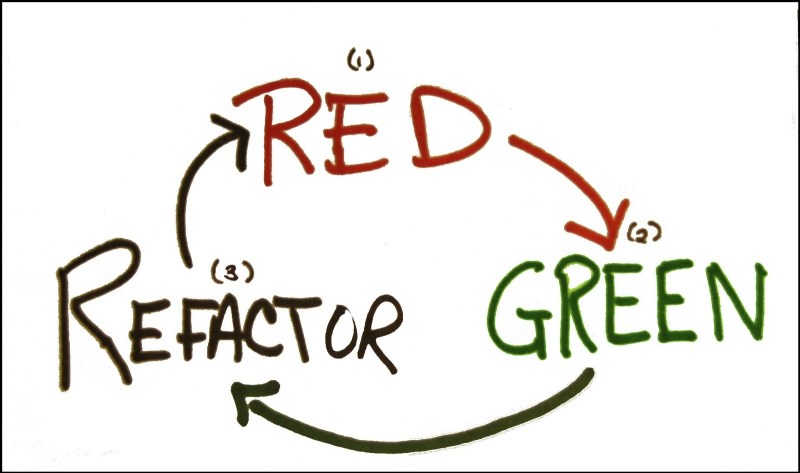
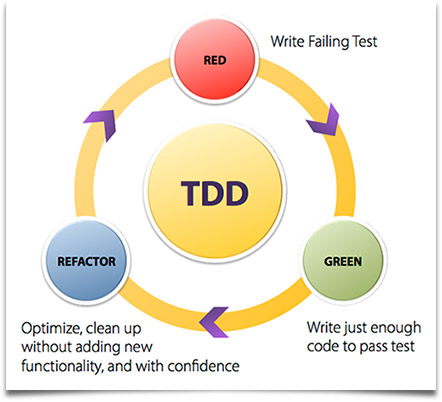
As we can see on the picture above, the following steps must be met to proceed in using the TDD paradigm:

  1. Write a test (that fails): Represented by the red circle, it means that before we implement the code – a method on a class, for example – we implement a test case, like a JUnit method for instance, and invoke our code, in this case a simple empty method. Of course, on this scenario the test will fail, since there is no implementation, which leads to our next step;
  2. Write code just enough to pass: Represented by the green circle, it means that we write code on our method just enough to make our test case pass with success. The principle behind this step is that we write code with simplicity in mind, in other words, keeping it simple, like the famous kiss principle;
  3. Refactor the code, improving his quality: Represented by the blue circle, it means that, after we make our code to pass the test, we analyse our code, looking for chances to improve his quality. Is there duplicate code? Remove the duplications! Is there hard coded constants? Consider changing to a enum or a properties table, for instance.

A important thing to notice is that the focus of the third step and the previous one is to not implement more functionality then the test code is testing. The reason for this is pretty obvious: since our focus is to implement the tests for our scenarios first, any functionality that we implement without the test reflecting the scenario is automatically a code without test coverage;

After we conclude the third step, the construction returns to the first step, reinitiating the cycle. On the next iteration, we implement another test case for our method, representing another scenario. We then code the minimum code to implement the new scenario and conclude the process by refactoring the code. This keeps going until all the scenarios are met, leaving at the end not only our final code, but all the test cases necessary to effective test our method, with all the functionalities he is intended to implement.

The reader may be asking: “but couldn’t we get the same by coding the tests after we write our production code?”. The answer is yes, we could get the same results by adding our tests at the end of the process, but then we wouldn’t have something called feedback from our code.

Feedback

When we talk about feedback, we mean the perception we have about how our code will perform. If we think about, the test code is the first client of our code: he will prepare the data necessary for the invocation, invoke our code and then collect the results. By implementing the tests first, we receive more rapidly this feedbacks from our implementation, not only on the sphere of correctness, but also on design levels.

For instance, imagine that we are building a test case and realize that the test is getting difficult to implement because of the complex class structure we have to populate just to make the invocation of our test’s target. This could mean that our class model is too complex and a refactoring is necessary.

By getting this feedback when we are just beginning the development – remember that we always code just enough to the test to pass! – it makes a lot more cheap and less complex to refactor the model then if we receive this feedback just at the end of the construction, when a lot of time and effort was already made! By this point of view, we can easily see the benefits of the TDD approach.

Types of tests

When we talked about tests on the previous sections, we talked about a type of test called unit test. Unit tests are tests focused on testing a single program unit, like a class, not focusing on testing the access to external resources, for example. Of course, there are other types of tests we can implement, as follows:

Unit tests: Unit tests have their focus to test individually each program unit that composes the system, without external interferences.

Integration tests: Integration tests also have the focus to test program units, but in this case to test the integration of the system with external resources, like a database, for example. A good example of a integration test is test cases for a DAO class, testing the code that implement insertions, updates, etc.

System tests: System tests, as the name implies, are tests that focus on testing the whole system, across all his layers. In a web application, for example, that means a automated test that turns on a server, execute some HTTP requests to the web application and analyse the responses. A good example of technology that could be used to test the web tier is a tool called Selenium.

Acceptance tests: Acceptance tests, commonly, are tests made by the end user of the system. The focus of this kind of test is to measure the quality of the implementation of requirements specified by the user. Other requirements such as usability are also evaluated by this kind of test.

A important thing to notice is that this kind of test is also referred as a automated system test, with the objective of testing the requirement as it is, for example:

  • Requirement: the invoice must be inserted on the system by the web interface;
  • Test: create a system test that executes the insertion by the web interface and verifies if the data is correctly inserted;

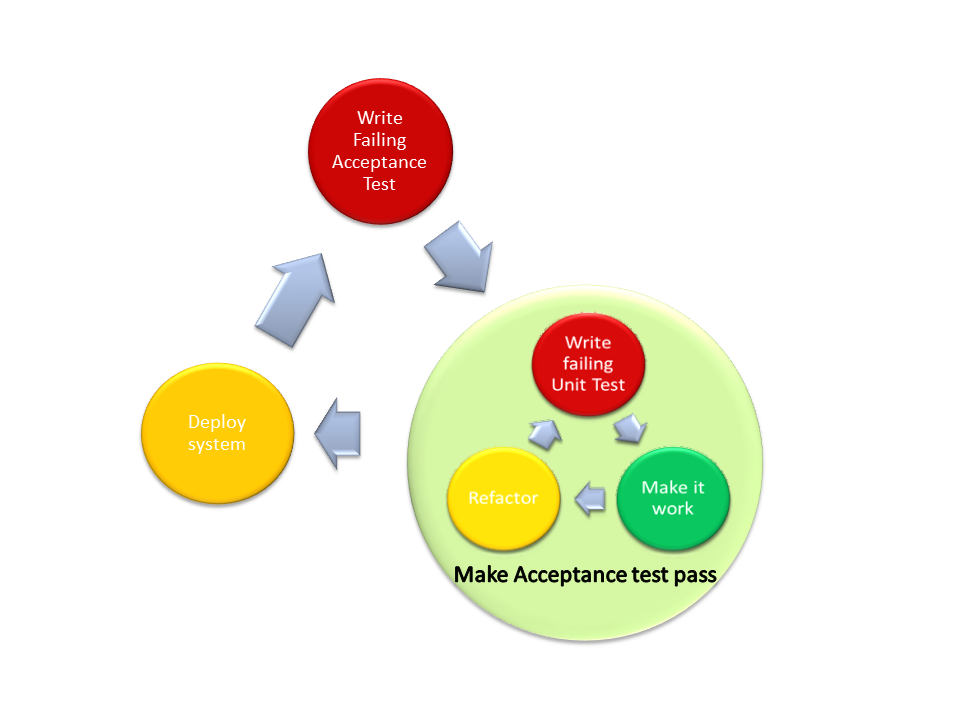
This technique, called ATDD (Acceptance Test-Driven Development) preaches that first a acceptance test must be created, and then the TDD technique is applied, until the acceptance test is satisfied. The diagram bellow shows this technique in practice:

Mock objects and unit tests

When we talk about unit tests, as said before, it is important to isolate the program unit we are testing, avoiding the interference from other tiers and dependencies that the program unit uses. On the Java world, a good framework we can use to create mocks is Mockito, which we talked about on my previous post.

With mocks, following the principles of TDD, we can, for example, create just the interfaces our code depends on and mock that interfaces, this way already establishing the communication channel that will be created, without leaving our focus from the program unit we are creating.

Another benefit of this approach is on the creation of the interfaces themselves, since our focus is always to implement the minimum necessary for the tests to pass, the resulting interfaces will be simple and concise, improving their quality.

Considerations

When do I use mocks?

A important note about mocks is that not always is good to use them. Taking for example a DAO class, that essentially is just a class that implement code necessary to interact with a database, for instance, the use of mocks won’t bring any value, since the code of the class itself is too simple to benefit from a unit test. On this cases, typically just a integration test is enough, using for example in-memory databases such as HSQLDB to act as the database.

Should I code more then one test case at a time?

In general, is considered a bad practice to write more then one test case at once before running and getting the fail results. The reason for this is that the point of the technique is to test one functionality at a time, which of course is “ruined” by the practice of coding more then one test at once.

How much of a functionality do I code on the test?

On the TDD terminology, we can also call the “amounts” of functionality we code at each iteration as baby steps. There is no universal convention of how much must be implement in each of this baby steps, but it is a good advice to follow common sense. If the developer is experienced and the functionality is simple, it could be even possible to implement almost the whole code on just one iteration.

If the developer is less experienced and/or the functionality is more complex, it makes more sense to spend more time with more baby steps, since it will create more feedbacks for the developer, making it easier to implement the complex requirements.

Should I test private code?

Private code, as the name implies, are code – like a method, for instance – that are accessible only inside the same program unit, like a class, for example. Since the test cases are normally implemented on another program unit (class), the test code can’t access this code, which in turn begs the question: should I make any code to test that private code?

Generally speaking, a common consensus is that private code is intended to implement little things, like a portion of code that is duplicated across multiple methods, for example. In that scenario, if you have for instance a private method on a Java class that it is enormous with lots of functionality, then maybe it means that this method should be made public, maybe even moved to a different class, like a utility class.

If that is not the case, then it is really necessary to design test cases to efficiently test the method, by invoking him indirectly by his public consumer. Talking specifically on the Java World, one way to test the code without the “barrier” of the public consumer is by using reflection.

My target code has too much test cases, is this normal?

When implementing the test cases for a target production code – a method, for example – the developer could end up on a scenario that lots of test cases are created just to test the whole functionality that single code composes. When this kind of situation happens, it is a good practice that the developer analyse if the code doesn’t have too much functionality implemented on itself, which leads to what in OO we call as low cohesion.

To avoid this situation, a refactoring from the code is needed, maybe splitting the code on more methods, or even classes on Java’s case.

Conclusion

And this concludes our post about TDD. By shifting the focus from implementing the code first to implementing the tests first, we can easily make our code more robust, simple and testable.

In a time that software is more important then ever – been on places like airplanes, cars and even inside human beans -, testing efficiently the code is really important, since the consequences of a bad code are getting more and more devastating. Thank you for following me on another post, until next time.
Java 8: Knowing the new features – the new Date API

Standard

Hi, dear readers! Welcome to my blog. On this post, the last on the series, we talk about the new library for Date & Time manipulation, which was inspired by the Joda Time library.

So, without further delay, let’s begin our journey through this feature!

Manipulating Dates & Time on Java

It is a old complain on the Java community how the Java APIs for manipulating Dates has his issues, like limitations, difficult  to work with, etc. Thinking on this, the Java 8 comes with a new API that brings simplicity and strength to the way we work with datetimes on Java. Let’s start by learning how to create instances of the new classes.

To create a new Date instance (without time), representing the current date, all we have to do is:

LocalDate date = LocalDate.now();

To create a new Time instance, based at the time the instance was created, we do this:

LocalTime time = LocalTime.now();

And finally, to create a datetime, in other words, a date and time representation, we use this:

LocalDateTime dateTime = LocalDateTime.now();

The instance above have not timezone information, using only the local timezone. If it is needed to use a specific timezone, we created a class called ZonedDateTime. For example, if we wanted to create a instance from our timezone and them change to Sidney’s timezone, we could do like this:

ZonedDateTime zonedDateTime = ZonedDateTime.now();

System.out.println("Time at my timezone: " + zonedDateTime);

zonedDateTime = zonedDateTime.withZoneSameInstant(ZoneId
.of("Australia/Sydney"));

System.out.println("Time at Sidney: " + zonedDateTime);

The code above print the following at my location:

Time at my timezone: 2015-06-04T14:42:30.850-03:00[America/Sao_Paulo]
Time at Sidney: 2015-06-05T03:42:30.850+10:00[Australia/Sydney]

Another way of instantiating this classes is for a predefined date and/or time. We can do this like the following:

 date = LocalDate.of(2015, Month.DECEMBER, 25);

 dateTime = LocalDateTime.of(2015, Month.DECEMBER, 25, 10, 30);

With all those classes is really simple to add and/or remove days, months or years to a date, or the same to a time object. the code bellow illustrate this simplicity:

System.out.println("Date before adding days: " + date);

date = date.plusDays(10);

System.out.println("Date after adding days: " + date);

date = date.plusMonths(6);

System.out.println("Date after adding months: " + date);

date = date.plusYears(5);

System.out.println("Date after adding years: " + date);

date = date.minusDays(7);

System.out.println("Date after subtracting days: " + date);

date = date.minusMonths(6);

System.out.println("Date after subtracting months: " + date);

date = date.minusYears(10);

System.out.println("Date after subtracting years: " + date);

time = time.plusHours(12);

System.out.println("Time after adding hours: " + time);

time = time.plusMinutes(30);

System.out.println("Time after adding minutes: " + time);

time = time.plusSeconds(120);

System.out.println("Time after adding seconds: " + time);

time = time.minusHours(12);

System.out.println("Time after subtracting hours: " + time);

time = time.minusMinutes(30);

System.out.println("Time after subtracting minutes: " + time);

time = time.minusSeconds(120);

System.out.println("Time after subtracting seconds: " + time);

Running the above code, it prints:

Date before adding days: 2015-12-25
Date after adding days: 2016-01-04
Date after adding months: 2016-07-04
Date after adding years: 2021-07-04
Date after subtracting days: 2021-06-27
Date after subtracting months: 2020-12-27
Date after subtracting years: 2010-12-27
Time after adding hours: 09:28:24.380
Time after adding minutes: 09:58:24.380
Time after adding seconds: 10:00:24.380
Time after subtracting hours: 22:00:24.380
Time after subtracting minutes: 21:30:24.380
Time after subtracting seconds: 21:28:24.380

One important thing to notice is that in all methods we had to “catch” the return of the operations. The reason for this is that, opposite to the old classes we used like the Calendar one, the instances on the new date API are immutable, so they always return a new value. This is useful for scenarios with concurrent access for example, since the instances wont carry states.

Another simplicity is on the way we get the values from a date or time. On the old days, when we wanted to get a year or month from a Calendar, for example, we would need to use the generic get method, with a indication of the field we would want, like Calendar.YEAR. With the new API, we could use specific methods with ease, like the following:

System.out.println("For the date: " + date);

System.out.println("The year from the date is: " + date.getYear());

System.out.println("The month from the date is: " + date.getMonth());

System.out.println("The day from the date is: " + date.getDayOfMonth());

System.out.println("The era from the date is: " + date.getEra());

System.out.println("The day of the week is: " + date.getDayOfWeek());

System.out.println("The day of the year is: " + date.getDayOfYear());

After we run the code above, the following result will be produced:

For the date: 2010-12-27
The year from the date is: 2010
The month from the date is: DECEMBER
The day from the date is: 27
The era from the date is: CE
The day of the week is: MONDAY
The day of the year is: 361

Another simple thing to do is comparing dates with the API. If we code the following:

  // comparing dates
  LocalDate today = LocalDate.now();
  LocalDate tomorrow = today.plusDays(1);

   System.out.println("Is today before tomorrow? "
			+ today.isBefore(tomorrow));

   System.out.println("Is today after tomorrow? "
			+ today.isAfter(tomorrow));

   System.out.println("Is today equal tomorrow? "
			+ today.isEqual(tomorrow));

On the code above, as expected, only  the first print will print true.

One interesting feature of the new API is the locale support. On the code bellow, for example, we print the month of a date in different languages:

System.out.println("English: "+today.getMonth().getDisplayName(TextStyle.FULL, Locale.ENGLISH));
		
System.out.println("Portuguese: "+today.getMonth().getDisplayName(TextStyle.FULL, Locale.forLanguageTag("pt")));
		
System.out.println("German: "+today.getMonth().getDisplayName(TextStyle.FULL, Locale.GERMAN));
		
System.out.println("Italian: "+today.getMonth().getDisplayName(TextStyle.FULL, Locale.ITALIAN));
		
System.out.println("Japanese: "+today.getMonth().getDisplayName(TextStyle.FULL, Locale.JAPANESE));
		
System.out.println("Chinese: "+today.getMonth().getDisplayName(TextStyle.FULL, Locale.CHINESE));

Running the above code, on my current date, we will get the following result:

English: June
Portuguese: Junho
German: Juni
Italian: giugno
Japanese: 6月
Chinese: 六月

Formatting dates is also a easy task with the new API. If we wanted to format a date to a “dd/MM/yyyy” format, all we have to do is pass a DateTimeFormatter with the desired format:

System.out.println(today.format(DateTimeFormatter
			.ofPattern("dd/MM/yyyy")));

One very common requirement we encounter from time to time is the need to calculate the time between two dates. With the new API, we can calculate this very easily, with the ChronoUnit class:

 LocalDateTime oneDate = LocalDateTime.now();
 LocalDateTime anotherDate = LocalDateTime.of(1982, Month.JUNE, 21, 20,
 00);

 System.out.println("Days between the dates: "
 + ChronoUnit.DAYS.between(anotherDate, oneDate));

 System.out.println("Months between the dates: "
 + ChronoUnit.MONTHS.between(anotherDate, oneDate));

 System.out.println("Years between the dates: "
 + ChronoUnit.YEARS.between(anotherDate, oneDate));

System.out.println("Hours between the dates: "
 + ChronoUnit.HOURS.between(anotherDate, oneDate));

 System.out.println("Minutes between the dates: "
 + ChronoUnit.MINUTES.between(anotherDate, oneDate));

 System.out.println("Seconds between the dates: "
 + ChronoUnit.SECONDS.between(anotherDate, oneDate));

On my current day (08/06/2015), the above code produced:

Days between the dates: 12040
Months between the dates: 395
Years between the dates: 32
Hours between the dates: 288962
Minutes between the dates: 17337771
Seconds between the dates: 1040266275

One thing to note is that, if we use the same methods with the objects exchanged, we will receive negative numbers. If our logic needs the calculations to be always positive, we could use the classes Period and Duration to calculate the time between the dates, which have the methods isNegative() and negated() to produce this desired effect.

One final feature we will visit of the new API is the concept of invalid dates. When we were using a Calendar,  if we tried to input the date of February, 30, on a year the month goes to 28 days, the Calendar will adjust the date to March, 2, in other words, it will go past the date inputted, without throwing any errors. This is not always the desired effect, since sometimes this could lead to unpredictable behaviors. On the new API, if we try for example to do the following:

LocalDate invalidDate = LocalDate.of(2014, Month.FEBRUARY, 30);
		
System.out.println(invalidDate);

We will receive a invalid date exception, ensuring a easier way to treat this kind of bug:

Exception in thread "main" java.time.DateTimeException: Invalid date 'FEBRUARY 30'
	at java.time.LocalDate.create(LocalDate.java:431)
	at java.time.LocalDate.of(LocalDate.java:249)
	at com.alexandreesl.handson.DateAPIShowcase.main(DateAPIShowcase.java:174)

References

This series was inspired by a book from the publisher “Casa do Código”, which was used by me on my studies. Unfortunately the book is on Portuguese, but it is a good source for developers who want to quickly learn about the new features of Java 8:

Java 8 prático

Conclusion

And that concludes our series about the new features  of the Java 8. Of course, there is other subjects we didn’t talked about, like the end of the PermGen, that it was replaced by another memory technique called metaspace. If the reader wants to know more about this, this article is very interesting on the subject. However, with this series, the reader can have a good base to start developing on Java 8.

On a programming language like Java, it is normal to have changes from time to time. For a language with so many years, it is impressive how Java can still evolve, reflecting the new tendencies from the more modern languages. Will it Java continue like this forever? Only time will tell….

Thank you for following me on another post from my blog, until next time.
Continue reading

Java 8: Knowing the new features – Streams

Standard

Hi, dear readers! Welcome to my blog. On this post, the second on the series, we talk about streams, a new way to manipulate collections.

So, without further delay, let’s begin our journey through this feature!

Streams

Streams was introduced on Java 8 as a way to create a new form of manipulating Collections. Normally, when we use a Collection, we prepare a list of items, make several operations by this collection, like filtering, sums, etc and finally we use a final result, which could be evaluated as a single operation. That is exactly the goal of the streams API: allow us to program our Collection’s logic like a single operation, using the functional programming paradigm.

So, let’s get started with the preparations for the examples.

First, we create a Client class, which we will use as the POJO for our examples:

public class Client {

private String name;

private Long phone;

private String sex;

private List<Order> orders;

public List<Order> getOrders() {
return orders;
}

public void setOrders(List<Order> orders) {
this.orders = orders;
}

public String getName() {
return name;
}

public void setName(String name) {
this.name = name;
}

public Long getPhone() {
return phone;
}

public void setPhone(Long phone) {
this.phone = phone;
}

public String getSex() {
return sex;
}

public void setSex(String sex) {
this.sex = sex;
}

public void markClientSpecial() {

System.out.println("The client " + getName() + " is special! ");

}

}

Our Client class this time has a reference to another POJO, the Order class, which we will use to enrich our examples:

public class Order {

private Long id;

private String description;

private Double total;

public Long getId() {
return id;
}

public void setId(Long id) {
this.id = id;
}

public String getDescription() {
return description;
}

public void setDescription(String description) {
this.description = description;
}

public Double getTotal() {
return total;
}

public void setTotal(Double total) {
this.total = total;
}

}

Finally, for all the examples, we will use a single Collection’s data, so we create a Utility class to populate our data:

public class CollectionUtils {

public static List<Client> getData() {

List<Client> list = new ArrayList<>();

List<Order> orders;

Order order;

Client clientData = new Client();

clientData.setName("Alexandre Eleuterio Santos Lourenco");
clientData.setPhone(33455676l);
clientData.setSex("M");

list.add(clientData);

orders = new ArrayList<>();

order = new Order();

order.setDescription("description 1");
order.setId(1l);
order.setTotal(32.33);
orders.add(order);

order = new Order();

order.setDescription("description 2");
order.setId(2l);
order.setTotal(42.33);
orders.add(order);

order = new Order();

order.setDescription("description 3");
order.setId(3l);
order.setTotal(72.54);
orders.add(order);

clientData.setOrders(orders);

clientData = new Client();

clientData.setName("Lucebiane Santos Lourenco");
clientData.setPhone(456782387l);
clientData.setSex("F");

list.add(clientData);

orders = new ArrayList<>();

order = new Order();

order.setDescription("description 4");
order.setId(4l);
order.setTotal(52.33);
orders.add(order);

order = new Order();

order.setDescription("description 2");
order.setId(5l);
order.setTotal(102.33);
orders.add(order);

order = new Order();

order.setDescription("description 5");
order.setId(6l);
order.setTotal(12.54);
orders.add(order);

clientData.setOrders(orders);

clientData = new Client();

clientData.setName("Ana Carolina Fernandes do Sim");
clientData.setPhone(345622189l);
clientData.setSex("F");

list.add(clientData);

orders = new ArrayList<>();

order = new Order();

order.setDescription("description 6");
order.setId(7l);
order.setTotal(12.43);
orders.add(order);

order = new Order();

order.setDescription("description 7");
order.setId(8l);
order.setTotal(98.11);
orders.add(order);

order = new Order();

order.setDescription("description 8");
order.setId(9l);
order.setTotal(130.22);
orders.add(order);

clientData.setOrders(orders);

return list;

}

}

So, let’s begin with the examples!

To use the stream API, all we have to to is use the stream() mehod on the Collection’s APIs to get a stream already prepared for our use. The Stream interface use the default methods feature, so we don’t need to implement the interface methods. Another good point on this approach is that consequently all Collections already has support for the Streams feature, so if the reader has that favorite framework for collections (like the commons one from Apache), all you have to do is upgrading the JVM of your projects and the support is added!

The first thing to notice about streams is that they don’t change the Collection. That means that if we do something like this:

public class StreamsExample {

public static void main(String[] args) {

List<Client> clients = CollectionUtils.getData();

clients.stream().filter(
c -> c.getName().equals("Alexandre Eleuterio Santos Lourenco"));

clients.forEach(c -> System.out.println(c.getName()));

}

}

And run the code, we will see that the Collection will still print the 3 clients from our Collection’s test data, not just the one we filtered on our stream! This is a important concept to keep it in mind, since it means we don’t have to populate multiple collections with different data to execute different logic.

So, how we could print the result of our previous filter? All we have to do is link the methods, like this:

.

.

.

clients.stream()
.filter(c -> c.getName().equals(
"Alexandre Eleuterio Santos Lourenco"))
.forEach(c -> System.out.println(c.getName()));

if we run our code again, we will see that now the code only prints the elements we filtered. On this example, as said before, we didn’t received the list we filtered. If we needed to retrieve the Collection formed by the transformations we made on our Streams, we can use the collect method. This method receives 3 functional interfaces as the parameters, but fortunately Java 8 already comes with another interface, called Collectors, that supply common implementations for the interfaces we need to supply to the collect method. Using this features, we could retrieve the Collection coding like this:

.

.

.

List<Client> filteredList = clients
.stream()
.filter(c -> c.getName().equals(
"Alexandre Eleuterio Santos Lourenco"))
.collect(Collectors.toList());

filteredList.forEach(c -> System.out.println(c.getName()));

On our previous examples, we retrieved the whole Client objects on our filtering. But and if we wanted to retrieve a List with the names of the Clients that has orders with total > 90 and print on the console? We could do this:

.

.

.

System.out.println("USING THE MAP METHOD!");

clients.stream()
.filter(c -> c.getOrders().stream()
.anyMatch(o -> o.getTotal() > 90))
.map(Client::getName)
.forEach(System.out::println);

The code above could seen a little strange at first, but if we imagine the size of the code we would do to make the same with traditional Java code – iterating by multiple Collections, creating another collection with just the names and iterating again for the prints – we can see that the new features really help to make a more simple and cleaner code. We also see the use of the anyMatch method, which receives a predicate as parameter and returns true or false if any of the elements on the stream succeeds on the predicate.

Besides the all-purpose map method, there’s also another implementations specific for integers, longs and doubles. The reason for this is to prevent the called “boxing effect” where the primitive values would be wrapped and unwrapped on the operations, which will cause a performance overhead, and since we already informed the type of value we are working with, this implementations provide some interesting methods that return things like the average or the max value of our mapping. Let’s see a example. Imagine that we want to retrieve the max total from the orders on each client and print the name and the total on the console. We could do like this:

.

.

.
clients.stream().forEach(
c -> System.out.println("Name: "
+ c.getName()
+ " Highest Order Total: "
+ c.getOrders().stream().mapToDouble(Order::getTotal)
.max().getAsDouble()));

The reader may notice that the max method’s return is not the primitive itself, but a Object. This object is a OptionalDouble, that together with other classes like the java.util.Optional, it supplies a implementation that allow us to provide a default behavior for the cases in which the operation been used with the Optional – in our case, the max() method – has some null element among the values. For example, if we want in our previous operation that the max returns 0 in case any of the elements was null, we could modify the code as follows:

.

.

.

clients.stream().forEach(
c -> System.out.println("Name: "
+ c.getName()
+ " Highest Order Total: "
+ c.getOrders().stream().mapToDouble(Order::getTotal)
.max().orElse(0)));

One interesting behavior of the streams is their lazy behavior. That means that when we create a flow – also called a pipe – of streams operations, the operations will always execute only at the time they are really needed to produce the final result. We can see this behavior using one method called peek(). Let’s see a example that clearly shows this behavior:

.

.

.

clients.stream()

.filter(c -> c.getName().equals(
"Alexandre Eleuterio Santos Lourenco"))
.peek(System.out::println);

System.out.println("*********** SECOND PEEK TEST ******************");

clients.stream()
.filter(c -> c.getName().equals(
"Alexandre Eleuterio Santos Lourenco"))
.peek(System.out::println)
.forEach(c -> System.out.println(c.getName()));

If we run the example above, we can see that on the first stream the peek method doesn’t print anything. That’s because the filter operation it was not executed, since we didn’t do anything with the stream after the filtering. On the second stream, we used the foreach operation afterwards, so the peek method will print a toString() of all the objects inside the filtered stream.

On our previous examples, we see the max method, which returns the max value from a stream of numbers. That type of operation, that returns a single result from a stream, is called a reduce operation. We can make our own reduce operations, just providing a initial value and the operation itself, using the reduce method. For example, if we wanted to subtract the values from the stream:

.

.

.

clients.stream().forEach(
c -> System.out.println("Name: "
+ c.getName()
+ " TOTAL SUBTRACTED: "
+ c.getOrders().stream().mapToDouble(Order::getTotal)
.reduce(0, (a, b) -> a - b)));

This is a really useful feature to keep in mind when the default arithmetic operations don’t suffice.

Parallel Streams

At last, let’s talk about the last subject on our streams’s journey: parallel streams. When using parallel streams, we run all the operations we see previously with parallel processing mode, instead of just the main thread as usual. The jdk will choose the number of threads, how to break the segments of processing and how to join the parts to the final result. The reader may be asking “what do I have to pass to help the jdk on this settings?” the answer is: nothing! That’s right, all we have to do to use parallel streams is change the beginning of our commands, like the example bellow:

.

.

.
clients.parallelStream()
.filter(c -> c.getOrders().stream()
.anyMatch(o -> o.getTotal() > 90)).map(Client::getName)
.forEach(System.out::println);

As we can see, all we have to do is change from stream() to parallelStream(). One important thing to keep in mind is when to use parallel streams. Since there is a payload of preparing the thread pool and managing the segmentation and joining of the results, unless we have a really big volume of data to use or a really heavy operation to do with the data, we normally will use single thread streams.

Other features

Of course, there is more features we could talk on this post, like the sort method, that as the name implies, make sorting of the items on our streams. Another really powerful feature is on the Collectors’s methods, which has impressive transformation options such as grouping, partitioning, joining and so on. However, with this post we made a very good start with the usage of the feature, sowing the way for his adoption.

Conclusion 

And so we conclude another part of our series. As we can easily see, streams is a very powerful tool, which can help us a lot on keeping a really short code when processing our collections. That is one of the keys – or maybe the master key – of the Java 8 philosophy. For years, the Java scenario was plagued with “accusations” of not being a simple language, since it is so verbose, specially with the appearance of languages like Python or Ruby, for example. With this new features, maybe the burden of “being complex” for Java will finally begone. I thank the reader for following me on another post and invite you to please return to the last part of our series, when we will talk about the last of our pillars, the new Date API. Until next time.

Continue reading

Java 8: Knowing the new features – Lambdas

Standard

Hi, dear readers! Welcome to my blog. On this post, the first of a 3-part series, we will talk about the new features of Java 8, launched on 2014. The new version comes with several features that change the way we think when we code on Java. The series will be split on 3 pillars, each dedicated to one specific subject, as it follows:

  • Lambdas;
  • Streams;
  • java.time (aka the new Date API);

So, without further delay, let’s begin by talking about what probably is the most famous of the new features: Lambdas!

Lambdas

On a nutshell, a lambda on Java is a way that the Java ecosystem aggregated in order to enable the use of functional programming. The functional programming paradigm is a programming paradigm that advocate the use of functions – or in other words, blocks of code with arguments and/or return values – that work on a sequence of calls, without the implications of maintaining states of variables and such. With lambdas, we can create and store functions on our code, that we can use across our programs. One of the major benefits we can take on this method is the simplification of our code, that become simpler then the usual way.

So, let’s begin with the examples!

Let’s imagine we want to print all the numbers from a for looping, using a new thread to print each number. On a Java code made pre-Java 8, we could do this by coding the following:

.

.

.

for (int i = 1; i <= 10; i++) {

final int number = i;

Thread thread = new Thread(new Runnable() {

@Override
public void run() {

System.out.println(“The number is ” + number);

}

});

thread.start();

}

.

.

.

There’s nothing wrong with the above code, except maybe the verbosity of the code, since we need to declare the interface (runnable) and the method (run()) we want to override, in order to create the inner class we need to create the Thread’s implementation. It would be good if the Java language had any feature that could remove this verbosity out of the way. Now, with Java 8, we have such feature: lambdas!

Let’s revisit the same example, now with a lambda:

.

.

.

for (int i = 1; i <= 10; i++) {

int number = i;

Runnable runnable = () -> System.out
.println(“The number with a lambda is ” + number);

Thread thread = new Thread(runnable);

thread.start();

}

.

.

.

As we can see, the lambda version is much simpler then our previous code, taking the creation of the thread’s implementation to a simple one-line command. One interesting thing to notice is that the “runnable” variable we created on our code is it not a object, but a function. That means that the “translation” of the lambda differs from the interpretation of a inner class. This become apparent when we print the result of the getClass method of our lambda, which will produce a print like the following:

The ‘class’ of our lambda: class com.alexandreesl.handson.LambdaBaseExample$$Lambda$1/424058530

This is interesting, because if we search for the compiled folder of our project, we can see that, depending on the strategy the compiler is using, he didn’t even produce a .class file for the lambda, opposed to a inner class! If the reader want to delve more on the subject of the lambda’s interpretation, this link has more information on this subject.

The reader may also notice that we didn’t need to declare the number variable as final in order to the lambda to read the value. That is because on the lambda’s interpretation, the concept that the variable is implicitly final is enough for the compiler to accept our code. If we try to use the variable on any other place of the code, we would receive a compilation error.

Well, everything is good, but the reader may be questioning: “but how does the compiler now which method I am trying to override from the Runnable interface?”

Is to resolve that question that enters another new concept on Java 8: Functional Interfaces!

A functional interface is a interface that has just one abstract method – by default, all methods are abstract on a interface, with the exception of another novelty we will talk about it in a few moments -, which means that when the compiler checks the interface, he interprets that method as the one to infer the lambda. One key point here is that, in order to promote a interface to be a functional interface, all we have to do is having just one abstract method on it, so all the older Java interfaces that has this condition are already functional interfaces, like the Runnable interface, that we used previously. If we want to ensure that a functional interface won’t be demoted from this condition, there is a new annotation called @FunctionalInterface. Let’s see a example of the use of this annotation.

Let’s create a interface called MyInterface, with the@FunctionalInterface annotation:

package com.alexandreesl.handson;

@FunctionalInterface
public interface MyInterface {

void methodA(String message);

}

Now, let’s create a class and test creating a lambda for our functional interface:

package com.alexandreesl.handson;

public class FunctionalInterfaceExample {

public static void main(String[] args) {

MyInterface myFunctionalInterface = (message) -> System.out
.println(“The message is: ” + message);

myFunctionalInterface.methodA(“SECRET MESSAGE!”);

}

}

If we run the code, we can see that works as intended:

The message is: SECRET MESSAGE!

Now, let’s try adding another method to the interface:

package com.alexandreesl.handson;

@FunctionalInterface
public interface MyInterface {

void methodA(String message);

void methodB();

}

When we add this method and save, Eclipse – in case the reader is using a IDE for the examples – will immediately get a compiler error:

Description Resource Path Location Type
The target type of this expression must be a functional interface FunctionalInterfaceExample.java /Java8Lambdas/src/main/java/com/alexandreesl/handson line 7 Java Problem

If we try to run the class we created previously, we will receive the following error:

Exception in thread “main” java.lang.Error: Unresolved compilation problem:
The target type of this expression must be a functional interface

at com.alexandreesl.handson.FunctionalInterfaceExample.main(FunctionalInterfaceExample.java:7)

The reader remembers, a moment ago, we talked about another novelty on the language when we were talking about interfaces having by default abstract methods. Well, now, we also have the possibility to do the unthinkable: implementations on Interfaces! So it enters the default methods!

Default methods

A default method is a method on a interface that, as the name implies, has a default implementation. Let’s see this on our previous interface. Let’s change MyInterface to the following:

package com.alexandreesl.handson;

@FunctionalInterface
public interface MyInterface {

void methodA(String message);

default String methodB(String message) {
System.out.println(“I received: ” + message);
message += ” ALTERED!”;
return message;
}

}

As we can see, it is simple to create a default method, all we have to do is use the keyword default and provide a implementation. To test our modifications, let’s change our test class to:

package com.alexandreesl.handson;

public class FunctionalInterfaceExample {

public static void main(String[] args) {

MyInterface myFunctionalInterface = (message) -> System.out
.println(“The message is: ” + message);

String secret = “SECRET MESSAGE!”;

myFunctionalInterface.methodA(secret);

System.out.println(myFunctionalInterface.methodB(secret));

}

}

If we run the code:

The message is: SECRET MESSAGE!
I received: SECRET MESSAGE!
SECRET MESSAGE! ALTERED!

We can see that our modifications were successful.

Multiple Inheritance

The reader may be asking: “My God! This is multiple inheritance on Java!”. Indeed, on a first look, that could be seen to be the case, but the goal that the Java developer team behind the Java 8 targeted was actually the maintenance of old Java interfaces. On Java 8, the List interface for example has new methods, like the forEach method, that enables us to iterate through a collection using a lambda. Just imagine the chaos that it would be on the whole Java ecosystem – proprietary and open-source frameworks alike – not to mention our own Java project’s code, if we would need to implement this new method on all the places! In order to prevent this, the default methods were created.

Still, if the reader is not convinced, the leaders of the specification had prepared a page with their arguments on this case, like for example the fact that default methods can’t use state variables, since interfaces didn’t accept variables. the link to the page can be found here.

Method References

Another new feature of Java 8’s plethora is method references. With method references, in the same way we did with lambdas, we can shorten our code when accessing methods, making the code more “functional readable”.  Let’s make a POJO for example:

public class Client {

private String name;

private Long phone;

private String sex;

public String getName() {
return name;
}

public void setName(String name) {
this.name = name;
}

public Long getPhone() {
return phone;
}

public void setPhone(Long phone) {
this.phone = phone;
}

public String getSex() {
return sex;
}

public void setSex(String sex) {
this.sex = sex;
}

public void markClientSpecial() {

System.out.println(“The client ” + getName() + ” is special! “);

}

}

Now, let’s imagine that we want to populate a List of this POJOs, and iterate by them, calling the markClientSpecial method. Before Java 8, we could do this by doing the following:

public class MethodReferencesExample {

public static void main(String[] args) {

List<Client> list = new ArrayList<>();

Client clientData = new Client();

clientData.setName(“Alexandre Eleuterio Santos Lourenco”);
clientData.setPhone(33455676l);
clientData.setSex(“M”);

list.add(clientData);

clientData = new Client();

clientData.setName(“Lucebiane Santos Lourenco”);
clientData.setPhone(456782387l);
clientData.setSex(“F”);

list.add(clientData);

clientData = new Client();

clientData.setName(“Ana Carolina Fernandes do Sim”);
clientData.setPhone(345622189l);
clientData.setSex(“F”);

list.add(clientData);

// pre Java 8

System.out.println(“PRE-JAVA 8!”);

for (Client client : list) {

client.markClientSpecial();

}

}

}

We iterate using a for loop, calling the method explicit. Now on Java 8, with Lambdas, we can do the following:

.

.

.

// Java 8 with lambdas

System.out.println(“JAVA 8 WITH LAMBDAS!”);

list.forEach(client -> client.markClientSpecial());

Using the new forEach method, we iterated by the elements of the list, also calling our desired method. But that is not all! With method references, we could also do the following:

.

.

.

// Java 8 with method references

System.out.println(“JAVA 8 WITH METHOD REFERENCES!”);

list.forEach(Client::markClientSpecial);

With the method reference syntax, we indicate the class which we want to execute a method – in our case, the Client class – and a reference of the method we want  to execute. The forEach method interprets that we want to execute this method for all the elements of the List, as we can see on the results of our execution:

PRE-JAVA 8!
The client Alexandre Eleuterio Santos Lourenco is special!
The client Lucebiane Santos Lourenco is special!
The client Ana Carolina Fernandes do Sim is special!
JAVA 8 WITH LAMBDAS!
The client Alexandre Eleuterio Santos Lourenco is special!
The client Lucebiane Santos Lourenco is special!
The client Ana Carolina Fernandes do Sim is special!
JAVA 8 WITH METHOD REFERENCES!
The client Alexandre Eleuterio Santos Lourenco is special!
The client Lucebiane Santos Lourenco is special!
The client Ana Carolina Fernandes do Sim is special!

The method references could also be pointed for methods referring a specific instance. This is interesting for example if we want to make a Thread that only will execute a method from a Object’s instance in her run method:

.

.

.

// Thread with method reference

Client client = list.get(0);

Thread thread = new Thread(client::markClientSpecial);

System.out.println(“THREAD WITH METHOD REFERENCES!”);

thread.run();

On our examples, we are only using method references without parameters and no return values, but is also possible to use methods with parameters or returns, for example using the Consumer and Supplier interfaces:

.

.

.

// Method references with a parameter and return
System.out.println(“METHOD REFERENCES WITH PARAMETERS!”);

client = list.get(1);

Consumer<String> consumer = client::setName;

consumer.accept(“Altering the name! “);

Supplier<String> supplier = client::getName;

System.out.println(supplier.get());

With method references, we can get, in some cases, a even more simple code than with lambdas!

Typing of a Lambda 

One last subject we will talk about on this first part, is the typing of a lambda. To define the type of a lambda, the compiler infer the typing by using a technique we call context, which means that he uses the context of the method or constructor the lambda is being used to identify the type of the lambda. For example, if we see our first lambda example:

.

.

.

Runnable runnable = () -> System.out
.println(“The number with a lambda is ” + number);

Thread thread = new Thread(runnable);

.

.

.

We can see that we declared the lambda as of type Runnable and passed to a Thread class. However, we could also coded like this:

.

.

.

Thread thread = new Thread(() -> System.out
.println(“The number with a lambda is ” + number));

thread.start();

.

.

.

And the code would also work as well. On this case, the compiler would utilize the type of the parameter of the Thread’s class constructor – a Runnable interface implementation – to infer the type of the Lambda.

Conclusion

And that concludes the first part of our series. Proposing a new way to see how we code, searching for more simplicity and enabling the refactoring of old interfaces, the new features of Java 8 come to stay, changing our way of developing and evolving our Java projects. Thank you for following on this post, until next time.

Continue reading

My ELK Series was mentioned on ElasticSearch’s official blog!

Standard

Welcome, my dear readers! It is always nice to see our work been recognized, so I want to post this in thanks from ElasticSearch’s official blog, which I found out that it has praised my series about the ELK stack on his blog. Thank you very much for you guys on elastic.co, you guys rock!

https://www.elastic.co/blog/2015-03-04-this-week-in-elasticsearch

My work of graduation on SOA architecture (In Portuguese)

Standard

Hi, my dear readers, on this post, I thought of doing something a little different: On 2010, I have concluded a graduation study on SOA’s architecture and have made this work about SOA security. So, on my philosophy of sharing the knowledge, here it is my work, please enjoy the reading and if you have any questions, please ask. Oh, and sorry about been in Portuguese, but it is my native language, hehehe

Artigo_TCC_Seguranca_SOA

ELK: using a centralized logging architecture – final part

Standard

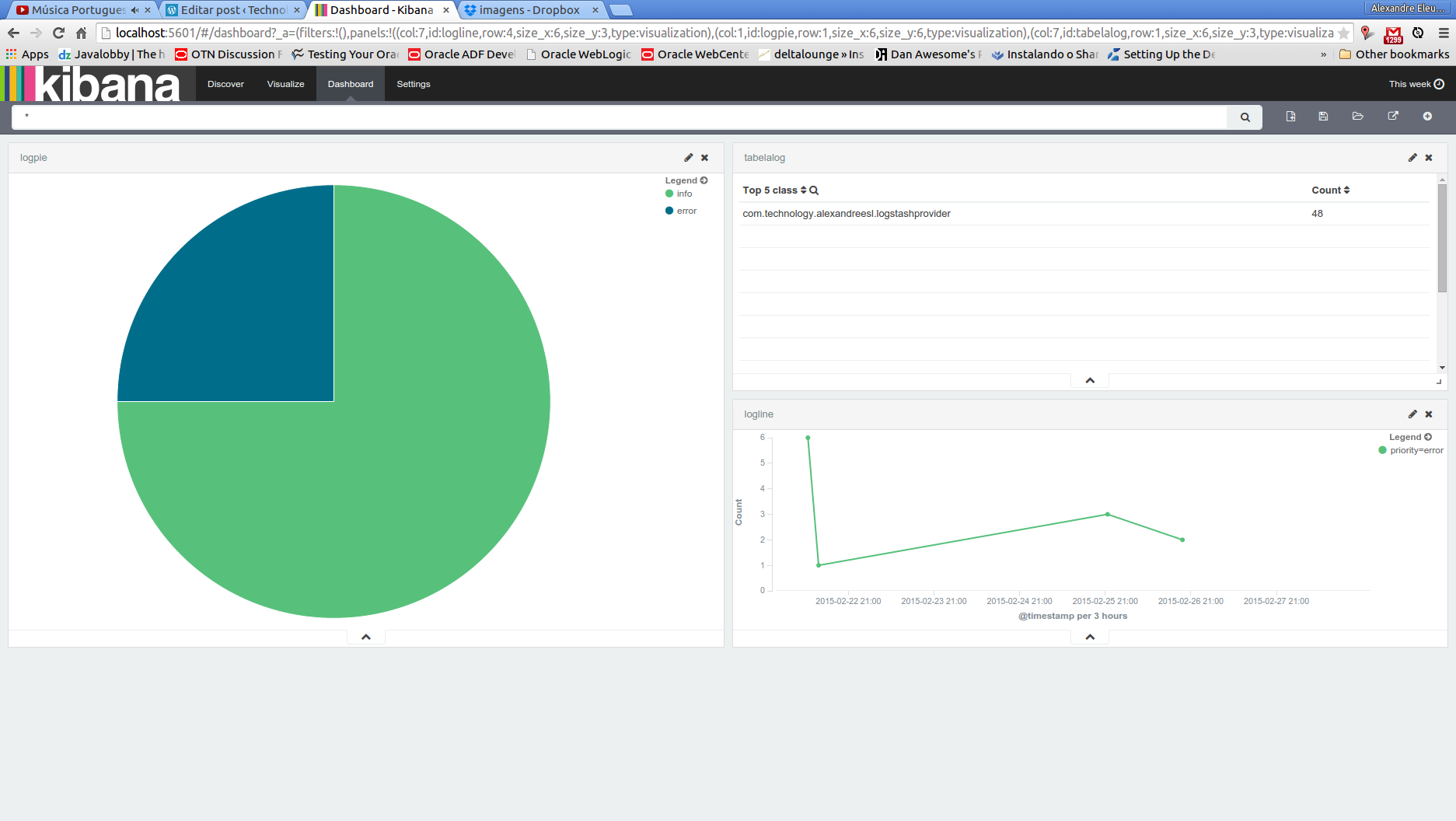
Welcome, dear reader! This is the last part of our series about the ELK stack, that provides a centralized architecture for gathering and analyse of application logs. On this last part, we will see how we can construct a rich front-end for our logging solution, using Kibana.

Kibana

Also developed by Elasticsearch, Kibana provides a way to explore the data and/or build rich dashboards of our data on the indexer. With a simple configuration, that consist of pointing Kibana to a ElasticSearch’s index – it also allows to point to multiple indexes at once, using a wildcard configuration -, it allow us to quickly set up a front-end for our stack.

So, without further delay, let’s begin our last step on the setup of our solution.

Hands-on

Installation

Beginning our lab, let’s download Kibana from the site. To do this, let’s open a terminal and type the following command:

curl https://download.elasticsearch.org/kibana/kibana/kibana-4.0.0-linux-x64.tar.gz | tar -zx

PS: this lab assumes the reader is using a linux 64-bit OS (I am using Ubuntu 14.10). If the reader is using another type of OS, the download page for Kibana is the following:

http://www.elasticsearch.org/overview/kibana/installation/

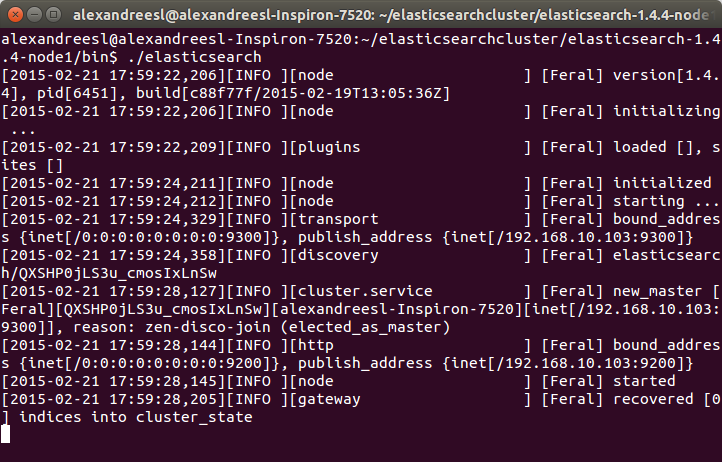
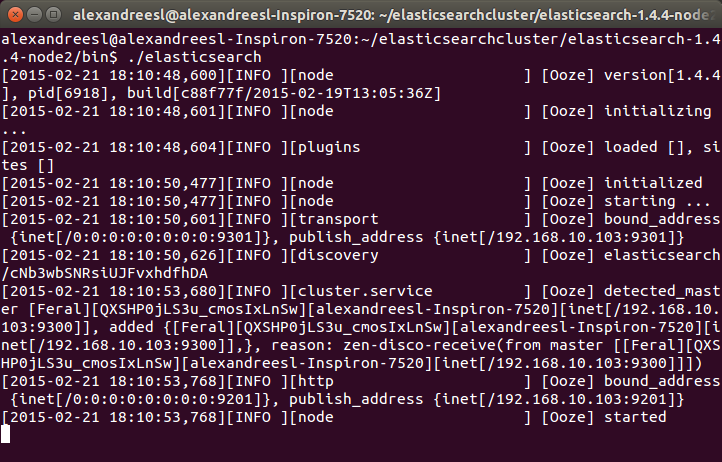
After running the command, we can see a folder called “kibana-4.0.0-linux-x64”. That’s all we need to do to install Kibana on our lab. Before we start running, however, we need to start both Logstash and ElasticSearch, to make our whole stack go live. If the reader didn’t have the stack set up, please refer to part 1 and part 2.

One configuration that the reader may take note is the elasticsearch_url property, inside the “kibana.yml” file, on the config folder. Since we didn’t change the default port from our elasticsearch’s cluster and we are running all the tools on the same machine, there is no need to change anything, but on a real world scenario, you may need to change this property to point to your elasticsearch’s cluster. The reader can made other configurations as well on this file, such as configuring a SSL connection between Kibana and Elasticsearch or configure the name of the index Kibana will use to store his metadata on elasticsearch.

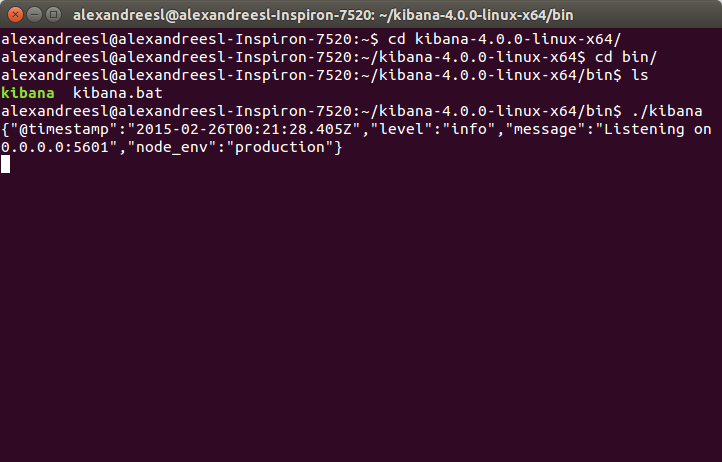
After we start the rest of the stack, it is time to run Kibana.To run it, we navigate to the bin folder of Kibana’s installation folder, and type:

 ./kibana

After some seconds, we can see that Kibana has successfully booted:

Set up

Now, let’s start using Kibana. Let’s open a web browser and enter:

http://localhost:5601/

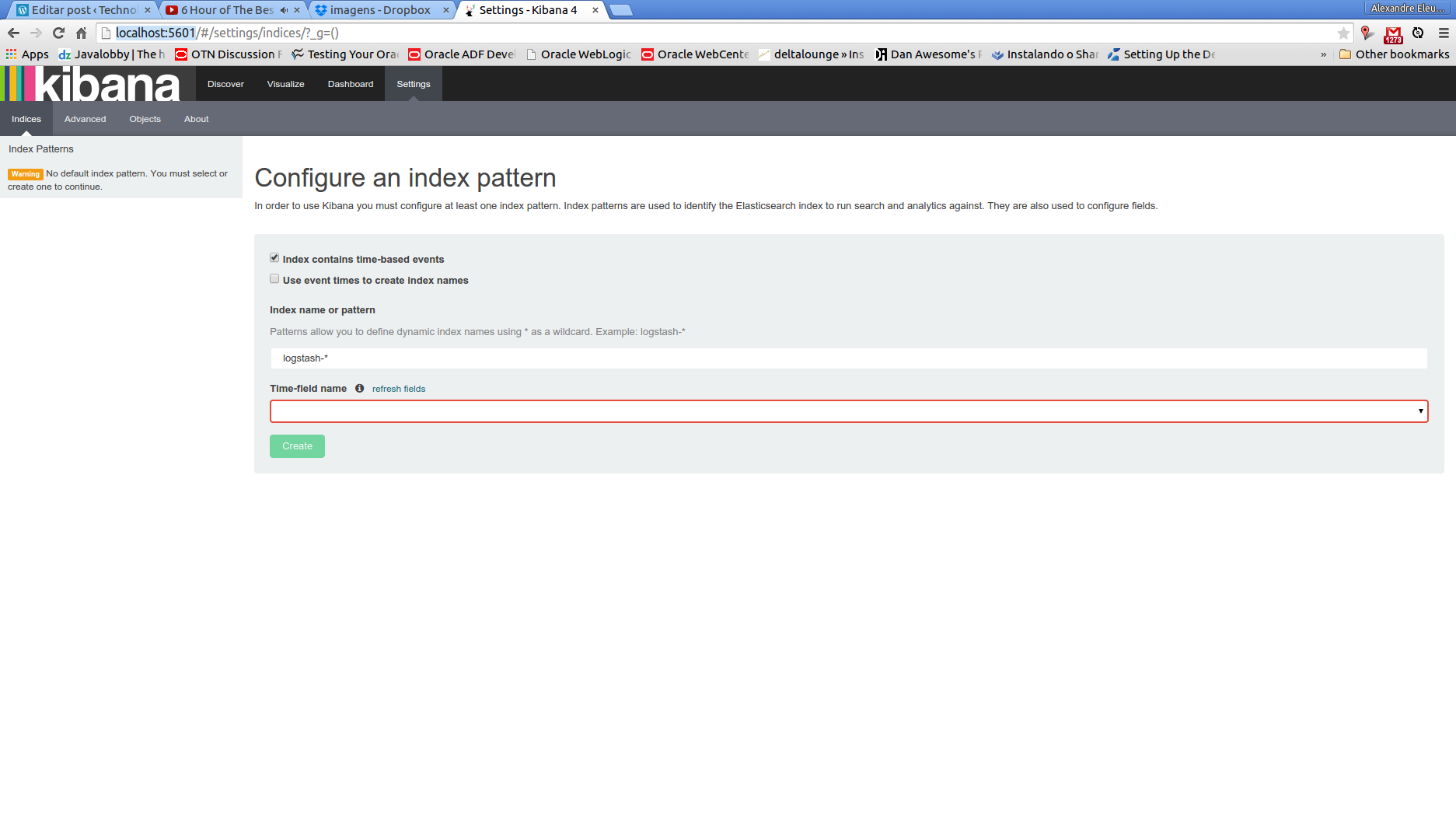
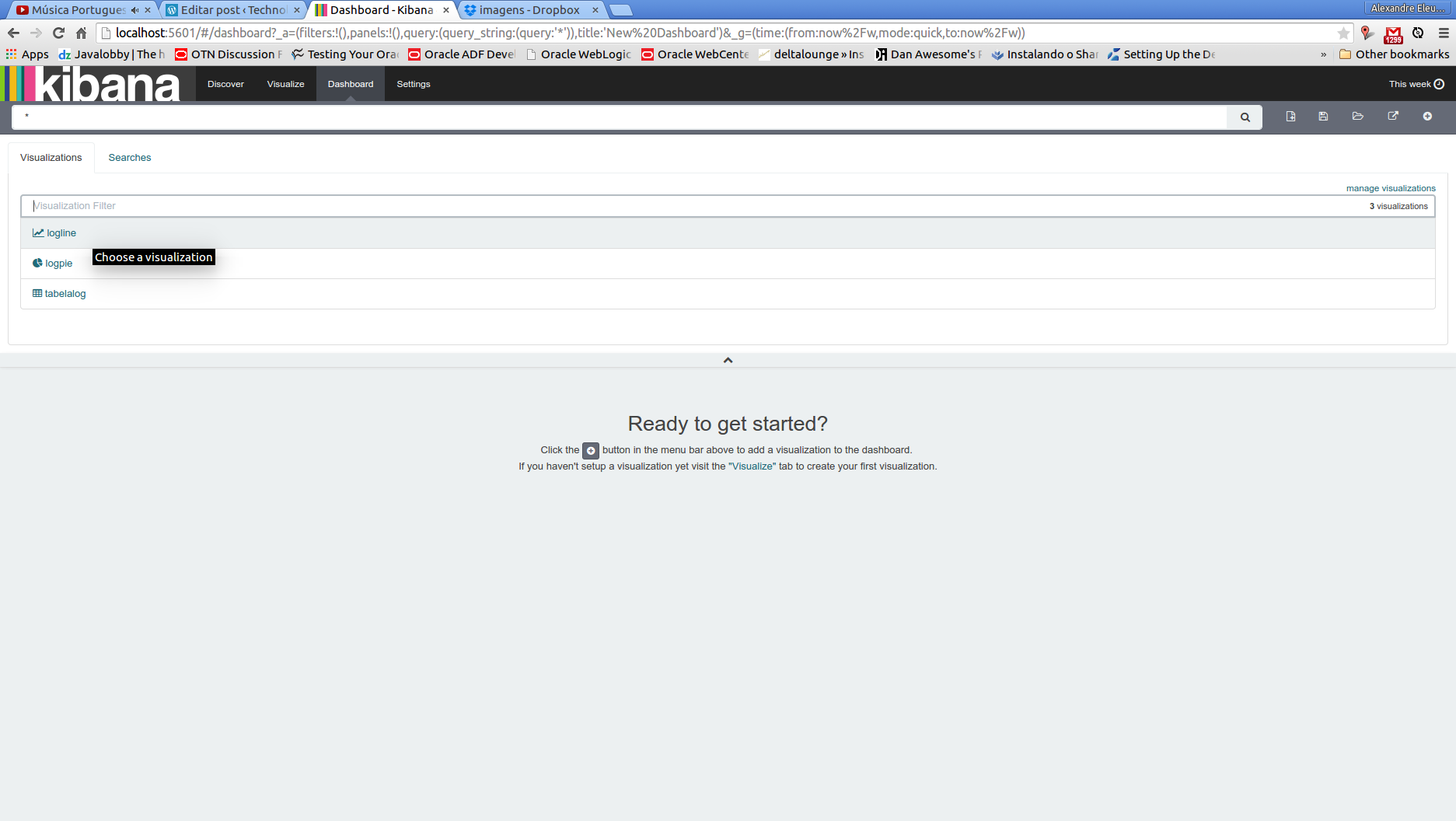
On our first run, we will be greeted with the following screen:

The reason because we are seeing this screen is because we dont have any index configured. It is on this screen that we can, for example, point to multiple indexes. If we think, for example, about the default naming pattern of logstash’s plugin, we can see that, for each new date we run, logstash will demand the creation of a new index with the pattern “logstash-%{+YYYY.MM.dd}”. So, if we want Kibana to use all the indexes created this way on a single dataset, we simply configure the field with the value “logstash-*”

On our case, we change the default naming of the index, to demonstrate the possible configurations of the tool, so we change the field to “log4jlogs”. One important thing to note on logstash’s plugin documentation, is that the idea behind the index pattern is to make more easy to do operations such as deleting old data, so in a real world scenario, it would be more wise to leave the default pattern enabled.

The other field we need to set is the Time-field name . This field is used by Kibana as a primary filter, allowing him to filter the data from the dashboards and data explorations on a timeline perspective. If we see our document type from the documents storing log information on elasticsearch, we can see it has a field called @timestamp. This field is perfectly fit to our time-field need, so we put “@timestamp” in the field.

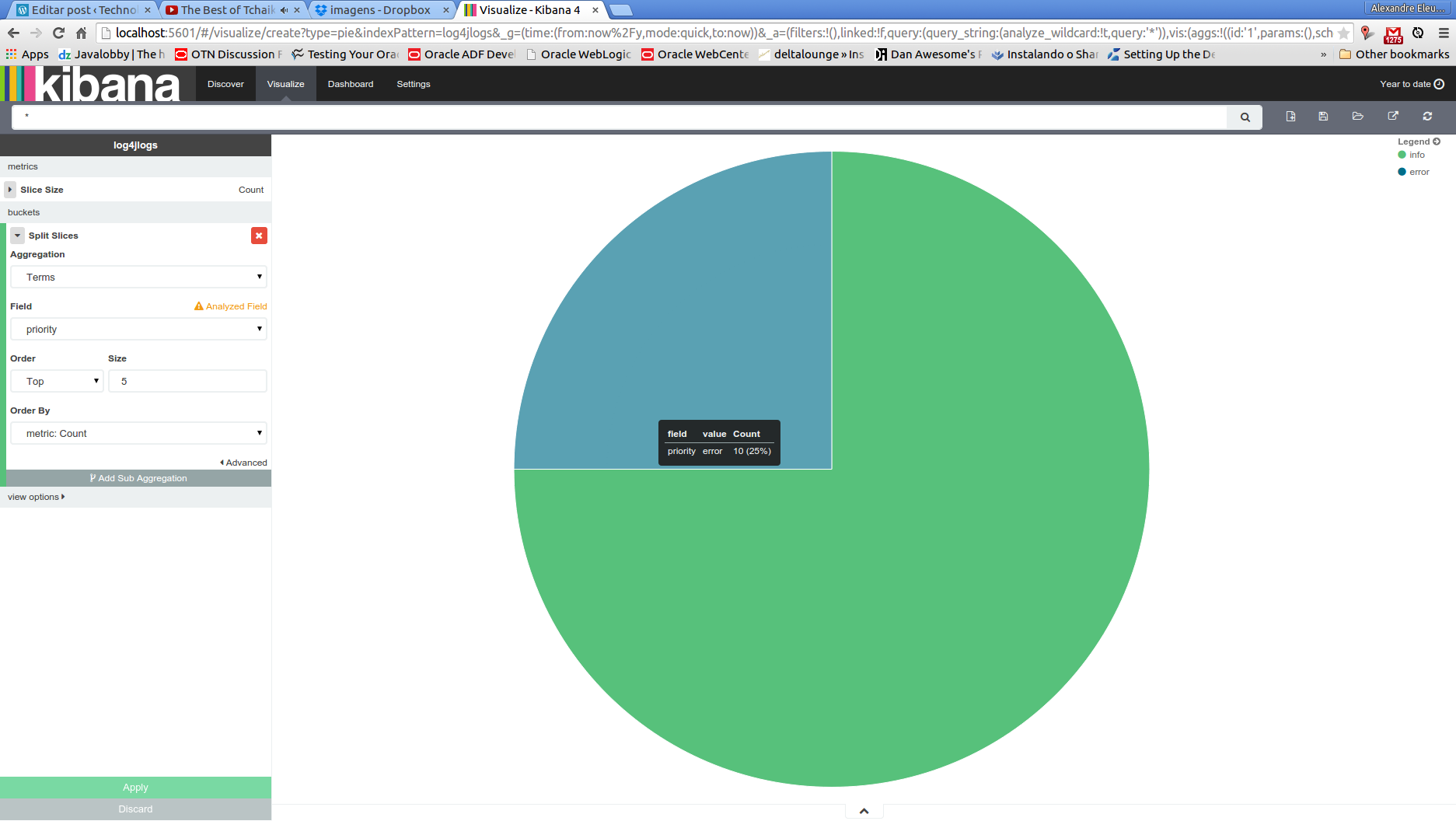
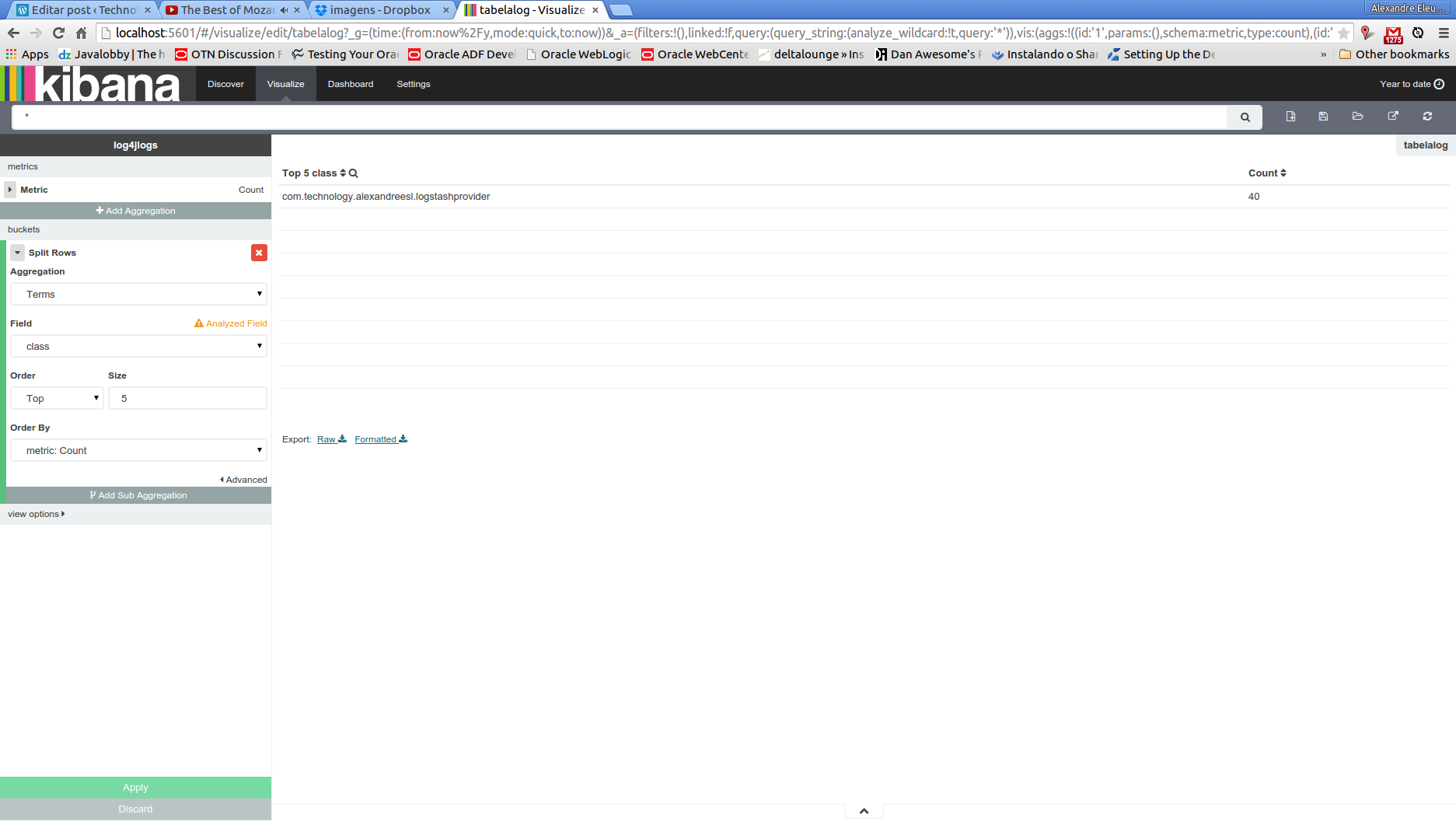
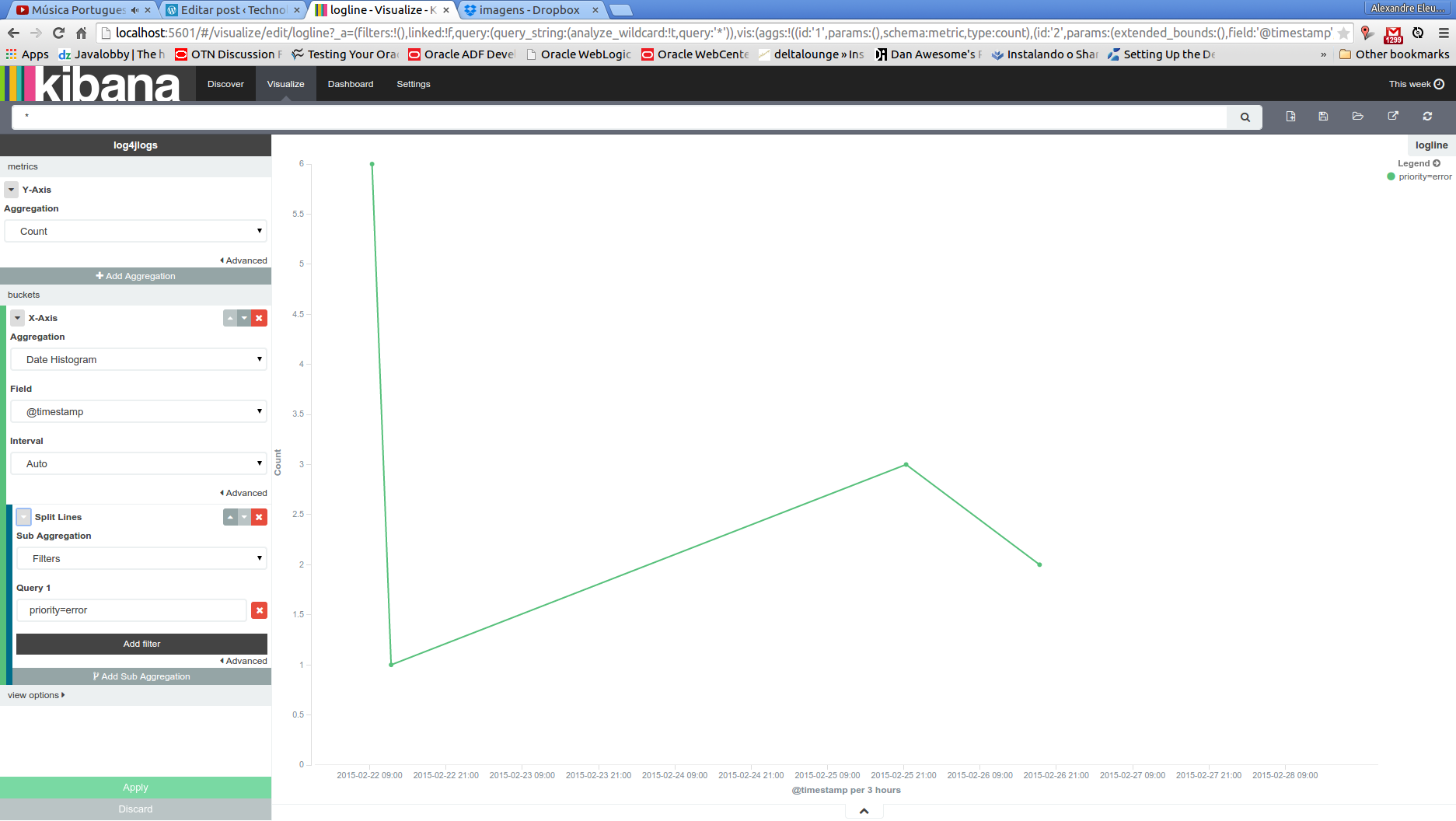
After we click on the “create” button, we will be sent to a new page, where we can see all the fields from the index we pointed, proving that our configuration was a success:

Of course, there is other settings as well that we can configure, such as the precision on the numeric fields or the date mask when showing this kind of data on the interface, all available on the “advanced” menu. For our lab needs, however, the default options will suffice, so we leave this page by clicking on the “Discover” menu.

Discovering the data

When we enter the new page, if we didnt send any data to the cluster in the last 15 minutes, we will see a message of no data found (see bellow). The reason for this is because, by default, Kibana limits the results for the last 15 minutes only. To change this, we can either change the time limit by clicking on the value on the upper right corner of the page, or by running again the java program from the previous post, so we have more fresh data.

After we set some data to explore, we can see that the page changes to a data view, where we can dinamically change field filters, by changing the left menu, and drill down the data to the fields level, as we can see bellow. The reader can feel free to explore the page before we move on to our next part.

Dashboards

Now that we have all set, let’s begin by creating a simple dashboard. we will create a pie chart of the messages by the log level, a table view showing the count of messages by class and a line chart of the error messages across the time.

First, let’s begin with the pie chart. We will select, from the menu, “Visualize” , then follow this sequence of options on the next pages:

pie chart >> from a new search

We will enter a page like the one bellow:

In this page, we will make our log level pie chart. To do this, we leave the metrics area unchanged, with the “count” value as slice size. Then, we choose “split slices” on the buckets area and select a “terms” aggregation, by the field “priority”. The screen bellow show our pie chart born!

After we made our chart, before we leave this page, we click on the disk icon on the top menu, input a name for our chart – also called visualization by Kibana’s terminology – and save it, for later use.

Now it is time for our table view. From the same menu we used to save our pie chart, click on the most left icon, called “new visualization”, then select “data table” and “from a new search”. We will see a similar page from the pie chart one, with similar options of aggregations and metrics to configure. With the intent of not bothering the reader with much repetitive instructions, from now on I will keep the explanation the more graphical possible, by the screenshots.

So, our data table view is made by making the configurations we can see on the left menu:

Analogous with what we made on the previous visualization, let’s also save the table view and click on new visualization, selecting line chart this time. The configuration for this chart can be seen bellow:

That concludes our visualizations. Now, let’s conclude our lab by making a dashboard that will show all the visualizations we build on the same page. To do this, first we select the “dashboard” option on the top menu. We will be greeted with the screen bellow:

This is the dashboard page, where we can create, edit and load dashboards. To add visualizations, we simply click on the plus icon on the top right side and select the visualization we want to add, like we can see bellow:

After we add the visualizations, it is pretty simple to arrange them: all we have to do is to drag and drop the visualizations as we like. My final arrangement of the dashboard is bellow, but the reader can arrange the way he finds best:

Finally, to save the dashboard, we simply click on the disk icon and input a name for our dashboard.

Cons

Of course, we cant make a complete overview of a tool, if we dont mention any noticeable con of it. The most visible downside of Kibana, on my opinion, is the lack of a native support to authentication and authorization. The reader may notice, by our tour of the interface, that there is no user or permission CRUDs whatsoever. Indeed, Kibana doesnt come with this feature.

One common workaround for this is to configure basic authentication on the web server Kibana runs with it – if we were using Kibana 3 on our lab, we would have to install manually a web server and deploy Kibana on it. On Kibana 4, we dont have to do this, because Kibana comes with a embedded node.js – , so the authentication is made by URL patterns. This link to the official node.js documentation provides a path to set basic authentication on the embedded server Kibana comes with it. The file that starts the server and need to be edited is on /src/bin/kibana.js.

Very recently, Elasticsearch has released shield, a plugin that implements a versatile security layer on Elasticsearch and subsequently on Kibana. Evidently, is a much more elegant and complete solution then the previous one, but the reader has to keep it in mind that he has to acquire a license to use shield.

Conclusion

And that concludes our tour by the ELK stack. Of course, on a real world scenario, we have some more steps to do, like the aforementioned authentication configuration, the configuration of purge policies and so on.However, we still can see that the core features we need were implemented, with very little effort. Like we talked about on the beginning of our series, logging information is a very rich source of information, that it has to be better explored on the business world. Thanks to everyone that follows my blog, until next time.

Continue reading

ELK: using a centralized logging architecture – part 2

Standard

Welcome, dear reader, to another post of our series about the ELK stack for logging. On the last post, we talked about LogStash, a tool that allow us to integrate data from different sources to different destinations, using transformations along the way, in a stream-like form. On this post, we will talk about ElasticSearch, a indexer based on apache Lucene, which can allow us to organize our data and make textual searches on the data, in a scalable infrastructure. So, let’s begin by understanding how ElasticSearch is organized on the inside

Indexes, documents and shards

On ElasticSearch, we have the concept of indexes. A index is like a repository, where we can store our data in the format of documents. A document on ElasticSearch’s terminology consists of a structure for the data to be stored, analysed and classified, following a mapping definition, composed of a series of fields – a important thing to note, is that a field on ElasticSearch has the same type across the whole index, meaning that we cant have a field “phone” with the type int on a document and the type string on another.

In turn, we have our documents stored on shards, which divide the data on segments based on a rule – by default, the segmentation is made by hashing the data, but it can also be manually manipulated -, making the searches faster.

So, in a nutshell, we can say that the order of organization of ElasticSearch is as follows:

Index >> Document (mappings/type) >> shard

This organization is used by the user on the two basic operations of the cluster: indexing and searching.

One last thing to say about documents is that they can not only be stored as independent , but also be mounted on a tree-like hierarchy, with links between them. This is useful in scenarios that we can make use of hierarchical searches, such as product’s searches based on their categories.

Indexing

Indexing is the action of inputing the data from a external source to the cluster. ElasticSearch is a textual indexer, which means he can only analyse text on plain format, despite that we can use the cluster to store data in base64 format, using a plugin. Later on the post, we will see a example installation of a plugin, which are extensions we can aggregate to expand our cluster usability.

When we index our data,  we define which fields are to be analysed, which analyser to use, if the default ones does not suffice and which fields we want to store the data on the cluster, so we can use as the result of our searches. One important thing to note about the indexing operations is that, despite it has CRUD-like operations, the data is not really updated or deleted on the cluster, instead a new version is generated and the old version is marked as deleted.

This is a important thing to take note, because if not properly configured to make purges – which can be made with a configuration that break the shards into segments, and periodically make merges of the segments, phisically deleting the obsolet documents on the process -, the cluster will keep indefinitely expanding in size with the “deleted” older versions of our data, making specially the searches to became really slow.

All the operations can be made with a REST API provided by ElasticSearch, that we will see later on this post.

Searching

The other, and probably most important, action on ElasticSearch, is the searching of the data previously indexed. Like the indexing action, ElasticSearch also provide a REST API for the searches. The API provides a very rich range of possibilities of searching, from basic term searches to more complex searches such as hierarchical searches, searches by synonims, language detections, etc.

All the searching is based on a score system, where formulas are applied to confront the accuracy of the documents founded versus the query supplied. This score system can also be customized.

By default, the searching on the cluster occurs in 2 phases:

  • On the first phase, the master node sends the query for all the nodes, and subsequently shards , retrieving just the IDs and scores of the documents. Using a parameter called size which defines the maximum results from a query, the master selects the more meaningful documents, based on the score;
  • On the second phase, the master send requests for the nodes to retrieve the documents selected on the previous phase. After receiving the documents, the master finally sends the result for the client;

Alongside this search type, there’s also other modes, like the query_and_fetch. On this mode, the searching is made simultaneous on all shards, not only to retrieve the IDs and scores but also returning the data itself, limited only by the size parameter, which is applied per shard. In turn, on this mode, the maximum of results returned will be the size parameter plus the number of shards.

One interesting feature of ElasticSearch’s configuration options is the ability to make some nodes exclusive to query operations, and others to make the storage part, called data nodes. This way, when we query, our query dont need to run  across all the cluster to formulate the results, making the searches faster. On the next section we will see a little more about cluster configurations.

Cluster capabilities

When we talk about a cluster, we talk about scalability, but we also talk about availability. On ElasticSearch, we can configure the replication of shards, where the data is replicated by a given factor, so we dont lose our data if a node is lost. The replication if also maintained by the cluster, so if we lost a replica, the cluster itself will distribute a new replica for another node.

Other interesting feature of the cluster are the ability to discover itself. By the default configuration, when we start a node he will use a discovery mode called Zen, which uses unicast and multicast to search for another instances on all the ports of the OS. If it founds another instance, and the name of the cluster is the same – this is another one of the cluster’s configuration properties. All of this configurations can be made on the file elasticsearch.yml, on the config folder -, it will communicate with the instance and establish a new node for the already running cluster. There is another modes for this feature, including the discover of nodes from other servers.

Logging

The reader could be thinking: “Lol, do I need all of this to run a logging stack?”.

Of course that ElasticSearch is a very robust tool, that can be used on other solutions as well. However, on our case of making a centralized logging analysis solution, the core of ElasticSearch’s capabilities serve us well for this task, after all, we are talking about the textual analysis of log texts, for use on dashboards, reports, or simply for real-time exploration of the data.

Well, that concludes the conceptual part of our post. Now, let’s move on to the practice.

Hands-on

So, without further delay, let’s begin the hands-on. For this, we will use the previous Java program we used on our lab about LogStash. The code can be found on GitHub, on this link. On this program, we used the org.apache.log4j.net.SocketAppender from log4j to send all the logging we make to LogStash. However, on that point we just printed the messages on the console, instead of sending to ElasticSearch. Before we change this, let’s first start our cluster.

To do this, first we need to download the last version from the site and unzip the tar. Let’s open a terminal, and type the following command:

curl https://download.elasticsearch.org/elasticsearch/elasticsearch/elasticsearch-1.4.4.tar.gz | tar -zx

After running the command, we will find a new folder called “elasticsearch-1.4.4” created on the same folder we run our command. To our example, we will create 2 copies of this folder on a folder we call “elasticsearchcluster”, where each one will represent one node of the cluster. To do this, we run the following commands:

mkdir elasticsearchcluster

sudo cp -avr elasticsearch-1.4.4/ elasticsearchcluster/elasticsearch-1.4.4-node1/

sudo cp -avr elasticsearch-1.4.4/ elasticsearchcluster/elasticsearch-1.4.4-node2/

After we made our cluster structure, we dont need the original folder anymore, so we remove:

rm -R elasticsearch-1.4.4/

Now, let’s finally start our cluster! To do this, we open a terminal, navigate to the bin folder of our first node (elasticsearch-1.4.4-node1) and type:

./elasticsearch

After some seconds, we can see our first node is on:

For curiosity sake, we can see the name “Feral” on the node’s name on the log. All the names generated by the tool are based on Marvel Comic’s characters. IT world sure has some sense of humor, heh?

Now, let’s start our second node. On a new terminal window, let’s navigate to the folder of our second node (elasticsearch-1.4.4-node2) and type again the command “./elasticsearch”. After some seconds, we can see that the node is also started:

One interesting thing to notice is that our second node “Ooze”, has a mention of comunicating with our other node, “Feral”. That is the zen discover on the action, making the 2 nodes talk to each other and form a cluster. If we look again at the terminal of our first node, we can see another evidence of this bidirectional communication, as “Feral” has added “Ooze” to the cluster, as his role as a master node:

 Now that we have our cluster set up, let’s adjust our logstash script to send the messages to the cluster. To do this, let’s change the output part of the script, to the following:

input {
log4j {
port => 1500
type => “log4j”
tags => [ “technical”, “log”]
}
}

output {
stdout { codec => rubydebug }
elasticsearch_http {
host => “localhost”
port => 9200
index => “log4jlogs”
}
}

As we can see, we just included another output – we remained the console output just to check how logstash is receiving the data – including the ip and port where our ElasticSearch cluster will respond. We also defined the name of the index we want our logs to be stored. If this parameter is not defined, logstash will order elasticsearch to create a index with the pattern “logstash-%{+YYYY.MM.dd}”.

To execute this script, we do like we did on the previous post, we put the new script on a file called “configelasticsearch.conf” on the bin folder of logstash, and run with the command:

./logstash -f configelasticsearch.conf

PS1: On the GitHub repository, it is possible to find this config file, alongside a file containing all the commands we will send to ElasticSearch from now on.

PS2: For simplicity sake, we will use the default mappings logstash provide for us when sending messages to the cluster. It is also possible to pass a elasticsearch’s mapping structure, which consists of a JSON model, that logstash will use as a template. We will see the mapping from our log messages later on our lab, but for satisfying the reader curiosity for now, this is what a elasticsearch’s mapping structure look like, for example for a document type “product”:

“mappings” : {
“product”: {
“properties” : {

“variation” : { “type” : int }

“color”  : { “type” : “string” }

“code” : { “type” : int }

“quantity” : { “type” : int }

}
}
}

After some seconds, we can see that LogStash booted, so our configuration was a success. Now, let’s begin sending our logs!

To do this, we run the program from our previous post, running the class com.technology.alexandreesl.LogStashProvider . We can see on the console of logstash, after starting the program, that the messages are going through the stack:

Now that we have our cluster up and running, let’s start to use it. First, let’s see the mappings of the index that ElasticSearch created for us, based on the configuration we made on LogStash. Let’s open a terminal and run the following command:

curl -XGET ‘localhost:9200/log4jlogs/_mapping?pretty’

On the command above, we are using ElasticSearch’s REST API. The reader will notice that, after the ip and port, the URL contains the name of the index we configured. This pattern for calls of the API is applied to most of the actions, as we can see below:

<ip>:<port>/<index>/<doc type>/<action>?<attributes>

So, after this explanation, let’s see the result from our call:

{
“log4jlogs” : {
“mappings” : {
“log4j” : {
“properties” : {
“@timestamp” : {
“type” : “date”,
“format” : “dateOptionalTime”
},
“@version” : {
“type” : “string”
},
“class” : {
“type” : “string”
},
“file” : {
“type” : “string”
},
“host” : {
“type” : “string”
},
“logger_name” : {
“type” : “string”
},
“message” : {
“type” : “string”
},
“method” : {
“type” : “string”
},
“path” : {
“type” : “string”
},
“priority” : {
“type” : “string”
},
“stack_trace” : {
“type” : “string”
},
“tags” : {
“type” : “string”
},
“thread” : {
“type” : “string”
},
“type” : {
“type” : “string”
}
}
}
}
}
}

As we can see, the index “log4jlogs” was created, alongside the document type “log4j”. Also, a series of fields were created, representing information from the log messages, like the thread that generated the log, the class, the log level and the log message itself.

Now, let’s begin to make some searches.

Let’s begin by searching all log messages which the priority was “INFO”. We make this searching by running:
curl -XGET ‘localhost:9200/log4jlogs/log4j/_search?q=priority:info&pretty=true’
A fragment of the result of the query would be something like the following:

{
“took” : 12,
“timed_out” : false,
“_shards” : {
“total” : 5,
“successful” : 5,
“failed” : 0
},
“hits” : {
“total” : 18,
“max_score” : 1.1823215,
“hits” : [ {
“_index” : “log4jlogs”,
“_type” : “log4j”,
“_id” : “AUuxkDTk8qbJts0_16ph”,
“_score” : 1.1823215,
“_source”:{“message”:”STARTING DATA COLLECTION”,”@version”:”1″,”@timestamp”:”2015-02-22T13:53:12.907Z”,”type”:”log4j”,”tags”:[“technical”,”log”],”host”:”127.0.0.1:32942″,”path”:”com.technology.alexandreesl.LogStashProvider”,”priority”:”INFO”,”logger_name”:”com.technology.alexandreesl.LogStashProvider”,”thread”:”main”,”class”:”com.technology.alexandreesl.LogStashProvider”,”file”:”LogStashProvider.java:20″,”method”:”main”}
}

.

.

.

As we can see, the result is a JSON structure, with the documents that met our search. The beginning information of the result is not the documents themselves, but instead information about the search itself, such as the number of shards used, the seconds the search took to execute, etc. This kind of information is useful when we need to make a tuning of our searches, like manually defining the shards we which to use on the search, for example.

Let’s see another example. On our previous search, we received all the fields from the document on the result, which is not always the desired result, since we will not always use the whole information. To limit the fields we want to receive, we make our query like the following:
curl -XGET ‘localhost:9200/log4jlogs/log4j/_search?pretty=true’ -d ‘
{
“fields” : [ “priority”, “message”,”class” ],
“query” : {
“query_string” : { “query” : “priority:info” }
}
}’
On the query above, we asked ElasticSearch to limit the return to only return the priority, message and class fields. A fragment of the result can be seen bellow:

.

.

.

{
“_index” : “log4jlogs”,
“_type” : “log4j”,
“_id” : “AUuxkECZ8qbJts0_16pr”,
“_score” : 1.1823215,
“fields” : {
“priority” : [ “INFO” ],
“message” : [ “CLEANING UP!” ],
“class” : [ “com.technology.alexandreesl.LogStashProvider” ]
}
}

.

.

.

Now, let’s use the term search. On the term searches, we use ElasticSearch’s textual analysis to find a term inside the text of a field. Let’s run the following command:
curl -XGET ‘localhost:9200/log4jlogs/log4j/_search?pretty=true’ -d ‘
{
“fields” : [ “priority”, “message”,”class” ],
“query” : {
“term” : {
“message” : “up”
}
}
}’
If we see the result, it would be all the log messages that contains the word “up”. A fragment of the result can be seen bellow:

{
“_index” : “log4jlogs”,
“_type” : “log4j”,
“_id” : “AUuxkESc8qbJts0_16pv”,
“_score” : 1.1545612,
“fields” : {
“priority” : [ “INFO” ],
“message” : [ “CLEANING UP!” ],
“class” : [ “com.technology.alexandreesl.LogStashProvider” ]
}
}

Of course, there is a lot more of searching options on ElasticSearch, but the examples provided on this post are enough to make a good starting point for the reader. To make a final example, we will use the “prefix” search. On this type of search, ElasticSearch will search for terms that start with our given text, on a given field. For example, to search for log messages that have words starting with “clea”, part of the word “cleaning”, we run the following:
curl -XGET ‘localhost:9200/log4jlogs/log4j/_search?pretty=true’ -d ‘
{
“fields” : [ “priority”, “message”,”class” ],
“query” : {
“prefix” : {
“message” : “clea”
}
}
}’
If we see the results, we will see that are the same from the previous search, proving that our search worked correctly.

Kopf

The reader possibly could ask “Is there another way to send my queries without using the terminal?” or “Is there any graphical tool that I can use to monitor the status of my cluster?”. As a matter of fact, there is a answer for both of this questions, and the answer is the kopf plugin.

As we said before, plugins are extensions that we can install to improve the capacities of our cluster. In order to install the plugin, first let’s stop both the nodes of the cluster – press ctrl+c on both terminal windows to stop – then, navigate to the nodes root folder and type the following:

bin/plugin -install lmenezes/elasticsearch-kopf

If the plugin was installed correctly, we should see a message like the one bellow on the console:

.

.

.

-> Installing lmenezes/elasticsearch-kopf…
Trying https://github.com/lmenezes/elasticsearch-kopf/archive/master.zip&#8230;
Downloading …………………………………………………………………………………………………………………………………………………………………………………………………………………………………………………………………………………………………………………………………………………………………………………………………………………………………………………………………………………………………………………………………..DONE
Installed lmenezes/elasticsearch-kopf into….

After installing on both nodes, we can start again the nodes, just as we did before. After the booting of the cluster, let’s open a browser and type the following URL:

http://localhost:9200/_plugin/kopf

We will see the following web page of the kopf plugin, showing the status of our cluster, such as the nodes, the indexes, shard information, etc

Now, let’s run our last example from the search queries on kopf. First, we select the “rest” option on the top menu. On the next screen, we select “POST” as the http method, include on the URL field the index and document type to narrow the results and on the textarea bellow we include our JSON query filters. The print bellow shows the query made on the interface:

 Conclusion

And so we conclude our post about ElasticSearch. A very powerful tool on the indexing and analysis of textual information, the central stone on our ELK stack for logging is a tool to be used, not only on a logging analysis system, but on other solutions that his features can be useful as well.

So, our stack is almost complete. We can gather our log information, and the information is indexed on our cluster. However, a final piece remains: we need a place where we can have a more friendly interface, that allow us not only to search the information, but also to make rich presentations of the data, such as dashboards. That’s when it enters our last part of our ELK series and the last tool we will see, Kibana. Thank you for following me on another post, until next time.

Continue reading